Introdución
The ALOGIC Clarity Fold Stand (Model ACFS) is designed to enhance the versatility and ergonomics of your ALOGIC Clarity Pro Touch monitor. This stand allows for seamless transformation of your monitor into various configurations, including a traditional display, a drafting board, or an almost-flat tablet, catering to diverse creative and professional needs. Its robust design ensures stability and security, while the 360-degree rotation feature facilitates easy screen sharing and positioning.
Contido do paquete
- ALOGIC Clarity Fold Stand (ACFS)
- Mounting Hardware (screws, tools if applicable)
- Manual de usuario (este documento)
Instrucións de configuración
Follow these steps to set up your ALOGIC Clarity Fold Stand and attach your compatible monitor.
1. Unpacking the Stand
Carefully remove all components from the packaging. Ensure all parts listed in the package contents are present.

Image: The ALOGIC Clarity Fold Stand in its initial configuration, ready for monitor attachment.
2. Conexión do monitor
- Ensure your ALOGIC Clarity Pro Touch monitor is powered off and disconnected from all cables.
- Carefully align the VESA mounting holes on the back of your monitor with the mounting plate on the Clarity Fold Stand.
- Secure the monitor to the stand using the provided screws. Tighten them firmly but do not overtighten.
- Once secured, place the assembled stand and monitor on a stable, flat surface.

Image: A Clarity Pro Touch monitor securely attached to the ALOGIC Clarity Fold Stand, demonstrating its use in an angled position.
Instrucións de funcionamento
The Clarity Fold Stand offers multiple adjustment options to optimize your viewing and interaction experience.
Adjusting the Monitor Angle (Folding Mechanism)
The stand's unique folding mechanism allows for quick transitions between different modes:
- Traditional Display Mode: Position the monitor upright for standard viewing.
- Drafting Board Mode: Gently fold the monitor down to an ergonomic angle, ideal for sketching or detailed work.
- Almost-Flat Tablet Mode: Continue folding until the monitor is nearly flat against the table surface, suitable for touch-intensive tasks.
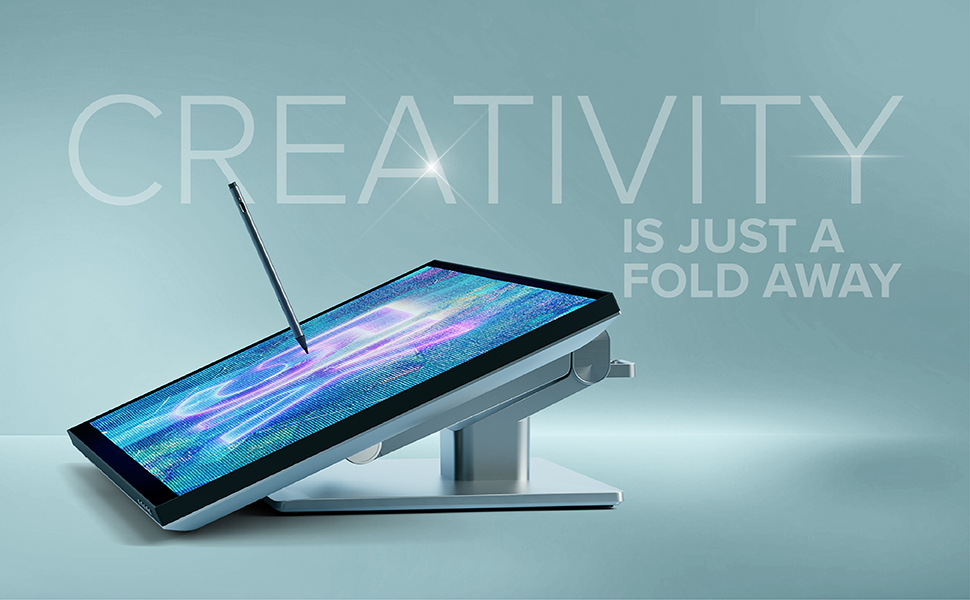
Image: A Clarity Pro Touch monitor on the Fold Stand, angled low for use as a creative tablet with a stylus.
Rotación de 360 graos
The base of the Clarity Fold Stand features a 360-degree rotation capability. To rotate the monitor, gently turn the entire stand base. This allows for easy screen sharing with colleagues or repositioning within your workspace without lifting the stand.

Image: An overhead diagram illustrating the 360-degree rotational capability of the stand's base.
Mantemento
To ensure the longevity and optimal performance of your ALOGIC Clarity Fold Stand, follow these simple maintenance guidelines:
- Limpeza: Use a soft, dry, lint-free cloth to wipe down the stand. For stubborn marks, a slightly damp Pódese usar un pano con xabón suave e despois un pano seco. Evite produtos de limpeza ou solventes abrasivos.
- Inspección: Periodically check all screws and connections to ensure they remain secure. Do not overtighten.
- Movemento: When adjusting the stand, do so smoothly and avoid sudden, forceful movements to prevent undue stress on the joints.
Resolución de problemas
If you encounter any issues with your Clarity Fold Stand, refer to the following common solutions:
| Problema | Causa posible | Solución |
|---|---|---|
| A posición de pé parece inestable ou tambaleante. | Loose mounting screws or uneven surface. | Ensure all monitor mounting screws are securely tightened. Place the stand on a flat, stable desk or table. |
| Difficulty adjusting the angle or rotation. | Resistance in the joints. | Apply gentle, even pressure when adjusting. Avoid forcing the mechanism. If resistance persists, contact support. |
| Monitor not fitting the stand. | Modelo de monitor incompatible. | The Clarity Fold Stand is designed for ALOGIC Clarity Pro Touch monitors (27" and 32" models). Verify your monitor's compatibility. |
Especificacións
| Característica | Detalle |
|---|---|
| Número de modelo | ACFS |
| Marca | ALOGICO |
| Cor | Negro |
| Factor de forma | Tripod (Base design) |
| Dispositivos compatibles | Desktop monitors, specifically ALOGIC Clarity Pro Touch 27" and 32" |
| Peso do elemento | 8.8 libras |
| Dimensións do paquete | 21.06 x 15.16 x 6.85 polgadas |
| Rotación | 360-degree base rotation |
| Axustabilidade | Multi-angle folding for traditional, drafting, and flat modes |
Garantía e Soporte
Para obter información sobre a garantía e asistencia técnica, consulte a páxina oficial de ALOGIC websitio web ou póñase en contacto directamente co servizo de atención ao cliente. Garde o recibo de compra para reclamacións de garantía.
Soporte en liña: www.alogic.co


