1. Introdución
Thank you for choosing TTQ Open Ear Headphones, Model CT26. These true wireless sports earbuds are designed to provide a comfortable listening experience while allowing you to remain aware of your surroundings. Featuring Bluetooth 5.3 connectivity, IPX7 waterproofing, and crystal-clear call quality, they are ideal for various activities including running, cycling, workouts, and driving. This manual will guide you through the setup, operation, and maintenance of your new headphones.
2. Contido do paquete
Verifique que todos os elementos estean presentes no seu paquete:
- TTQ Open Ear Headphones (Left and Right Earbuds)
- Estuche de carga
- Cable de carga USB-C
- Manual de usuario

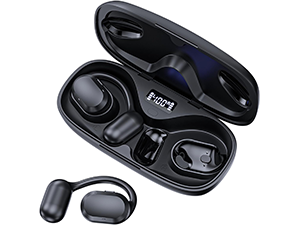
Imaxe: The TTQ Open Ear Headphones, Model CT26, displayed within their open charging case. The case features an LED digital power display indicating the battery level of both the case and the individual earbuds.
3. Produto rematadoview
The TTQ CT26 headphones feature an innovative open-ear design with flexible earhooks, ensuring comfort and stability during extended use. This design allows ambient sounds to be heard, enhancing safety in outdoor environments.

Imaxe: A person wearing the TTQ Open Ear Earbuds, demonstrating how the open-ear design sits comfortably outside the ear canal, allowing for situational awareness.

Imaxe: Two individuals cycling outdoors, both wearing TTQ Open Ear Headphones. This illustrates the product's suitability for sports and activities where awareness of surroundings is crucial for safety.
4. Configuración
4.1 Carga dos auriculares e da funda
Before first use, fully charge the headphones and the charging case. Connect the provided USB-C charging cable to the charging port on the case and a power source. The LED display on the charging case will show the battery percentage, and individual earbud charge indicators will light up during charging.
- A full charge provides up to 8 hours of music playtime or 9 hours of call time for the earbuds.
- The charging case extends total playtime to up to 36 hours.

Imaxe: The TTQ charging case with its lid open, showcasing the digital LED display that indicates the battery percentage of the case and the charging status of the earbuds. A USB-C charging port is visible at the front.
4.2 Emparellamento co teu dispositivo
- Asegúrese de que os auriculares estean cargados.
- Open the charging case. The earbuds will automatically enter pairing mode, indicated by a flashing light (if applicable, refer to product specific light indicators).
- No teu dispositivo (teléfono intelixente, tableta, ordenador), vai á configuración de Bluetooth e activa Bluetooth.
- Busca available devices and select "CT26" from the list.
- Unha vez conectados, os auriculares indicarán que o emparellamento se realizou correctamente (por exemplo, unha indicación de voz ou unha luz fixa).
Os auriculares volverán conectarse automaticamente ao último dispositivo emparellado ao sacalos da funda, se o Bluetooth está activado no dispositivo.

Imaxe: A visual representation of Bluetooth 5.3 technology, showing a smartphone's Bluetooth settings screen with 'CT26' listed as a connected device, illustrating the stable and fast connection capability.
5. Instrucións de funcionamento
The TTQ CT26 headphones feature a physical button for easy control of various functions.
Imaxe: A diagram illustrating the single button controls on the earbud, detailing actions for pause/play, answer/hang up, rejection, volume adjustment, switching songs, and activating Siri.
5.1 Reprodución de música
- Reproducir/Pausa: Press the button once (x1).
- Próxima canción: Press the button twice (x2).
- Canción anterior: Press the button three times (x3).
- Subir/Baixar o volume: Press and hold the button for 2 seconds (Hold 2s).
5.2 Xestión de chamadas
- Responder/Finalizar chamada: Press the button once (x1).
- Rexeitar a chamada: Press and hold the button for 2 seconds (Hold 2s).
The headphones feature dual-mic noise-cancelling technology for clearer calls by reducing environmental noise.

Imaxe: A man wearing TTQ Open Ear Headphones while holding a smartphone, illustrating the intelligent noise cancellation feature that boosts human voice and reduces environmental noise for clearer calls.
5.3 Asistente de voz
- Activar o Asistente de voz (Siri, Asistente de Google, etc.): Press the button three times (x3).
6. Mantemento
To ensure the longevity and optimal performance of your TTQ Open Ear Headphones, follow these maintenance guidelines:
- Limpeza: Limpe regularmente os auriculares e a funda de carga cun pano suave, seco e sen pelusa. Evite o uso de materiais abrasivos ou produtos químicos agresivos.
- Resistencia á auga: The headphones are IPX7 waterproof, meaning they can withstand submersion in up to 1 meter of water for 30 minutes. They are resistant to sweat and rain, making them suitable for workouts. However, they are not designed for swimming or prolonged submersion. Ensure the charging port is dry before charging.
- Almacenamento: Cando non os uses, garda os auriculares na súa funda de carga para protexelos do po e doutros danos. Gardaos nun lugar fresco e seco, lonxe de temperaturas extremas.

Imaxe: TTQ Open Ear Headphones and their charging case on a wet surface with water splashes, demonstrating their IPX7 waterproof rating, indicating resistance to rain and sweat.
7 Solución de problemas
If you encounter issues with your TTQ Open Ear Headphones, please refer to the following common solutions:
- Sen son/Volume baixo:
- Ensure the headphones are properly paired and connected to your device.
- Comprobe o nivel de volume tanto nos auriculares como no dispositivo conectado.
- Asegúrate de que os auriculares estean cargados.
- Problemas de emparellamento:
- Asegúrate de que o Bluetooth estea activado no teu dispositivo.
- Ensure the headphones are in pairing mode (flashing indicator).
- Desactiva o Bluetooth noutros dispositivos próximos que poidan estar a tentar conectarse.
- Forget/remove "CT26" from your device's Bluetooth list and try pairing again.
- Restart both your device and the headphones (by placing them back in the case and taking them out).
- Problemas de carga:
- Asegúrate de que o cable de carga estea conectado correctamente tanto á carcasa como á fonte de alimentación.
- Proba cun cable USB-C e un adaptador de corrente diferentes.
- Asegúrate de que os contactos de carga dos auriculares e da funda estean limpos e libres de residuos.
- Conexión intermitente:
- Ensure your device is within the Bluetooth range (up to 10 meters/33 feet).
- Avoid physical obstructions between the headphones and your device.
- Minimizar as interferencias doutros dispositivos sen fíos.
Se o problema persiste despois de probar estes pasos, ponte en contacto co servizo de atención ao cliente.
8. Especificacións
| Característica | Especificación |
|---|---|
| Nome do modelo | CT26 |
| Tecnoloxía de conectividade | Sen fíos (Bluetooth) |
| Tecnoloxía de comunicación sen fíos | Bluetooth 5.3 |
| Alcance Bluetooth | 10 metros (33 pés) |
| Nivel de resistencia á auga | Impermeable IPX7 |
| Colocación do oído | Orella aberta |
| Factor de forma | True Wireless |
| Duración da batería (auriculares) | 8 Hours (Music) / 9 Hours (Calls) |
| Tempo de reprodución total coa caixa de carga | Ata 36 horas |
| Tipo de controlador de audio | Driver dinámico |
| Tamaño do controlador de audio | 16.2 milímetros |
| Rango de frecuencias | 20 Hz - 20,000 Hz |
| Control de ruído | Cancelación activa de ruído (para chamadas) |
| Método de control | Botón físico |
| Porto de carga | USB-C |
| Peso do elemento | 7.8 onzas (0.22 quilogramos) |
| Material | Plástico |
| UPC | 717977781312 |
9. Atención ao cliente
For any questions, concerns, or if you receive a defective product, please do not hesitate to contact TTQ customer support. We are committed to providing solutions within 24 hours.
Please visit the official TTQ store on Amazon for more information and support resources: TTQ Store


