1. Introdución
This manual provides detailed instructions for the safe and efficient operation of your Xprinter XP-P323B Portable Thermal Printer. Please read this manual thoroughly before using the device to ensure proper functionality and to prevent damage. The XP-P323B is designed for printing receipts and labels, offering portability and high-speed capabilities for various business needs.
2. Información de seguridade
- Do not expose the printer to water or excessive moisture.
- Evite deixar caer a impresora ou sometela a impactos fortes.
- Empregue só o adaptador de corrente e os accesorios especificados.
- Manteña a impresora lonxe de fontes de calor e da luz solar directa.
- Non intente desmontar nin reparar a impresora vostede mesmo. Póñase en contacto co persoal de servizo cualificado.
- Asegurar unha ventilación adecuada durante o funcionamento.
3. Contido do paquete
Verifica que todos os elementos estean presentes no paquete:
- Xprinter XP-P323B Portable Thermal Printer
- Power Adapter (not explicitly listed but standard)
- USB Cable (not explicitly listed but standard)
- Sample Thermal Paper Roll (not explicitly listed but standard)
- Manual de usuario (este documento)
4. Produto rematadoview
The Xprinter XP-P323B is a compact and efficient thermal printer designed for various printing tasks. It supports NV logo download and picture printing (BMP format), along with concentration adjustment for print quality.
4.1. Compoñentes da impresora

Figura 1: Fronte view of the Xprinter XP-P323B Portable Thermal Printer, showing the power button, display, and a sample label being printed.
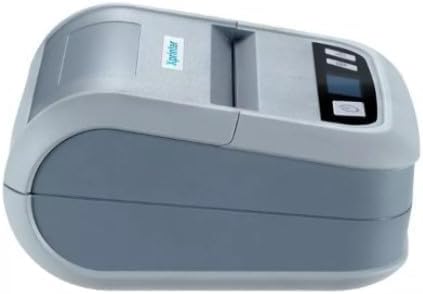
Figura 2: Lado view of the Xprinter XP-P323B, highlighting its compact design and the Xprinter logo.
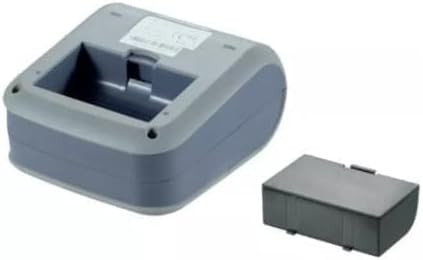
Figura 3: Parte inferior view of the Xprinter XP-P323B, showing the base and the removable battery compartment.
5. Configuración
5.1. Cargando a batería
- Connect the power adapter to the printer's charging port.
- Enchufe o adaptador de alimentación a unha toma de corrente.
- The charging indicator light will illuminate. Allow the printer to charge fully before first use.
5.2. Loading Thermal Paper/Labels
- Open the paper compartment cover by gently pushing the release latch.
- Insert the thermal paper roll with the printing surface facing the print head. Ensure the roll is seated correctly.
- Pull a small amount of paper out past the print head.
- Peche firmemente a tapa do compartimento de papel ata que encaixe no seu lugar.
5.3. Conexión a un dispositivo
The XP-P323B supports USB and Bluetooth connectivity.
5.3.1. Conexión USB
- Conecte a impresora ao seu ordenador mediante o cable USB proporcionado.
- Install the necessary printer drivers (available from the Xprinter website or included software).
5.3.2. Bluetooth Connection (for Smartphones/iOS)
- Asegúrese de que a impresora estea acendida.
- On your smartphone or iOS device, go to Bluetooth settings and enable Bluetooth.
- Busca available devices and select 'XP-P323B' (or similar name).
- Enter the pairing PIN if prompted (refer to printer documentation for default PIN, often '0000' or '1234').
- Once paired, you can use a compatible printing application to send print jobs.
6. Funcionamento da impresora
6.1. Impresión básica
- Ensure the printer is connected to your device and has paper loaded.
- Open the document or image you wish to print on your connected device.
- Select the print option within your application.
- Choose 'XP-P323B' as the printer.
- Adjust print settings as needed (e.g., paper size, print quality).
- Iniciar o traballo de impresión.
6.2. NV Logo and Picture Printing
The printer supports downloading and printing NV (Non-Volatile) logos and BMP format pictures. This functionality typically requires specific software or commands. Refer to the advanced programming guide or software documentation for detailed instructions on how to upload and print custom logos or images.
6.3. Adjusting Print Concentration
Print concentration can be adjusted to optimize print quality. This setting is usually accessible through the printer driver software on a computer or within the settings of a compatible mobile printing application. Consult your software's help section for specific steps.
7. Mantemento
7.1. Limpeza da impresora
- Exterior: Limpe o exterior da impresora cun pano suave eamp pano. Non use produtos químicos agresivos ou produtos de limpeza abrasivos.
- Cabezal de impresión: The thermal print head should be cleaned periodically to ensure optimal print quality. Use a cotton swab lightly dampened with isopropyl alcohol. Gently wipe the print head surface. Allow it to dry completely before closing the cover and resuming operation.
- Ruta do papel: Elimine o po ou os residuos de papel da ruta do papel cun cepillo suave ou aire comprimido.
7.2. Almacenamento
When not in use for extended periods, store the printer in a cool, dry place, away from direct sunlight and extreme temperatures. Remove the paper roll if storing for a very long time to prevent dust accumulation.
8 Solución de problemas
| Problema | Causa posible | Solución |
|---|---|---|
| A impresora non se acende | Low battery; Power adapter not connected; Faulty power adapter | Charge the battery; Ensure power adapter is securely connected; Try a different power outlet or adapter |
| Sen saída de impresión | No paper; Paper loaded incorrectly; Printer not connected; Driver issue | Load paper correctly; Re-establish connection; Reinstall printer drivers |
| Mala calidade de impresión | Dirty print head; Low print concentration; Low battery | Clean the print head; Adjust print concentration in software; Charge the battery |
| A conexión Bluetooth falla | Bluetooth off on device; Incorrect pairing PIN; Printer out of range | Enable Bluetooth; Re-enter correct PIN; Move device closer to printer |
9. Especificacións
| Marca | Xprinter |
| Número de modelo | XP-P323B |
| Dimensións do artigo (D x W x H) | 15 D x 7 W x 10 H centímetros |
| Tecnoloxía de conectividade | USB |
| Tecnoloxía de impresión | Térmica |
| Características especiais | Portátil |
| Cor | Gris |
| Dispositivos compatibles | Smartphones |
| Tipo de controlador | iOS |
| Tamaño máximo do soporte | 4 x 6 polgadas |
| Medios impresos | Etiquetas |
| Tamaño do papel | 4 x 6 polgadas |
| Saída da impresora | Monocromo |
| Maximum Print Speed (Black and White) | 40 mm/s (estimated from context) |
| Peso do elemento | 300 gramos |
10. Garantía e soporte
For warranty information and technical support, please refer to the warranty card included with your product or visit the official Xprinter websitio. Garde o recibo da compra como xustificante de compra para reclamacións de garantía.


