1. Introdución
This manual provides essential information for the safe and efficient operation of your TELLUR Obia PRO 60W Bluetooth Speaker. Please read this manual thoroughly before using the product and retain it for future reference.
2. Información de seguridade
- Non expoña o altofalante a temperaturas extremas nin á luz solar directa durante períodos prolongados.
- Evite deixar caer ou someter o altofalante a fortes impactos.
- Non intente desmontar nin modificar o altofalante. Isto anulará a garantía.
- Manteña o altofalante lonxe de dispositivos médicos.
- Asegúrate de que a tapa do porto de carga estea ben pechada cando esteas preto da auga para manter a resistencia á auga IPX6.
- Use só o cable de carga e o adaptador de corrente especificados.
3. Contido do paquete
Verifica que todos os elementos estean presentes no paquete:
- TELLUR Obia PRO 60W Bluetooth Speaker
- Cable de carga USB
- Cable de audio AUX de 3.5 mm
- Manual de usuario (este documento)
4. Produto rematadoview e Controis
Familiarize yourself with the speaker's components and control buttons.

Figura 4.1: Fronte view of the TELLUR Obia PRO speaker, showcasing the main grille, control panel, and integrated LED lights on the handle and side woofers.
4.1 Panel de control

Figura 4.2: Detallado view of the control buttons located on the top panel of the speaker.
- Baixar volume (-) / Pista anterior: Prema brevemente para baixar o volume. Manteña premido para ir á pista anterior.
- Subir volume (+) / Seguinte pista: Prema brevemente para aumentar o volume. Manteña premido para ir á seguinte pista.
- LED Light Mode Button: Prema para alternar entre os diferentes modos de luz LED.
- Botón de encendido: Press and hold to power on/off. Briefly press to play/pause music.
- TWS (True Wireless Stereo) Button: Press to activate TWS pairing mode.
- Botón de modo (M): Press to switch between Bluetooth, USB, and AUX input modes.
4.2 Portos de entrada/saída
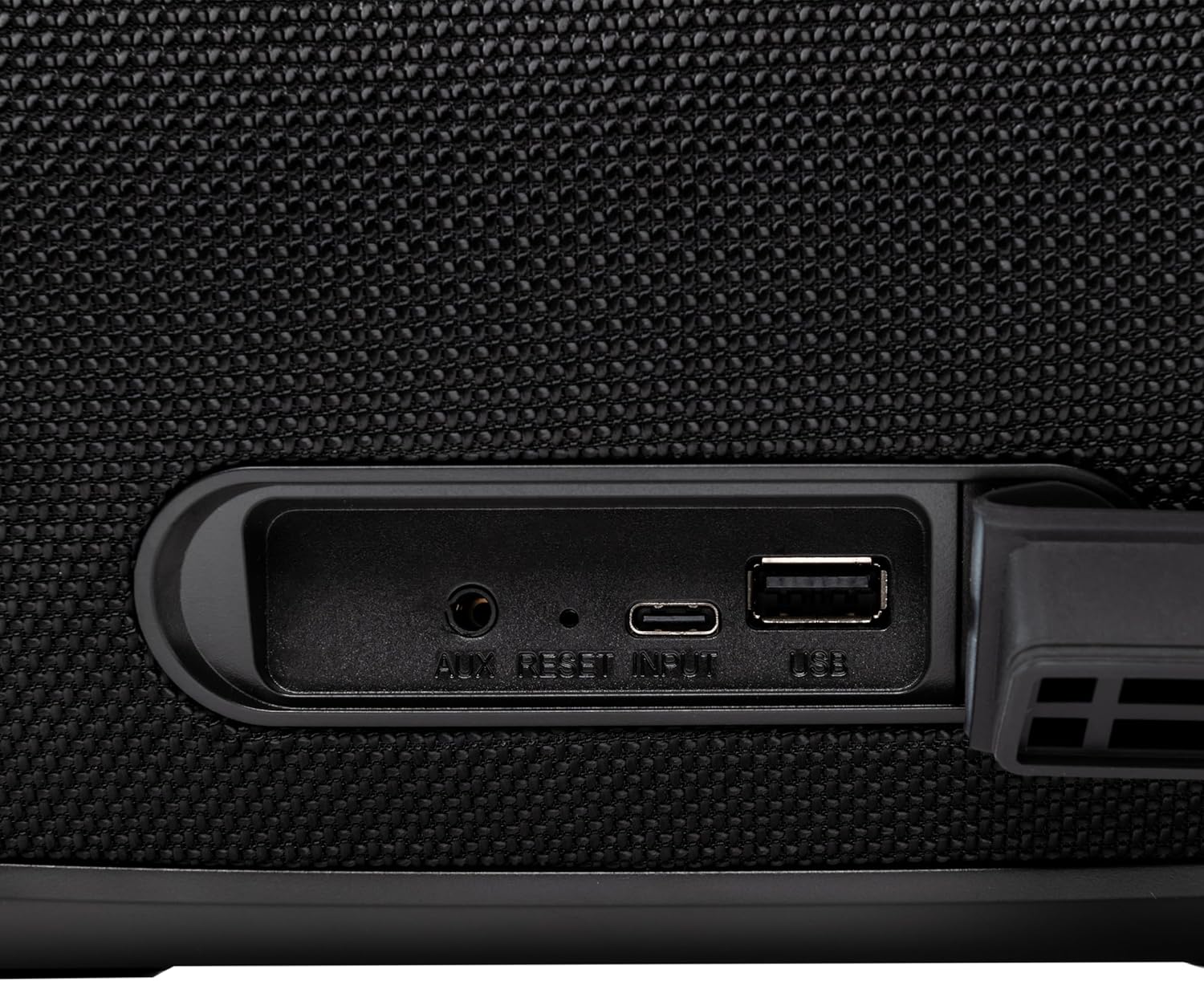
Figura 4.3: Close-up of the protected input/output ports on the rear of the speaker.
- Porto de entrada auxiliar: Para conectar dispositivos de son externos mediante un cable de son de 3.5 mm.
- Botón de reinicio: Use a thin object to press and reset the speaker if necessary.
- Entrada USB-C: Para cargar o altofalante.
- Porto USB-A: For playing MP3 audio files from a USB drive or for power bank functionality.
5. Configuración
5.1 Carga do altofalante
Before initial use, fully charge the speaker. The speaker also functions as a power bank to charge other devices via its USB-A port.
- Connect the USB charging cable to the USB-C input port on the speaker.
- Conecta o outro extremo do cable a un adaptador de corrente USB compatible (non incluído).
- The charging indicator light will illuminate. It will turn off once charging is complete.
- The battery level can be displayed on your connected phone when paired via Bluetooth.
5.2 Acendido/Apagado
- Para acender: Manteña premido o Botón de encendido for approximately 3 seconds until you hear an audible prompt and the LED lights activate.
- Para apagar: Manteña premido o Botón de encendido for approximately 3 seconds until you hear an audible prompt and the LED lights turn off.
6. Instrucións de funcionamento
6.1 Emparejamento Bluetooth
The speaker uses Bluetooth v5.3 for stable wireless connection up to 10 meters.
- Asegúrate de que o altofalante estea acendido e en modo Bluetooth (indicado por un LED azul intermitente). Se non o está, preme o botón Botón de modo (M) para cambiar ao modo Bluetooth.
- Activa o Bluetooth no teu dispositivo móbil (teléfono intelixente, tableta, etc.).
- Busca dispositivos Bluetooth dispoñibles e selecciona "TELLUR Obia PRO"da lista.
- Once paired, the speaker will emit an audible confirmation, and the blue LED will stop flashing.
- The speaker will automatically reconnect to the last paired device when powered on, if available.

Figura 6.1: The TELLUR Obia PRO speaker wirelessly connected to a smartphone, ready for audio playback.
Función estéreo sen fíos verdadeiro 6.2 (TWS)
TWS allows you to pair two Obia PRO speakers for a stereo sound experience.
- Ensure both Obia PRO speakers are powered on and in Bluetooth mode, but not yet paired with any device.
- Nun altofalante (este será o altofalante principal), prema o botón Botón TWS. The speaker will enter TWS pairing mode, indicated by a flashing light.
- The two speakers will automatically connect to each other. Once connected, you will hear an audible confirmation, and the TWS indicator light on both speakers will become solid.
- Now, connect your mobile device to the primary speaker via Bluetooth as described in Section 6.1. The audio will play in stereo across both speakers.
6.3 Multiple Link Technology
This technology allows connecting an unlimited number of Obia PRO speakers wirelessly for a synchronized audio experience. Refer to the manufacturer's website or specific instructions for detailed setup of Multiple Link.
6.4 USB Playback (MP3)
Reproducir audio MP3 filedirectamente desde unha unidade flash USB (ata 128 GB).
- Insira unha unidade flash USB que conteña MP3 files no porto USB-A.
- Preme o Botón de modo (M) to switch to USB mode. The speaker will automatically begin playing music from the USB drive.
- Usa o Subir/Baixar o volume e Botón de encendido (for play/pause) to control playback.
6.5 Conexión AUX-IN
Connect non-Bluetooth devices using the 3.5mm AUX audio cable.
- Connect one end of the 3.5mm AUX audio cable to the AUX-IN port on the speaker.
- Conecta o outro extremo á toma de saída de audio do teu dispositivo externo (por exemplo, reprodutor de MP3, portátil).
- Preme o Botón de modo (M) para cambiar ao modo AUX.
- Controla a reprodución e o volume desde o teu dispositivo externo.
6.6 Chamadas mans libres
When connected to a smartphone via Bluetooth, the speaker's built-in microphone allows for hands-free calls.
- Responder/Finalizar chamada: Prema brevemente o Botón de encendido.
- Rexeitar a chamada: Manteña premido o Botón de encendido durante 2 segundos.
6.7 modos de luz LED
The speaker features integrated LED lights with multiple display modes.
- Preme o Botón de modo de luz LED to cycle through available light patterns and colors.
- Manteña premido o Botón de modo de luz LED para acender ou apagar as luces.

Figura 6.2: A user interacting with the LED light mode button to change the speaker's lighting effects.
6.8 Equalizer Settings (Indoor/Outdoor)
The speaker allows for equalizer customization for different environments. Specific controls for this are not detailed in the provided data, but typically involve a dedicated button or a combination of existing buttons. Refer to the product's quick start guide or manufacturer's website for precise instructions on adjusting the equalizer.
7. Mantemento
7.1 Limpeza
- Limpe o altofalante cun pano suave e seco.
- Non empregue produtos de limpeza abrasivos, alcol nin disolventes químicos.
7.2 Resistencia á auga (IPX6)
The Obia PRO speaker is rated IPX6, meaning it is protected against high-pressure water jets from any direction. This makes it suitable for outdoor use and environments where it might be exposed to splashes or rain.
- Ensure the rubber cover for the charging and AUX ports is securely closed before exposing the speaker to water.
- Non mergullo o altofalante na auga.
- Despois da exposición á auga, seque o altofalante antes de cargalo.
7.3 Coidado coa batería
- Para prolongar a duración da batería, evite descargala completamente con frecuencia.
- Cargue o altofalante regularmente, mesmo se non o está a usar, para manter a batería en bo estado.
- Garde o altofalante nun lugar fresco e seco cando non o use durante períodos prolongados.
8 Solución de problemas
| Problema | Causa posible | Solución |
|---|---|---|
| O altofalante non se acende. | Batería baixa. | Cargue o altofalante completamente. |
| Non se pode emparellar por Bluetooth. | O altofalante non está en modo de emparellamento; o Bluetooth do dispositivo está desactivado; está demasiado lonxe do altofalante. | Ensure speaker is in Bluetooth mode (flashing LED). Turn on Bluetooth on your device. Move device closer to speaker (within 10m). |
| Sen son. | Volume demasiado baixo; modo incorrecto seleccionado; dispositivo non reproduce. | Increase speaker and device volume. Press Botón de modo (M) to select correct input. Ensure audio is playing on the connected device. |
| Fallou o emparellamento de TWS. | Speakers already paired to a device; not both Obia PRO models. | Disconnect both speakers from any Bluetooth devices. Ensure both speakers are Obia PRO models. Try TWS pairing again. |
| A reprodución por USB non funciona. | USB drive not formatted correctly; unsupported file type; drive capacity too large. | Ensure USB drive is formatted to FAT32. Only MP3 files are supported. Max capacity 128GB. |
9. Especificacións
| Nome do modelo | Obia PRO |
| Marca | TELLUR |
| Potencia de saída | 60W (2x 20W RMS subwoofers, 2x 10W RMS tweeters) |
| Versión Bluetooth | v5.3 |
| distancia wireless | Ata 10 metros |
| Resposta en frecuencia | 80 MHz (Note: This value is unusual for speaker frequency response and may be a typo in source data. Typically measured in Hz-kHz.) |
| Impedancia | 4 ohmios |
| Modos de audio | Bluetooth, USB (MP3), AUX-IN |
| Soporte USB | USB 2.0/3.0, up to 128GB (MP3 format) |
| Resistencia á auga | IPX6 |
| Capacidade da batería | 5400 mAh |
| Tempo de reprodución | Ata 12 horas (a un volume moderado) |
| Función Power Bank | Yes, via USB-A port |
| Dimensións (L x W x H) | 37.7 x 17 x 18 cm |
| Peso | 3.48 kg |
| Material | Plástico |
| Cor | Negro |
Nota: as especificacións están suxeitas a cambios sen previo aviso.
10. Garantía e soporte
TELLUR products are manufactured to the highest quality standards. For information regarding warranty terms, technical support, or service, please refer to the warranty card included with your product or visit the official TELLUR websitio.
Información de contacto: Por favor visite www.tellur.com para obter a información de soporte máis recente.


