Introdución
This manual provides detailed instructions for the installation, operation, and maintenance of your ICUIXIAN 16x16 HDMI Matrix Switch, Model DC-16x16. This professional device is designed for switching and distributing multiple HDMI digital signals to multiple display terminals, supporting HDMI 1.4a standard and EDID management up to 1080P resolutions.
Información de seguridade
Please read and understand all safety instructions before operating this device. Failure to do so may result in injury or damage to the equipment.
- Asegúrese de ventilar adecuadamente o dispositivo para evitar o sobreenriquecido.
- Use só o adaptador de alimentación proporcionado.
- Non expoñas o dispositivo á auga nin a humidade excesiva.
- Evite colocar obxectos pesados enriba do dispositivo.
- Desconecte a enerxía antes de limpar ou reparar.
Produto rematadoview
The ICUIXIAN 16x16 HDMI Matrix Switch allows you to connect up to 16 HDMI input sources and distribute them to 16 HDMI output displays. It features various control options and supports advanced video management.

Imaxe: Front and rear panels of the ICUIXIAN 16x16 HDMI Matrix Switch, highlighting 16 HDMI inputs, 16 HDMI outputs, RS-232, LAN, and power ports.
Características do panel frontal:
- LED de alimentación: Indica o estado da enerxía.
- Input/Output Selection Buttons: For local control of source and display routing.
- Pantalla LCD: Shows current input/output status and menu options.
- Receptor IR: For remote control commands.
Características do panel traseiro:
- Entrada de alimentación DC 5 V: Conecte o adaptador de corrente fornecido.
- RS-232 Port (IN/OUT): For serial communication control.
- RJ45 (LAN) Port: For network-based control via Web GUI.
- HDMI Input Ports (1-16): Connect your HDMI source devices.
- HDMI Output Ports (1-16): Connect your HDMI display devices.
Configuración e conexión
Follow these steps to set up your HDMI Matrix Switch:
- Apagar dispositivos: Ensure all HDMI source devices, display devices, and the matrix switch are powered off before making connections.
- Conectar fontes HDMI: Connect your HDMI source devices (e.g., Blu-ray players, PCs, game consoles) to the HDMI Input ports (1-16) on the rear panel of the matrix switch using high-quality HDMI cables.
- Conectar pantallas HDMI: Connect your HDMI display devices (e.g., TVs, projectors, monitors) to the HDMI Output ports (1-16) on the rear panel of the matrix switch using high-quality HDMI cables.
- Conectar os cables de control (opcional):
- For RS-232 control, connect an RS-232 cable from your control system to the RS-232 IN port.
- For LAN control, connect an Ethernet cable from your network router/switch to the RJ45 LAN port.
- Encendido: Connect the provided DC 5V power adapter to the matrix switch and then plug it into a power outlet. Power on the matrix switch, followed by your display devices, and then your source devices.
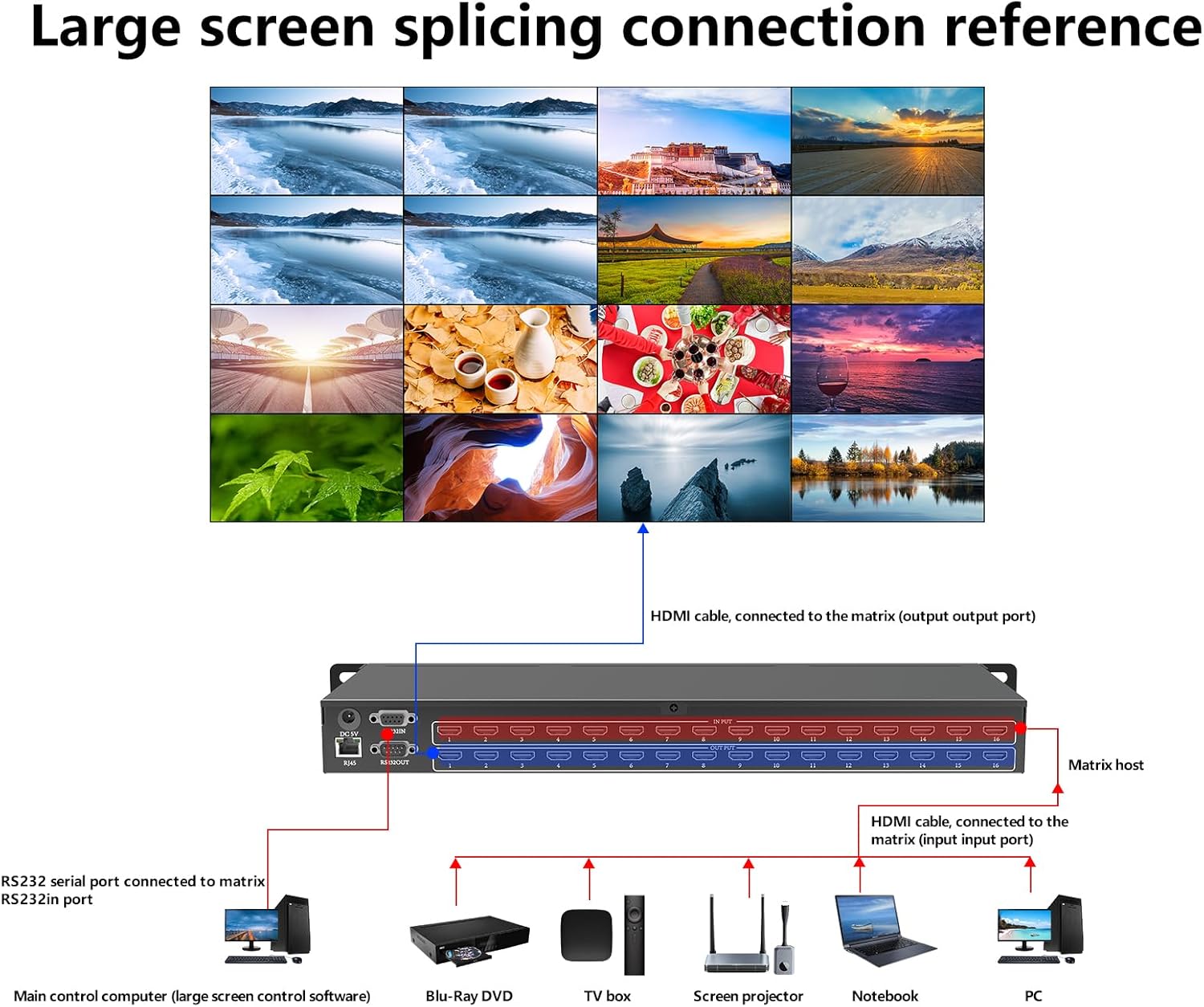
Imaxe: A connection diagram illustrating how to connect various HDMI sources (PC, Notebook, Screen projector, TV box, Blu-ray DVD) to the input ports and how the output ports connect to a large screen display, along with RS-232 serial port connection.
Instrucións de funcionamento
The ICUIXIAN 16x16 HDMI Matrix Switch offers multiple control methods for flexible operation.
1. Local Button Control
Use the buttons on the front panel to select inputs and outputs. Refer to the front panel layout in the Product Overview section for button locations.
- Selección de entrada: Press the corresponding input button (1-16) to select a source.
- Selección de saída: Press the corresponding output button (1-16) to select a display.
- Cambio: After selecting an input and output, confirm the switch using the designated button (e.g., "OK" or "Switch").
2. Control remoto IR
The included IR remote control allows for convenient wireless operation. Point the remote directly at the IR receiver on the front panel of the matrix switch.
- Use the numeric buttons to select input and output channels.
- Dedicated buttons for switching, menu navigation, and other functions are available on the remote.
3. RS-232 Serial Control
For integration with professional control systems, the matrix switch can be controlled via RS-232 commands. Connect your control system to the RS-232 IN port.
- Refer to the detailed RS-232 command protocol document (usually provided separately or available for download) for specific commands and syntax.
- Default baud rate: 9600, Data bits: 8, Stop bit: 1, No parity.
4. Web GUI Control (LAN Port)
O Web Graphical User Interface (GUI) provides a user-friendly way to control the matrix switch from a computer, mobile phone, or tablet connected to the same network.
- Conectarse á rede: Ensure the matrix switch's LAN port is connected to your network.
- Atopar enderezo IP: The IP address of the matrix switch can usually be found on the device's LCD display or through network scanning tools.
- Acceso Web GUI: Abrir a web browser on a device connected to the same network and enter the IP address of the matrix switch in the address bar.
- Iniciar sesión: If prompted, enter the default username and password (refer to the separate network configuration guide or contact support if unknown).
- Control: Use the intuitive interface to switch inputs to outputs, manage EDID settings, and configure scenes.

Imaxe: Screenshots demonstrating the web control interface, showing input/output selection grids and system settings for easy operation.
Xestión EDID
The matrix switch supports EDID (Extended Display Identification Data) management to ensure optimal compatibility between sources and displays. This feature allows you to select the best EDID settings for your connected devices, preventing resolution or audio issues.
- EDID settings can typically be configured via the Web Comandos GUI ou RS-232.
- Options may include copying EDID from a specific output, using a default EDID, or custom EDID settings.
Xestión de escenas
The device includes a built-in pre-plan management system that allows you to save and recall up to 32 different input/output configurations (scenes). This is useful for quickly switching between complex setups.
- Saving a Scene: Configure your desired input-to-output routing, then use the control interface (Web GUI, RS-232, or local buttons) to save this configuration as a scene.
- Recalling a Scene: Select the desired scene number from the control interface to instantly apply the saved configuration.
Video Switching Modes
The matrix switch supports various display configurations:
- Conmutación independente: Each display can show a different input source.
- Entrada compartida: Multiple displays can share the same input source.
- Uso compartido parcial: Some displays show independent sources, while others share a common source.

Imaxe: Exame visualamples of different screen configurations: each display showing an independent source, all displays sharing the same source, and some displays sharing a source while others are independent.
Vídeo: This video demonstrates common switching modes and configurations possible with the ICUIXIAN HDMI Matrix Switch/Splitter, showcasing how different inputs can be routed to various outputs.
Mantemento
To ensure the longevity and optimal performance of your ICUIXIAN HDMI Matrix Switch, follow these maintenance guidelines:
- Limpeza: Usa un pano suave e seco para limpar o exterior do dispositivo. Non empregues produtos de limpeza líquidos nin en aerosol.
- Ventilación: Asegúrese de que as aberturas de ventilación non estean bloqueadas.
- Xestión de cables Keep cables organized and free from kinks or excessive tension.
- Actualizacións de firmware: Consulte o do fabricante websitio periodicamente para obter actualizacións de firmware que poidan mellorar o rendemento ou engadir novas funcións.
Resolución de problemas
If you encounter issues with your HDMI Matrix Switch, refer to the following common problems and solutions:
| Problema | Causa posible | Solución |
|---|---|---|
| Sen saída de vídeo na pantalla. |
|
|
| Mala calidade de vídeo ou parpadeo. |
|
|
| O control remoto non funciona. |
|
|
| Non se pode acceder Web GUI. |
|
|
Especificacións
Technical specifications for the ICUIXIAN 16x16 HDMI Matrix Switch (Model DC-16x16):
| Xeral | |
|---|---|
| Entradas | 16 |
| Saídas | 16 |
| Largura da interface | 13.5 Gbps |
| Soporte de resolución | 1920*1080@60Hz (backward compatible) |
| Estándar HDMI | HDMI 1.4a |
| Decodificación HDCP | Soportado |
| Soporte 3D | Soportado |
| Control | |
| Métodos de control | Web GUI, RS-232, IR Remote, Local Buttons |
| Serial Control Interface | RS-232, 9-pin female D-type connector with 9-pin male D-type connector |
| Velocidade en baudios | 9600 |
| Bits de datos | 8 |
| Stop Bit | 1 |
| Paridade | Ningún |
| Ambiental e físico | |
| Fonte de alimentación do sistema operativo | 100VAC ~ 240VAC, 50/60Hz (International adaptive) |
| Storage, Operating Temperature | 0 ~ + 50 ° C |
| Storage, Working Humidity | 20 % ~ 70 % |
| Tamaño do recinto | Montaxe en rack 1U |
| Peso do chasis | 3 kg (aprox. 6.6 lbs) |
| Dimensions (without lugs) | 435 x 182 x 47 mm (17.1 x 7.2 x 1.85 polgadas) |
| Dimensions (with lugs) | 496 x 182 x 47 mm (19.5 x 7.2 x 1.85 polgadas) |
| Tempo medio entre fallos (MTBF) | 30,000 horas |

Imaxe: A table summarizing the technical specifications of the ICUIXIAN 16x16 HDMI Matrix Switch, including inputs, outputs, resolution, control interfaces, power, and physical dimensions.
Garantía e Soporte
ICUIXIAN products are designed for reliability and performance. For warranty information, technical support, or service inquiries, please refer to the contact information provided with your purchase or visit the official ICUIXIAN websitio.
For product quality assurance, each unit undergoes thorough testing before shipment. Professional technical staff are available to assist with any product-related issues.
Recursos en liña: Visit the ICUIXIAN Store on Amazon


