1. Produto rematadoview
The DJI Mic 2 is a wireless microphone system designed for high-quality audio recording. This system includes one transmitter (TX) and one receiver (RX), along with a compact DJI Lavalier Mic. It features intelligent noise cancelling, 32-bit float internal recording, and a 250-meter (820 ft.) transmission range, making it suitable for various recording scenarios including interviews, vlogs, and live streaming. The system is compatible with a wide range of devices including iPhones, Android phones, PCs, and cameras.
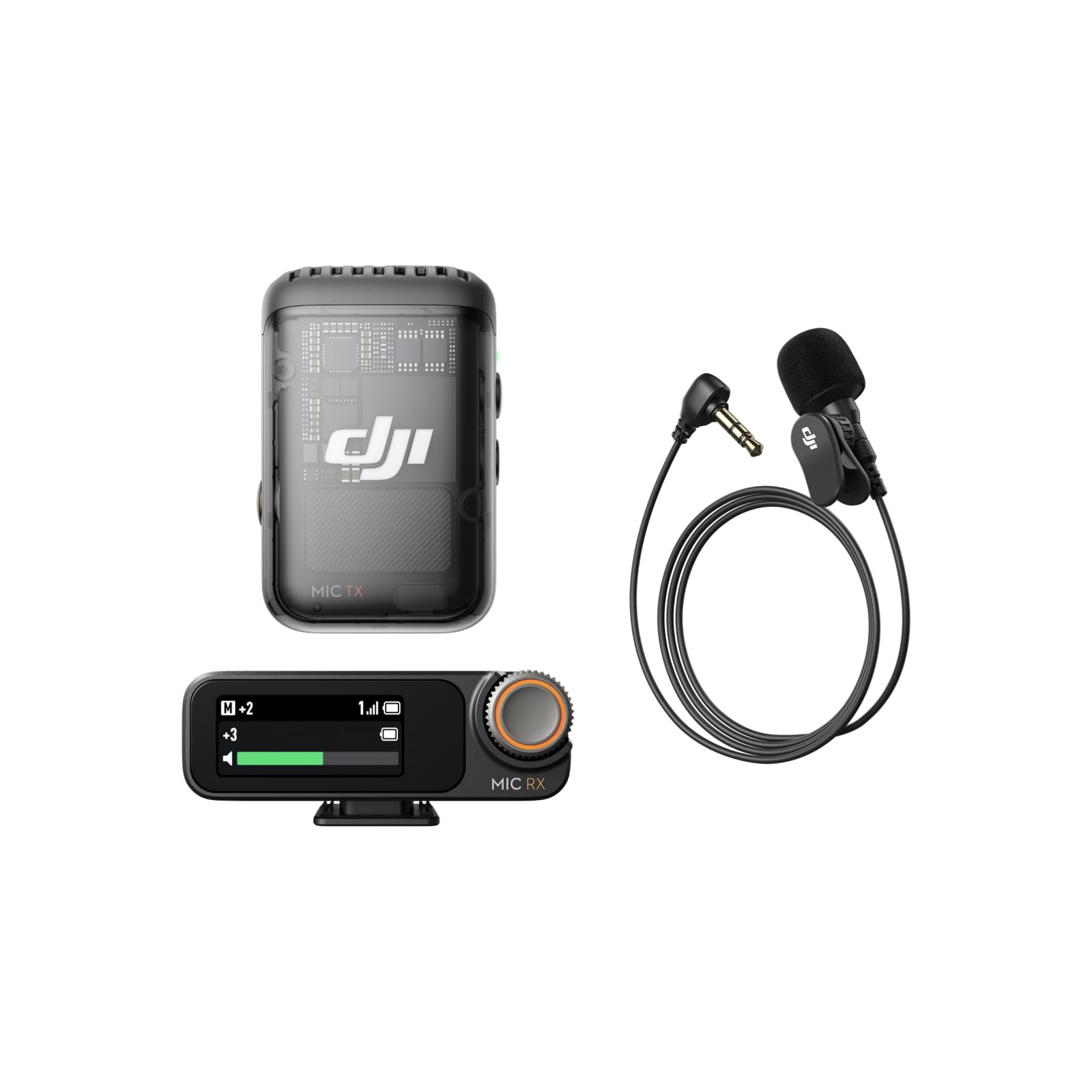
Image: The DJI Mic 2 wireless microphone system, showcasing o seu deseño compacto.
2. Que hai na caixa
The DJI Mic 2 (1 TX + 1 RX) + Lavalier Mic combo includes the following components:
- Receptor DJI Mic 2
- DJI Mic 2 Transmitter (Shadow Black)
- Micrófono Lavalier DJI
- DJI Mic 2 Carrying Pouch
- DJI Mic Splitter Charging Cable
- DJI Mic 2 Windscreen
- DJI Mic 2 Clip Magnet
- DJI Mic 2 Camera Audio Cable (3.5mm TRS)
- DJI Mic 2 Mobile Phone Adapter (Lightning)
- DJI Mic 2 Mobile Phone Adapter (Type-C)

Imaxe: Detallada view of all components included in the DJI Mic 2 package.
3. Configuración
- Cargando: Ensure both the transmitter and receiver are fully charged using the provided charging cable. The charging case (if included in your specific kit) also charges the units.
- Encendido: Press and hold the power button on both the transmitter and receiver to turn them on.
- Emparejamento: The transmitter and receiver should automatically pair upon powering on. If not, refer to the device's screen for pairing instructions or initiate pairing manually.
- Conectar ao dispositivo:
- Para teléfonos intelixentes: Attach the appropriate USB-C or Lightning adapter to the receiver and plug it into your phone's charging port.
- Para cámaras: Use the 3.5mm TRS camera audio cable to connect the receiver's output port to your camera's microphone input jack.
- Para PCs: Connect the receiver to your PC via a USB-C cable.
- Colocación do micrófono: Attach the transmitter to your clothing using the clip or magnetic attachment. For optimal sound, place it approximately 15-20 cm (6-8 inches) from the sound source. If using the lavalier mic, plug it into the transmitter's 3.5mm input jack and secure the lavalier mic to clothing.

Image: Proper placement of the DJI Mic 2 transmitter on clothing for clear audio capture.

Image: The DJI Mic 2 receiver connected to a smartphone and a camera using the included adapters, demonstrating wide compatibility.
4. Instrucións de funcionamento
4.1. Funcionamento básico
- Gravación: Press the record button on the transmitter to start/stop internal recording. The 32-bit float internal recording provides up to 14 hours of backup audio.
- Seguimento: Connect headphones to the receiver's 3.5mm monitoring port for real-time audio monitoring.
- Axuste de ganancia: Use the precision parameter dial on the receiver to adjust the gain (audio input level) for optimal sound.
- Pantalla táctil: The 1.1-inch OLED touchscreen on the receiver displays information such as volume, battery level, and charging status. Swipe up or down to access settings.

Image: Close-up of the DJI Mic 2 receiver's 1.1-inch OLED touchscreen and precision parameter dial for easy control.
4.2. Funcións avanzadas
- Cancelación de ruído intelixente: Activate this feature for clearer vocals, especially in environments with background noise.
- Pista de seguridade: The system can record a second audio track at -6dB alongside the main track, providing a backup against unexpected audio level spikes.
- DJI OsmoAudio™ Direct Connection: The transmitter supports direct connection to various DJI products (e.g., Osmo Nano, Osmo 360, Osmo Action 5 Pro, Osmo Pocket 3) without needing the receiver, delivering premium audio.

Image: Visual representation of intelligent noise cancelling, showing audio waveforms before and after processing.

Image: Diagram illustrating the safety track feature, showing a normal audio track and a -6dB safety track.
5. Mantemento
- Limpeza: Use a soft, dry cloth to clean the transmitter, receiver, and charging case. Avoid using liquids or abrasive cleaners.
- Almacenamento: Store the DJI Mic 2 system in its carrying pouch or charging case when not in use to protect it from dust and damage.
- Coidado da batería: For long-term storage, ensure the batteries are charged to approximately 50-60% to prolong their lifespan. Recharge periodically if stored for extended periods.
- Parabrisas: Regularly clean or replace the windscreen to maintain optimal audio quality and prevent debris from entering the microphone.
6 Solución de problemas
- Sen audio:
- Check if both transmitter and receiver are powered on and paired.
- Verify the receiver is correctly connected to your recording device (phone, camera, PC).
- Ensure the recording device's audio input is set to the external microphone.
- Adjust the gain on the receiver.
- Mala calidade de audio/ruído:
- Ensure the transmitter is placed correctly and not rubbing against clothing.
- Activate the intelligent noise cancelling feature.
- Use the windscreen in windy environments.
- Comprobe se hai interferencias doutros dispositivos sen fíos.
- Problemas de conectividade:
- Ensure the transmitter and receiver are within the 250m (820 ft.) operating range.
- Restart both the transmitter and receiver.
- Re-pair the devices if necessary.
- A batería non se carga:
- Verify the charging cable is securely connected to a power source and the device.
- Proba cun cable de carga ou adaptador de corrente diferente.
- Clean the charging contacts on the devices and case.
7. Especificacións
| Característica | Especificación |
|---|---|
| Relación sinal-ruído | 60 dB |
| Plataforma de hardware | Camera, PC, Smartphone |
| Número de canles | 2 |
| Tecnoloxía de conectividade | USB |
| Tipo de conector | Conector de 3.5 mm, USB |
| Característica especial | Clip |
| Dispositivos compatibles | Teléfono intelixente |
| Cor | Negro |
| Patrón polar | Omnidireccional |
| Factor de forma do micrófono | Lavalier |
| Fonte de enerxía | Eléctrico con cable |
8. Product Comparison (DJI Mic 1 vs. DJI Mic 2)
This video provides a comparison between the DJI Mic 1 and DJI Mic 2, highlighting key differences in features and design to help users understand the advancements in the newer model.
Video: A comparison of the DJI Mic 1 and DJI Mic 2, detailing their differences in features and included accessories.

Image: A table comparing the features of DJI Mic 2 and DJI Mic 1, including noise cancelling, internal recording, operating time, and connectivity.
9. Garantía e soporte
Para obter información sobre a garantía e asistencia técnica, consulte a páxina oficial de DJI websitio web ou póñase en contacto co servizo de atención ao cliente de DJI. Garde o comprobante de compra para reclamacións de garantía.


