1. Introdución
This manual provides essential information for the safe and efficient operation, maintenance, and troubleshooting of your Fafrees F20 Mate Folding 3-Wheel Electric Bicycle. Please read this manual thoroughly before using the product to ensure proper assembly and usage.
The Fafrees F20 Mate is an electric cargo tricycle designed for stability and convenience, featuring a powerful motor, long-range battery, and hydraulic disc brakes for a secure riding experience.
2. Instrucións de seguridade
- Usa sempre casco e equipamento de seguridade axeitado cando conduzas.
- Familiarízate coas leis e regulamentos de tráfico locais.
- Realiza unha inspección previa á condución antes de cada uso, comprobando os freos, os pneumáticos e o nivel da batería.
- Do not exceed the maximum load capacity of 180 kg (rider + cargo). Front basket max: 20 kg, Rear basket max: 45 kg.
- Avoid riding in extreme weather conditions or on slippery surfaces.
- Asegúrese de que os mecanismos de pregamento estean ben bloqueados antes de montar en bicicleta.
- Manteña as mans e os pés lonxe das pezas móbiles.
3. Produto rematadoview
3.1 Compoñentes clave
- Marco: Aluminum alloy folding frame.
- Motor: Rear hub motor with differential, 65 N.m max torque.
- Batería: Removable 48V 18.2Ah (873.6 Wh) Lithium-ion battery.
- Freos: Hydraulic disc brakes (180mm/2.3T brake discs).
- Pneumáticos: 20 x 3.0 inch pneumatic fat tires.
- Visualización: Full-screen LCD display.
- Suspensión: Front shock-absorbing fork (35mm travel) and rear seat tube shock absorber (15mm travel).
- Iluminación: Headlight, taillight, front and rear turn signals, reflectors.
- Accesorios: Rear basket (48 x 36 x 16 cm), electric horn, rearview espellos.
3.2 Dimensións e peso
| Medición | Valor |
|---|---|
| Dimensións despregadas (L x A x H) | 174 x 74 x 116 cm |
| Dimensións dobradas (L x W x H) | 100 x 74 x 82 cm |
| Altura do manillar axustable | 98-116 cm |
| Altura do asento axustable | 82-106 cm |
| Tamaño do pneumático | 20 x 3.0 polgadas |
| Rear Basket Dimensions | 48 x 36 x 16 cm |
| Peso neto | 40 kg |
| Peso da batería | 5 kg |
| Capacidade de carga máxima | 180 kg |
| Altura recomendada do piloto | 160-200 cm |
3.3 Especificacións de rendemento
- Velocidade máxima: 25 km/h
- Max Range (Pedal Assist Mode): 85-110 km
- Max Range (Pure Electric Mode): 55-75 km
- Max Climbing Capacity: 15°
- Tempo de carga: 6-7 horas
- Nivel impermeable: IPX5
- Temperatura de funcionamento: -20°C a 40°C
4. Configuración e montaxe
Your Fafrees F20 Mate electric tricycle comes partially assembled. Follow these steps for final assembly:
- Desembalaxe: Carefully remove all components from the packaging. Verify all parts listed in the "Package Contents" section are present.
- Desdobramento do cadro: Locate the main folding latch on the frame. Release the latch and carefully unfold the frame until it locks into place. Ensure the mechanism is fully engaged and secure.
- Instalación de manillar: Insert the handlebar stem into the fork tube. Adjust the height to your preference and tighten the quick-release lever or bolts securely. Ensure the handlebars are aligned with the front wheel.
- Instalación da tija do asento: Insert the seat post into the frame's seat tube. Adjust the seat height for comfortable pedaling, ensuring your feet can touch the ground when stopped. Secure the quick-release clamp.
- Conexión do pedal: Identifica os pedais esquerdo (E) e dereito (R). O pedal esquerdo rosca en sentido antihorario e o pedal dereito en sentido horario. Aplica unha pequena cantidade de graxa nas roscas e aperteas firmemente cunha chave inglesa.
- Instalación da batería: Insert the fully charged battery into its compartment. Ensure it clicks securely into place.
- Comprobación previa á viaxe: Before your first ride, double-check all bolts, quick releases, and connections. Test the brakes, lights, and horn. Ensure tires are inflated to the recommended pressure.
Note: A tool kit is included for assembly. Refer to the included user manual for detailed diagrams and instructions.

Image: The Fafrees F20 Mate electric tricycle in its unfolded state, ready for use. It features a blue frame, fat tires, a rear cargo basket, and front and rear lighting.
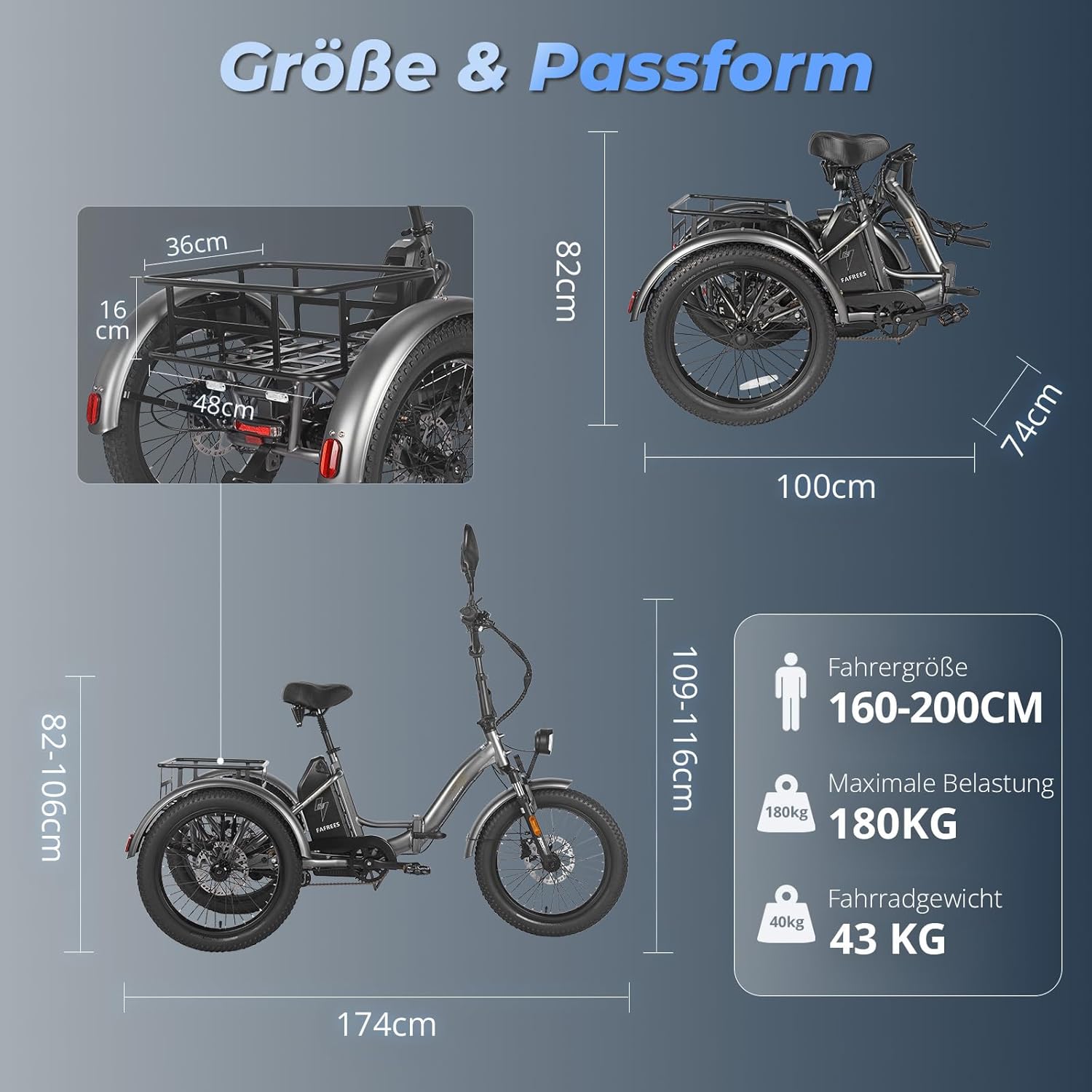
Image: A diagram illustrating the key dimensions of the Fafrees F20 Mate electric tricycle, including unfolded and folded sizes, handlebar and seat height ranges, and basket dimensions. Recommended rider height and maximum load capacity are also shown.
5. Instrucións de funcionamento
5.1 Acendido/Apagado
To power on the tricycle, press and hold the power button on the LCD display. To power off, press and hold the power button again until the display turns off.
5.2 Modos de condución
The F20 Mate offers three riding modes:
- Modo humano: Ride the tricycle like a traditional bicycle using pedal power only.
- Modo de asistencia ao pedaleo (PAS): The motor provides assistance as you pedal. Use the '+' and '-' buttons on the display to adjust the assist level from 0 (no assist) to 5 (maximum assist). This mode offers a range of 85-110 km.
- Modo eléctrico puro: Use the throttle to engage the motor without pedaling. This mode offers a range of 55-75 km.
5.3 Funcións da pantalla LCD
The full-screen LCD display provides real-time information:
- Velocidade: Velocidade actual de condución.
- Nivel de batería: Indica a carga restante da batería.
- Quilometraxe: Displays trip distance and total odometer.
- Nivel PAS: Shows the current pedal assist level (0-5).
- Códigos de erro: Alerts for system malfunctions.
- 6 km/h Walk Mode: Activates a low-speed assist for walking alongside the tricycle.
- Control de crucero: Mantén unha velocidade establecida sen necesidade de pisar o acelerador.

Imaxe: Primeiro plano view of the Fafrees F20 Mate's full-screen LCD display, showing various indicators such as speed, battery level, PAS level, and error codes. The image also highlights the left and right turn signals and warning blinkers.
5.4 Sistema de freos
The F20 Mate is equipped with hydraulic disc brakes for reliable stopping power. Both front and rear brakes are controlled by levers on the handlebars. The tricycle also features parking brake levers to secure it when stationary.
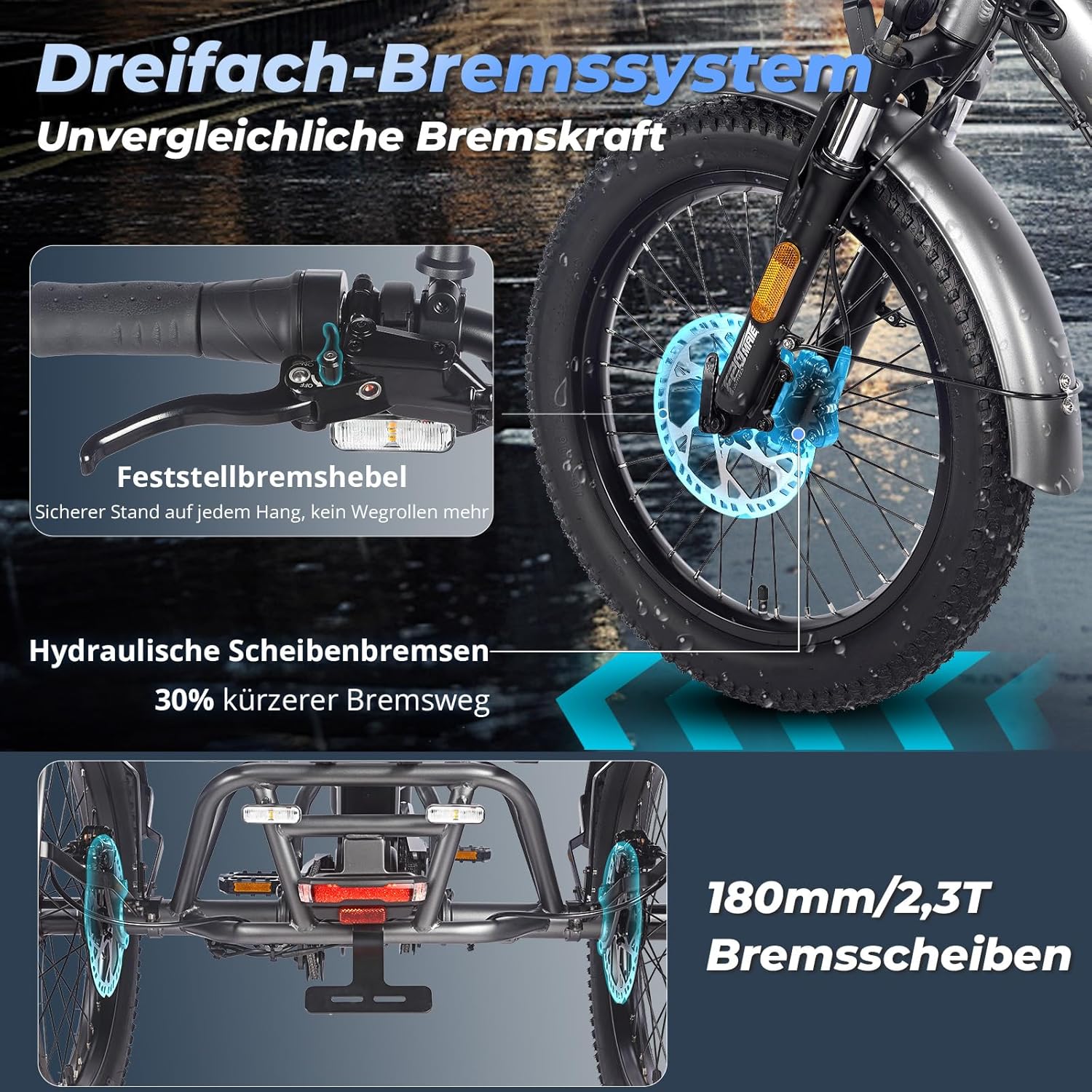
Imaxe: Detallada view of the hydraulic disc brake system on the Fafrees F20 Mate, showing the brake lever on the handlebar and the disc brake caliper on the wheel. The image emphasizes the 180mm/2.3T brake discs and the parking brake feature.
5.5 Características de seguridade
- Faro e faro traseiro: Ensure these are on when riding in low light conditions.
- Sinais de giro: Use front and rear turn signals to indicate your direction.
- Reflectores: Located on the rear fenders for enhanced visibility.
- Trompa eléctrica: Use to alert pedestrians or other riders.
- Traseiraview Espellos: Provide visibility of traffic behind you.

Imaxe: Unha vez máisview of the Fafrees F20 Mate highlighting its comprehensive safety features, including the headlight, taillight, front and rear turn signals, electric horn, reflectors, and rearview mirrors, designed for day and night visibility.
6. Carga e coidado da batería
6.1 Carga da batería
The 48V 18.2Ah lithium-ion battery can be charged on or off the tricycle. Use only the original Fafrees charger provided (Input: 180-240V, Output: 54.6V, 3A). Charging time is approximately 6-7 hours.
- Conecta o cargador ao porto de carga da batería.
- Conecte o cargador a unha toma de parede estándar.
- The charger indicator light will show charging status (typically red for charging, green for fully charged).
- Desconecte o cargador unha vez que se complete a carga.

Image: Illustration of the Fafrees F20 Mate's 48V 18.2Ah lithium-ion battery, showing its removable design and the charging process. The image also highlights the IPX5 waterproof rating and the 7-8 hour fast charging capability.
6.2 Coidado coa batería
- Evite descargar completamente a batería antes de recargala.
- Garde a batería nun lugar fresco e seco, lonxe da luz solar directa e de temperaturas extremas.
- If storing for extended periods, charge the battery to 50-70% every 1-2 months.
- Do not expose the battery to water or moisture beyond its IPX5 rating.
7. Mantemento
7.1 Comprobacións periódicas
- Pneumáticos: Check tire pressure regularly (20 x 3.0 inch fat tires). Ensure they are inflated to the recommended PSI for optimal performance and safety.
- Freos: Inspect brake pads for wear and ensure brake levers provide firm and responsive braking. Adjust as needed.
- Parafusos e elementos de fixación: Periodically check and tighten all bolts, nuts, and quick releases, especially on the folding mechanisms, handlebars, and wheels.
- Cadea: Keep the chain clean and lubricated to ensure smooth pedaling and prevent rust.
- Conexións eléctricas: Ensure all electrical cables and connectors are secure and free from damage.
7.2 Limpeza e almacenamento
- Limpar o triciclo con anuncioamp cloth and mild detergent. Avoid using high-pressure washers directly on electrical components.
- Store the tricycle in a dry, sheltered area to protect it from the elements.
- When folding for storage, ensure all folding mechanisms are properly engaged.
8 Solución de problemas
| Problema | Causa posible | Solución |
|---|---|---|
| Tricycle does not power on. | Battery not charged or not properly installed. Loose electrical connection. | Asegúrate de que a batería estea completamente cargada e firmemente colocada. Comproba todas as conexións eléctricas visibles. |
| Motor not assisting or no power in pure electric mode. | Low battery. PAS level set to 0. Brake levers engaged. Motor or controller issue. | Charge battery. Increase PAS level. Ensure brake levers are fully released. Check display for error codes. |
| Os freos parecen débiles ou esponxosos. | Worn brake pads. Air in hydraulic lines. Misaligned calipers. | Inspect and replace brake pads if worn. Bleed hydraulic brakes (professional service recommended). Adjust caliper alignment. |
| Ruídos pouco comúns durante a condución. | Loose components. Dry chain. Bearing issue. | Check and tighten all fasteners. Lubricate chain. If noise persists, seek professional inspection. |
| A pantalla non funciona correctamente. | Loose cable connection. Water damage. Software glitch. | Check display cable connection. Ensure no water ingress. Try powering off and on again. |
For issues not listed here or if solutions do not resolve the problem, please contact Fafrees customer support.
9. Garantía e soporte
9.1 Información da garantía
Fafrees provides professional customer service. While specific warranty terms are not detailed in the product description, the brand states: "If you have any questions, please do not hesitate to contact us, we will reply within 24 hours. If you can cooperate with us, we can offer you the effective solution within 2 working days. We also have a bike workshop in Stuttgart, Germany."
Conserve o comprobante de compra para calquera reclamación de garantía.
9.2 Atención ao cliente
For technical assistance, parts, or warranty inquiries, please contact Fafrees customer support through the retailer where you purchased the product or visit the official Fafrees websitio.
You can also visit the Fafrees store on Amazon: Fafrees Official Store
For issues requiring visual explanation, it is recommended to provide photos or video links to assist the support team.


