1. Introdución
This manual provides essential information for the safe and efficient operation of your Metz MUD8500Z 43-inch 4K UHD Google Smart TV. Please read these instructions thoroughly before using the television and retain them for future reference. This television features a 43-inch Direct LED display with UHD 4K HDR resolution, integrated Google TV operating system, and a built-in soundbar with Wonder Audio technology.
2. Que hai na caixa
Desembala o televisor con coidado e comproba que inclúe todos os seguintes elementos:
- Metz MUD8500Z 43-inch Smart TV
- Adaptador de alimentación
- Control remoto
- Manual de usuario (este documento)
- Compoñentes do soporte de TV (se corresponde)
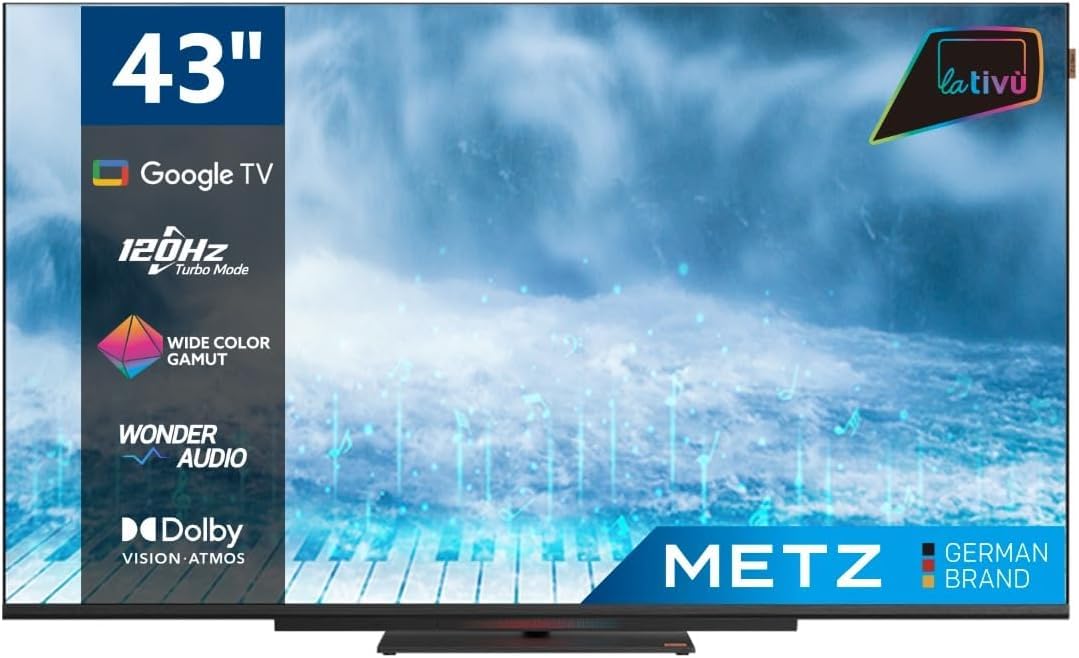
Imaxe: Fronte view of the Metz MUD8500Z 43-inch Smart TV.
3. Configuración
3.1. Desembalaxe e colocación
Retire o televisor da súa embalaxe. Colóqueo sobre unha superficie estable e plana ou mónteo na parede cun soporte VESA compatible (véndese por separado). Asegúrese de que haxa unha ventilación axeitada arredor do televisor.

Image: Diagram showing the dimensions of the Metz MUD8500Z TV (96.6cm width, 57cm height, 11cm depth).
3.2. Potencia de conexión
Connect the power adapter to the TV's power input, then plug the adapter into a wall outlet. The TV will enter standby mode.
3.3. Configuración inicial (Google TV)
Ao acender o televisor por primeira vez, este guiarache polo proceso de configuración inicial. Isto inclúe:
- Selección do idioma: Escolle o teu idioma preferido.
- Conexión de rede: Connect the TV to your home Wi-Fi network or via an Ethernet cable.
- Inicio de sesión na conta de Google: Inicia sesión coa túa conta de Google para acceder ás funcións, aplicacións e recomendacións personalizadas de Google TV.
- Escaneo de canles: Busca canles de televisión dispoñibles (antena/cable).
4. Instrucións de funcionamento
4.1. Funcións básicas da televisión
- Encendido/apagado: Prema o botón de acendido/apagado do mando a distancia ou do televisor.
- Control de volume: Usa os botóns para subir/baixar o volume do mando a distancia.
- Selección de canles: Use os botóns Canle arriba/abaixo ou o teclado numérico.
- Fonte de entrada: Press the 'Input' button to select HDMI, AV, or other connected devices.
4.2. Google TV Navigation
The Google TV interface provides access to streaming services, apps, and live TV. Use the directional pad and 'OK' button on your remote to navigate menus and select items.

Image: Remote control for the Metz Smart TV, highlighting dedicated buttons for popular streaming services and Google Assistant.
4.3. Asistente de Google
Your TV has an integrated Google Assistant. Press the Google Assistant button on your remote or use the built-in microphone for voice commands to search for content, control smart home devices, and more.
4.4. App Access
Access a wide range of applications from the Google Play Store directly on your TV. Navigate to the 'Apps' section on the Google TV home screen to browse, download, and manage your applications.

Image: Screenshot of the Google TV interface displaying various streaming applications.
5. Características
5.1. UHD 4K Resolution and HDR
Experience stunning visuals with a resolution of 3840x2160 pixels, providing exceptional clarity and detail. The 4K HDR (High Dynamic Range) support enhances contrast and color accuracy for a more lifelike picture.
5.2. Wide Color Gamut
The Wide Color Gamut technology allows the TV to display a broader spectrum of colors, resulting in more vibrant and realistic images.

Image: A visual comparison demonstrating the enhanced color range with Wide Color Gamut versus normal display.
5.3. Wonder Audio Soundbar
The integrated soundbar with Wonder Audio technology delivers an immersive and clear audio experience. This advanced sound processing algorithm improves treble and bass, offering a more realistic virtual surround sound.

Image: Diagram illustrating the internal structure of the Surging Soundbar, showing increased diaphragm area and net sound cavity volume.
5.4. Google TV Operating System
Powered by Google TV, this television provides a personalized experience with easy access to your favorite movies, shows, live TV, and apps from across your subscriptions. It also offers smart recommendations based on your viewing hábitos.
5.5. 120Hz Turbo Mode
The 120Hz Turbo Mode enhances motion clarity, making fast-paced scenes and gaming content appear smoother and more fluid.

Image: Visual representation of the 120Hz Turbo Mode, illustrating enhanced smoothness for dynamic content.
5.6. Dolby Vision and Dolby Atmos
Enjoy cinematic picture quality with Dolby Vision, offering incredible brightness, contrast, and color. Dolby Atmos provides immersive, multi-dimensional audio that flows around you.
6. Conexións
Your Metz MUD8500Z TV offers various ports for connecting external devices:
- HDMI (x3): Conecta reprodutores de Blu-ray, consolas de xogos, descodificadores, etc.
- USB 2.0 (x2): Conecta dispositivos de almacenamento USB para a reprodución multimedia.
- LAN (Ethernet): Para conexión a internet por cable.
- AV IN: Connect older devices with composite video and stereo audio outputs.
- RF Input (Antenna/Satellite): Conecta a túa antena terrestre ou de satélite.
- Saída óptica: For digital audio output to a sound system or soundbar.
- Ranura CI: For Common Interface modules (e.g., for pay-TV services).

Imaxe: Detallada view of the rear panel connections, including CI, AV IN, RF Input, USB 2.0, HDMI, Optical Out, and LAN ports.
7. Especificacións
| Parámetro | Valor |
|---|---|
| Número de modelo | MUD8500Z (S9147779) |
| Tamaño da pantalla | 43 polgadas (108 cm) |
| Tecnoloxía de visualización | LED |
| Resolución | 4K UHD (3840 x 2160) |
| Taxa de actualización | 60 Hz (with 120Hz Turbo Mode) |
| Relación de aspecto | 16:9 |
| Conectividade | Ethernet, HDMI (x3), USB (x2), Wi-Fi |
| Características especiais | Flat Screen, Google TV, Google Assistant, Wonder Audio Soundbar, HDR, Wide Color Gamut |
| Dimensións do produto (WxDxH) | 96.6 x 10.9 x 56.9 cm |
| Peso | 8.2 kg |
| Clase de eficiencia enerxética (SDR) | F |
| Consumo de enerxía (SDR) | 50.0 W |
| Clase de eficiencia enerxética (HDR) | G |
| Consumo de enerxía (HDR) | 90.0 W |
| Potencia en espera | 0.4 W |
For detailed energy information, please refer to the official EU energy label: https://eprel.ec.europa.eu/qr/1530402
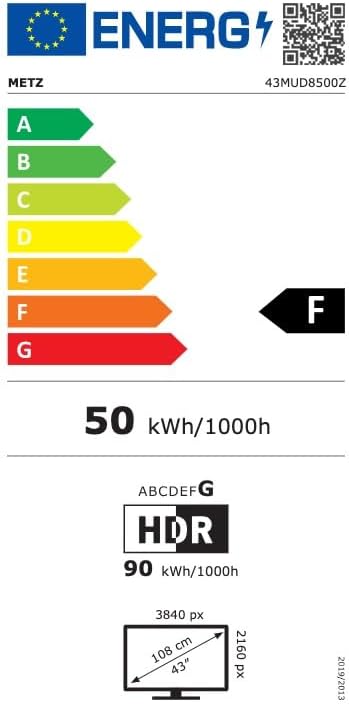
Image: EU Energy Label for the Metz MUD8500Z television, showing energy efficiency class F.
8 Solución de problemas
If you encounter issues with your TV, consult the following common problems and solutions:
- Sen enerxía:
- Asegúrate de que o cable de alimentación estea conectado correctamente tanto ao televisor como á toma de corrente.
- Check if the wall outlet is functioning by plugging in another device.
- Press the power button on the remote or TV. - Sen imaxe/son:
- Verify the correct input source is selected (e.g., HDMI 1, AV).
- Check all cable connections between the TV and external devices.
- For no sound, ensure volume is not muted or too low. - O control remoto non funciona:
- Substitúa as pilas do mando a distancia.
- Asegúrate de que non haxa obstrucións entre o mando a distancia e o sensor de infravermellos do televisor.
- Apunta o mando a distancia directamente ao televisor. - Problemas de conexión á rede:
- Reinicia o teu enrutador Wi-Fi.
- Check Wi-Fi password and ensure it is entered correctly.
- Tenta conectarte mediante un cable Ethernet se os problemas do wifi persisten. - Problemas de calidade de imaxe (por exemplo, borrosa, distorsionada):
- Check the resolution settings of the input source.
- Ensure the signal source (antenna, cable box, streaming) is stable.
- Adjust picture settings in the TV menu (brightness, contrast, sharpness).
Se o problema persiste despois de probar estas solucións, póñase en contacto co servizo de atención ao cliente.
9. Mantemento
9.1. Limpeza da pantalla
Limpe a pantalla con suavidade cun pano suave e sen pelusa. Para marcas difíciles, d suavementeampEnxugue o pano con auga ou cun limpador de pantallas especializado. Non empregue produtos químicos agresivos nin materiais abrasivos.
9.2. Limpeza do armario
Wipe the TV cabinet with a soft, dry cloth. Avoid using liquid cleaners directly on the TV.
9.3. Ventilación
Asegúrate de que as aberturas de ventilación da parte traseira do televisor non estean bloqueadas. Un fluxo de aire axeitado evita o sobrequecemento e prolonga a vida útil do televisor.
10. Garantía e soporte
The Metz MUD8500Z television comes with a standard manufacturer's warranty. According to specifications, the minimum general warranty duration provided by the supplier is 2 years.
For warranty claims, technical assistance, or further support, please refer to the contact information provided with your purchase documentation or visit the official METZ CONNECT websitio.


