Introdución
This user manual provides essential information for setting up, operating, maintaining, and troubleshooting your VIBOX I-45 Gaming PC. Please read this manual thoroughly before using your new computer to ensure optimal performance and longevity.
1. Configuración
1.1 Desembalaxe e contido da embalaxe
Carefully remove all components from the packaging. Ensure all items listed below are present. Retain the packaging for future transport or service needs.
- VIBOX I-45 Gaming PC (VTX-4 Black Tower)
- Cable de alimentación
- Wi-Fi Network Adapter (300 Mbps)
- Documentación (este manual)
1.2 Conexión de periféricos
Before powering on your PC, connect all necessary peripherals.
- Monitor: Connect your monitor to the graphics output port (HDMI or DisplayPort) on the rear of the PC. Ensure the monitor is also connected to a power source.
- Teclado e rato: Conecta o teclado e o rato aos portos USB dispoñibles.
- Rede: For wired internet, connect an Ethernet cable to the LAN port. For wireless internet, ensure the included Wi-Fi adapter is installed or connected.
- Audio: Connect speakers or a headset to the audio output jacks.
- Potencia: Connect the power cable to the PC's power input and then to a wall outlet.

Figure 1.2.1: Rear I/O Ports for connecting peripherals.
1.3 Arranque inicial e configuración de Windows 11
After connecting all peripherals, press the power button on the front of the PC. The system will boot into Windows 11 Home. Follow the on-screen instructions to complete the initial setup, including language selection, network connection, and user account creation.

Figure 1.3.1: Windows 11 Home Operating System.
2. Instrucións de funcionamento
2.1 Encender/apagar e reiniciar
- Encendido: Preme o botón de acendido situado no panel frontal.
- Apagar: Fai clic no botón Inicio en Windows e, a seguir, selecciona Enerxía > Apagar.
- Reiniciar: Fai clic no botón Inicio en Windows e, a seguir, selecciona Enerxía > Reiniciar.
2.2 Windows 11 Home Features
Your VIBOX I-45 comes pre-installed with Windows 11 Home, offering several features designed to enhance your computing experience:
- Almacenamento directo: Enables faster game loading times.
- AutoHDR: Automatically enhances visuals for improved graphics.
- Xbox Game Pass Integration: Seamless access to a library of games.
- Optimized CPU Performance: Enhanced performance for various tasks.
2.3 Control de iluminación RGB
The VTX-4 case features Hex RGB Infinity 120mm fans. You can customize the lighting effects and colors using the dedicated RGB change button on the top panel or through compatible software if available.

Figure 2.3.1: Customizable RGB Fans.
3. Mantemento
3.1 Cleaning Your PC
Regular cleaning helps maintain performance and extends the lifespan of your computer.
- Exterior: Use un suave, damp pano para limpar as superficies exteriores. Evite produtos químicos agresivos.
- Eliminación de po: Periodically use compressed air to clear dust from fan vents and internal components. Ensure the PC is powered off and unplugged before cleaning.
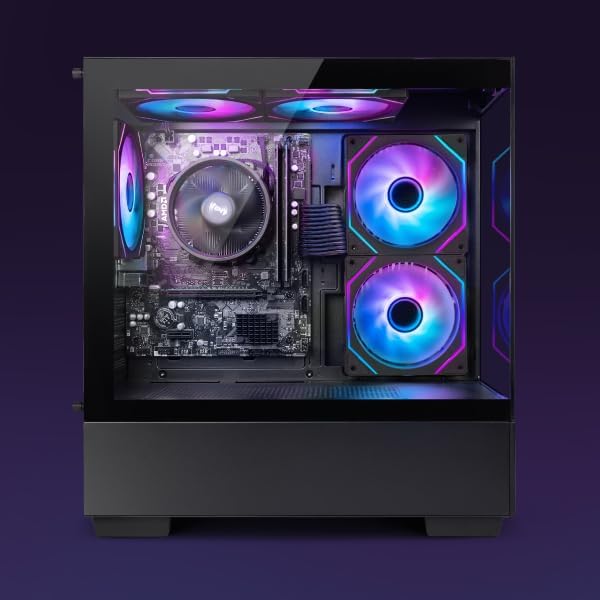
Figure 3.1.1: Internal components of the VIBOX I-45 PC.
3.2 Actualizacións de software
Manteña o sistema operativo e os controladores actualizados para garantir a seguridade, a estabilidade e un rendemento óptimo.
- Actualizacións de Windows: Windows 11 automatically checks for updates. You can manually check by going to Settings > Windows Update.
- Actualizacións de controladores: Regularly check the VIBOX support website or component manufacturers' websites (AMD for CPU/GPU) for the latest drivers.
3.3 Copia de seguridade do sistema
Fai copias de seguridade dos teus datos importantes con regularidade nun disco duro externo ou nun almacenamento na nube para evitar a perda de datos.
4 Solución de problemas
This section addresses common issues you might encounter. For more complex problems, please contact VIBOX support.
4.1 Sen enerxía
- Asegúrate de que o cable de alimentación estea conectado correctamente tanto ao PC como á toma de corrente.
- Verifica que a toma de corrente funcione conectando outro dispositivo.
- Check the power supply switch on the rear of the PC (if present) is in the 'On' position.
4.2 Sen visualización no monitor
- Confirm the monitor is powered on and correctly connected to the PC's graphics output port.
- Asegúrate de que estea seleccionada a fonte de entrada correcta no monitor.
- Try a different display cable if available.
4.3 Rendemento lento
- Pecha as aplicacións innecesarias que se executan en segundo plano.
- Comprobe e instale calquera actualización pendente de Windows ou de controladores.
- Run a disk cleanup and defragmentation (for HDD, not typically needed for SSD).
- Analizar en busca de software malicioso ou virus.
4.4 Problemas de conectividade de rede
- Wi-Fi: Ensure the Wi-Fi adapter is properly installed and drivers are up to date. Check your router and internet connection.
- Ethernet: Verify the Ethernet cable is securely connected to both the PC and the router/modem. Check router status.
- Restart your router/modem and PC.
5. Especificacións
| Característica | Especificación |
|---|---|
| Marca | VIBOX |
| Número de modelo | I-45 |
| Cor | VTX-4 Black |
| Sistema Operativo | Windows 11 Home |
| Procesador | AMD Ryzen 3 3200G (4 Cores, 3.6 GHz Base, up to 4.0 GHz Max) |
| Gráficos | Integrated Radeon Vega 8 Graphics (2GB Shared Memory) |
| RAM | 16 GB DDR4 (3200 MHz Dual Channel) |
| Almacenamento | SSD de 480 GB |
| Max Memory Support | 128 GB |
| Wi-Fi | 802.11n (300 Mbps adapter included) |
| Portos HDMI | 1 |
| Portos USB 2.0 | 3 |
| Portos USB 3.0 | 3 |
| Dimensións (L x W x H) | 36 x 20 x 41 cm |
| Dispositivos compatibles | Headset, Keyboard, Printer, Monitor, Mouse |
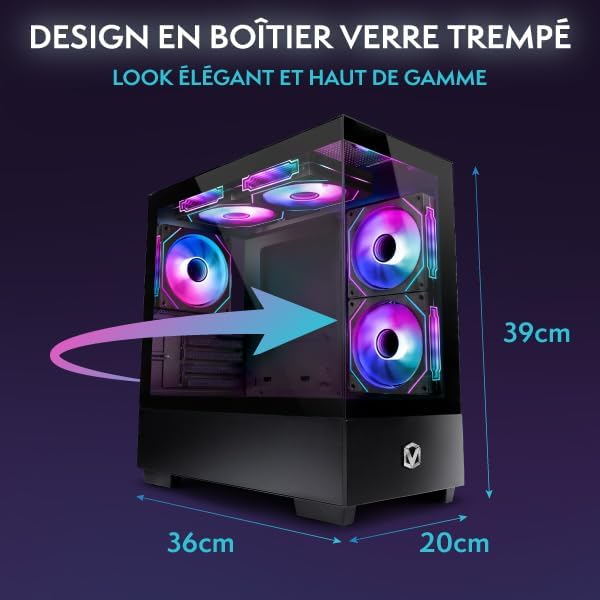
Figure 5.1.1: VIBOX I-45 PC Dimensions.
6. Información da garantía
Your VIBOX I-45 Gaming PC comes with a manufacturer's warranty covering:
- Partes: 2 Anos
- Laboral: De por vida
Please retain your proof of purchase for warranty claims. For detailed terms and conditions, refer to the warranty card included with your product or visit the official VIBOX websitio.
7. Apoio
For technical assistance, troubleshooting beyond this manual, or warranty inquiries, please contact VIBOX customer support. You can find contact information on the official VIBOX Gaming websitio web ou a través do seu vendedor.
Recursos en liña:
- Visita o VIBOX Gaming Store on Amazon para obter información e actualizacións do produto.


