1. Introdución
The LTC Nimbleback NB831 is a versatile 75% mechanical keyboard designed for various computing environments. It offers multiple connectivity options, customizable features, and a compact layout. This manual provides detailed instructions for setting up, operating, and maintaining your keyboard.

Imaxe 1.1: Acabadoview of the LTC Nimbleback NB831 Mechanical Keyboard.
2. Contido do paquete
Verifica que todos os elementos estean presentes no teu paquete:
- Teclado mecánico LTC Nimbleback NB831
- Tirador de chaves
- Cable USB (USB-A a USB-C)
- Manual de Usuario Tarxeta
- Replacement Switches (4 pieces)

Image 2.1: Contents included in the LTC Nimbleback NB831 package, featuring the keyboard, USB cable, keycap/switch puller, and extra switches.
3. Configuración
3.1 Modos de conectividade
The NB831 supports three connection modes:
- Sen fíos de 2.4 GHz: Use the included USB dongle for a stable wireless connection.
- Bluetooth 5.0: Pair with up to three Bluetooth-enabled devices.
- USB-C con cable: Connect directly via the USB-C cable for a wired connection and simultaneous charging.

Image 3.1: Visual representation of the three connectivity modes: 2.4GHz wireless, Bluetooth 5.0, and USB-C wired.
3.2 Compatibilidade do sistema operativo
The NB831 keyboard is compatible with Windows (Win7, Win8, Win10, Win11), iOS, and macOS operating systems. Use the following key combinations to switch between modes:
- Modo Windows: Preme Fn + A
- Modo macOS: Preme Fn + S

Image 3.2: Illustration of switching between Windows and macOS modes using Fn key combinations.
3.3 Axustes físicos
The keyboard features 2-level adjustable feet for ergonomic typing angles. The USB dongle can be stored in a dedicated magnetic socket on the underside of the keyboard when not in use. The USB-C cable can be routed through three different channels (left, center, right) for neat cable management.

Image 3.3: Details of the keyboard's underside, showing 2-level feet, 3-side cable routing, and the magnetic dongle socket.
4. Instrucións de funcionamento
4.1 Botón de control de volume
The integrated volume knob allows for quick audio adjustments:
- Xirar no sentido das agullas do reloxo: Aumentar o volume.
- Xirar en sentido antihorario: Diminuír o volume.
- Prensa: Silenciar/Activar son.
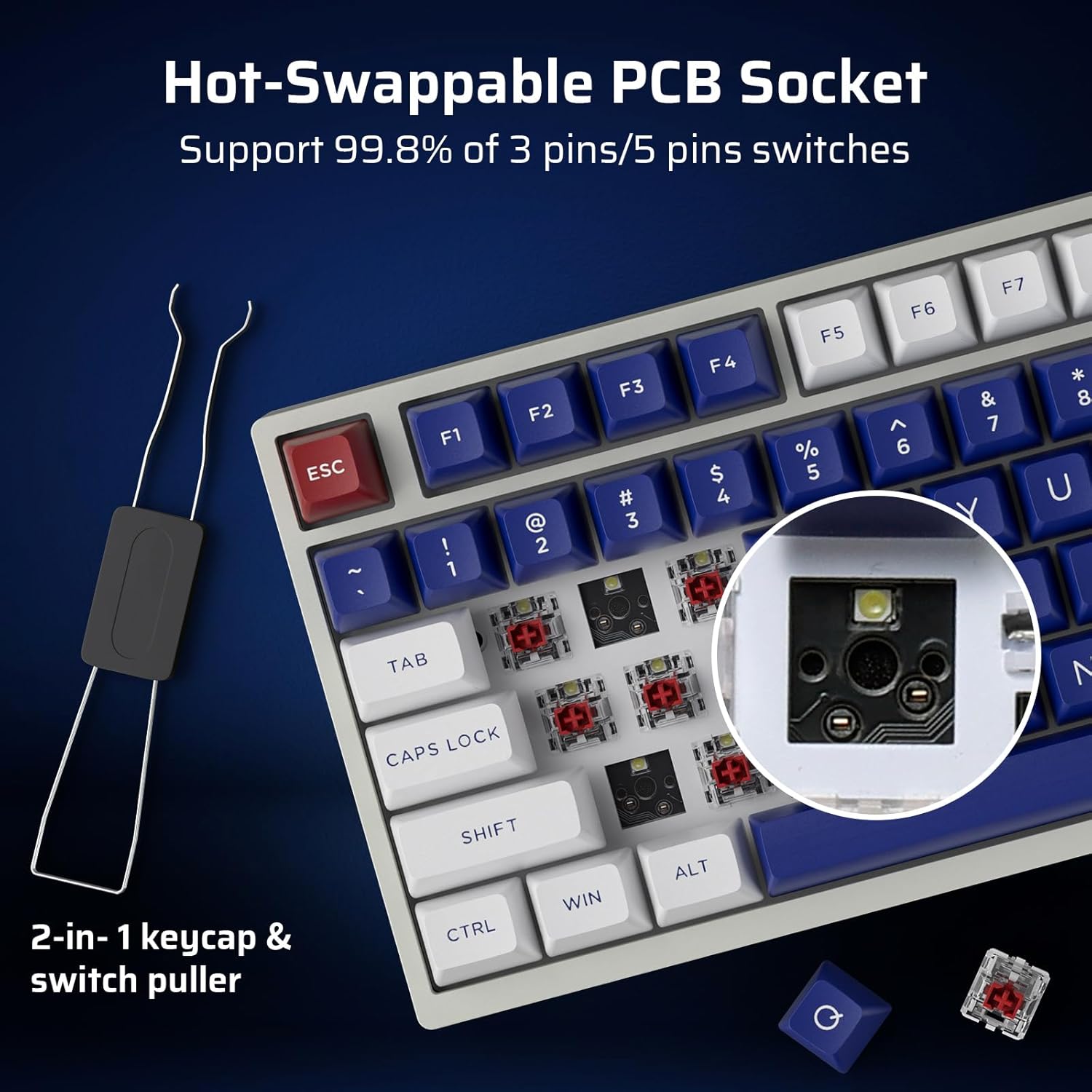
Image 4.1: Demonstrates the functionality of the convenient volume knob for adjusting audio levels and muting.
4.2 Retroiluminación RGB
The keyboard features 18 dynamic RGB lighting modes. Control them using the following key combinations:
- Cambiar os modos de retroiluminación: Preme Fn + ↑ (Frecha cara arriba)
- Cambiar as cores da retroiluminación: Preme Fn + ↓ (Frecha cara abaixo)
- Velocidade de luz de fondo +: Preme Fn + → (Right Arrow)
- Velocidade da luz de fondo: Preme Fn + ← (Left Arrow)
- Retroiluminación activada/desactivada: Preme Fn + \
- Restore Factory Mode: Presión longa Fn + espazo
4.3 Interruptores intercambiables en quente
The NB831 features a hot-swappable PCB, allowing you to change mechanical switches without soldering. It supports both 3-pin and 5-pin MX-style switches (e.g., Gateron, Kailh). Use the included 2-in-1 keycap and switch puller for easy removal and installation.

Imaxe 4.2: Primeiro plano view of the hot-swappable PCB socket, demonstrating compatibility with different switch types.
Soporte de software profesional 4.4
Utilize the dedicated LTC software to customize your keyboard experience. The software allows you to:
- Remapear combinacións de teclas.
- Asignar macros para comandos complexos.
- Personaliza os efectos de iluminación e as cores RGB.

Image 4.3: Screenshot of the LTC Pro Software interface, showing options for key remapping, macro assignment, and RGB customization.
Vídeo 4.1: Unha análise detalladaview of the LTC Nimbleback NB831 keyboard, including a demonstration of its software features and customization options.
5. Mantemento
5.1 Limpeza
To maintain optimal performance and appearance, regularly clean your keyboard. Use a soft, dry cloth to wipe the surface. For deeper cleaning, remove keycaps using the provided keycap puller and use compressed air to clear debris from between switches. The PBT keycaps are oil-resistant, making them easier to clean.
5.2 Substitución do interruptor e da tapa das teclas
Leverage the hot-swappable design to replace switches or keycaps. Use the included 2-in-1 tool to carefully remove keycaps first, then switches. Ensure new switches are aligned correctly before pressing them into the PCB to avoid bending pins.
5.3 Sound Dampening
The keyboard is designed with dual layers of sound-damping foam to minimize hollow sounds and reduce noise, contributing to a satisfying typing experience.

Image 5.1: Diagram illustrating the two-layer silencing foam structure within the keyboard, designed to reduce hollow sounds and noise.
6 Solución de problemas
- O teclado non responde: Ensure the keyboard is charged and properly connected (wired, 2.4GHz dongle, or Bluetooth paired). Try switching between connectivity modes.
- Problemas de emparellamento por Bluetooth: Ensure the keyboard is in Bluetooth mode and discoverable. Remove previous pairings on your device and try re-pairing.
- A iluminación RGB non funciona: Comprobe se a retroiluminación está activada usando Fn + \. If issues persist, try restoring factory settings with Fn + espazo (prema longa).
- O software non detecta o teclado: Ensure the keyboard is connected via USB-C wired mode when using the software. Check for software updates.
- Problemas coa duración da batería: Check the battery level by pressing Fn + Retroceso. Ensure the keyboard is fully charged.
7. Especificacións
| Característica | Detalle |
|---|---|
| Dimensións do produto | 12.64 x 5.24 x 1.65 polgadas |
| Peso do elemento | 2.57 libras |
| Fabricante | LTC |
| Número de modelo do artigo | NB831 |
| Baterías | 2 pilas de iones de litio necesarias (incluídas) |
| Tecnoloxía de conectividade | Bluetooth, RF (2.4GHz), USB-C |
| Descrición do teclado | Mechanical, 75% Layout (81-Keys) |
| Característica especial | Programmable Keys, Rechargeable, Volume Roller, Hot-Swappable |
| Retroiluminación del teclado | RGB |
7.1 Información da batería
The keyboard is equipped with a 4000mAh battery, providing up to 12 hours of continuous use with RGB backlight and up to 80 hours without. To check the battery level, press Fn + Retroceso.

Image 7.1: Visual guide for checking the battery level using the Fn + Backspace key combination.
8. Garantía e soporte
For warranty information, technical support, or customer service inquiries, please refer to the official LTC websitio web ou póñase en contacto co seu vendedor. Garde o recibo da compra para reclamacións de garantía.


