1. Introdución
This manual provides detailed instructions for the setup, operation, and maintenance of your HUNSN RJ47 Micro Firewall Appliance. The RJ47 is a compact, fanless mini PC designed for network security applications, supporting various open-source firewall solutions like OPNsense and pfSense, as well as Linux distributions and Windows operating systems.
Equipped with an Intel 12th Gen Alder Lake-N N200 processor and multiple 2.5GbE network interfaces, this appliance offers robust performance for network routing and security tasks.
2. Características do produto
- Procesador: Intel 12th Gen Alder Lake-N N200 with AES-NI support.
- Memoria: 1 x SO-DIMM DDR5 4800 MT/s slot, supporting up to 32GB RAM.
- Almacenamento: 2 x M.2 2280 NVMe x1 SSD slots and 1 x 2.5-inch SATA SSD/HDD bay.
- Interfaces de rede: 6 x Intel 2.5GbE I226-V LAN ports.
- Saída de vídeo: 2 x HDMI 2.1 ports and 1 x Type-C port for display.
- Portos USB: 1 x USB 3.2, 4 x USB 2.0, and 1 x Type-C (data/display).
- Additional I/O: TF slot for data storage/system boot, Power ON/OFF button, RST button, DC_IN.
- Refrixeración: Fanless design for silent operation.
- Compatibilidade do sistema: Supports 5.10.x and above core-based FreeBSD router systems, Linux distributions, and Windows OS. UEFI support only.
- Xestión de enerxía: Supports hardware auto power-on (enabled by default), network wake-up, and system power management.
3. Guía de configuración
3.1 Contido do paquete
Antes de continuar, asegúrate de que todos os elementos estean presentes no paquete:
- HUNSN RJ47 Firewall Appliance
- Fonte de alimentación (12V3A)
- Cable de alimentación
- Tarxeta de garantía
3.2 Hardware completadoview

Figura 1: Panel frontalview
This image displays the front panel of the HUNSN RJ47, featuring the power button, USB 3.2 port, TF card slot, Type-C port, two HDMI 2.1 ports, RST button, and four USB 2.0 ports.
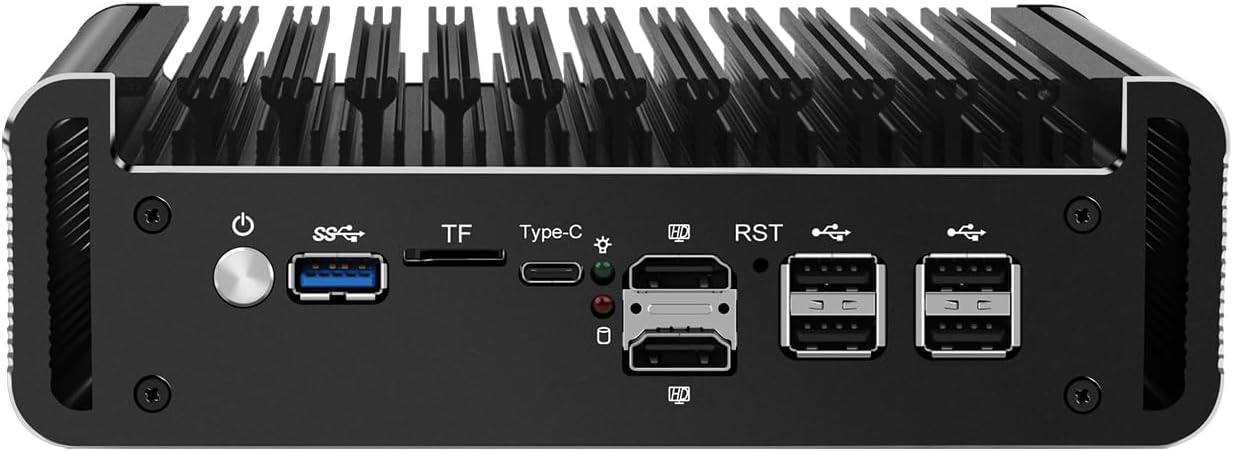
Figura 2: Panel traseiroview
This image illustrates the rear panel of the HUNSN RJ47, showing the DC 12V power input and six 2.5 Gigabit Ethernet (LAN) ports labeled ETH0 to ETH5.
3.3 Conexión inicial
- Conectar a pantalla: Connect a monitor to one of the HDMI 2.1 ports or the Type-C port using an appropriate cable.
- Conectar periféricos: Conecta un teclado e un rato USB aos portos USB dispoñibles.
- Conectar rede: Connect your network cables to the 2.5GbE LAN ports as required for your network configuration.
- Conectar enerxía: Connect the power supply to the DC_IN port on the appliance and then plug the power cord into an electrical outlet.
- Encendido: Press the power button on the front panel to turn on the appliance.
3.4 Instalación do sistema operativo
The HUNSN RJ47 supports various operating systems, including FreeBSD-based router systems (e.g., OPNsense, pfSense), Linux distributions, and Windows OS. It supports UEFI boot only.
- Prepare a bootable USB drive with your chosen operating system.
- Insert the bootable USB drive into a USB port on the appliance.
- Power on the appliance and access the BIOS/UEFI settings (usually by pressing DEL or F2 during startup) to set the boot order or select the USB drive as the boot device.
- Siga as instrucións en pantalla para instalar o sistema operativo.
4. Instrucións de funcionamento
4.1 Encendido/apagado
- Encendido: Press the power button on the front panel. The system will automatically power on if configured in BIOS.
- Apagado normal: Initiate a shutdown through your installed operating system.
- Forzar o apagado: Press and hold the power button for approximately 5 seconds. Use this only when a normal shutdown is not possible.
4.2 Configuración de rede
The RJ47 features six 2.5GbE LAN ports. After installing your operating system, configure the network interfaces according to your specific network topology and firewall requirements. Refer to the documentation of your chosen operating system (e.g., OPNsense, pfSense) for detailed network setup instructions.
4.3 Configuración da BIOS/UEFI
To access the BIOS/UEFI settings, power on the appliance and repeatedly press the DEL or F2 key. Here you can configure boot options, enable/disable features, and manage power settings such as "Auto Power On" and "Network Wake-up".
5. Mantemento
5.1 Limpeza
Due to its fanless design, the RJ47 requires minimal cleaning. Periodically wipe the exterior with a soft, dry cloth to remove dust. Ensure the ventilation fins are clear of obstructions to maintain optimal passive cooling.
- Non empregue produtos de limpeza líquidos nin aerosois directamente sobre o dispositivo.
- Asegúrese de que o dispositivo estea apagado e desenchufado antes de limpalo.
5.2 Condicións ambientais
To ensure longevity and stable operation, operate the appliance within the specified environmental conditions:
- Temperatura de funcionamento: -10°C a 70°C
- Temperatura de almacenamento: 0°C a 70°C
- Humidade relativa: 5% a 85% (sen condensación)
6 Solución de problemas
- Sen enerxía:
- Ensure the power adapter is securely connected to the appliance and the electrical outlet.
- Verifique que a toma de corrente funcione.
- Comprobe se o botón de acendido está premido correctamente.
- Sen saída de visualización:
- Confirm the monitor is powered on and connected to the correct HDMI or Type-C port.
- Proba cun cable de pantalla ou monitor diferente.
- Asegúrate de que estea seleccionada a fonte de entrada correcta no monitor.
- Problemas de conectividade de rede:
- Check all Ethernet cable connections to the LAN ports.
- Verify network settings within your installed operating system.
- Ensure your router/switch is functioning correctly.
- Operating System Installation Failure:
- Confirm your bootable USB drive is created correctly and is recognized in BIOS/UEFI.
- Remember that the appliance supports UEFI boot only. Ensure your OS installer is configured for UEFI.
- Check the integrity of your OS image.
7. Especificacións técnicas
| Característica | Especificación |
|---|---|
| Número de modelo | RJ47 |
| CPU | Intel Processor N200 (12th Gen Alder Lake-N), 6M Cache, up to 3.70 GHz |
| AES-NI Support | Si |
| Memoria | 1 x SO-DIMM DDR5 4800 MT/s, up to 32GB |
| Almacenamento | 2 x M.2 2280 NVMe x1 SSD, 1 x 2.5 Inch SATA SSD/HDD |
| Tarxeta de rede | 6 x Intel 2.5GbE I226-V |
| Interface de E/S | Power ON/OFF, USB 3.2, TF slot, Type-C (display/data), 2 x HDMI 2.1, RST, 4 x USB 2.0, DC_IN, 6 x LAN |
| Expansión | Built-in reserved TPM header, 1 x COM pin, 1 x GPIO pin |
| Entrada de enerxía | DC 100-240V AC/50-60Hz, 12V3A |
| Temperatura de funcionamento | -10°C a 70°C |
| Temperatura de almacenamento | 0°C a 70°C |
| Humidade relativa | 5% ~ 85% sen condensación |
| TDP | 6W |
| Sistema de refrixeración | Sen ventilador |
| Dimensións | 178.3 x 126.5 x 55 mm |
| Peso | 1.3 kgs (Appliance), 2 kg (Shipping Weight) |
| Compatibilidade do sistema | FreeBSD router systems (5.10.x+), Linux distros, Windows OS (UEFI support only) |
| Baterías | 1 batería CR2032 (incluída) |
8. Información da garantía
The HUNSN RJ47 Firewall Appliance includes a warranty card in its packaging. Please refer to this card for specific details regarding warranty coverage, terms, and conditions. Retain your proof of purchase for warranty claims.
9. Apoio
For technical assistance, product inquiries, or support, please contact HUNSN directly.
- Fabricante: Shenzhen Shi Han Song Ke Ji You Xian Gong Si
- Teléfono: (86) 13613019665
- Fax: (86) 0755-23057094
- Tenda en liña: Visita o oficial HUNSN Store on Amazon para máis produtos e información.

