1. Introdución
The Pronomic DX-50 USB MKII is a professional 4-channel DJ mixer designed for a wide range of applications, including discos, parties, restaurants, and presentations. Its user-friendly design ensures that both experienced and less experienced users can fully utilize its features. This manual provides detailed instructions for setting up, operating, and maintaining your mixer.
Key features include a recording function, integrated Bluetooth interface, USB player with transport controls, and multiple input channels.
2. Instrucións de seguridade importantes
- Ler as instrucións: Read all safety and operating instructions before using the product.
- Instrucións para conservar: Conserve as instrucións de seguridade e funcionamento para futuras consultas.
- Atención ás advertencias: Cumpre todas as advertencias do produto e das instrucións de funcionamento.
- Siga as instrucións: Siga todas as instrucións de funcionamento e uso.
- Auga e humidade: Do not use this apparatus near water (e.g., bathtub, washbowl, kitchen sink, laundry tub, wet basement, or swimming pool).
- Ventilación: Non bloquee ningunha abertura de ventilación. Instáleo segundo as instrucións do fabricante.
- Calor: Non instale preto de fontes de calor como radiadores, rexistros de calor, cociñas ou outros aparellos (incluíndo amplificadores) que producen calor.
- Fontes de enerxía: Use only power sources specified by the manufacturer.
- Protección do cable de alimentación: Protexa o cable de alimentación para evitar que se pise ou se pinche, especialmente nos enchufes, tomas de corrente e no punto de saída do aparello.
- Limpeza: Limpar só cun pano seco.
- Servizo: Non intente reparar este produto por si mesmo xa que abrir ou quitar as tapas pode exporse a perigosos volúmenestage ou outros perigos. Encargue toda a reparación a persoal de servizo cualificado.
3. Contido do paquete
Please check that all items listed below are included in your package. If any items are missing or damaged, contact your dealer immediately.
- Pronomic DX-50 USB MKII DJ Mixer
- Power Adapter (AC 12V)
- USB Stick (32 GB, if included in your specific bundle)
- Manual de usuario (este documento)
4. Produto rematadoview
Familiarize yourself with the various controls and connections on your DX-50 USB MKII mixer.
4.1 Controis do panel frontal
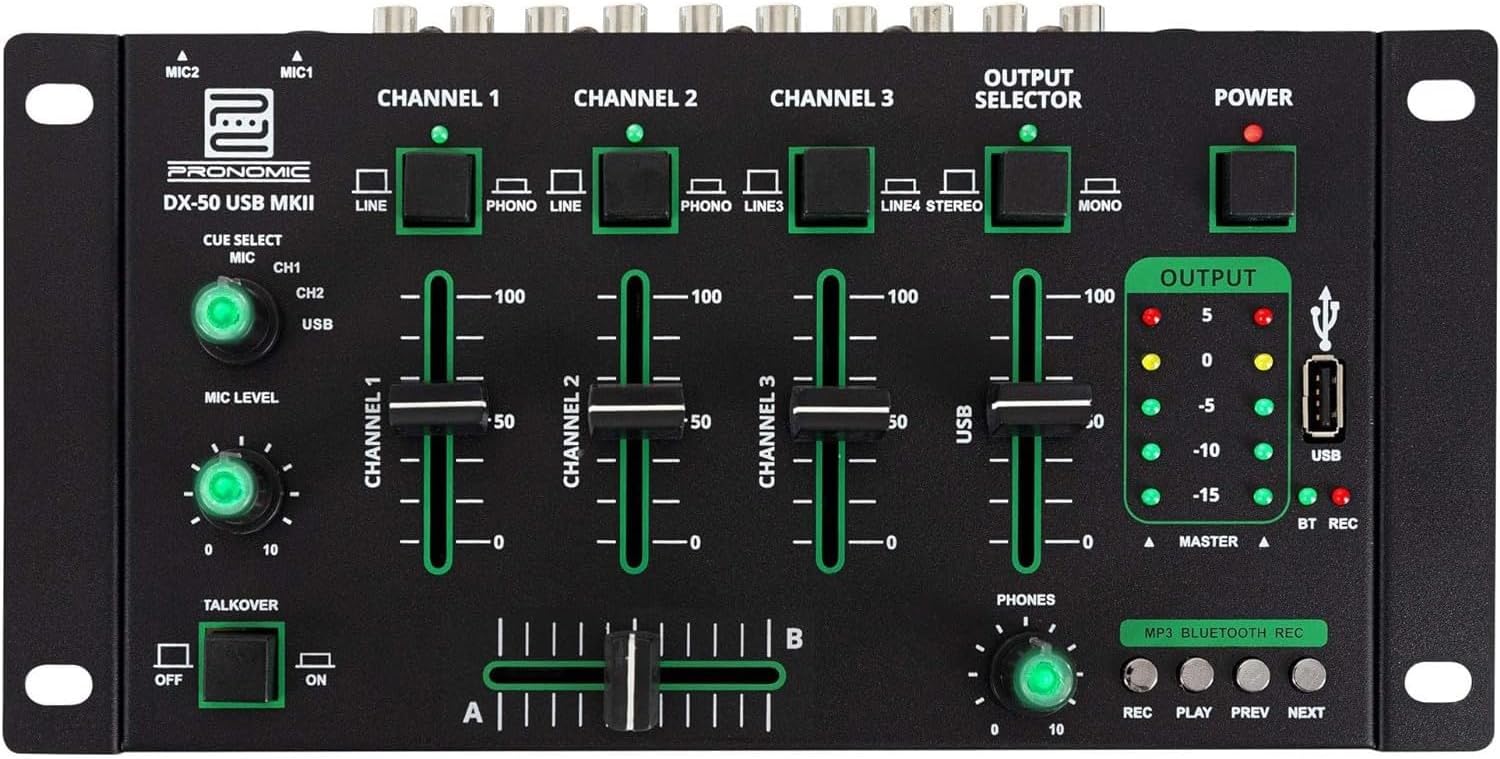
- MIC 1/2 Inputs: Conectar micrófonos.
- Channel 1-4 Input Selectors: Switch between LINE, PHONO, or USB/Bluetooth inputs for each channel.
- Faders de canles: Adjust the volume level for each channel.
- CUE Select Buttons: Route specific channels to the headphone output for monitoring.
- Botón de nivel do micrófono: Adjust the volume of the microphone inputs.
- Talkover Switch: Activates the talkover function, which automatically lowers music volume when speaking into the microphone.
- Output Selector: Choose between Stereo or Mono master output.
- Interruptor de alimentación: Turns the mixer on/off.
- Medidores de nivel de saída: LED indicators showing the master output level.
- Porto USB: Connect a USB drive for MP3 playback and recording.
- MP3/Bluetooth/REC Player Controls: Buttons for Play/Pause, Previous, Next, and Record functions for the integrated player.
- Phones Level Knob: Axusta o volume da saída dos auriculares.
- Atenuador cruzado (A/B): Blends between channels assigned to A and B.
4.2 Conexións do panel traseiro

- Entrada de alimentación de CA de 12 V: Conecte aquí o adaptador de corrente fornecido.
- Saída de auriculares: Conector de 6.3 mm para conectar auriculares.
- MASTER OUT L/R (RCA): Connect to your main amplifier ou altofalantes alimentados.
- Channel 1 & 2 Inputs (RCA Line/Phono): Connect turntables (Phono) or other line-level devices (CD players, media players). Use the front panel selector to switch.
- Channel 3 & 4 Inputs (RCA Line): Connect line-level devices.
- MIC 1 & 2 Inputs (6.3mm Jack): Conectar micrófonos.
5. Configuración
Follow these steps to set up your Pronomic DX-50 USB MKII mixer:
- Conexión de alimentación: Ensure the mixer's power switch is in the OFF position. Connect the supplied AC 12V power adapter to the "AC 12V" input on the rear panel of the mixer. Plug the adapter into a suitable power outlet.
- Master Output Connection: Connect the "MASTER OUT L/R" RCA outputs on the rear panel to the inputs of your amplifier ou altofalantes alimentados.
- Conexión do dispositivo de entrada:
- Tocadiscos: Connect turntables to the "CHANNEL 1" or "CHANNEL 2" RCA inputs. Set the corresponding input selector on the front panel to "PHONO".
- CD Players/Line Devices: Connect CD players, media players, or other line-level devices to "CHANNEL 1", "CHANNEL 2", "CHANNEL 3", or "CHANNEL 4" RCA inputs. Set the corresponding input selector on the front panel to "LINE".
- Micrófonos: Connect microphones to the "MIC 1" or "MIC 2" 6.3mm jack inputs on the rear panel.
- Conexión de auriculares: Connect your headphones to the "PHONES" 6.3mm jack on the rear panel.
- USB Drive (Optional): If using a USB drive for playback or recording, insert it into the "USB" port on the front panel.
- Encendido: Once all connections are made, switch the mixer's power switch to the ON position. The power indicator LED will illuminate.
6. Instrucións de funcionamento
6.1 Basic Mixing
- Seleccione entrada: For each channel, use the input selector switch (LINE/PHONO/USB/BT) to choose the desired audio source.
- Adjust Channel Volume: Use the vertical faders for each channel to adjust its individual volume level.
- Saída principal: Monitor the "OUTPUT" LED meters and adjust the master volume knob (if present, otherwise rely on channel faders and amplifier volume) to achieve a suitable overall output level without clipping.
- Crossfader: Use the crossfader to smoothly transition between channels assigned to A and B. Channels 1 and 2 are typically assigned to the crossfader.
6.2 Uso do micrófono
- Connect your microphone to one of the MIC inputs on the rear panel.
- Adjust the "MIC LEVEL" knob on the front panel to control the microphone's volume.
- Talkover Function: Activate the "TALKOVER" switch to automatically reduce the volume of the music when you speak into the microphone. This is useful for announcements.
6.3 Reprodución e gravación por USB
- Reprodución USB: Insira unha unidade USB que conteña MP3 files into the "USB" port. Select "USB" as the input source for the dedicated USB channel. Use the "PLAY/PAUSE", "PREV", and "NEXT" buttons to control playback.
- Gravación USB: Press the "REC" button to start recording the master output to the connected USB drive. Press "REC" again to stop recording. Ensure your USB drive has sufficient free space and is formatted correctly (FAT32 is commonly supported).
6.4 Conectividade Bluetooth
- Activar Bluetooth: Select "BT" as the input source for the dedicated Bluetooth channel. The mixer will enter pairing mode.
- Parear dispositivo: On your Bluetooth-enabled device (smartphone, tablet, etc.), search for available Bluetooth devices. Select "Pronomic DX-50 USB MKII" (or similar name) from the list to pair.
- Reproducir audio: Once paired, you can play audio from your device through the mixer. Control playback from your device or using the mixer's transport controls (if supported by your device).
6.5 Monitorización con auriculares
- Connect headphones to the "PHONES" output.
- Use the "CUE SELECT" buttons to choose which channels you want to monitor in your headphones without affecting the main output.
- Adjust the "PHONES" level knob to set your desired headphone volume.
7. Mantemento
- Limpeza: Disconnect the power before cleaning. Use a soft, dry cloth to wipe the surface of the mixer. Do not use liquid cleaners, aerosols, or solvents.
- Almacenamento: Garda a batedora nun lugar fresco e seco, lonxe da luz solar directa e de temperaturas extremas.
- Fader and Knob Care: Avoid excessive force when operating faders and knobs. Periodically check for dust or debris accumulation around moving parts.
- Xestión de cables Ensure cables are not kinked or strained, which can lead to damage.
8 Solución de problemas
| Problema | Causa posible | Solución |
|---|---|---|
| Sen poder | Power adapter not connected; Power switch off; Faulty power outlet. | Check power adapter connection; Ensure power switch is ON; Try a different power outlet. |
| No sound from main output | Master volume too low; Amplifier/speakers off or disconnected; Incorrect input selection; Channel faders down. | Increase master volume; Check amplifier/speaker connections and power; Verify correct input selected for channels; Raise channel faders. |
| Non hai son dos auriculares | Headphone volume too low; Headphones not connected; No CUE selected. | Increase PHONES level; Connect headphones properly; Press CUE button for desired channel. |
| Bluetooth non se sincroniza | Mixer not in pairing mode; Device too far; Interference. | Ensure BT input is selected; Bring device closer; Restart mixer and device. |
| A reprodución USB non funciona | USB drive not inserted correctly; Incorrect file format; USB drive not formatted correctly. | Re-insert USB drive; Ensure files are MP3; Format USB drive to FAT32. |
9. Especificacións
| Modelo | Pronomic DX-50 USB MKII |
| Número de canles | 4 |
| Tecnoloxía de conectividade | Bluetooth, USB |
| Entrada de audio | RCA (line/phono), 6.3mm microphone, Bluetooth, USB |
| Tipo de conector de saída | RCA (Master Out), 6.3mm (Phones) |
| Fonte de enerxía | Electric Cable (AC 12V adapter) |
| Dimensions (without corner brackets and controls) | 222 x 129 x 28 mm (ancho x fondo x alto) |
| Total Dimensions (with corner brackets and controls) | 267 x 136 x 51 mm (ancho x fondo x alto) |
| Peso | 790 g |
10. Garantía e soporte
Para obter información sobre a garantía e asistencia técnica, consulte a documentación incluída coa súa compra ou póñase en contacto co seu vendedor. Garde o comprobante de compra para calquera reclamación de garantía.
For further assistance, you may also visit the official Pronomic websitio ou póñase en contacto co seu departamento de atención ao cliente.


