1. Produto rematadoview
The Motorola Solutions T802 Talkabout FRS Two-Way Radios are designed for reliable communication in various outdoor and off-grid environments. These radios offer advanced features including Bluetooth connectivity for app integration, NOAA weather alerts, and a durable, weather-resistant design. They are ideal for staying connected with travel companions when cell service is unavailable.

Imaxe: Fronte view of two Motorola T802 radios, highlighting their compact design and digital display.
2. Contido do paquete
Your Motorola Solutions T802 package includes the following items:
- 2 Radios
- 2 USB-C to USB-A cables
- 2 Battery Packs (rechargeable)
- 2 clips para cinto
- 16 adhesivos de personalización
3. Características clave
- 22 canles e 121 códigos de privacidade: Offers 2,662 combinations for finding available channels.
- Conectividade Bluetooth: Connects to the TALKABOUT app and compatible audio accessories.
- Weather Proof (IP54): Designed to withstand splashes and light rain.
- Potencia dual: Operates with rechargeable NiMH battery packs (included) or 3 AA alkaline batteries (not included).
- NOAA Weather Radio & Alerts: Provides real-time weather updates and alerts.
- Off-Grid Group Messaging/Broadcast: Utilize the TALKABOUT app for communication without cell service.
- Lanterna integrada: Built-in LED flashlight for convenience in low-light conditions.
- Alerta de chamada: Notifies you of incoming transmissions.
- Alerta de vibración: Provides discreet notification of incoming calls.
4. Iniciación
4.1 Instalación e carga da batería
- Asegúrate de que a radio estea apagada.
- Abra a tapa do compartimento das baterías na parte traseira da radio.
- Insert the provided rechargeable NiMH battery pack, ensuring correct polarity. Alternatively, insert 3 AA alkaline batteries.
- Pecha a tapa do compartimento da batería de forma segura.
- To charge, connect one of the provided USB-C to USB-A cables to the USB-C port on the radio and the other end to a compatible USB power source. Both radios can be charged simultaneously using the two cables.
4.2 Acendido/Apagado
Rotate the On/Off/Volume knob clockwise to power on the radio. Rotate it counter-clockwise until a 'click' is heard to power off.
4.3 Fixación da pinza do cinto
Align the belt clip with the slots on the back of the radio and slide it down until it clicks into place. To remove, lift the tab on the belt clip and slide it upwards.
5. Funcionamento básico
5.1 Selección de canles e códigos de privacidade
Use the Up/Down buttons to select one of the 22 available channels. To set a privacy code, enter the menu and navigate to the privacy code setting, then use the Up/Down buttons to select one of the 121 codes. Ensure all radios in your group are on the same channel and privacy code for communication.
5.2 Premer para falar (PTT)
Press and hold the large PTT button on the side of the radio to transmit your voice. Release the button to listen for incoming transmissions.
5.3 Alerta de chamada
Press the Call button to send an audible alert tone to other radios on the same channel and privacy code.
Lanterna integrada de 5.4 polgadas

Image: The integrated flashlight on top of the Motorola T802 radio.
To activate the integrated flashlight, press the dedicated flashlight button (refer to your radio's button layout for exact location). Press again to turn off.
6. Funcións avanzadas
6.1 NOAA Weather Radio & Alerts
The T802 radios include NOAA Weather Radio and Alert functionality. This feature allows you to receive real-time weather broadcasts and emergency alerts, keeping you informed of changing conditions, especially useful in remote areas.
6.2 Bluetooth Connectivity & TALKABOUT App

Image: User interacting with the TALKABOUT app on a smartphone, connected to the radio via Bluetooth.
The TALKABOUT T802 radios can connect to your smartphone via Bluetooth. Download the TALKABOUT app to access advanced off-grid features:
- Seguimento da localización: Locate friends' campsites, share your location, and track routes.
- Off-Grid Messaging: Send messages to other app users even without cell service.
- Control de radio: Adjust radio settings directly from the app.
- What3words Addresses: Communicate exact locations to other FRS users without the app.
7. Range Information
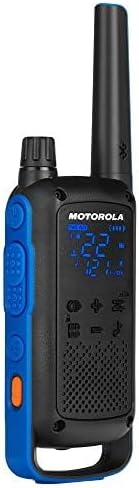
Image: Visual representation of radio range in various environments.
The communication range of the T802 radios is quoted as up to 35 miles. Actual range can vary significantly depending on terrain, weather conditions, electromagnetic interference, and obstructions. Optimal range is achieved in open, unobstructed areas. Typical ranges are:
- De montaña a val: Ata 35 millas
- Open Water: Ata 6 millas
- Neighborhood/Urban: Ata 2 millas
8. Coidados e mantemento
8.1 Limpeza
Limpar a radio cun pano suaveamp pano. Non empregue produtos de limpeza abrasivos nin disolventes. Asegúrese de que todas as tapas dos portos estean ben pechadas antes de limpalas.
8.2 Resistencia á auga
The T802 radios are rated IP54 weather-proof, meaning they are protected against dust and splashing water from any direction. They are not designed to be submerged in water. Always ensure the USB-C port cover and battery compartment are securely sealed to maintain water resistance.
8.3 Coidado coa batería
To maximize battery life, fully charge the NiMH battery packs before initial use and after extended storage. Store batteries in a cool, dry place. If using AA alkaline batteries, replace them when power is low.
9 Solución de problemas
- Sen enerxía: Check if the battery pack is correctly installed and charged. If using AA batteries, ensure they are fresh and correctly inserted.
- Non se pode transmitir/recibir: Verify that both radios are on the same channel and privacy code. Check battery levels. Ensure you are within range.
- Mala calidade de audio: Move closer to the other radio. Check for obstructions. Ensure the volume is adjusted appropriately.
- Problemas de conectividade Bluetooth: Ensure Bluetooth is enabled on both the radio and your smartphone. Try restarting both devices.
10. Especificacións técnicas
- Número de modelo: T802
- Dimensións do produto: 1.28 x 2.2 x 7.52 polgadas
- Peso do artigo: 7.2 onzas
- Número de canles: 22
- Códigos de privacidade: 121
- Rango de frecuencia: 400-470 MHz
- Rango de conversación máximo: 35 Miles (terrain dependent)
- Nivel de resistencia á auga: IP54 resistente á intemperie
- Fonte de enerxía: Rechargeable NiMH Battery Pack (included) or 3 AA batteries (not included)
- Cargando: USB-C
- Características especiais: Call Alert, Integrated Flashlight, Rechargeable, Weather Alert, Bluetooth Connectivity
11. Garantía e soporte
Motorola Solutions typically offers a 2-year warranty on their two-way radios. For detailed warranty information, technical support, or service inquiries, please refer to the official Motorola Solutions websitio web ou póñase en contacto directamente co servizo de atención ao cliente. Garde o comprobante de compra para reclamacións de garantía.


