1. Información de seguridade
Please read this manual carefully before using the LEVENHUK Atom DNB200 Digital Night Vision Binoculars to ensure proper operation and to prevent damage. Keep this manual for future reference.
- Do not attempt to disassemble or repair the device yourself. Refer all servicing to qualified specialists.
- Avoid direct exposure to strong light sources, especially sunlight, as this can damage the internal components.
- Keep the device away from high temperatures, direct sunlight, and high humidity.
- Use only the specified battery type (18650 Li-ion) and charger. Improper use can lead to fire or explosion.
- Manter fóra do alcance dos nenos.
2. Contido do paquete
Verifique que todos os elementos que se indican a continuación estean presentes no seu paquete:
- LEVENHUK Atom DNB200 Digital Night Vision Binoculars
- Maletín de transporte
- Correa para o pescozo
- Cable USB
- Pano de limpeza
- Tarxeta MicroSD (preinstalada ou por separado)
- Manual de usuario

Image 2.1: All items included in the LEVENHUK Atom DNB200 package, including the binoculars, carrying case, neck strap, USB cable, cleaning cloth, and a microSD card.
3. Compoñentes do produto
Familiarize yourself with the main parts and controls of your digital night vision binoculars.

Imaxe 3.1: Arriba view of the binoculars, highlighting the control panel with various buttons.
- Botón de encendido: Acende/apaga o dispositivo.
- Botón de modo (M): Alterna entre os modos Foto, Vídeo e Reprodución.
- IR Illuminator Button (Sun/Light icon): Adjusts the infrared illumination level.
- Botón Aceptar: Confirms selections in the menu or takes a photo/starts video recording.
- Zoom In/Up Button (Magnifying glass with +): Increases digital zoom or navigates up in menus.
- Zoom Out/Down Button (Magnifying glass with -): Decreases digital zoom or navigates down in menus.
- Roda de enfoque: Located on the side, adjusts optical focus for clear viewing.
- Eyepiece/Display: Viewfinder for observing images.
- Lente obxectivo: Front lens for capturing light.
- LED IR: Infrared light emitter for night vision.
- Compartimento de batería: Located at the rear.
- Porto USB-C: Para carga e transferencia de datos.
- Ranura para tarxetas MicroSD: Para a inserción de tarxetas de memoria.

Imaxe 3.2: Fronte view of the binoculars, showcasing the display screen and objective lens.
4. Iniciación
4.1. Instalación da batería
The device uses one 18650 Li-ion rechargeable battery.
- Locate the battery compartment cover on the rear of the binoculars.
- Abre a tapa.
- Insert the 18650 battery according to the polarity markings (+/-) inside the compartment.
- Pecha a tapa do compartimento da batería de forma segura.
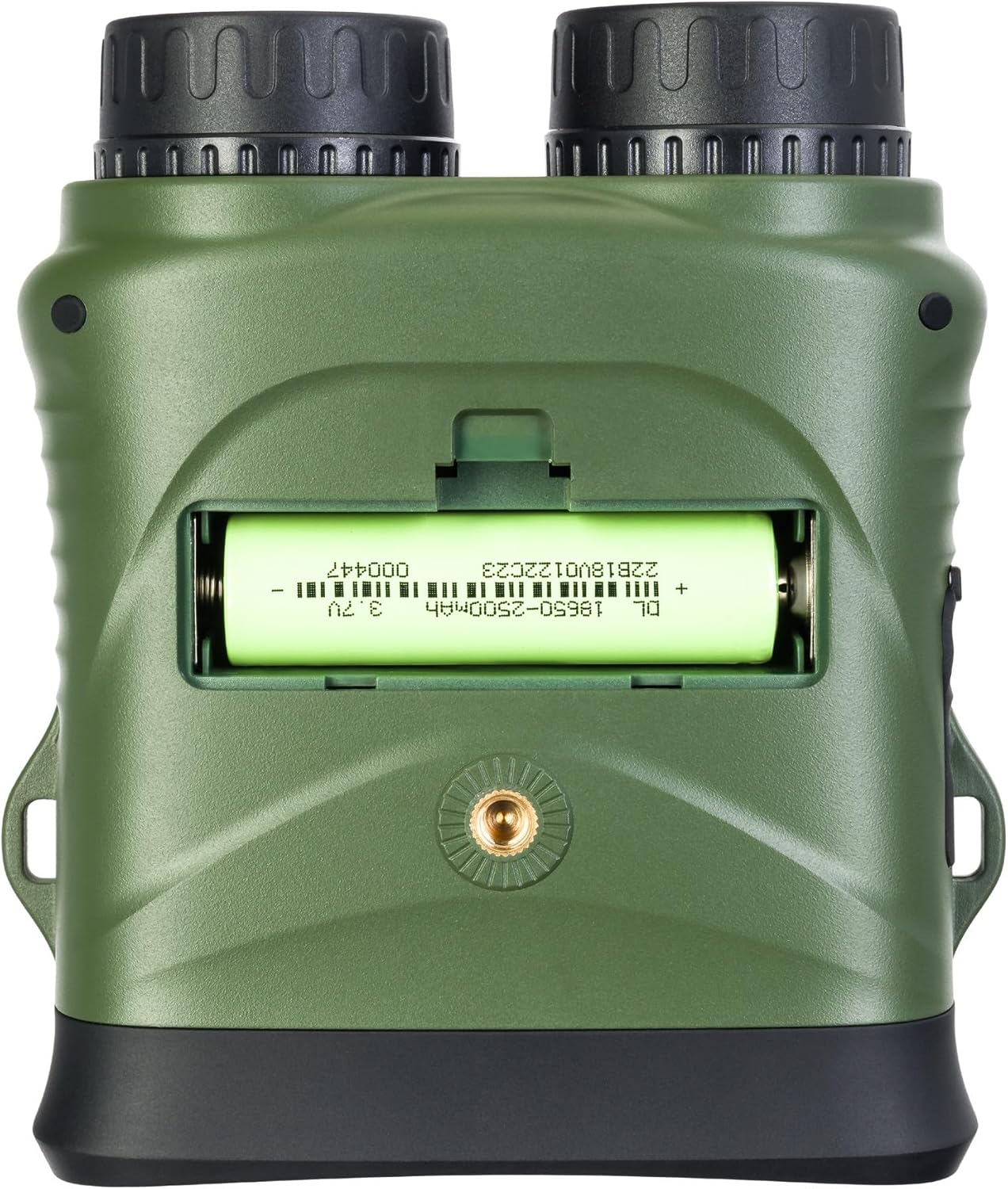
Imaxe 4.1: Traseira view of the binoculars with the battery compartment open, illustrating correct battery insertion.
4.2. Instalación da tarxeta de memoria
A microSD card (up to 32GB, Class 10 recommended) is required to save photos and videos.
- Locate the microSD card slot on the side of the binoculars, usually protected by a rubber flap.
- Gently open the rubber flap.
- Insira a tarxeta microSD cos contactos dourados cara abaixo ata que encaixe no seu lugar.
- Close the rubber flap to protect the port from dust and moisture.

Imaxe 4.2: Lateral view of the binoculars, showing the USB-C port and the microSD card slot under a protective cover.
4.3. Acendido/apagado
- Para acender: Press and hold the Power button (⑁) for a few seconds until the display illuminates.
- Para apagar: Press and hold the Power button (⑁) again until the display turns off.
5. Instrucións de funcionamento
5.1. Axuste do foco
To achieve a clear image, adjust the focus:
- Mira polo ocular.
- Rotate the focus wheel (located on the side of the binoculars) until the image appears sharp.
5.2. Selección de modo
Preme o Modo (M) botón para percorrer os modos dispoñibles:
- Modo foto: Para capturar imaxes fixas.
- Modo de vídeo: For recording video footage.
- Modo de reprodución: Para reviewgravando fotos e vídeos capturados.
5.3. Night Vision and IR Illumination
The device automatically switches to night vision mode in low light conditions. To enhance visibility in complete darkness:
- In Photo or Video mode, press the IR Illuminator button (Sun/Light icon).
- Each press will cycle through different IR illumination levels (e.g., Off, Level 1, Level 2, Level 3). Higher levels provide more illumination but consume more battery.
5.4. Zoom dixital
Usa o Achegar (+) e Afastar (-) buttons to adjust the digital magnification of the image on the display.
5.5. Captura de fotos e vídeos
- Para facer unha foto: In Photo Mode, frame your subject and press the OK botón.
- Para gravar un vídeo: In Video Mode, press the OK button once to start recording. Press it again to stop recording. A recording indicator will appear on the screen.
5.6. Configuración do menú
Para acceder e axustar a configuración do dispositivo:
- Manteña premido o Modo (M) botón para entrar no menú.
- Usa o Achegar (+) e Afastar (-) botóns para navegar polas opcións do menú.
- Preme o OK button to select an option or enter a sub-menu.
- Preme o Modo (M) botón de novo para saír do menú.
Common settings include: Video Resolution, Photo Resolution, Date Stamp, Language, Auto Power Off, Format SD Card.
6. Mantemento
6.1. Limpeza
- Lentes: Use the included cleaning cloth or a soft, lint-free cloth specifically designed for optical surfaces. Breathe lightly on the lens or use a small amount of lens cleaning fluid if necessary.
- Corpo: Wipe the body of the device with a soft, dry cloth. Do not use abrasive cleaners or solvents.
6.2. Almacenamento
- When not in use, store the binoculars in their carrying case in a cool, dry place.
- Retire a batería se non vai usar o dispositivo durante un período prolongado para evitar fugas.
7 Solución de problemas
| Problema | Causa posible | Solución |
|---|---|---|
| O dispositivo non se acende. | A batería está descargada ou inserida incorrectamente. | Cargue a batería ou volva a inserila coa polaridade correcta. |
| A imaxe está borrosa. | Focus is not adjusted. | Rotate the focus wheel until the image is sharp. |
| Non se poden gardar fotos/vídeos. | No microSD card or card is full/corrupted. | Insert a microSD card, delete old files ou formate a tarxeta (isto borrará todos os datos). |
| Mal rendemento da visión nocturna. | IR illuminator is off or set too low. | Increase the IR illumination level using the IR button. |
| Device freezes. | Fallo de software. | Press and hold the Power button for 10 seconds to force a shutdown, then restart. |
8. Especificacións técnicas
| Característica | Especificación |
|---|---|
| Número de modelo | 81702 |
| Dimensións do produto | 3.94 x 1.97 x 0.5 polgadas |
| Peso do elemento | 3.53 onzas |
| Marca | Levenhuk |
| Característica especial | Visión Nocturna |
| Cor | Negro |
| Alivio dos ollos | 5 milímetros |
| Binocular Prism Description | Prisma do tellado |
| Fonte de enerxía | 18650 Li-ion Rechargeable Battery (included) |
| Almacenamento | MicroSD card (up to 32GB, Class 10 recommended) |
9. Garantía e atención ao cliente
LEVENHUK products are covered by a manufacturer's warranty. For detailed warranty terms and conditions, please refer to the warranty card included with your product or visit the official Levenhuk websitio.
If you encounter any issues or have questions regarding your LEVENHUK Atom DNB200 Digital Night Vision Binoculars, please contact our customer support team:
- Websitio: www.levenhuk.com
- Correo electrónico: Consulte website for support contact.
- Teléfono: Consulte website for support contact.
Please have your product model (DNB200) and serial number ready when contacting support.


