1. Introdución
This manual provides detailed instructions for the installation, configuration, and operation of the FLIPSKY FT85BD Dual Electronic Speed Controller (ESC). The FT85BD is designed for various electric vehicle applications, including electric skateboards, scooters, ebikes, electric motorcycles, and robotics. Please read this manual thoroughly before use to ensure proper functionality and safety.
2. Información de seguridade
Operating high-power electronic components requires adherence to safety precautions. Failure to follow these guidelines may result in injury, damage to the ESC, or other components.
- Voltage Límites: Non exceda o vol especificadotage range of 14-84V (4S-20S). Over-voltage can cause irreversible damage to the ESC.
- Cableado adecuado: Ensure all connections are secure and correctly polarized. Incorrect wiring can lead to short circuits and component failure.
- Xestión de calor: The ESC generates heat during operation. Ensure adequate ventilation and consider ambient temperature for optimal performance and longevity.
- Compatibilidade do firmware: Always use the correct firmware version (V1.4 or above) with the Flipsky ESC Tool. Incompatible firmware can lead to incorrect parameters and potential damage.
- Illamento: Insulate all exposed wires and connections to prevent accidental short circuits.
- Instalación profesional: If you are unsure about any installation steps, seek assistance from a qualified professional.
3. Contido do paquete
Verify that all items listed below are included in your package. The USB cable color (black or white) may vary.

Figure 3.1: FLIPSKY FT85BD Dual ESC and Included Accessories. This image displays the FT85BD Dual ESC unit along with various connection cables, including motor phase wires, sensor wires, communication cables (USB, PPM, UART, CAN), and a power switch with an LED button.
- FLIPSKY FT85BD Dual ESC with Aluminum Case
- Power Switch with Green LED Button (16mm diameter)
- Various connection cables (PPM, UART, CAN, ADC, Hall sensor wires)
- USB Cable (for PC connection)
- Motor phase wires (pre-attached)
- Battery power wires (pre-attached)
4. Especificacións
The following table details the technical specifications of the FLIPSKY FT85BD Dual ESC.
| Parámetro | Valor |
|---|---|
| Firmware | V1.4 or above (update via Flipsky ESC Tool) |
| Voltage Alcance | 14-84V (safe for 4S-20S battery configurations) |
| Corrente Continua | 100A / Single; 200A / Dual (dependent on mounting and ambient temperature) |
| Corrente máxima | 250A / Single; 500A / Dual |
| Portos de comunicación | USB, CAN, UART, PPM, ADC |
| Input Signals Support | PPM, ADC, UART (compatible with FLIPSKY remote VX4 and VX3Pro), PAS |
| Startup Modes | IPDS (sensorless), HFPI (sensorless), HALL (sensored), Encoder (ABI, AS5047 SPI) |
| Saída BEC | 5 V @ 1 A |
| Speed Gear Levels | Baixa, Media, Alta, Inversa |
| External Light/Horn Support | Front Lights, Rear Brake Lights, Horn (12V 3A) |
| Programable | Si |
| Regenerative Capacity | Si |
| Smart Switch Function | Slide Power-on & Auto Shutdown (adjustable time) |
| Tamaño do cable de alimentación | 10 AWG |
| Motor Wire Size | 12 AWG |
| Dimensións (L*W*H) | 132mm * 81mm * 26.5mm (Including Aluminum Case) |
| Material | Caja de aluminio |

Figure 4.1: FLIPSKY FT85BD Dual ESC with Key Dimensions. This image illustrates the overall length, width, and height of the ESC unit, including the aluminum casing.
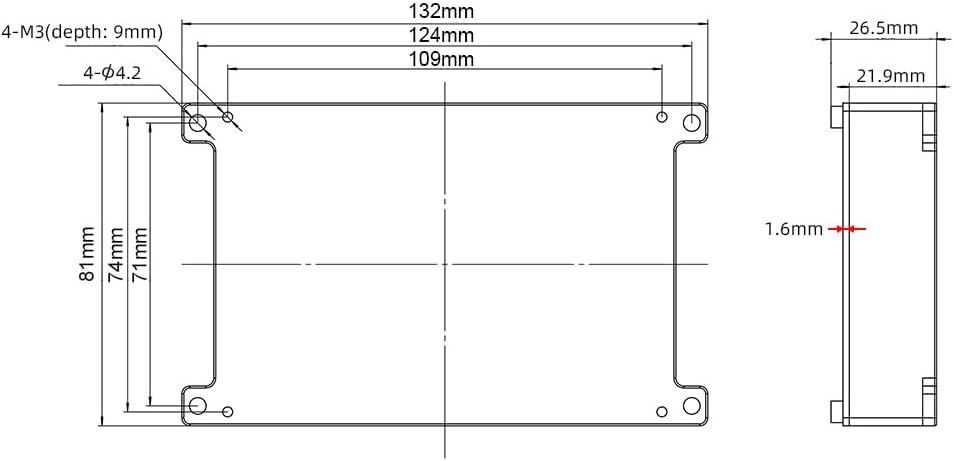
Figure 4.2: Detailed Dimensions of the FT85BD Dual ESC. This technical drawing provides precise measurements for mounting points, overall length, width, and height, including internal clearances.
5. Características
The FT85BD Dual ESC incorporates advanced features for enhanced performance and control:
- CPU de alto rendemento: Utilizes an AT32F403ARCT7 CPU with ARM Cortex-M4 structure, enabling a 240MHz clock speed and a maximum PWM switching frequency of 45KHz for improved motor RPM.
- Versatile Programmability: Fully programmable via the Flipsky ESC Tool, allowing compatibility with various motor types, battery voltages, and control methods.
- Remote Control Integration: Programmable via Flipsky remote controllers VX4 (firmware V1.2.1 or above) and VX3Pro.
- FOC Motor Control: Supports Field-Oriented Control (FOC) for quiet operation and smooth motor startup.
- Real-time Data & Alerts: Provides real-time data monitoring and fault alerts for operational awareness.
- Adaptive PWM Frequency: Features adaptive variable PWM frequency control.
- Multiple Sensor Modes: Supports both sensored (HALL) and sensorless (IPDS, HFPI) motor operation modes.
- Tipos de control: Supports Current and Duty Cycle control types.
- Integrated Smart Switch: Includes slide power-on and automatic shutdown functions, with adjustable auto-shutdown time via the ESC Tool.
- Soporte de interface externa: Dedicated fixtures for front lights, rear brake lights, and a horn (12V 3A output).
- Temperature Sensor Support: Compatible with various motor temperature sensors (NTC-10K-100C, PT1000, PTC-1K-100C, KTY, etc.).
6. Configuración e cableado
Careful wiring is essential for the correct and safe operation of the FT85BD Dual ESC. Refer to the diagrams below for proper connections.

Figure 6.1: FT85BD Dual ESC Wiring Diagram Overview. This diagram illustrates the main connections for motors, battery, power switch, and external accessories like lights and horn.

Figure 6.2: Detailed Pinout Diagram for FT85BD Dual ESC Ports. This image provides a close-up view of the various communication and sensor ports, detailing their pin assignments.
6.1. Conexións de alimentación
- Batería: Connect your battery pack to the main power wires (red for positive, black for negative) of the ESC. Ensure correct polarity. The ESC supports 4S-20S battery configurations (14-84V).
- Interruptor de alimentación: Connect the provided self-resetting switch to the designated power switch port (labeled '13. POWER SWITCH' in Figure 6.2). This switch controls the main power to the ESC.
6.2. Motor Connections
- Cables de fase do motor: Connect the three phase wires from each motor to the corresponding outputs on the ESC (typically labeled A, B, C or U, V, W). The FT85BD is a dual ESC, supporting two motors.
- Cables de sensor Hall: If your motors are sensored, connect the Hall sensor wires to the 'HALL' ports (labeled '6. HALL' and '12. HALL' in Figure 6.2). Ensure the correct order of the sensor wires (5V, GND, A, B, C, Temp).
6.3. Communication and Control Connections
- PPM (Modulación da posición do pulso): Connect your receiver's PPM output to the 'PPM' port (labeled '1. PPM' or '7. PPM' in Figure 6.2) for throttle control.
- UART (Universal Asynchronous Receiver/Transmitter): Use the 'UART' port (labeled '4. UART' or '10. UART' in Figure 6.2) for connecting compatible FLIPSKY remote controllers (VX4, VX3Pro) or other UART devices for telemetry and control.
- CAN (Controller Area Network): The 'CAN POWER' ports (labeled '3. CAN POWER' or '9. CAN POWER' in Figure 6.2) allow for communication between multiple ESCs or other CAN-enabled devices.
- ADC (conversor analóxico a dixital): The 'ADC/PAS' ports (labeled '5. ADC/PAS' or '11. ADC/PAS' in Figure 6.2) can be used for analog throttle input or PAS (Pedal Assist System) sensors.
- USB: Connect the ESC to a computer using the provided USB cable via the 'USB' ports (labeled '2. USB' or '8. USB' in Figure 6.2) for configuration with the Flipsky ESC Tool.
6.4. Accesorios externos
- Luces dianteiras: Connect front lights to the designated 'Front Light' port.
- Rear Brake Lights: Connect rear brake lights to the designated 'Brake Light' port.
- Corno: Connect a horn to the designated 'Horn' port.
7. Configuration and Software
The FLIPSKY FT85BD ESC is highly configurable using the Flipsky ESC Tool software.

Figure 7.1: Excerpt from FT85BD Manual V1.4 detailing specifications and features. This image shows a page from the official manual, listing key technical data and functional capabilities.
7.1. Flipsky ESC Tool
The Flipsky ESC Tool is a PC-based software used for configuring parameters, updating firmware, and monitoring the ESC. It is crucial to use the correct version of the software and firmware (V1.4 or above).
- Descargar: The software and detailed manual can be downloaded by scanning the QR code provided in Section 10 or by visiting the official Flipsky support page.
- Conexión: Connect the ESC to your computer via the USB port.
- Actualización de firmware: If prompted, update the ESC firmware to the latest compatible version. Ensure the firmware version matches the software version to avoid inconsistencies.
- Axuste de parámetros: Configure motor parameters (e.g., motor type, pole pairs), battery settings (e.g., voltage limits), control modes, and other advanced settings.
7.2. Remote Controller Configuration
The FT85BD is compatible with FLIPSKY remote controllers like the VX4 and VX3Pro. These remotes can be used to program the ESC (VX4 remote firmware version: VX4_V1.2.1 or above) and provide real-time data.
8. Funcionamento
Once the ESC is properly installed and configured, you can begin operation.
- Encendido: The ESC supports a slide power-on function. Alternatively, press the connected power switch button.
- Control de velocidade: Utilize your connected remote control (PPM, UART) to control the speed. The ESC supports multiple speed gear levels: Low, Medium, High, and Reverse.
- Freado: The ESC supports regenerative braking, which can return energy to the battery during deceleration.
- Apagado automático: The ESC features an automatic shutdown function after a period of inactivity. The shutdown time is adjustable via the Flipsky ESC Tool.
9. Funcións de protección
The FT85BD ESC includes several protection mechanisms to safeguard the unit and connected components:
- Baixo Voltage Protección: Prevents over-discharge of the battery.
- Alto Voltage Protección: Protects against over-voltage entrada.
- Protección contra sobrecorriente: Limits current draw to prevent damage to the ESC and motor.
- Temperature Abnormality Protection: Monitors internal temperature and reduces power or shuts down if temperatures exceed safe limits.
- MOSFETs Over-Temperature and Over-Current Protection: Specific protection for the power MOSFETs.
- Protección contra descarga excesiva da batería: Ensures battery health by preventing excessive discharge.
- Motor Over-Temperature Protection: Protects the motor from overheating when a compatible temperature sensor is connected.
10. Mantemento
Regular maintenance helps ensure the longevity and reliable performance of your FT85BD Dual ESC.
- Manter limpo: Periodically clean the ESC and its connectors to remove dust, dirt, and debris. Use a soft, dry brush or compressed air.
- Inspeccionar conexións: Regularly check all wiring connections for looseness, corrosion, or damage. Secure any loose connections.
- Monitor de temperatura: During operation, ensure the ESC is not overheating. Adequate airflow is crucial, especially in enclosed spaces.
- Actualizacións de firmware: Check the official Flipsky website periodically for firmware updates to benefit from performance improvements and bug fixes.
- Evitar a humidade: While the aluminum case offers some protection, avoid exposing the ESC to excessive moisture or water unless specifically rated for waterproof use.
11 Solución de problemas
This section addresses common issues you might encounter with the FT85BD Dual ESC.
- ESC Not Powering On:
- Comprobe a conexión e o volume da bateríatage.
- Ensure the power switch is correctly connected and functioning.
- Verifique que a batería estea cargada.
- Motor Not Spinning / Irregular Operation:
- Confirm motor phase wire connections are secure.
- If using sensored motors, check Hall sensor connections.
- Verify motor detection and configuration in the Flipsky ESC Tool.
- Check for fault codes or alerts in the ESC Tool.
- ESC Disconnects from Software:
- Asegúrate de que o cable USB estea conectado correctamente.
- Check for driver issues on your computer.
- Verify that the ESC firmware and software versions are compatible.
- Sobrequecemento:
- Reduce load or operating current.
- Improve airflow around the ESC.
- Check motor and battery parameters in the ESC Tool for appropriate settings.
- Inconsistent Remote Control:
- Recalibrate the remote control in the Flipsky ESC Tool.
- Check remote battery level.
- Ensure the remote's firmware is up to date and compatible.
12. Garantía
The FLIPSKY FT85BD Dual ESC comes with a warranty period of 2 months (2M+). Please refer to your purchase documentation or contact your retailer for specific warranty terms and conditions.
13. Apoio
For further assistance, software downloads, and the latest user manual, please refer to the official Flipsky resources.

Figure 13.1: QR Code for Flipsky ESC Tool and User Manual Download. Scan this QR code to access the latest software and documentation.
You can also find the Flipsky ESC Tool and User Manual at the following link:


