1. Produto rematadoview
The LIORQUE Digital Kitchen Timer Model YGH5249 is a multi-functional device designed to assist with various timing needs. It features a large LCD display, adjustable alarm volume, and multiple placement options. This timer can function as a countdown timer, a count-up stopwatch, and a digital clock.

Imaxe 1.1: Fronte view of the LIORQUE Digital Kitchen Timer, highlighting its large LCD screen and control buttons.
Características principais:
- Funcionalidade 3 en 1: Timer, Stopwatch, and Clock modes.
- Pantalla LCD grande: Ensures clear readability of time.
- Volume de alarma axustable: Three levels (Mute, Low, High) to suit different environments.
- Modo personalizado: Save frequently used countdown times for quick access.
- Colocación versátil: Magnetic back, foldable stand, and lanyard hole for flexible use.
- Delay Reminder: Automatically starts counting up after countdown finishes.
- Auto-Restore: Remembers the last set countdown time.

Image 1.2: Visual representation of the timer's main features and functions.
2. Configuración e instalación da batería
The timer requires 2 AAA batteries (included) for operation. Follow these steps to install them:
- Localice a tapa do compartimento das pilas na parte traseira do temporizador.
- Deslice a tapa para abrir.
- Insira dúas pilas AAA, asegurándose de manter a polaridade correcta (+ e -) como se indica no interior do compartimento.
- Pecha a tapa do compartimento da batería de forma segura.
The timer will power on automatically once batteries are installed.
3. Instrucións de funcionamento
3.1 Switching Modes (Timer/Stopwatch/Clock)
The LIORQUE timer offers three modes: Timer (countdown), Stopwatch (count-up), and Clock. To switch between Timer mode and Clock mode, press and hold the ST/SP button for 2 seconds. The timer will display the current time in Clock mode or the timer interface in Timer mode.

Image 3.1: Switching between Counting Mode and Clock Mode.
3.2 Setting Countdown Timer
- Ensure the timer is in Timer mode (displaying H:M:S).
- Usa o 1H, 5M, 1M, e 5S buttons to set the desired countdown time. Each press adds the corresponding time increment.
- Preme o ST/SP botón para iniciar a conta atrás.
- To pause the countdown, press ST/SP de novo. Prócheo unha vez máis para continuar.
- To reset the timer to zero, press the RESET botón.
- When the countdown reaches zero, the alarm will sound for 1 minute.
3.3 Using Stopwatch (Count-Up)
- Ensure the timer is in Timer mode and reset to 00:00:00.
- Preme o ST/SP button to start counting up.
- Para deter o cronómetro, prema ST/SP de novo. Prócheo unha vez máis para continuar.
- Para poñer o cronómetro a cero, prema o botón RESET botón.

Image 3.2: Illustration of Count-up and Countdown modes.
3.4 Shortcut Setting
The timer allows for quick setting of common intervals:
- Preme 1H durante 1 hora.
- Preme 5M durante 5 minutos.
- Preme 1M durante 1 minuto.
- Preme 5S durante 5 segundos.

Imaxe 3.3: Ex.amples of using shortcut buttons for quick time setting.
3.5 Modo personalizado
The Custom Mode allows you to save a frequently used countdown time for instant recall.
- In Timer mode, set your desired countdown time using the 1H, 5M, 1M, e 5S botóns.
- Manteña premido o PERSONALIZADO button for 2 seconds. The timer will remember this setting.
- Each subsequent short press of the PERSONALIZADO button will automatically load the saved time.

Image 3.4: Setting and recalling a custom timer value.
3.6 Axustar o volume da alarma
The timer features a 3-level alarm volume adjustment (Mute, Low, High). A switch on the side of the timer allows you to select the desired volume level.

Image 3.5: Volume adjustment switch and its three settings.
3.7 Opcións de colocación
The LIORQUE timer offers flexible placement options:
- Magnético: Attach the timer to metal surfaces like refrigerators using its strong magnetic back.
- Stand: Use the integrated foldable stand to place the timer on any flat surface, such as a countertop or desk.
- Orificio do cordón: Hang the timer using a rope through the designated lanyard hole.
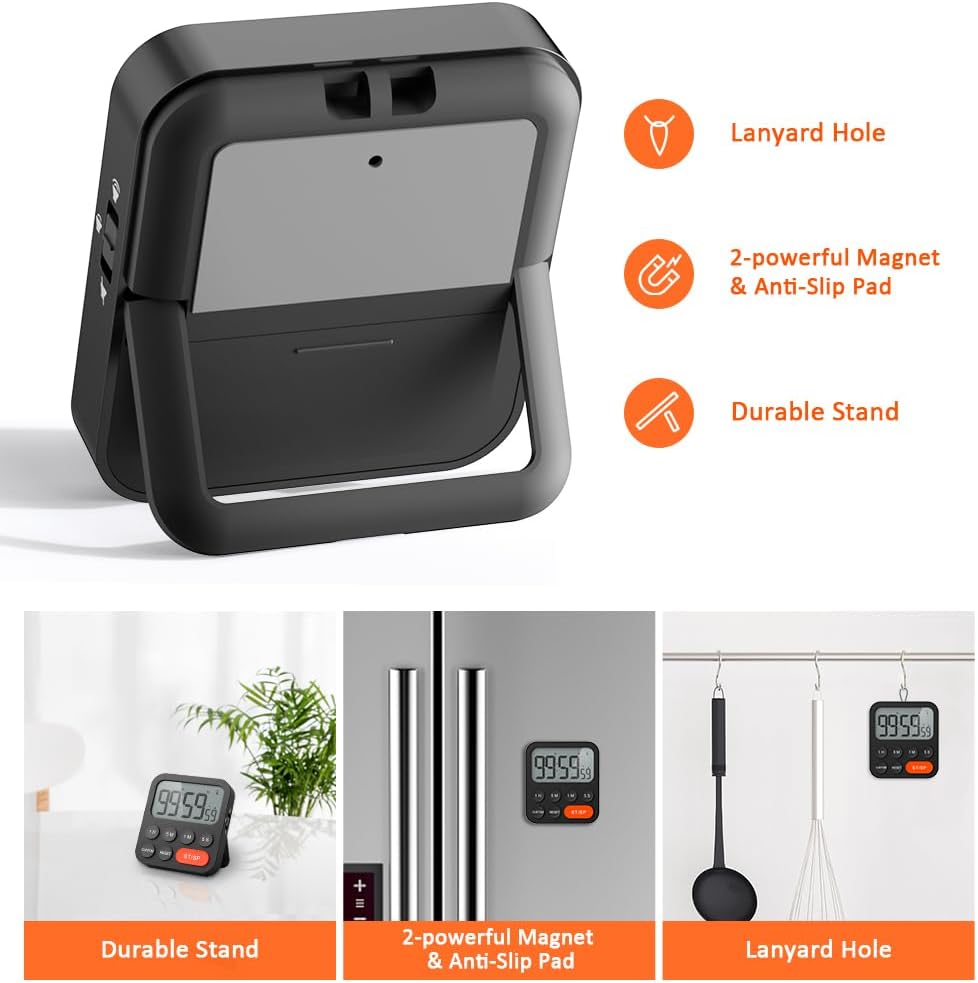
Image 3.6: Various ways to place and use the timer.
3.8 Funcións adicionais
- Delay Reminder: After a countdown finishes, the timer will automatically start counting up, indicating the elapsed time since the alarm.
- Auto-Restore: Once a countdown is complete and the alarm has sounded, pressing the ST/SP button will restore the timer to the last set countdown time, making it convenient for repetitive tasks.

Image 3.7: Explanation of Delay Reminder and Auto-restore features.
4. Mantemento
- Clean the timer with a soft, dry cloth. Do not use abrasive cleaners or immerse in water.
- Replace batteries when the display becomes dim or the timer functions erratically.
- Store the timer in a cool, dry place when not in use for extended periods.
5 Solución de problemas
- O temporizador non responde: Comprobe se as baterías están instaladas correctamente e teñen a carga suficiente. Substitúaas se é necesario.
- Alarm too quiet/loud: Adjust the volume switch on the side of the timer to your preferred level.
- A pantalla está en branco: Ensure batteries are installed and functional. If the issue persists, contact customer support.
6. Especificacións
| Característica | Detalle |
|---|---|
| Marca | LIORQUE |
| Número de modelo | YGH5249 |
| Cor | Negro |
| Dimensións do produto | 0.94" de profundidade x 0.94" de altura |
| Peso do elemento | 4.2 onzas |
| Fonte de enerxía | 2 pilas AAA (incluídas) |
| Número de configuracións | 3 (volume) |
| Tamaño da pantalla | 1E+1 Centímetros |
7. Garantía e soporte
For warranty information or technical support, please refer to the product packaging or contact LIORQUE customer service through their official websitio web ou o vendedor onde se comprou o produto. Garde o recibo de compra para reclamacións de garantía.


