Introdución
Welcome to the VTech Genius XL Interactive Video Binoculars. This device is designed for children aged 5 and above to explore the world around them through observation, interactive videos, images, and educational games. This manual provides essential information for setup, operation, and maintenance to ensure optimal use and longevity of your product.

Image: The VTech Genius XL Interactive Video Binoculars, showing the main unit with its flip-up color screen and binocular lenses.
Información importante de seguridade
WARNING: Not suitable for children under 36 months due to small parts.
- Supervise sempre os nenos durante o uso.
- Do not look directly at the sun through the binoculars, as this can cause serious eye damage.
- Asegúrese de que as baterías estean inseridas correctamente.
- Non mesture pilas vellas e novas ou diferentes tipos de pilas.
- Retire rapidamente as baterías esgotadas.
- Deseche as baterías de forma responsable.
O que hai na caixa
- 1 Pair of VTech Genius XL Interactive Video Binoculars
- Batteries (4 x LR6-AA)
- Correa para o pescozo
Configuración
1. Instalación da batería
- Localice o compartimento da batería no dispositivo.
- Usando un desaparafusador, abra a tapa do compartimento da batería.
- Insira dúas pilas LR6-AA novas, asegurándose de manter a polaridade correcta (+/-).
- Volva colocar a tapa e aperte o parafuso.
2. Colocación da correa do pescozo
Thread the provided neck strap through the designated loops on the binoculars. Adjust the strap length for comfortable and secure wearing.

Image: A child wearing the VTech Genius XL Interactive Video Binoculars with the neck strap, demonstrating how it can be worn for outdoor exploration.
Instrucións de funcionamento
1. Acendido/apagado
Press and hold the power button to turn the device on or off. The device features an automatic shut-off function to preserve battery life.
2. ViewModos de ing
The binoculars offer two primary viewing methods:
- Through the Binoculars: Look directly through the eyepieces (binocular lenses) for traditional observation. The interpupillary distance is adjustable for optimal comfort.
- On the LCD Screen: Flip up the 2.4-inch color LCD screen to view observations digitally.

Image: A child looking through the VTech Genius XL Interactive Video Binoculars, demonstrating the traditional viewmétodo de ing.
3. Magnification and Focus
- The binoculars provide up to Aumento de 10x.
- Use the focus wheel to adjust the image clarity for both binocular and screen viewing.
4. Modo de visión nocturna
Activate the integrated infrared system for night vision. This mode is exclusively available on the LCD screen, allowing observation in low-light or dark conditions.

Image: The VTech Genius XL Interactive Video Binoculars displaying a night vision image of a hedgehog on its screen, highlighting the night vision feature.
5. Captura de fotos e vídeos
The integrated camera allows you to capture images of flora and fauna. The internal memory can store up to 50 photos. A micro-SD card slot (card not included) is available to expand storage capacity and save photos for printing.

Image: The VTech Genius XL Interactive Video Binoculars with multiple captured images of animals and nature displayed around it, illustrating the photo capture function.
6. Interactive Content (BBC Videos & Images)
Explore over 340 official videos and images from the BBC, providing more than 700 educational facts categorized into 9 groups:
- Amphibianos
- Artrópodos
- Terrestrial Birds
- Flying Birds
- Terrestrial Mammals
- Marine Mammals
- Réptiles
- Plantas con flores
- Other Plants and Fungi

Image: The VTech Genius XL Interactive Video Binoculars displaying an image of a mushroom on its screen, with a speech bubble indicating educational information, showcasing the BBC content.
7. Games and Quizzes
- Adventure Game: Navigate through 5 natural environments, encountering over 100 animals and exploring 25 levels.
- Educational Quiz: Test scientific knowledge through a 3-stage quiz (Training, Time Challenge, Clue Game).
- Use the joystick and 12 buttons to navigate through games and features.
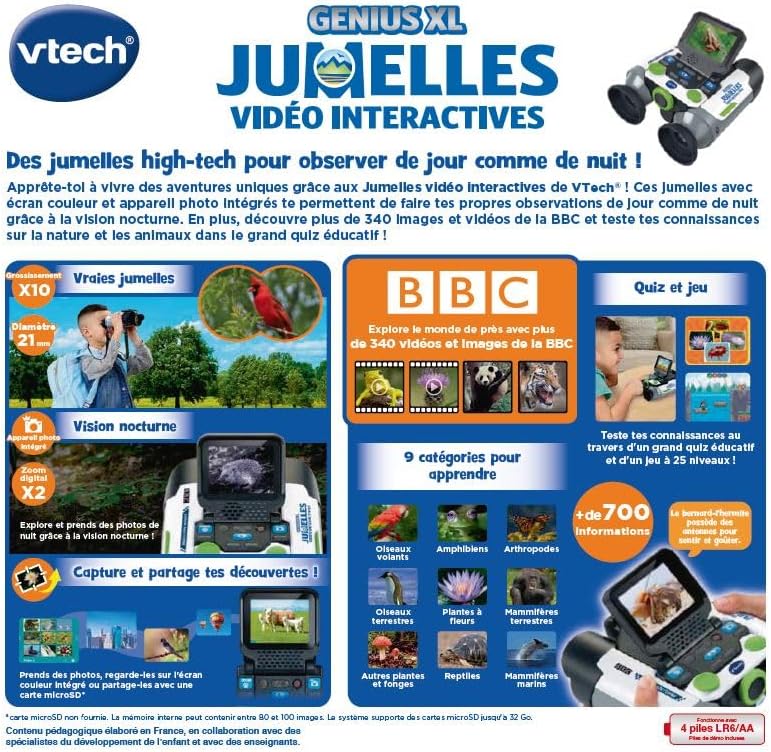
Image: A child holding the VTech Genius XL Interactive Video Binoculars, playing an adventure game on its screen, demonstrating the interactive game feature.
8. Control de volume
Adjust the sound volume using the dedicated controls on the device.
Integración de medios
Vídeos oficiais de produtos
The following video demonstrates the key features and interactive capabilities of the VTech Genius XL Interactive Video Binoculars.
Vídeo: Unha breve presentaciónview presentación de vídeoasing children using the VTech Genius XL Interactive Video Binoculars to observe nature, take photos, play games, and utilize the night vision mode. It highlights the educational BBC content and interactive features.
This video provides a broader overview of the Genius XL range, including the Interactive Video Binoculars and the Interactive Video Globe.
Vídeo: Unha preview video demonstrating both the VTech Genius XL Interactive Video Binoculars and the Interactive Video Globe. It shows children engaging with both products, highlighting their educational and interactive aspects, including exploring animals and geography.
Mantemento
Limpeza
Limpe o dispositivo cun lixeiro damp pano. Non empregue produtos químicos agresivos nin produtos de limpeza abrasivos. Asegúrese de que o dispositivo estea seco antes de gardalo.
Almacenamento
Store the binoculars in a cool, dry place away from direct sunlight. Remove batteries if the device will not be used for an extended period.
Resolución de problemas
- O dispositivo non se acende: Check battery installation and ensure batteries are not depleted. Replace with new batteries if necessary.
- A pantalla está en branco ou conxelada: Try turning the device off and on again. If the issue persists, remove and reinsert the batteries.
- O son non funciona: Check the volume settings. If the issue persists after checking volume and restarting, contact customer support.
- Photos lost or unable to access gallery: Ensure a micro-SD card is properly inserted if you are relying on external storage. If using internal storage and experiencing issues, a factory reset might be necessary, but this will erase all stored photos. It is recommended to regularly transfer important photos to an external micro-SD card.
- Imaxe borrosa: Adjust the focus wheel until the image is clear.
Especificacións
| Característica | Detalle |
|---|---|
| Dimensións do produto | 12.1 x 6.9 x 16.2 cm |
| Peso | 170 gramos |
| Idade recomendada | 5 anos en diante |
| Valor Educativo | Learning, Creativity, Animal Discoveries, Interaction |
| Linguaxe | French (Note: Product content is in French as per specifications) |
| Referencia do fabricante | 618605 |
| Número de pezas | 1 |
| Pilas necesarias | Si (4 pilas LR6-AA) |
| Pilas incluídas | Si |
| Material principal | Plástico |
| Cor | Gris |
| Característica especial | Visión Nocturna |
| Diámetro da lente obxectivo | 21 milímetros |
| Ampliación máxima | 10x |
| Tipo de montaxe | Collar (Neck Strap) |
| Nome do modelo | X 21 |
| Binocular Prism Description | Prisma de Porro |
Garantía e Soporte
Para obter información sobre a garantía e a atención ao cliente, consulte a documentación incluída coa súa compra ou visite o sitio web oficial de VTech. websitio. Garda o comprobante de compra para calquera reclamación de garantía.
Product support and spare parts availability may vary by region. The manufacturer states that spare parts are unavailable for this product.


