1. Introdución e finalview
The ARROWMAX Electric Engraving Pen (Model AM-230312) is a versatile, cordless rotary tool designed for fine work such as engraving, sanding, grinding, polishing, and carving on various materials including metal, wood, glass, and plastic. It features a high-performance hollow-core motor, an OLED display for status, and magnetic charging for convenience. This manual provides essential information for safe and effective operation, maintenance, and troubleshooting.

Figure 1: ARROWMAX Electric Engraving Pen and accessories.
2. Contido do paquete
Verifica que todos os elementos estean presentes no paquete:
- 1 x ARROWMAX Electric Engraving Pen
- 30 x Engraving Bits
- 12 x Polishing Bits
- 1 x bolsa de almacenamento
- 1 x Manual de usuario
- 1 x USB Charging Cable (Magnetic)

Figure 2: Complete set of included components.
3. Características do produto
The ARROWMAX Electric Engraving Pen is equipped with several features designed for precision and ease of use:
- Hollow-Core Motor: Provides 3 times the torque of a regular motor for enhanced precision.
- Pantalla OLED: Shows battery status, selected mode, and rotation direction.
- Carga magnética: Convenient and secure charging directly in the storage case.
- Velocidade axustable: Four RPM modes (15000, 20000, 25000, 30000 RPM) for various tasks.
- Rotación bidireccional: Easily switch between forward and reverse rotation.
- Corpo de aliaxe de aluminio: Durable and ergonomic design for comfortable handling.
- Mandril de cambio rápido: Allows for easy bit changes without additional tools.

Figure 3: Key features of the ARROWMAX Engraving Pen.

Figure 4: Adjustable speed settings.

Figure 5: OLED display indicators.
4. Configuración
- Carga inicial: Before first use, fully charge the engraving pen. Connect the magnetic USB charging cable to the pen's magnetic charging port and a suitable USB power source (e.g., computer USB port, USB wall adapter). The OLED display will indicate charging status. A full charge takes approximately 90 minutes and provides up to 120 minutes of uninterrupted work.
- Seleccionando un bit: Choose the appropriate engraving or polishing bit for your task. The kit includes 30 engraving bits and 12 polishing bits suitable for various materials and applications.
- Inserción dun bit:
- Unscrew the chuck at the tip of the pen counter-clockwise.
- Insert the desired bit into the collet. Ensure the bit is fully seated.
- Tighten the chuck clockwise until the bit is securely held. Ensure it is tightened firmly to prevent the bit from dislodging during operation.

Figure 6: Inserting a bit into the chuck.
5. Instrucións de funcionamento
- Power On/Off and Rotation Direction:
- Press the Power button (marked with a circle and vertical line) to turn the pen on. The OLED display will activate.
- Press the Power button again to switch between clockwise and anti-clockwise rotation. The display will show the current direction.
- To turn off the pen, press and hold the Power button for a few seconds.
- Velocidade de axuste:
- Press the Gear Adjustment button (marked with a 'G' or gear icon) to cycle through the four available RPM modes (15000, 20000, 25000, 30000 RPM).
- Select the appropriate speed based on the material and task. Lower speeds are suitable for delicate work, while higher speeds are for more aggressive material removal.
- Consellos de uso:
- Always wear appropriate safety glasses to protect your eyes from debris.
- Hold the pen firmly but comfortably. The ergonomic design allows for precise control.
- Apply light and consistent pressure. Excessive force can damage the bit, the material, or the tool.
- For engraving, use a steady hand and guide the bit smoothly along your desired path.
- For polishing, use the appropriate polishing bits and compounds, moving the tool in small, circular motions.
- Practice on scrap materials before working on your final project.

Figure 7: Engraving a 3D printed object.

Figure 8: Polishing a metal piece.

Figure 9: Sanding or carving wood.
Video 1: Demonstration of the ARROWMAX SGS ULTRA engraving pen rotary tool in various applications, including engraving and polishing different materials.
6. Mantemento
- Limpeza: After each use, wipe down the engraving pen with a soft, dry cloth to remove dust and debris. For stubborn residue, a slightly damp pódese usar un pano, garantindo que non entre humidade nos compoñentes internos.
- Coidado das brocas: Clean bits regularly. Use a small brush to remove accumulated material. Store bits in their designated slots within the aluminum case to prevent damage and loss.
- Almacenamento: Store the engraving pen and all accessories in the provided aluminum case in a cool, dry place, away from direct sunlight and extreme temperatures.
- Coidado da batería: To prolong battery life, avoid fully discharging the battery frequently. Charge the pen when the battery indicator is low. If storing for an extended period, charge the battery to about 50% every few months.
7 Solución de problemas
| Problema | Causa posible | Solución |
|---|---|---|
| O bolígrafo non se acende. | Batería baixa. | Charge the pen using the provided USB cable. |
| Bit is loose or falls out during operation. | Mandril non axustado o suficiente. | Ensure the chuck is tightened firmly after inserting the bit. |
| Reduced performance or unusual noise. | Bit is dull or damaged; debris in chuck/motor. | Replace the bit. Clean the chuck area. If problem persists, contact support. |
| Pen does not charge. | Cable or power source issue; magnetic connection not secure. | Check USB cable and power source. Ensure magnetic connector is properly aligned and connected. |
8. Especificacións
| Característica | Detalle |
|---|---|
| Marca | ARROWMAX |
| Número de modelo | AM-230312 |
| Voltage | 5 voltios |
| Fonte de enerxía | Alimentado por batería |
| Tipo de batería | 1 batería de polímero de litio (incluída) |
| Velocidade de rotación máxima | 30000 RPM |
| Velocidade mínima | 10000 RPM |
| Tamaño de Chuck | 2.35mm diameter bits (compatible with standard bits) |
| Peso do elemento | 12.7 onzas |
| Dimensións | 8.78 x 7.95 x 1.14 polgadas (embalaxe) |
| Compoñentes incluídos | 1 engraving pen, 30 engraving bits, 12 polish bits, 1 storage bag, 1 manual, 1 USB charging cable |
9. Garantía e soporte
For warranty information, technical support, or service inquiries, please refer to the contact details provided on the product packaging or the official ARROWMAX websitio. Garde o recibo da compra como proba de compra para calquera reclamación de garantía.
Manufacturer: Freemax Technology Company Limited (IMPORT)
Contact information (from product box image):
- Address: Flat C, 2/F, Infotech Centre, 21 Hung To Road, Kwun Tong, Hong Kong
- Teléfono: +852 3590 9790
- Correo electrónico: hello@arrowmax-rc.com
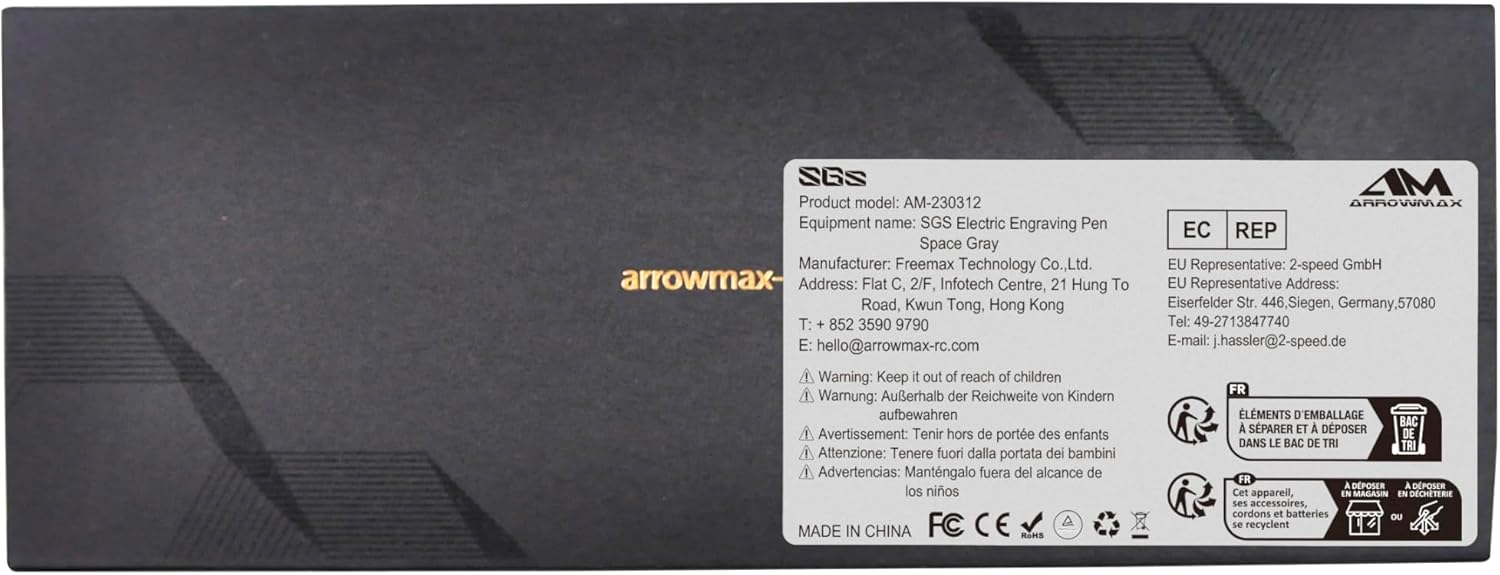
Figure 10: Product packaging with manufacturer details.


