1. Introdución
Grazas pola compraasing the Coolfire Vibrating Alarm Clock Wristband, Model 1685B. This device is designed to provide a discreet and effective silent alarm experience through gentle vibrations on your wrist. This manual provides detailed instructions for setup, operation, and maintenance to ensure optimal performance and longevity of your device.
2. Produto rematadoview
The Coolfire Vibrating Alarm Clock is a wristband-style watch featuring a digital display and a silent vibration alarm. It is suitable for individuals who need to wake up without disturbing others, or for those with hearing or visual impairments. The device includes a rechargeable battery and a washable sweatband for comfort and hygiene.
Características principais:
- Silent vibration alarm on the wrist.
- Large, bright LCD digital display.
- Up to 6 daily alarms.
- Three adjustable vibration strengths (Low, Medium, High).
- Integrated 24-hour precision 1/100 seconds digital stopwatch.
- Rechargeable lithium battery via USB.
- Soft, washable sweatband.

Figura 1: Fronte view of the Coolfire Vibrating Alarm Clock Wristband, showing the digital display and control buttons.
3. Configuración
3.1 Carga do dispositivo
Before initial use, fully charge the device. A full charge takes approximately 4 hours and provides 4-6 weeks of operation.
- Locate the USB charging cable provided with your device.
- Connect the USB cable to any standard USB adapter (not included).
- Release the locking ring from the back of the watch unit and gently push out the watch module from the sweatband.
- Plug the small end of the USB cable into the charging socket located on the back of the watch module.
- Permite que o dispositivo se cargue durante 4 horas.
- Once charged, disconnect the cable and reinsert the watch module into the sweatband, securing it with the locking ring.
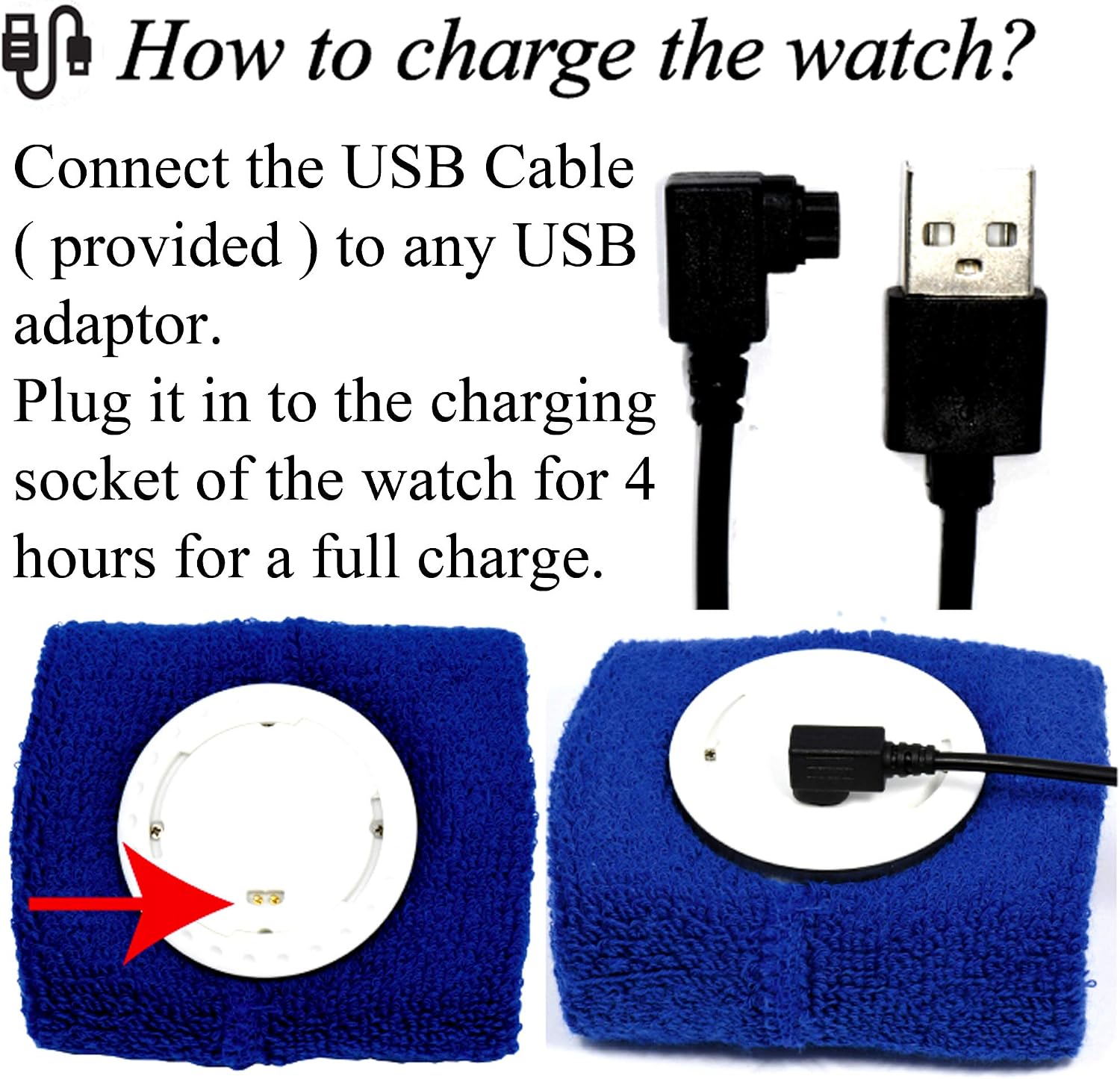
Figure 2: Illustration of connecting the USB cable to the watch module for charging.
3.2 Wearing the Wristband
The wristband is designed for comfortable wear. Ensure the watch module is securely placed within the sweatband.
- The sweatband is adjustable and fits wrist sizes from 6.7 inches (170mm) to 8.5 inches (215mm).
- Wear the wristband snugly enough to ensure good contact for vibration, but not so tight as to be uncomfortable.

Figura 3: Example of the Coolfire Vibrating Alarm Clock Wristband worn on a wrist, indicating suitable wrist sizes.
4. Instrucións de funcionamento
The Coolfire alarm clock features a simple digital display and user-friendly buttons for setting time, alarms, and other functions.
4.1 Funcións dos botóns
The watch module has three primary buttons:
- LIGHT/STW: Activates backlight; in stopwatch mode, starts/stops the stopwatch.
- CONXUNTO: Enters setting mode for time and alarms.
- TIME/ALARM: Toggles between time display and alarm display; in setting mode, adjusts values.
4.2 Axuste da hora e da data
- From the main time display, press and hold the SET button until the time digits begin to flash.
- Preme o HORA/ALARMA button to adjust the flashing value (e.g., hours, minutes).
- Preme o SET button again to move to the next setting (e.g., minutes, year, month, day).
- Repita os pasos 2 e 3 ata que todos os axustes de hora e data sexan correctos.
- Preme o SET button one last time to exit setting mode.
4.3 Configuración de alarmas
The device supports up to 6 daily alarms.
- From the main time display, press the HORA/ALARMA button repeatedly until "ALARM" is displayed and you see an alarm number (e.g., AL1).
- Manteña premido o SET button until the alarm time digits begin to flash.
- Preme o HORA/ALARMA button to adjust the flashing hour.
- Preme o SET button to move to the minutes.
- Preme o HORA/ALARMA button to adjust the flashing minutes.
- Preme o SET button to enable/disable the alarm (an alarm icon will appear when enabled).
- Preme o SET button again to save the alarm setting and exit.
- To set additional alarms, repeat steps 1-7, cycling through AL2, AL3, etc., using the HORA/ALARMA botón.
4.4 Adjusting Vibration Strength
The device offers three vibration strengths: Low, Medium, and High. The method for adjusting this setting is typically found within the alarm settings or a dedicated mode. Refer to the on-screen prompts or experiment with the SET e HORA/ALARMA buttons while in alarm setting mode to locate this option.
4.5 Uso do cronómetro
- From the main time display, press the HORA/ALARMA button repeatedly until "STW" (Stopwatch) is displayed.
- Preme o LIGHT/STW botón para iniciar o cronómetro.
- Preme o LIGHT/STW botón de novo para pausar o cronómetro.
- To reset the stopwatch, while paused, press and hold the SET botón.
- Preme o HORA/ALARMA button to return to the main time display.
5. Mantemento
5.1 Washing the Sweatband
The sweatband is washable, but the watch module is non resistente á auga. Always remove the watch module before washing the sweatband.
- To detach the watch module, release the locking ring from the back of the watch.
- Gently push the watch module out from the sweatband.
- Machine wash the sweatband as needed, following standard fabric care instructions.
- Ensure the sweatband is completely dry before reinserting the watch module.
- Reinsert the watch module and secure it with the locking ring.
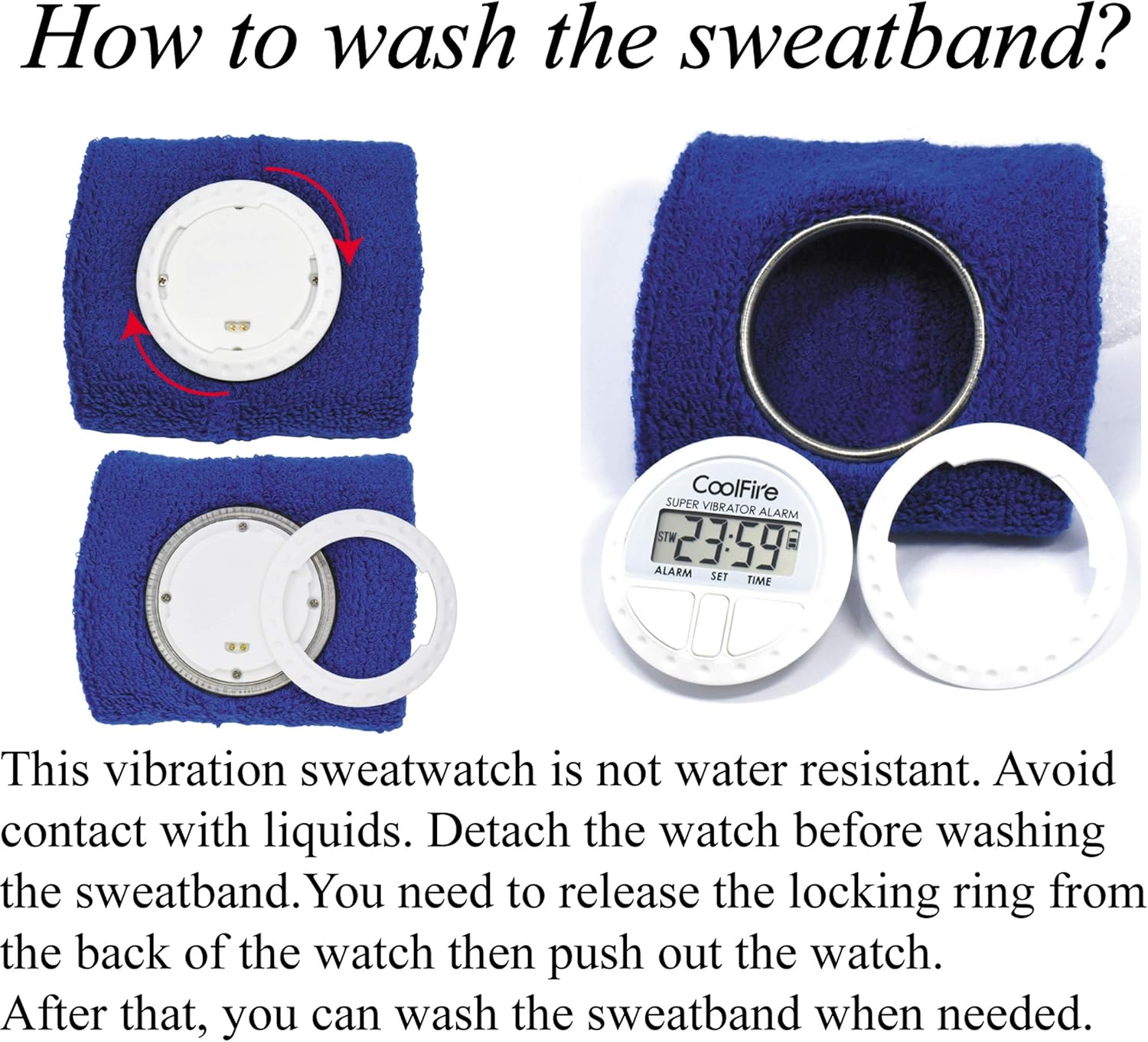
Figure 4: Steps for removing the watch module from the sweatband for cleaning.
6 Solución de problemas
| Problema | Causa posible | Solución |
|---|---|---|
| O dispositivo non se acende ou a pantalla está en branco. | A batería está esgotada. | Cargue o dispositivo durante 4 horas co cable USB fornecido. |
| Vibration alarm is too weak or not felt. | Vibration strength set to Low; wristband is too loose. | Adjust vibration strength to Medium or High. Ensure the wristband is worn snugly. |
| Alarm does not activate. | Alarm is not enabled or set incorrectly. | Verify alarm settings and ensure the alarm icon is displayed, indicating it is active. |
| A pantalla é difícil de ler. | No backlight activated. | Preme o LIGHT/STW botón para activar a luz de fondo. |
7. Especificacións
- Marca: Coolfire
- Número de modelo: 1685B
- Cor: Negro (outras cores poden estar dispoñibles)
- Dimensións do produto: 8.89 x 3.81 x 8.89 cm (watch module)
- Peso do artigo: 10 g (watch module)
- Material: Plastic (watch module), Fabric (sweatband)
- Tipo de visualización: LCD dixital
- Fonte de enerxía: Batería de litio recargable
- Tempo de carga: Aproximadamente 4 horas
- Duración da batería: 4-6 weeks on a full charge
- Características especiais: Silent Clock, Vibrating Alarm, Stopwatch
- Wristband Fit: 6.7" (170mm) to 8.5" (215mm)
8. Garantía e soporte
For warranty information and customer support, please refer to the documentation included with your purchase or contact your retailer. Keep your purchase receipt as proof of purchase.
For further assistance, you may visit the official Coolfire websitio web ou póñase en contacto co seu departamento de atención ao cliente. Os datos de contacto adoitan atoparse na embalaxe do produto ou na presenza oficial en liña da marca.


