1. Introdución
This user manual provides comprehensive instructions for operating your LAMA 64MP Digital Camera (Model: LM220C). This compact point-and-shoot camera is designed for ease of use, offering high-resolution photos and Full HD video recording, making it suitable for various users including kids, students, and teenagers. It features a 2.8-inch LCD screen, 16X digital zoom, anti-shake technology, and Wi-Fi connectivity.

Image: The LAMA 64MP Digital Camera shown with its included accessories, highlighting its compact design and the 2.8-inch LCD screen.
2. Contido do paquete
Ao desembalar, comproba o contido do paquete para asegurarte de que estean presentes todos os elementos:
- 1 x LAMA 64MP Digital Camera (Model: LM220C)
- 1 x Manual de usuario
- Tarxeta de memoria 1 x 32GB
- 1 x cable de carga tipo C
- 2 x Rechargeable Batteries (BL-5B type)
- 1 x Drawstring Pouch
- 1 x cordón
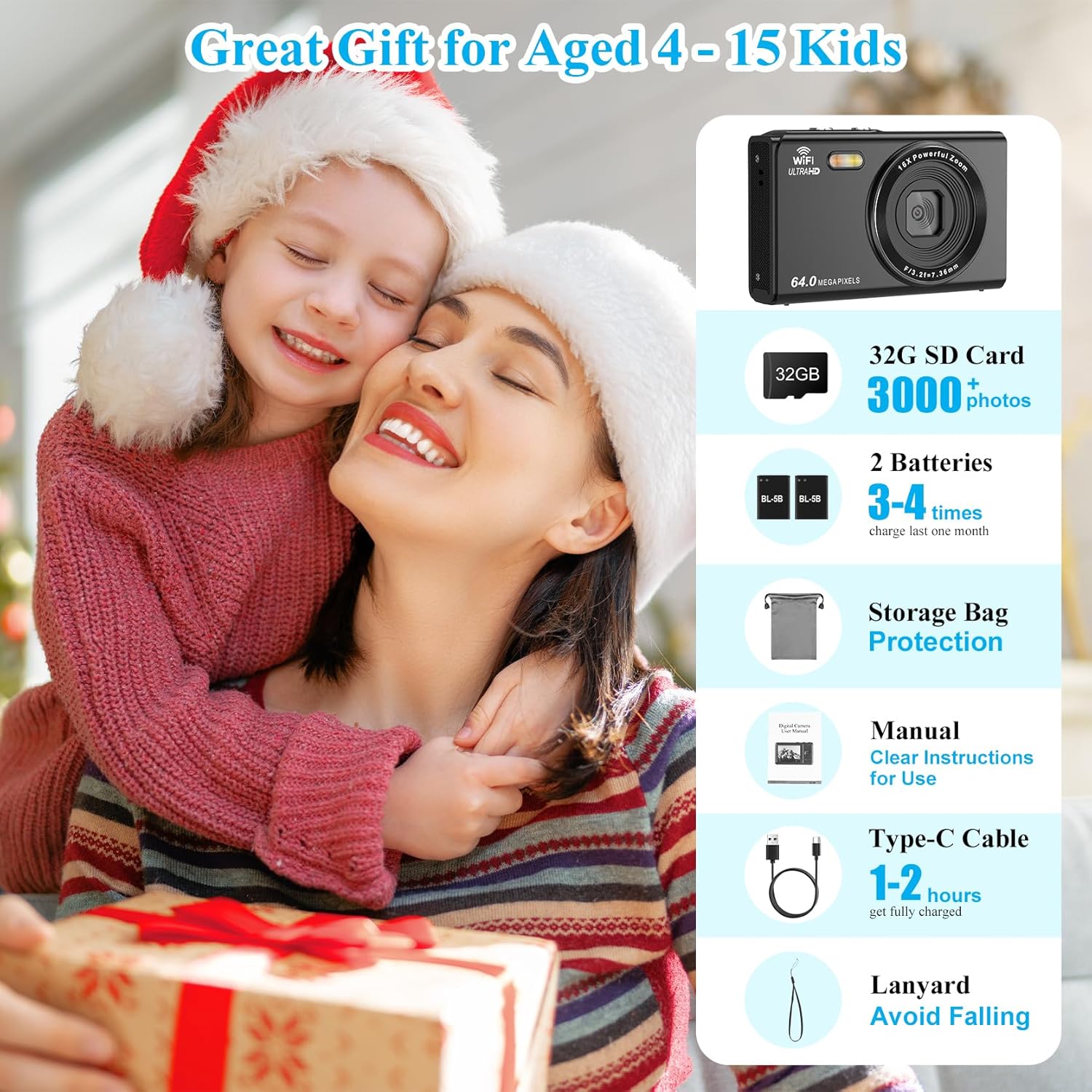
Image: A visual representation of the items included in the camera package, such as the camera, memory card, batteries, cables, and carrying pouch.
3. Guía de configuración
3.1 Instalación da batería e da tarxeta de memoria
- Locate the battery and memory card compartment door on the bottom of the camera.
- Slide the latch to open the compartment door.
- Insert the BL-5B battery into the battery slot, ensuring the correct orientation as indicated inside the compartment.
- Insert the 32GB memory card into the SD card slot until it clicks into place.
- Close the compartment door securely until it latches.

Image: A detailed diagram illustrating the location of the battery and memory card slots, and how to insert them correctly.
3.2 Carga da batería
Before first use, fully charge the camera battery. Connect the camera to a power source (USB wall adapter or computer) using the provided Type-C charging cable. The indicator light will show charging status and turn off when fully charged. A full charge typically takes 1-2 hours.
3.3 Encendido inicial
Press and hold the Power Button located on the top of the camera until the LCD screen illuminates. The camera will display a "Welcome" message before entering shooting mode.
Video: An official product video demonstrating the unboxing, battery and memory card installation, and initial power-on sequence of the LAMA 64MP Compact Camera.
4. Instrucións de funcionamento
4.1 Captura básica de fotos e vídeos
- Facendo fotos: In photo mode, frame your shot using the 2.8-inch LCD screen. Press the Shutter Button halfway to focus, then fully press to capture the image.
- Gravación de vídeos: Switch to video mode using the Mode/Menu button. Press the Shutter Button to start recording, and press it again to stop.
4.2 Función de zoom
The camera features a 16X digital zoom. Use the T/W (Telephoto/Wide-angle) button to zoom in or out. 'T' zooms in, 'W' zooms out.
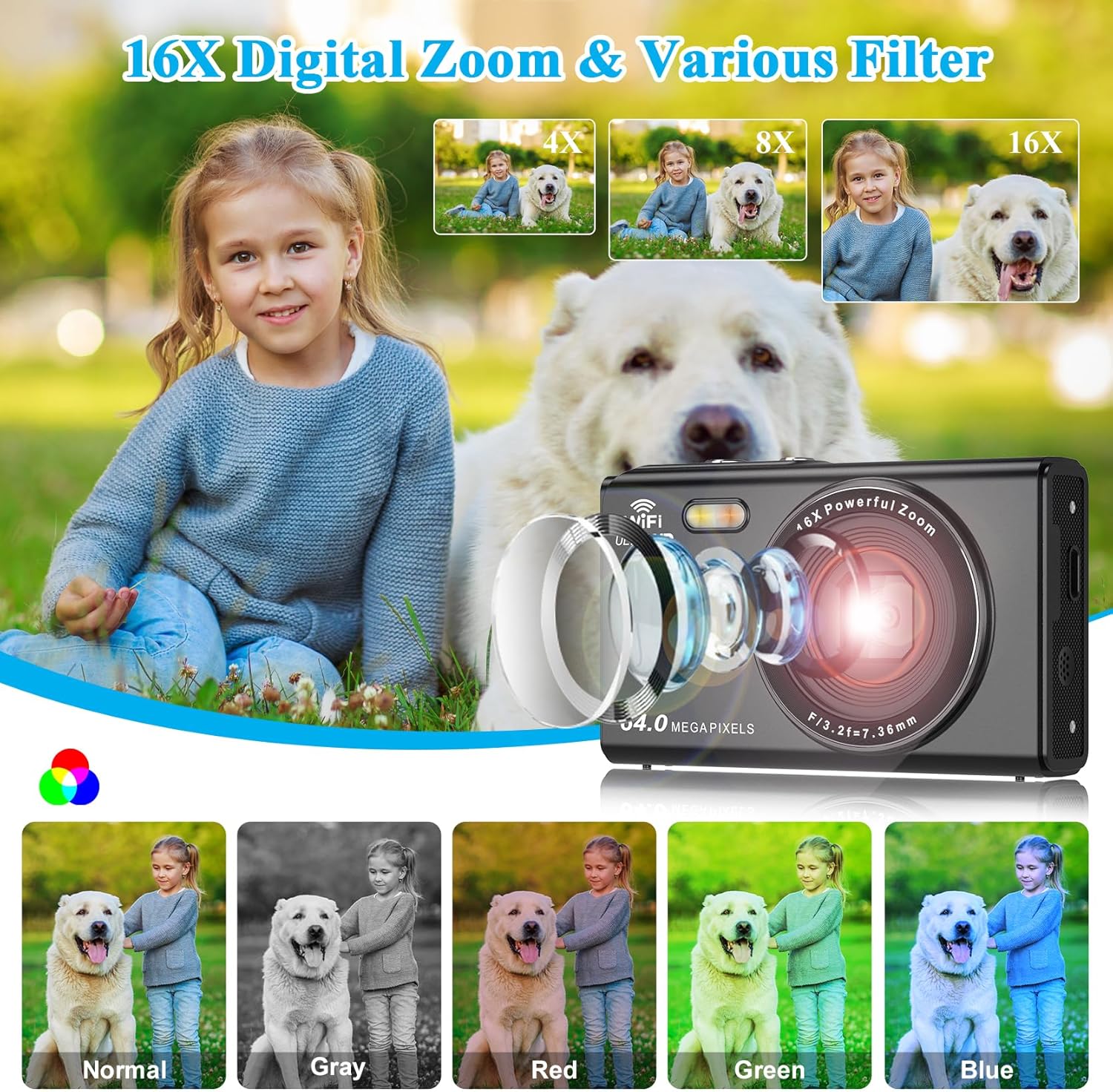
Image: Illustrates the camera's 16X digital zoom capability with examples at 4X, 8X, and 16X magnification, alongside various color filters (Normal, Gray, Red, Green, Blue).
4.3 Características especiais
- Luz de recheo: The built-in fill light can be activated for improved illumination in low-light conditions. Use the UP button to toggle the fill light on/off.
- Antivibración: The camera includes anti-shake technology to help reduce blur caused by camera movement, especially useful during video recording or in challenging lighting.
- Disparo continuo: Capture a rapid sequence of photos by holding down the shutter button in continuous shooting mode.
- Captura de sorrisos: When enabled, the camera can automatically detect smiles and capture photos.
- Temporizador automático: Set a delay (2s, 5s, 10s, 15s, 30s) before the camera takes a photo, allowing you to be in the shot.
- Filtros: Apply various special filters (e.g., Normal, Gray, Red, Green, Blue) to your photos for creative effects.

Imaxe: Visual examples of the camera's advanced features including smile detection, selfie mode, anti-shake for clear motion shots, and continuous shooting.

Image: A comparison showing the effect of the built-in fill light, with examples of photos taken with the light off and on, demonstrating improved brightness.
4.4 WebFuncionalidade de cam
A cámara pódese usar como un webcam for video calls or live streaming. Connect the camera to your computer using the Type-C cable. On the camera screen, select "PC Camera" mode when prompted. Note: In webcam mode, only the digital zoom button can be operated on the camera; other functions are disabled.
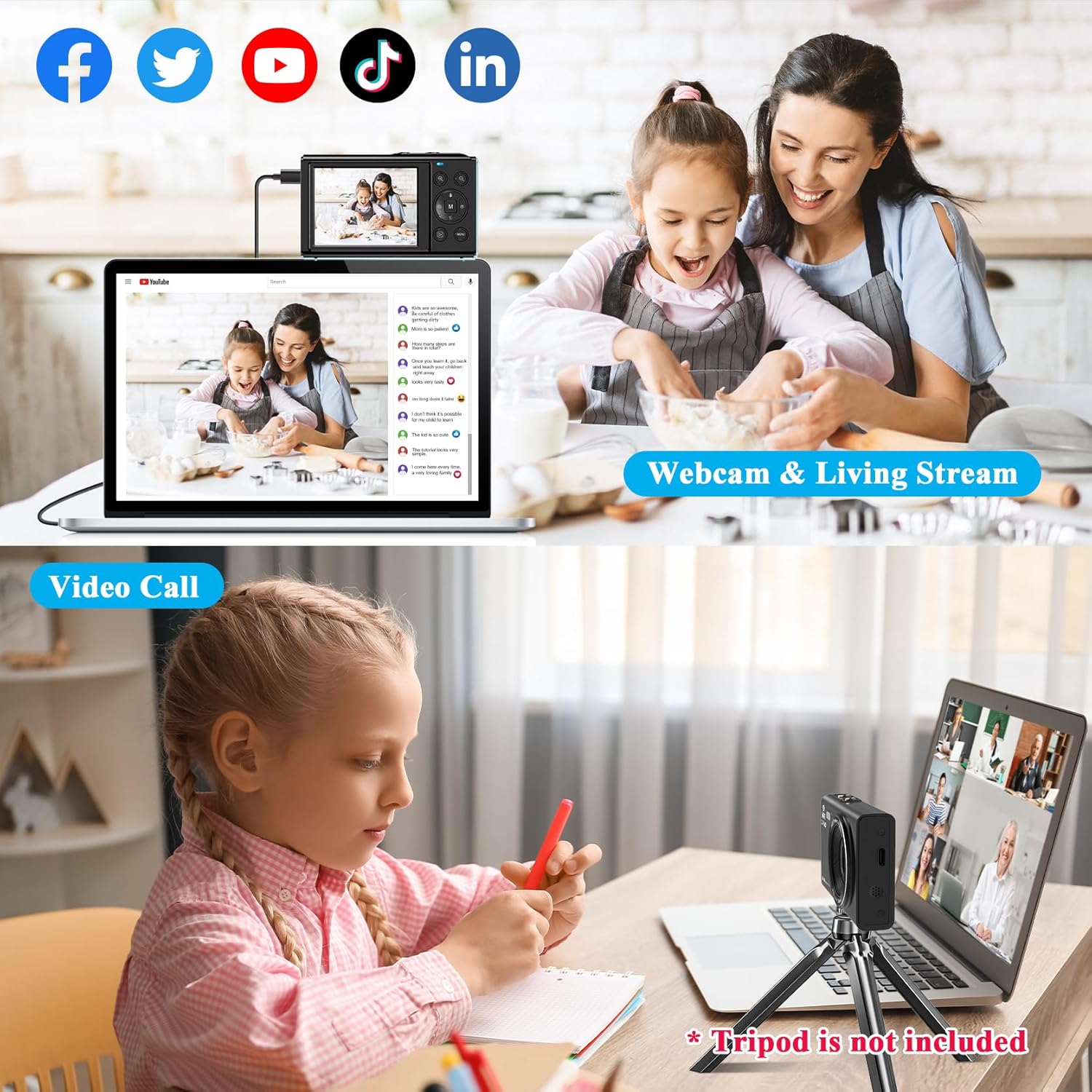
Image: Depicts the camera connected to a laptop, functioning as a webcam for video calls and live streaming on social media platforms.

Image: A visual guide showing the camera's menu option to select "PC Camera" mode when connected to a computer via USB.
4.5 Conexión Wi-Fi e uso da aplicación
The camera supports Wi-Fi connectivity for easy transfer of photos and videos to your mobile device. Download the "iDC CAM" app (scan the QR code provided in the product images or search your app store). Once connected, you can use your phone as a remote control for the camera, browse images, and download files for sharing.
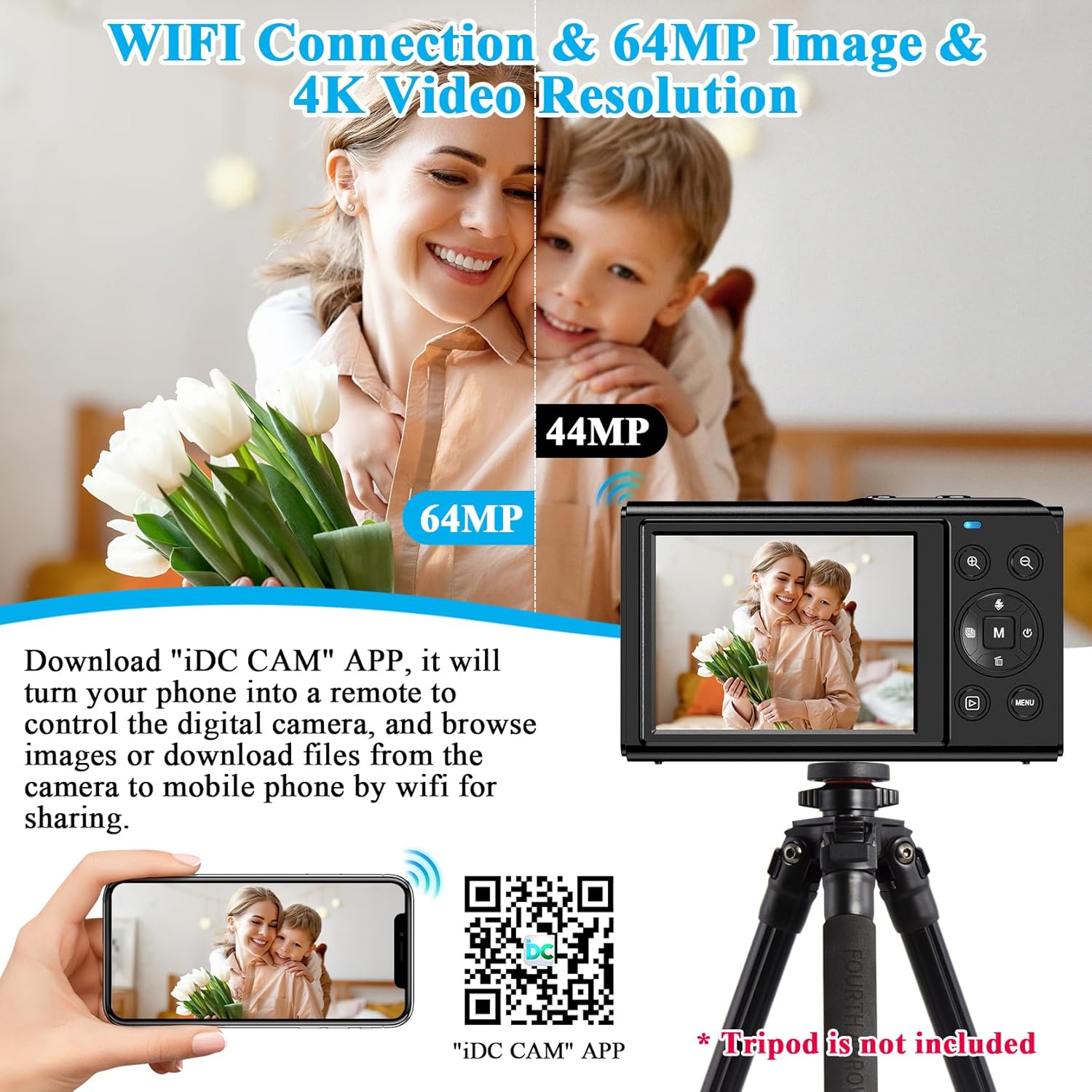
Image: Illustrates the camera's Wi-Fi function, showing a smartphone connected to the camera for image transfer and remote control via the "iDC CAM" app. A QR code for the app is also visible.
Download the "iDC CAM" app here: https://qr24.cn/FypBbk
5. Mantemento
- Limpeza: Use a soft, dry cloth to clean the camera body. For the lens and screen, use a specialized lens cleaning cloth and solution. Avoid abrasive materials or harsh chemicals.
- Coidado da batería: Store batteries in a cool, dry place when not in use. If storing for extended periods, charge them to about 50% capacity. Avoid fully discharging batteries frequently.
- Almacenamento: When not in use, store the camera in its provided pouch to protect it from dust and scratches. Keep it away from extreme temperatures, humidity, and direct sunlight.
6 Solución de problemas
| Problema | Causa posible | Solución |
|---|---|---|
| A cámara non se acende. | A batería está descargada ou inserida incorrectamente. | Ensure battery is charged and inserted with correct polarity. |
| Non se poden facer fotos/vídeos. | Memory card full, not inserted, or corrupted. | Check memory card. Delete old files, reinsert, or try a different card. |
| As imaxes son borrosas. | Camera shake, dirty lens, or out of focus. | Hold camera steady, clean lens, ensure auto-focus engages. |
| Falla a conexión wifi. | Incorrect password, camera too far from device, app issue. | Verify password, move closer, restart camera/app/device. |
7. Especificacións
| Característica | Detalle |
|---|---|
| Nome do modelo | LM220C |
| Resolución de sensor fotográfico | 64 MP |
| Resolución de vídeo | 1080p FHD |
| Zoom dixital | 16x |
| Tamaño da pantalla | 2.8 polgadas |
| Tipo de visualización | LCD |
| Estabilización da imaxe | Dixital |
| Capacidade de almacenamento da memoria | 32 GB (External-Memory Size) |
| Tecnoloxía de conectividade | Wi-Fi, USB Type-C |
| Peso do elemento | 113 gramos |
| Tipo de batería | Lithium Polymer (BL-5B) |
| Soportado File Formato | JPEG (imaxe), MP4 (vídeo) |
| Característica especial | sen fíos, Webcam Functionality, Fill Light, Anti-Shake, Continuous Shooting, Face Detection, Smile Capture, Self-Timer |
8. Garantía e soporte
LAMA products are designed for reliability and performance. For warranty information, please refer to the warranty card included in your product packaging or visit the official LAMA website. If you encounter any issues or require technical assistance, please contact LAMA customer support through the following channels:
- Oficial Websitio: Visit the LAMA Store on Amazon (for product information and updates)
- Soporte por correo electrónico: Refer to your user manual or product packaging for specific email contact.
- Online FAQ/Troubleshooting: Check the LAMA website for frequently asked questions and detailed troubleshooting guides.
Conserve o comprobante de compra para reclamacións de garantía.


