1. Introdución
The ICUIXIAN HDR HDMI Matrix Switch 8x8 is a professional audio and video switcher designed for high-quality signal distribution. It features 8 HDMI inputs, 8 HDMI outputs, and 8 SPDIF & LR analog audio outputs, supporting advanced video and audio formats.
Características principais:
- HDR10 HDMI Matrix 8x8 4K60Hz: Supports HDMI2.0 (HDCP2.3) with a maximum output resolution of 4K@60Hz 4:4:4, HDR10, and Dolby Vision.
- 4K@60Hz-4:4:4 Ultra HD Resolution: Features downward doubling function, allowing 4K video sources to display 4K content on 4K displays and 1080P content on 1080P displays simultaneously (up to two outputs).
- Control flexible: Offers multiple control options including two-way infrared (IR) control, RS232 command, TCP/IP network port control, and front panel key control.
- Broadcast-level Professional Matrix: 18Gbps bandwidth, HDMI2.0/HDCP2.2, HDR10, Web GUI, CEC, ARC, AOC, EDID management, and support for LPCM 7.1 Audio, Dolby Atmos, Dolby TrueHD, Dolby Digital Plus, DTS:X, and DTS-HD Master Audio pass-through.
- Web Control + EDID Presets: Cross-platform web control via computer, mobile phone, or tablet. Built-in scenario management allows setting up to 32 scenarios for quick recall and switching.
2. Contido do paquete
Please ensure all items are present and in good condition. If any items are missing or damaged, contact your vendor immediately.
- ICUIXIAN HDR HDMI Matrix Switch 8x8 Unit
- Adaptador de alimentación
- Control remoto IR
- Manual de usuario
- Soportes de montaxe (se corresponde)
3. Produto rematadoview
3.1 Panel frontal

Figura 3.1: Fronte view of the ICUIXIAN HDR HDMI Matrix Switch 8x8 with its remote control.

Figura 3.2: detallada view of the front panel, showing input and output selection buttons, and control method indicators.
- INPUTS 1-8 Buttons: Selecciona a fonte de entrada HDMI.
- OUTPUTS 1-8 Buttons: Selects the HDMI output destination.
- Botón TODO: Assigns the selected input to all outputs.
- Botón BORRAR: Clears all output assignments.
- Botón ENTER: Confirma as seleccións.
- PRESET/RECALL Buttons: Saves or recalls custom configurations.
- Receptor IR: For remote control operation.
- LED de alimentación: Indica o estado da enerxía.
3.2 Panel posterior

Figure 3.3: Rear panel connections including HDMI inputs/outputs, audio outputs, and control ports.
- ENTRADA HDMI 1-8: Portos de entrada HDMI para dispositivos fonte.
- SAÍDA HDMI 1-8: HDMI output ports for display devices.
- SPDIF & LR Audio Outputs: Coaxial and analog stereo audio outputs for each HDMI output.
- Porto RS232: For serial control via a computer or control system.
- TCP/IP (Ethernet) Port: For network control via Web GUI.
- IR EXT: External IR receiver port.
- DC 24 V: Porto de entrada de enerxía.
4. Configuración e conexións
Follow these steps to connect your ICUIXIAN HDR HDMI Matrix Switch 8x8:
- Apagado: Ensure all devices, including the matrix switch, are powered off before making any connections.
- Conectar fontes HDMI: Connect your HDMI source devices (e.g., Blu-ray players, game consoles, PCs) to the HDMI IN 1-8 ports on the matrix switch using high-quality HDMI cables.
- Conectar pantallas HDMI: Connect your HDMI display devices (e.g., TVs, projectors) to the HDMI OUT 1-8 ports on the matrix switch.
- Conexións de audio (opcionais): If using external audio systems, connect the SPDIF or LR audio outputs from the matrix switch to your audio receiver or ampmáis vivo.
- Control Connections (Optional):
- For RS232 control, connect a serial cable from your control system to the RS232 port.
- For network control, connect an Ethernet cable from your router/network to the TCP/IP port.
- For extended IR control, connect an external IR receiver to the IR EXT port.
- Encendido: Connect the power adapter to the DC 24V port and then plug it into a power outlet. Power on all connected source and display devices.

Figura 4.1: Example connection diagram showing various source devices connected to the matrix switch and then to multiple display devices.
5. Instrucións de funcionamento
5.1 Basic Switching Operations (Front Panel)
To switch an input to an output:
- Prema o desexado ENTRADA button (1-8). The corresponding LED will light up.
- Prema o desexado SAÍDA button (1-8). The corresponding LED will light up.
- Preme o ENTRAR button to confirm the switch. The selected input will now be displayed on the chosen output.
To switch one input to all outputs:
- Prema o desexado ENTRADA botón (1-8).
- Preme o TODOS botón.
- Preme o ENTRAR button to confirm. The selected input will now be displayed on all outputs.
To clear all output assignments:
- Preme o BORRAR botón.
5.2 Métodos de control
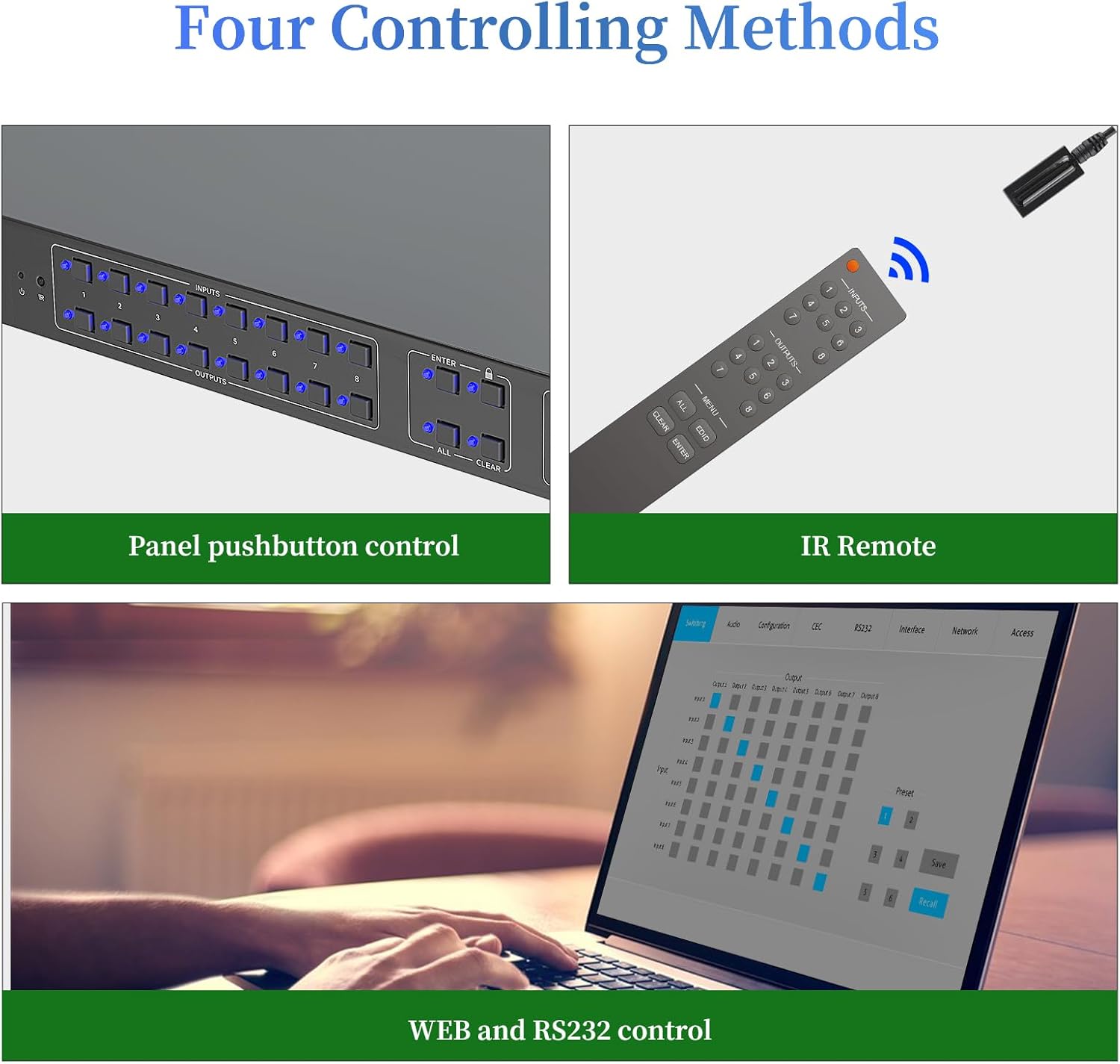
Figura 5.1: Máisview of the four available control methods for the matrix switch.
- Botóns do panel frontal: Direct control using the physical buttons on the device.
- Control remoto IR: Use the included IR remote for convenient wireless control.
- Control RS232: Integrate with professional control systems using RS232 commands. Refer to the detailed RS232 command set in the appendix (if available) or contact support.
- Web GUI Control (TCP/IP): Acceder a web-based graphical user interface for control from a computer, tablet, or smartphone connected to the same network.
5.3 Web Control Management
O Web GUI allows for comprehensive control and configuration of the matrix switch, including video signal switching, preset scene saving and recalling, audio settings, EDID management, CEC control, and network settings.
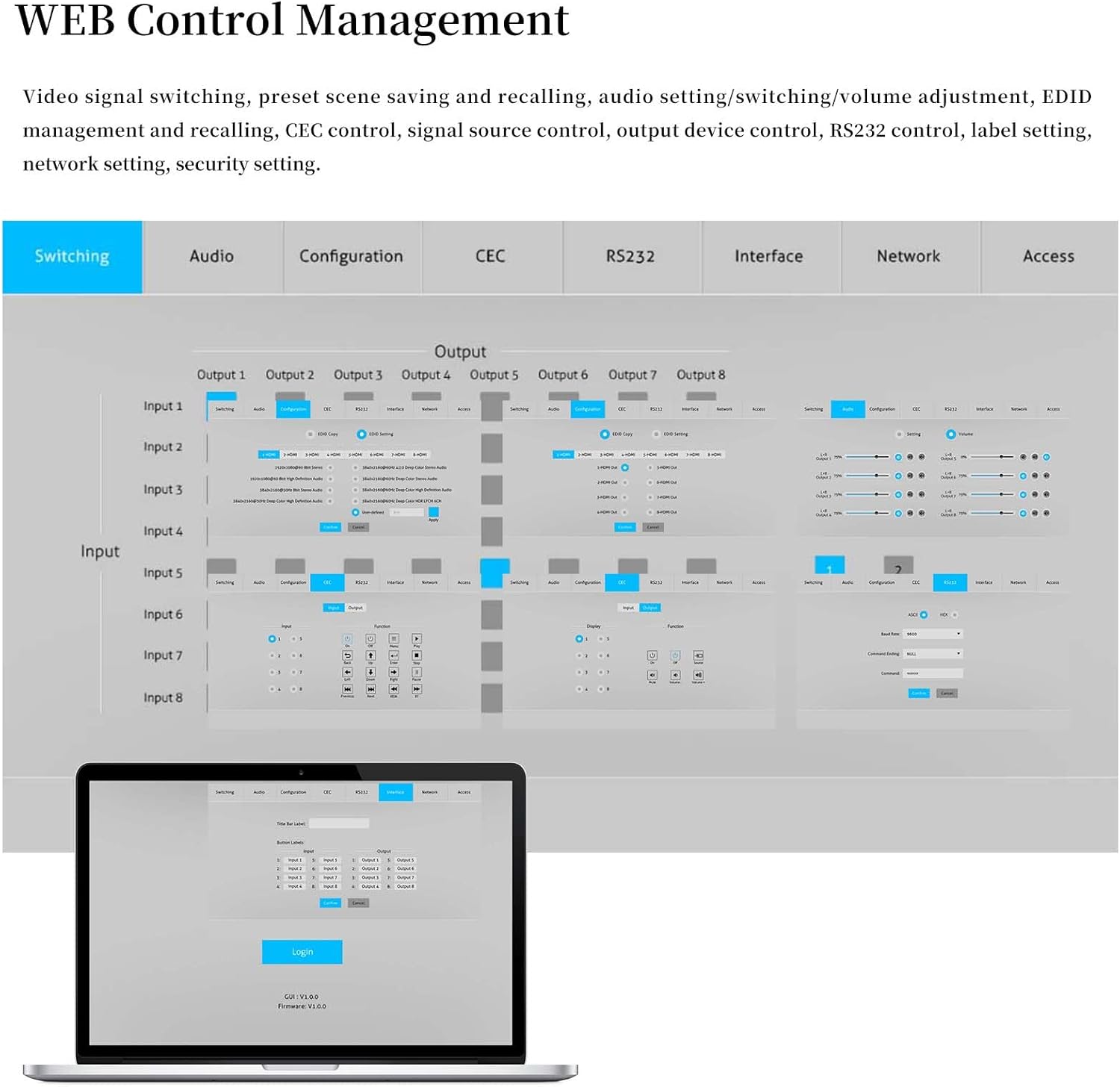
Figura 5.2: Web GUI interface showing input/output routing and various configuration tabs.
Para acceder ao Web GUI:
- Connect the matrix switch to your network via the TCP/IP port.
- Find the IP address of the device (usually displayed on a connected screen during boot or via network scanning tools).
- Abrir a web browser on a device connected to the same network and enter the IP address.
- Log in using the default credentials (refer to the device's label or contact support if unknown).
5.4 EDID Management and Presets
The matrix switch supports intelligent EDID management to ensure compatibility between source devices and displays. You can configure and save up to 32 custom scenarios (profiles) for quick recall.
To save a current configuration as a profile:
- Preme MODE + [Profile Number] + ENTER.
To recall a saved scenario:
- Preme SCENE + [Scenario Number] + ENTER.
Video 5.1: Demonstration of saving and recalling profiles using the front panel buttons. This video shows how to save current input/output configurations as profiles and recall them later.
Video 5.2: Further demonstration of profile saving and recalling, illustrating different input/output assignments.
5.5 Video Wall Functionality and Downscaling
The matrix switch supports various screen modes, including Matrix Mode, Matrix & Splitter Mode, and Splitter Mode, allowing flexible display configurations. It also supports 4K to 1080P downscaling, enabling simultaneous display of 4K content on 4K displays and 1080P content on 1080P displays.

Figure 5.3: Visual representation of different screen modes: Matrix (each display selects a standalone input), Matrix & Splitter (part of displays share the same input), and Splitter (all displays share the same input).

Figure 5.4: Demonstration of the 4K to 1080P downscaling capability, showing a 4K source displayed on both 4K and 1080P screens.
Video 5.3: Demonstration of the video wall functionality, showcasing various content displayed across multiple screens in different configurations.
6. Mantemento
- Limpeza: Usa un pano suave e seco para limpar o dispositivo. Evita produtos de limpeza líquidos ou aerosois.
- Ventilación: Asegúrese de que haxa unha ventilación axeitada arredor da unidade para evitar o sobrequecemento. Non bloquee ningunha abertura de ventilación.
- Xestión de cables Keep cables organized and free from kinks or excessive bending to prevent signal degradation or damage.
- Actualizacións de firmware: Consulte o do fabricante websitio periodicamente para obter actualizacións de firmware que garantan un rendemento óptimo e o acceso a novas funcións.
7 Solución de problemas
| Problema | Causa posible | Solución |
|---|---|---|
| Sen saída de vídeo na pantalla. |
|
|
| Mala calidade de vídeo ou parpadeo. |
|
|
| O control remoto non funciona. |
|
|
8. Especificacións
| Característica | Detalle |
|---|---|
| Marca | ICUIXIAN |
| Modelo | HDR HDMI Matrix Switch 8x8 |
| Cor | negro |
| Tipo de conector | HDMI |
| Dispositivos compatibles | Portátil, Televisión |
| Tipo de cable | HDMI |
| resolución máxima | 4K@60Hz 4:4:4 |
| Ancho de banda | 18 Gbps |
| Versión HDMI | HDMI 2.0 (HDCP2.3) |
| Soporte HDR | HDR10, Dolby Vision |
| Soporte de audio | LPCM 7.1, Dolby Atmos, Dolby TrueHD, Dolby Digital Plus, DTS:X, DTS-HD Master Audio |
| Métodos de control | Front Panel, IR Remote, RS232, TCP/IP (Web GUI) |
| Xestión EDID | Intelligent EDID, 32 Scenario Presets |
9. Garantía e soporte
ICUIXIAN products come with a standard manufacturer's warranty. For specific warranty details, please refer to the warranty card included with your product or visit the official ICUIXIAN website. For technical support, troubleshooting assistance, or to inquire about replacement parts, please contact ICUIXIAN customer service through their official channels.
Tamén podes considerar mercarasinPlans de protección ampliada de g para o teu dispositivo:
- Plan de protección a 3 anos
- Protección completa: un plan cobre todas as compras pasadas e futuras elixibles


