1. Produto rematadoview
The ULTRAK 495 Professional 100-Lap Digital Stopwatch is designed for precise timekeeping in various sports and training activities. It features a large, easy-to-read display and multiple functions to support athletes, coaches, and referees.
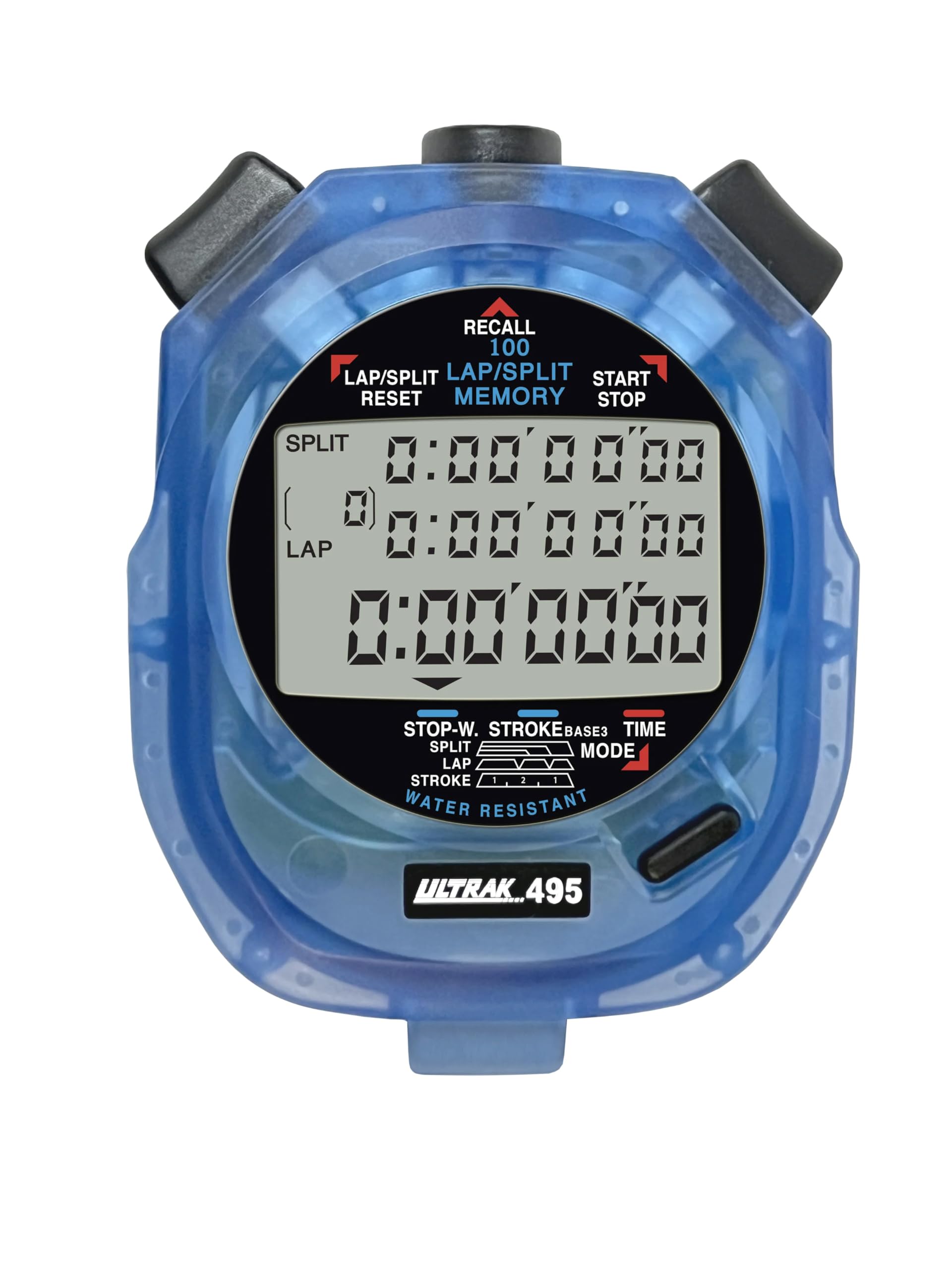
Figure 1: ULTRAK 495 Stopwatch in blue.
Características principais:
- 100 Dual Split Recallable Memory: Enhances accuracy for track and field events, ideal for athletes and coaches requiring precise timekeeping.
- Funcións versátiles: Includes stroke/frequency, time, and calendar functions, suitable for diverse sports activities.
- Deseño resistente á auga: Allows for outdoor use in various weather conditions.
- Large 3-Row Display: Facilita doado viewing of multiple lap times simultaneously.
- Batería de litio duradeira: Ensures reliability for extended use.
2. Configuración
2.1. Instalación da batería
The ULTRAK 495 Stopwatch comes with one Lithium Metal battery pre-installed. If battery replacement is needed, refer to the Maintenance section.
2.2. Configuración inicial da data e da hora
Para establecer a hora e a data:
- Preme o MODO button repeatedly until the time/calendar display mode is active.
- Manteña premido o SET button (usually located on the top right) until the digits begin to flash.
- Usa o LAP/SPLIT/RESET button (top left) to adjust the flashing digit.
- Preme o SET button to move to the next digit or setting (e.g., hours, minutes, seconds, month, day, year).
- Unha vez que todos os axustes sexan correctos, prema o botón MODO botón para saír do modo de configuración.

Figure 2: Stopwatch displaying various modes, including Time/Calendar.
3. Funcionamento
3.1. Stopwatch Mode (Standard Timing)
This mode is used for basic timing of events.
- Ensure the stopwatch is in the standard stopwatch mode (usually indicated by "STOPWATCH" on the display). If not, press MODO ata que aparece.
- Preme INICIAR/PARAR (top right button) to begin timing.
- Preme INICIAR/PARAR de novo para pausar o temporizador.
- Preme INICIAR/PARAR to resume timing.
- To reset the timer to zero, ensure it is stopped, then press LAP/SPLIT/RESET (top left button).
3.2. Lap/Split Timing with Memory Recall
The ULTRAK 495 can record up to 100 lap and split times.
- In stopwatch mode, press INICIAR/PARAR para comezar a cronometrar.
- Preme LAP/SPLIT/RESET to record a split time. The display will momentarily show the split time while the main timer continues running in the background. The bottom row displays the running event or lap time.
- Repeat step 2 for each lap or split you wish to record.
- Preme INICIAR/PARAR to end the timing session.
- To recall recorded times, press the LEMBRAR button (top center). Use the LAP/SPLIT/RESET e INICIAR/PARAR buttons to navigate through the stored lap and split times.
- To exit recall mode, press MODO. To clear memory, ensure the stopwatch is stopped and not in recall mode, then press and hold LAP/SPLIT/RESET.

Figure 3: Display showing simultaneous split, lap, and total times.
3.3. Modo de temporizador de conta atrás
The stopwatch includes a countdown timer function.
- Preme MODO until the countdown timer display appears.
- Mantén premido SET para entrar no modo de configuración.
- Use LAP/SPLIT/RESET to adjust the time and SET para moverse entre horas, minutos e segundos.
- Unha vez configurado o tempo de conta atrás desexado, prema MODO para saír do modo de configuración.
- Preme INICIAR/PARAR to begin the countdown. An alarm will sound when the timer reaches zero.
3.4. Stroke/Frequency Measuring Mode
This mode is useful for measuring stroke rates in swimming or other repetitive actions.
- Preme MODO until the stroke/frequency mode is displayed.
- Preme INICIAR/PARAR to begin measuring.
- Preme LAP/SPLIT/RESET at the start of each stroke or cycle. The stopwatch will calculate and display the frequency.
- Preme INICIAR/PARAR para deixar de medir.
4. Mantemento
4.1. Limpeza
Wipe the stopwatch with a soft, dry cloth. For stubborn dirt, use a slightly damp cloth and mild soap, then dry thoroughly. Avoid harsh chemicals or abrasive cleaners.
4.2. Resistencia á auga
The ULTRAK 495 is water-resistant, making it suitable for use in various weather conditions. However, it is not designed for submersion. Avoid pressing buttons while the stopwatch is wet to prevent water ingress.
4.3. Substitución da batería
The stopwatch uses one Lithium Metal battery. When the display becomes dim or functions become erratic, it's time to replace the battery. Carefully open the battery compartment (usually on the back, secured by small screws) and replace with a new battery of the same type. Ensure proper polarity and securely close the compartment.
5 Solución de problemas
- A pantalla está en branco ou escura: Comprobe a batería. Substitúaa se é necesario.
- Stopwatch resets unexpectedly during timing: This can sometimes occur due to low battery or a temporary electrical glitch. Try replacing the battery. If the issue persists, ensure buttons are not being pressed inadvertently.
- Os botóns non responden: Ensure the stopwatch is not in a locked mode (if applicable, check manual for specific lock features). If wet, ensure it is completely dry. If still unresponsive, try replacing the battery.
- Hora ou data incorrectas: Refer to section 2.2 to re-set the time and date.
6. Especificacións
| Característica | Detalle |
|---|---|
| Número de modelo | 495 |
| Memoria | 100 Dual Split Recallable Laps |
| Mostrar | Large 3-Row Display |
| Funcións | Stopwatch, Lap/Split, Countdown Timer, Stroke/Frequency, Time, Calendar |
| Resistencia á auga | Si (resistente á auga) |
| Tipo de batería | 1 batería de metal de litio (incluída) |
| Material | Plástico |
| Dimensións do produto | 0.2" D x 2.5" W x 3.5" H |
| Peso do elemento | 3.2 onzas |
7. Garantía e soporte
For specific warranty information and customer support, please refer to the documentation included with your product or visit the official Ultrak websitio. Garde o recibo da compra como proba de compra para calquera reclamación de garantía.


