Introdución
Thank you for choosing the Fintie Rotating Case for your iPad Air 13-inch. This manual provides essential information for the proper setup, operation, and maintenance of your new protective case. Please read these instructions carefully to ensure optimal use and longevity of the product.
Compatibilidade
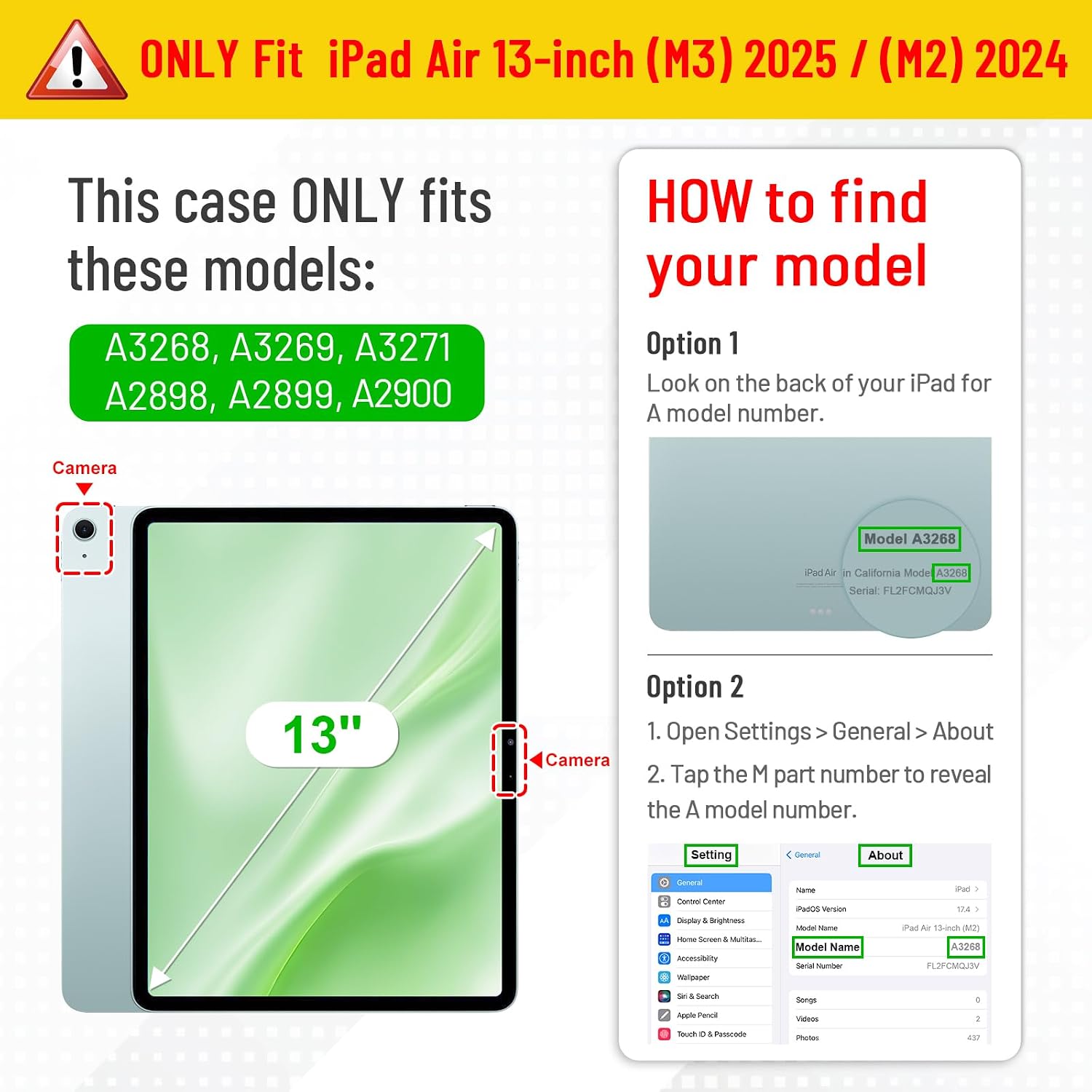
This Fintie Rotating Case is exclusively designed for the following iPad models:
- iPad Air 13-inch (M3) 2025 (Model Numbers: A3268, A3269, A3271)
- iPad Air 13-inch (M2) 2024 (Model Numbers: A2898, A2899, A2900)
To verify your iPad model number, please check the back bottom of your iPad. This case is not compatible with any other iPad models.
Características clave
- 360-Degree Rotating Stand: Allows for flexible horizontal (landscape) and vertical (portrait) viewángulos de inflexión.
- Integrated Pencil Holder: Securely stores your Apple Pencil Pro and supports magnetic and wireless charging while the case is on.
- Auto Wake/Sleep Function: Automatically wakes your iPad when opened and puts it to sleep when closed, conserving battery life.
- Dual Layer Protection: Features a hard interior cover and a premium synthetic leather exterior to protect against scratches and impacts.
- Snap-n-Roll Design: Easy installation and removal of your iPad.
- Elastic Band Closure: Keeps the case securely closed during transport.
- Touch ID Support: Designed with precise cutouts to allow full functionality of the fingerprint sensor.

Setup: Installing Your iPad
- Preparar o caso: If your case includes a screen protector film or back cover film, gently remove it before installation.
- Inserir iPad: Align your iPad with the left side of the case's inner shell. Gently snap the left side of your iPad into the case.
- Secure iPad: Press the right side of your iPad firmly into the case until it is fully seated and secure. Ensure all corners are protected.
- Comprobar axuste: Verify that all ports, buttons, and the camera are correctly aligned with the case's cutouts.
Instrucións de funcionamento
Using the 360-Degree Rotating Stand
The case features a unique rotating mechanism that allows you to position your iPad in multiple viewing angles. Simply rotate the iPad within the case to switch between portrait and landscape orientations. The cover can then be folded into a stand to support your device.

Axustable Viewángulos ing
The front cover of the case includes two anti-slip grooves. These grooves allow you to adjust the viewing angle of your iPad for comfortable use, whether for watching videos, typing, or browsing.

Apple Pencil Pro Holder
The case includes a built-in holder for your Apple Pencil Pro. This holder allows for secure storage and supports magnetic attachment and wireless charging of the Apple Pencil Pro when the case is on. To remove the pencil, gently push it from the cutout on the back of the case.

Auto Wake/Sleep Function
The integrated magnets in the cover automatically wake your iPad when you open the case and put it to sleep when you close it. This feature helps conserve battery life.

Touch ID Functionality
The case is designed with a precise cutout for the Touch ID sensor, ensuring full functionality for securely unlocking your iPad.

Secure Transport
An elastic band is integrated into the case design to hold the cover closed securely, preventing accidental opening and providing added protection when you are on the go.

Mantemento
To maintain the appearance and functionality of your Fintie Rotating Case, follow these simple guidelines:
- Limpeza: Limpe o exterior cun suave, damp cloth. Avoid using harsh chemicals or abrasive cleaners, as these may damage the material.
- Almacenamento: Garda a caixa nun lugar fresco e seco, lonxe da luz solar directa e de temperaturas extremas cando non a uses.
- Avoid Over-stuffing: Do not place excessive items in the case's pockets (if applicable) or force the cover closed, as this may deform the case or damage your iPad.
Resolución de problemas
iPad Not Waking/Sleeping Automatically
- Ensure your iPad is correctly seated within the case.
- Check your iPad settings: Go to Settings > Display & Brightness > Lock/Unlock and ensure it is enabled.
Difficulty with Stand Function
- Ensure the case is placed on a flat, stable surface.
- Adjust the iPad's position within the grooves to find the most stable angle.
Especificacións
| Característica | Detalle |
|---|---|
| Dimensións do produto | 11.3 x 9.25 x 0.91 polgadas |
| Peso do elemento | 1.1 libras |
| Marca | FINTIE |
| Dispositivos compatibles | iPad Air 13-inch (M2) 2024 (A2898/A2899/A2900), iPad Air 13-inch (M3) 2025 (A3268/A3269/A3271) |
| Factor de forma | Caso |
| Tipo de carcasa | Caso xiratorio |
| Características especiais | 360-Degree Rotating Stand, Pencil Holder, Auto Wake/Sleep, Dual Layer Protection, Elastic Band Closure, Touch ID Support |
| Cor | Blossom (variant shown) |
| O que hai na caixa | 1 * Funda protectora |
Garantía e Soporte
For warranty information or technical support, please refer to the documentation included with your purchase or visit the official Fintie website. Fintie is committed to customer satisfaction and provides support for its products.
You can visit the FINTIE Store for more information: FINTIE Store on Amazon


