Introdución
Welcome to the user manual for your new Redmi Xiaomi 13 4G LTE smartphone. This guide provides essential information on setting up, operating, maintaining, and troubleshooting your device to ensure optimal performance and user experience. Please read this manual thoroughly before using your phone.
O que hai na caixa
Upon unboxing your Redmi Xiaomi 13, verify that all the following items are included:
- Redmi Xiaomi 13 Smartphone
- Cargador de pared de 33 W
- Adaptador
- Cargador de coche rápido
- Expulsor da bandexa SIM
Configuración
1. Instalación da tarxeta SIM e da tarxeta MicroSD
Your Redmi 13 supports Dual Nano SIM cards or one Nano SIM and one MicroSD card in a hybrid slot. Ensure your SIM card is activated by your carrier before installation.
- Localiza a bandexa da tarxeta SIM no lateral do teu teléfono.
- Insira a ferramenta de expulsión da bandexa da SIM no pequeno orificio que hai xunto á bandexa e prema firmemente ata que esta saia.
- Carefully place your Nano SIM card(s) and/or MicroSD card into the designated slots on the tray. Ensure the gold contacts face downwards.
- Gently push the tray back into the phone until it is flush with the device.
Imaxe: Lateral view of the Redmi Xiaomi 13, illustrating the location of the SIM tray and camera module.
2. Acendido e configuración iniciais
Para acender o dispositivo por primeira vez:
- Press and hold the Power button (located on the right side of the phone) until the Redmi logo appears on the screen.
- Follow the on-screen instructions to select your language, region, connect to a Wi-Fi network, and set up your Google account.
- You will be prompted to set up security features such as a PIN, pattern, password, fingerprint, or face unlock.

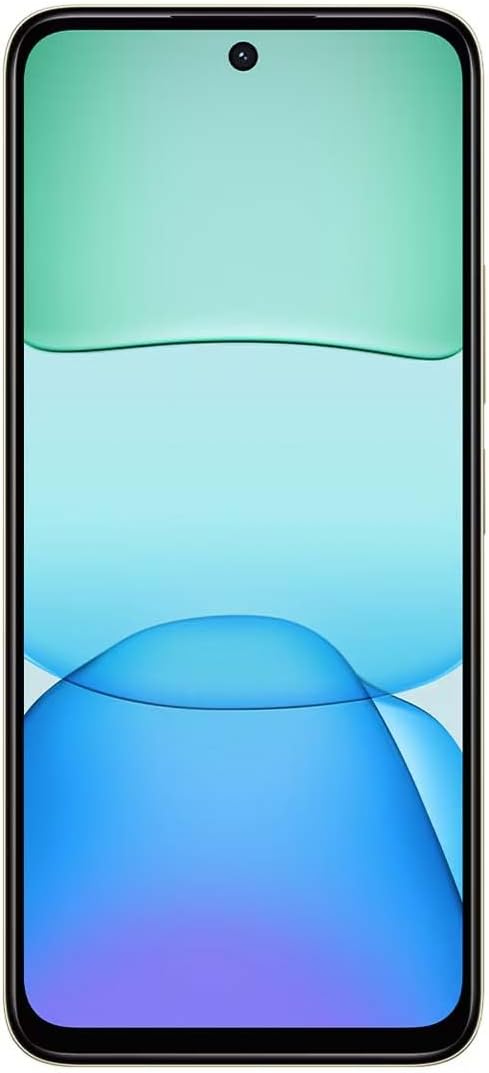
Imaxe: Fronte view of the Redmi Xiaomi 13, showing the display and front camera.
3. Configuración de rede
Your device is designed for 4G LTE connectivity. For USA users, it is compatible with Tello and Mint Mobile. For global users, it supports various GSM carriers. Ensure your APN settings are correctly configured if you experience network issues. These settings are usually automatically detected upon SIM insertion.
Operando o seu dispositivo
1. Características da pantalla
The Redmi 13 features a 6.79-inch Dot Drop HD+ display with a resolution of 1650 x 720. It supports Sunlight display for better visibility in bright conditions and Reading mode to reduce eye strain. You can adjust color temperature in the display settings.
2. Uso da cámara
Your phone is equipped with a powerful camera system:
- Cámara traseira: 108MP main camera (f/1.8 with 4-in-1 pixel binning) and a 2MP depth camera (f/2.4).
- Cámara frontal: 13MP para selfies e videochamadas.
Para facer unha foto:
- Abre a aplicación Cámara.
- Select your desired mode (Photo, Portrait, Video, etc.).
- Toca o botón do obturador para capturar unha imaxe.
The camera features HDR mode for improved dynamic range and quick snap functionality for capturing moving moments efficiently.

Imaxe: Costas view of the Redmi Xiaomi 13, highlighting the 108MP dual camera system.
3. Conectividade
The device supports Wi-Fi for internet access, GPS for navigation (including AGPS, GLONASS, Beidou, Galileo), and Bluetooth for connecting wireless accessories. It also includes a 3.5mm headphone jack for wired audio.
4. Características de seguridade
Protect your device and data using the following security options:
- Sensor de impresión dixital traseiro: Rexistra as túas impresións dixitais para un desbloqueo rápido e seguro.
- Desbloqueo facial por IA: Usa a túa cara para desbloquear o dispositivo.
- PIN/Patrón/Contrasinal: Standard lock screen security methods.
Mantemento
1. Coidado da batería
The Redmi 13 is equipped with a 5030mAh (typ) battery. To prolong battery life:
- Evita temperaturas extremas.
- Use the provided 33W charger for optimal charging speed and safety.
- Non deixes que a batería se descargue por completo con frecuencia.
2. Actualizacións de software
Comprobe e instale regularmente actualizacións de software para garantir que o seu dispositivo teña as últimas funcións, parches de seguridade e melloras de rendemento. Vaia a Configuración > Acerca do teléfono > Actualización do sistema para comprobar as actualizacións.
3. Limpeza do dispositivo
Use a soft, lint-free cloth to clean your phone. Avoid using harsh chemicals or abrasive materials that could damage the screen or finish.
Resolución de problemas
If you encounter issues with your Redmi 13, try the following common troubleshooting steps:
- O dispositivo non responde: Mantén premido o botón de acendido/apagado durante uns 10-15 segundos para forzar un reinicio.
- Problemas de rede: Check if your SIM card is properly inserted. Toggle Airplane Mode on and off. Reset network settings via Settings > Connection & sharing > Reset Wi-Fi, mobile networks, and Bluetooth.
- Fallo da aplicación: Limpar a caché e os datos da aplicación mediante Configuración > Aplicacións > Xestionar aplicacións > [Nome da aplicación] > Borrar datosSe o problema persiste, desinstala e reinstala a aplicación.
- A batería esgotando rapidamente: Review uso da batería en Axustes> Batería para identificar aplicacións que consomen moita enerxía. Reduce o brillo da pantalla e desactiva funcións innecesarias como o GPS ou o Bluetooth cando non esteas en uso.
- Almacenamento cheo: Eliminar innecesario files, photos, and videos. Uninstall unused apps. Consider moving media to a MicroSD card if installed.
- Restablecemento de fábrica: Como último recurso para problemas persistentes de software, podes realizar un restablecemento de fábrica. Aviso: Isto borrará todos os datos do teu teléfono. Fai unha copia de seguridade dos datos importantes antes de continuar. Ir a Configuración > Acerca do teléfono > Restablecemento de fábrica.
Especificacións
Below are the key technical specifications for the Redmi Xiaomi 13 4G LTE:
| Nome do modelo | Redmi 13 |
| Sistema Operativo | Android 14 HyperOS |
| Procesador | MediaTek Helio G91 Ultra Octa-core (2x2.0 GHz Cortex-A75 & 6x1.8 GHz Cortex-A55) |
| GPU | Mali-G52 MC2 |
| Mostrar | 6.79 Inches Dot Drop HD+ (1650 x 720) |
| RAM | 6 GB |
| Almacenamento interno | 128 GB |
| Cámara traseira | 108MP (main) + 2MP (depth) |
| Cámara frontal | 13 MP |
| Capacidade da batería | 5030 mAh (típico) |
| Cargando | Carga rápida de 33 W (USB tipo C) |
| Conectividade | 4G LTE, Wi-Fi, Bluetooth, GPS (AGPS, GLONASS, Beidou, Galileo) |
| Jack de audio | 3.5 mm |
| Seguridade | Rear Fingerprint Sensor, AI Face Unlock |
| Dimensións do paquete | 7 x 4 x 2 polgadas |
| Peso | 6 onzas |
Note: Specifications are subject to change without prior notice. Please refer to the official Redmi websitio para obter a información máis actualizada.
Garantía e Soporte
For warranty information, please refer to the warranty card included with your product or visit the official Redmi/Xiaomi website. For technical support, software updates, or service inquiries, please contact Xiaomi customer service or visit their official support channels. Keep your proof of purchase for warranty claims.
Official Redmi/Xiaomi Support: https://www.mi.com/global/support


