1. Introdución
The LAUNCH X431 PRO Star is an advanced automotive intelligent diagnostic tool designed for comprehensive vehicle analysis. This device features an 8-inch touch screen, runs on Android 10.0, and is powered by a 2.0GHz 4-Core processor with 4GB RAM and 64GB ROM. It includes a 6000mAh battery for extended operation. The PRO Star supports fault diagnosis for a wide range of vehicle models and systems, offering functions such as code reading, code clearing, data stream analysis, reset functions, action testing, coding, and matching.

Figure 1.1: LAUNCH X431 PRO Star Diagnostic Scanner with key features highlighted.
2. Configuración e primeiro uso
2.1 Desembalaxe e contido da embalaxe
Carefully unpack all items from the carrying box. Verify that all components listed below are present.

Figure 2.1: Contents of the LAUNCH X431 PRO Star package.
- LAUNCH X-431 PRO STAR Tablet
- Caixa de transporte
- Diagnostic Cable (OBDII)
- Cable USB tipo C
- Adaptador de CA
- US Plug, UK Plug, EU Plug
- Manual de usuario
- Guía rápida
- Lista de embalaxe
- PIN Envelope
2.2 Configuración inicial do dispositivo
- Cargar o dispositivo: Fully charge the LAUNCH X431 PRO Star tablet using the provided AC adapter and Type-C USB cable before first use.
- Encendido: Manteña premido o botón de acendido para acender o dispositivo.
- Language and Time Zone: Siga as instrucións na pantalla para seleccionar o idioma e a zona horaria que prefira.
- Conectar a wifi: Connect the device to a stable Wi-Fi network (supports 2.4GHz and 5.0GHz). Internet access is required for registration and software updates.
- Rexistrar conta: Register an account on the manufacturer's website using the serial number provided with your device.
- Actualización de software: After registration, you will be prompted to update the software. Perform all available updates to ensure optimal functionality and access to the latest vehicle data. This process may take some time.
3. Instrucións de funcionamento
3.1 Conexión a un vehículo
- Localiza o porto OBDII do vehículo, normalmente debaixo do taboleiro no lado do condutor.
- Connect the diagnostic cable to the LAUNCH X431 PRO Star tablet.
- Connect the other end of the diagnostic cable to the vehicle's OBDII port.
- Turn the vehicle's ignition to the 'ON' position (do not start the engine).
3.2 Funcións de diagnóstico básicas
Once connected, the device will attempt to auto-detect the vehicle's VIN. If auto-detection fails, you can manually enter the vehicle information.
- Informe de saúde: After identifying the vehicle, the system can generate a comprehensive health report.
- Análise completa do sistema: Perform a complete scan of all available vehicle systems.
- Ler/Borrar códigos: View códigos de diagnóstico de problemas (DTC) e borralos despois das reparacións.
- Datos en directo: Monitorizar fluxos de datos en tempo real procedentes de varios sensores e compoñentes.
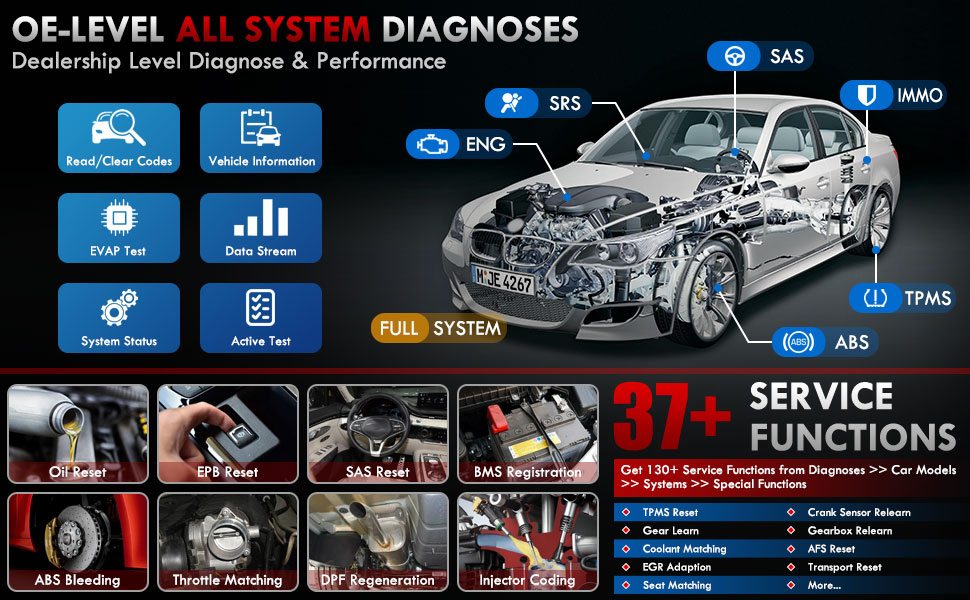
Figura 3.1: Máisview of OE-level all system diagnostic capabilities.
3.3 Advanced Maintenance Services (37+)
The LAUNCH X431 PRO Star offers over 37 advanced maintenance and reset functions, with the potential to expand to over 130 types depending on the vehicle's make, model, and year. These services include:
- Reinicio de aceite
- Sangrado por ABS
- Rexistro de baterías
- Reinicio do EPB (freo de estacionamento electrónico)
- Rexeneración do DPF (filtro de partículas diésel)
- Codificación do inxector
- Reinicio SAS (sensor de ángulo de dirección)
- Axuste do acelerador
- Reinicio do TPMS (sistema de monitorización da presión dos pneumáticos)
- Reset da caixa de cambios
- Reinicio da suspensión
- Cabeceira AFSamp Restablecer

Figura 3.2: Examples of the 37+ maintenance service functions.
3.4 Control bidireccional (proba activa)
This feature allows the technician to send commands to vehicle systems and components to test their functionality. This helps in quickly identifying faulty components without manual disassembly. Exampos inclúen:
- Turning the radiator fan on/off
- Probas dos actuadores de peche de portas
- Energizing injectors
- Espellos operativos
- Abrir/pechar fiestras

Figure 3.3: Illustration of bi-directional control capabilities.
3.5 Codificación da ECU
ECU Coding enables the matching, relearning, and coding of newly installed ECU modules after repairs or replacements. It also allows for the activation of higher-level vehicle functions. This includes:
- Flash/Match/Calibration
- Recode and Relearn
- Alter Configuration
- Reprogram Adaptive Data
- Recognize New CPU
- Match Current Settings
- Customize Car Features (e.g., automatic lock, reverse rearview mirror down, windows close when rain)

Figura 3.4: Examples of ECU coding applications.
3.6 FCA SGW Vehicle Access & Quick Guided Functions
- FCA SGW: The X431 PRO Star is AutoAuth certified, allowing secure diagnosis of SGW (Security Gateway) vehicles without limitations.
- Quick Guided: Provides step-by-step guidance for Volkswagen group vehicles, simplifying complex diagnostic procedures.
3.7 Extension Modules
The device supports various optional add-on tools to expand its capabilities, including:
- Battery Tester (e.g., BST360)
- Videoscope (e.g., VSP-600)
- Oscilloscope (e.g., O2-2)
- TPMS Detector (e.g., TSGUN, i-TPMS)
- WiFi Thermal Printer (e.g., X-431)
- Ferramenta de calibración ADAS
- XPROG 3 (Immobilizer Programmer)

Figure 3.5: Various optional extension modules for the X431 PRO Star.
4. Mantemento
4.1 Actualizacións de software
The LAUNCH X431 PRO Star includes 2 years of free software updates. After this period, the device will continue to function, but new software releases and vehicle data updates will require a subscription. Regular updates ensure compatibility with new vehicle models and access to the latest diagnostic features.
4.2 Coidados xerais
- Manteña o dispositivo limpo e libre de po e humidade.
- Garde o dispositivo na súa funda protectora cando non o use.
- Evite expoñer o dispositivo a temperaturas extremas ou á luz solar directa durante períodos prolongados.
- Use only the provided charging accessories to prevent damage.
5 Solución de problemas
If you encounter issues with your LAUNCH X431 PRO Star, consider the following:
- Problemas de conexión: Asegúrate de que o cable de diagnóstico estea conectado correctamente tanto ao escáner como ao porto OBDII do vehículo. Verifica que o contacto do vehículo estea na posición "ON".
- Avarías de software: Ensure the device's software is up to date. A factory reset may resolve persistent software issues (note: this will erase user data).
- Compatibilidade do vehículo: While the device covers over 99% of vehicles, specific advanced functions may vary by make, model, and year. Consult the vehicle coverage list or contact support for details.
- Rendemento do dispositivo: If the device is slow or unresponsive, try restarting it. Ensure sufficient battery charge.
6. Especificacións
| Característica | Especificación |
|---|---|
| Modelo | LAUNCH X-431 PRO STAR |
| Sistema Operativo | Android 10.0 |
| Procesador | 2.0 GHz de 4 núcleos |
| RAM | 4 GB |
| ROM (almacenamento) | 64 GB |
| Mostrar | 8-inch Touch Screen (1280x800 resolution) |
| Batería | 6000 mAh |
| Conectividade | Wi-Fi (2.4/5.0 GHz), CANFD, DoIP |
| Cámara | 8.0 MP Rear-facing |
| Peso do elemento | 8.4 libras |
| Dimensións do paquete | 13.6 x 13.2 x 6.1 polgadas |
| Tipo de ajuste automotriz | Ajuste universal |
7. Garantía e soporte
7.1 Información da garantía
The LAUNCH X431 PRO Star comes with a 2 ano de garantía covering manufacturing defects and hardware malfunctions.
7.2 Soporte técnico
LAUNCH provides asistencia técnica 7*24 for any post-sales issues or technical assistance. For support, please refer to the contact information provided in your product packaging or visit the official LAUNCH websitio.


