1. Introdución
The LSC Smart Connect Solar IP Camera is designed to provide reliable outdoor surveillance with the convenience of solar power. This camera offers 1080p video recording, two-way audio, and night vision capabilities up to 10 meters. It integrates seamlessly with the LSC Smart Connect app, allowing for remote monitoring and control. Key features include a light and sound alarm, flash function, and privacy mode to enhance security.
This manual provides essential information for the proper setup, operation, and maintenance of your LSC Smart Connect Solar IP Camera, ensuring optimal performance and longevity.
2. Contido e configuración do paquete
Antes de comezar a instalación, asegúrese de que todos os compoñentes estean presentes e non estean danados.

Imaxe 2.1: The LSC Smart Connect Solar IP Camera packaging, showing the camera, solar panel, and app interface. This image represents the complete product package as received.
2.1 Compoñentes anterioresview
The package typically includes the LSC Smart Connect Solar IP Camera unit, a solar panel for continuous power, and mounting accessories.
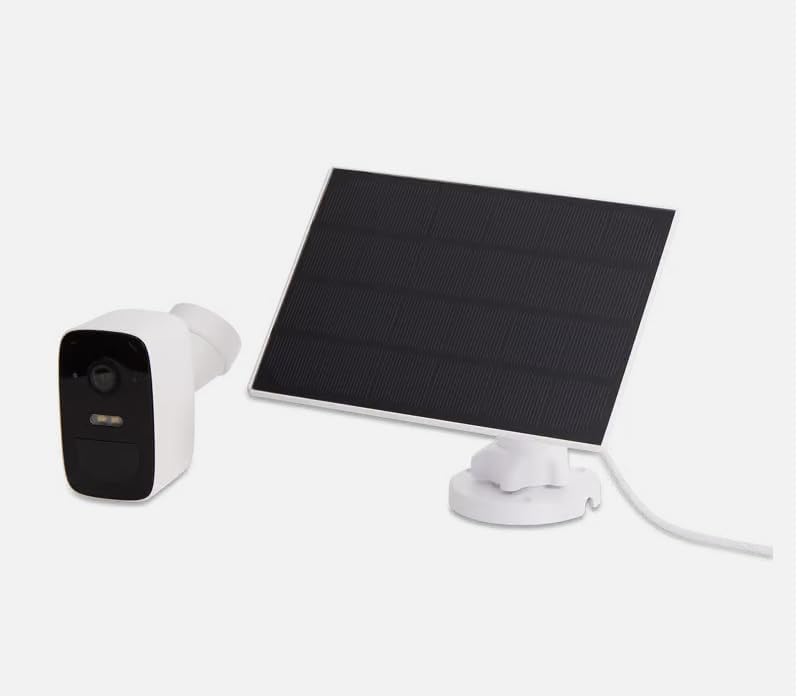
Imaxe 2.2: The LSC Smart Connect Solar IP Camera shown alongside its separate solar panel. This illustrates the two main components of the surveillance system.
2.2 Pasos de configuración iniciais
- Descarga a aplicación: Download the "LSC Smart Connect" app from your smartphone's app store (iOS or Android).
- Crear conta: Abre a aplicación e rexistra unha nova conta ou inicia sesión se xa tes unha.
- Acender a cámara: Ensure the camera is charged or connected to the solar panel. The camera should enter pairing mode (indicated by an LED light).
- Engadir dispositivo: In the app, select "Add Device" or the "+" icon. Follow the on-screen instructions to connect the camera to your 2.4GHz Wi-Fi network. Ensure your Wi-Fi signal is strong at the installation location.
- Montaxe: Choose a suitable outdoor location for the camera and solar panel. The solar panel should receive direct sunlight for most of the day. Use the provided screws and mounting brackets for secure installation. The camera supports wall mounting.
For detailed mounting instructions, refer to the quick start guide included in your product packaging.
3. Instrucións de funcionamento
Once your camera is set up and connected, you can begin monitoring and utilizing its features through the LSC Smart Connect app.
- En directo View: Abre a aplicación e selecciona a túa cámara para view a transmisión en directo.
- Audio bidireccional: Use the microphone icon in the app to speak through the camera and the speaker icon to hear audio from the camera's vicinity.
- Visión nocturna: The camera automatically switches to night vision in low-light conditions, providing clear images up to 10 meters.
- Detección de movemento e alertas: Configure motion detection sensitivity and set up push notifications to receive alerts on your smartphone when activity is detected.
- Funcións de alarma: Activate the light and sound alarm or flash function via the app to deter intruders.
- Gravación e reprodución: The camera supports local storage (e.g., microSD card, not included) or cloud storage (subscription may be required) for recording. Access recorded footage a través da función de reprodución da aplicación.
- Modo de privacidade: Utilize the privacy function to temporarily disable recording and live view for specific periods.
4. Mantemento
Regular maintenance ensures the optimal performance and longevity of your LSC Smart Connect Solar IP Camera.
- Limpeza: Limpe periodicamente a lente da cámara e o panel solar cun pano suave eamp un pano para eliminar o po, a sucidade e os residuos. Evite produtos de limpeza abrasivos.
- Eficiencia do panel solar: Ensure the solar panel is free from obstructions (e.g., leaves, snow) that could block sunlight and reduce charging efficiency.
- Actualizacións de firmware: Check the LSC Smart Connect app regularly for firmware updates. Keeping the camera's firmware updated ensures access to the latest features and security enhancements.
- Comprobación de conexión: Periodically verify the Wi-Fi connection strength and camera status in the app.
5 Solución de problemas
If you encounter issues with your LSC Smart Connect Solar IP Camera, refer to the following common troubleshooting steps:
- Cámara sen conexión:
- Comproba a intensidade do sinal wifi na localización da cámara.
- Ensure the camera is receiving adequate power from the solar panel or is sufficiently charged.
- Reinicia o teu enrutador Wi-Fi e a cámara.
- Verify that the camera is connected to a 2.4GHz Wi-Fi network.
- Mala calidade da imaxe:
- Limpar a lente da cámara.
- Asegúrate de que non haxa obstáculos diante da lente.
- Comproba a velocidade da túa conexión a internet.
- A detección de movemento non funciona:
- Verify motion detection settings in the app (sensitivity, detection zones).
- Ensure notifications are enabled on your smartphone and in the app.
- A batería non se carga:
- Asegúrese de que o panel solar estea limpo e reciba luz solar directa.
- Comprobe a conexión entre o panel solar e a cámara.
If issues persist, consult the LSC Smart Connect app's help section or the manufacturer's support resources.
6. Especificacións
| Característica | Especificación |
|---|---|
| Resolución de gravación de vídeo | 1080 p |
| Cor | Negro/Branco |
| Tecnoloxía de comunicación sen fíos | Wi-Fi (2.4 GHz) |
| Tipo de instalación | Screw-in / Wall Mount |
| Range de visión nocturna | 10 metros |
| Dimensións do artigo (L x W x H) | 15 x 6 x 15 cm |
| Fabricante | LSC |
| Número de modelo | 3203968 |
| ASIN | B0D899HFXL |
| Uso recomendado do produto | Seguridade ao aire libre |
| Tecnoloxía de conectividade | Sen fíos |
| Dispositivos compatibles | Teléfono intelixente |
| Tipo de controlador | SmartThings (via LSC Smart Connect App) |
| Uso interior/exterior | Ao aire libre |
7. Garantía e soporte
For warranty information, please refer to the documentation included with your purchase or contact the retailer/manufacturer directly. Typically, products come with a limited warranty covering manufacturing defects.
For technical support, frequently asked questions, or further assistance, please visit the official LSC Smart Connect website or utilize the support section within the LSC Smart Connect mobile application.
Recursos en liña:
- LSC Smart Connect App (available on iOS App Store and Google Play Store)
- Manufacturer's Official Website (for product updates and support)


