Introdución
Thank you for choosing the ErGear Electric Standing Desk. This manual provides important information regarding the assembly, operation, and maintenance of your new desk. Please read it thoroughly before use to ensure safe and efficient operation.
Información de seguridade
Pola súa seguridade e para evitar danos ao produto, teña en conta o seguinte:
- Do not exceed the maximum weight capacity of 80KG (176 lbs).
- Ensure correct installation of all components as per the assembly instructions.
- Keep the desk and its moving parts away from children and pets during operation.
- Evite colocar líquidos directamente sobre o panel de control ou os compoñentes do motor.
- Do not disassemble or modify the desk's electrical components. Contact customer support for assistance.
Produto rematadoview e Características
The ErGear Electric Standing Desk is designed to provide a versatile and ergonomic workspace. Key features include:
- Tailored Ergonomic Height: Adjustable from 72cm to 118cm (28.3 inches to 46.5 inches) for seamless transitions between sitting and standing.
- Panel de control intelixente: User-friendly LED control panel with 4 memory presets for quick height adjustments.
- Enhanced Stability & Safety: Robust design with a wide 65mm alloy lifting frame, supporting up to 80KG (176 lbs). Tested for over 50,000 lifting cycles.
- Spacious & Organized Workspace: Desktop measuring 140cm x 70cm (55.1 inches x 27.6 inches), equipped with 2 cable grommets and 2 hooks for cable management and accessory hanging.
- Premium Silent Motor: Operates with an ultra-quiet noise level of ≤55db, ensuring a distraction-free environment.
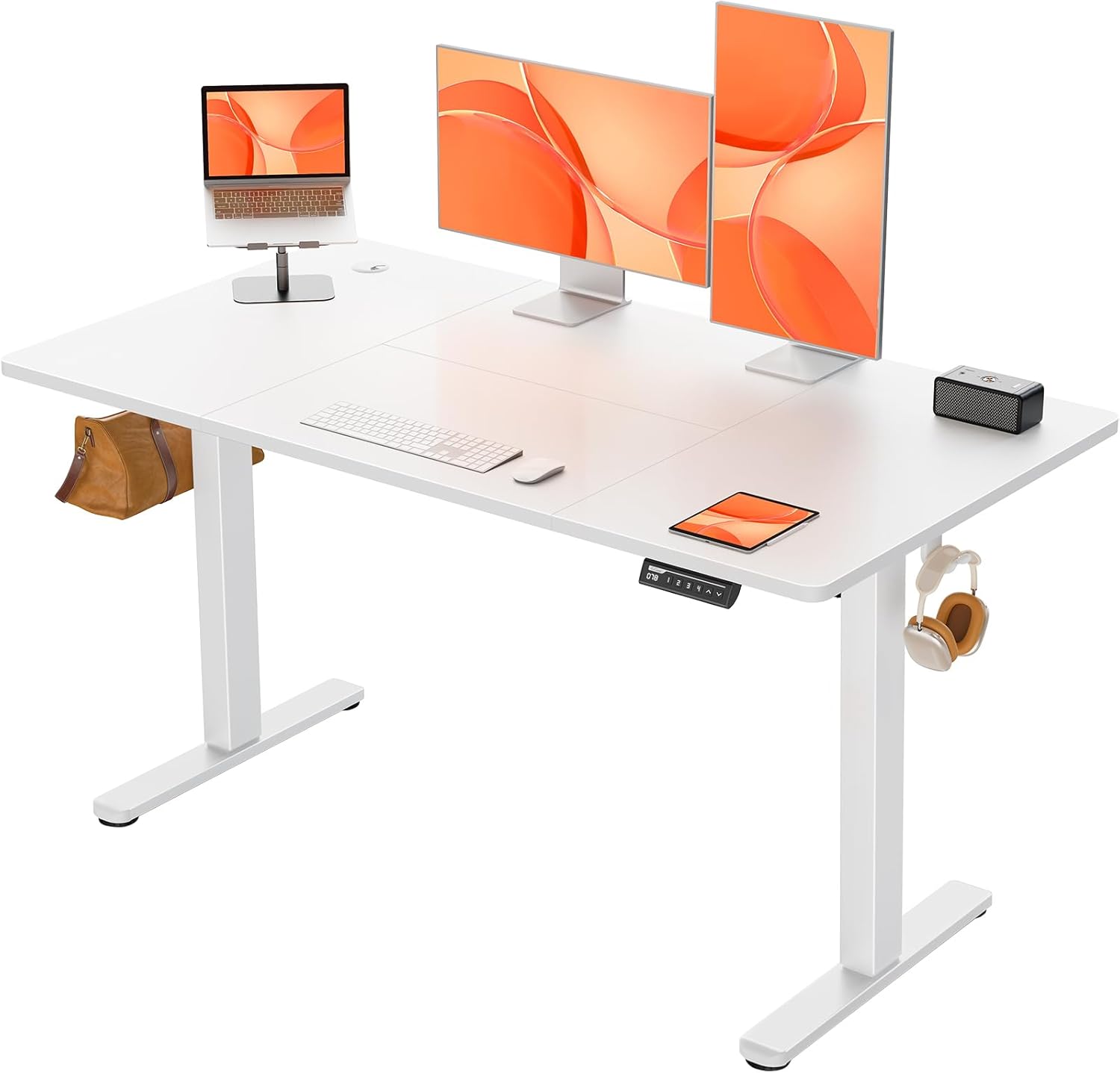
Figure 1: The ErGear Electric Standing Desk, showcasing its spacious white desktop and sturdy frame, equipped with dual monitors, a laptop, and a control panel.

Figure 2: The ErGear Electric Standing Desk integrated into a modern home office, highlighting its aesthetic appeal and functional design next to a window.
Lista de compoñentes e pezas
Before assembly, please ensure all components are present and undamaged. The package includes:
- Desktop (Four-piece wood tabletop)
- Lifting Columns (Legs)
- Pés
- Caixa de control
- Panel de control LED
- Adaptador de alimentación e cable
- Cable Grommets (2 included)
- Headphone Hooks (2 included)
- Ferraxes de montaxe (parafusos, bulóns, etc.)
- Guía de instalación
Configuración e montaxe
The ErGear Electric Standing Desk is designed for streamlined assembly. A comprehensive and concise installation guide is included with cleverly numbered accessories to facilitate the process. Assembly can typically be completed by one person.
Pasos da Asemblea Xeral:
- Desembale todos os compoñentes e verifíqueos coa lista de pezas.
- Attach the feet to the lifting columns.
- Assemble the frame and attach it to the desktop sections.
- Install the control box and LED control panel.
- Connect all necessary cables (motor to control box, control box to panel, power adapter).
- Install cable grommets and headphone hooks as desired.
- Perform an initial power-up and test the height adjustment.
Refer to the detailed installation guide provided in the packaging for step-by-step instructions and diagrams.

Figure 3: Diagram illustrating the product dimensions: 140cm (length) x 70cm (width), with adjustable height from 72cm to 118cm, and a base width of 58cm.
Instrucións de funcionamento
Your ErGear Electric Standing Desk features an intuitive control panel for easy height adjustments.
Axuste de altura
- Usa o Up (&) e Down (∨) arrow buttons on the control panel to manually adjust the desk height. The current height in centimeters will be displayed on the LED screen.
- The desk can be adjusted smoothly between 72cm (sitting height) and 118cm (standing height).

Figure 4: Illustration showing the seamless height transition capability of the desk, from a sitting height of 72cm to a standing height of 118cm.
Presets de memoria
The control panel features 4 memory buttons (1, 2, 3, 4) to save and recall your preferred heights.
- Para gardar unha predefinición: Adjust the desk to your desired height. Press and hold one of the memory buttons (1, 2, 3, or 4) until the LED display flashes or shows "S-" followed by the number, indicating the height has been saved.
- Para recuperar un preselección: Simply press the corresponding memory button (1, 2, 3, or 4). The desk will automatically move to the saved height.
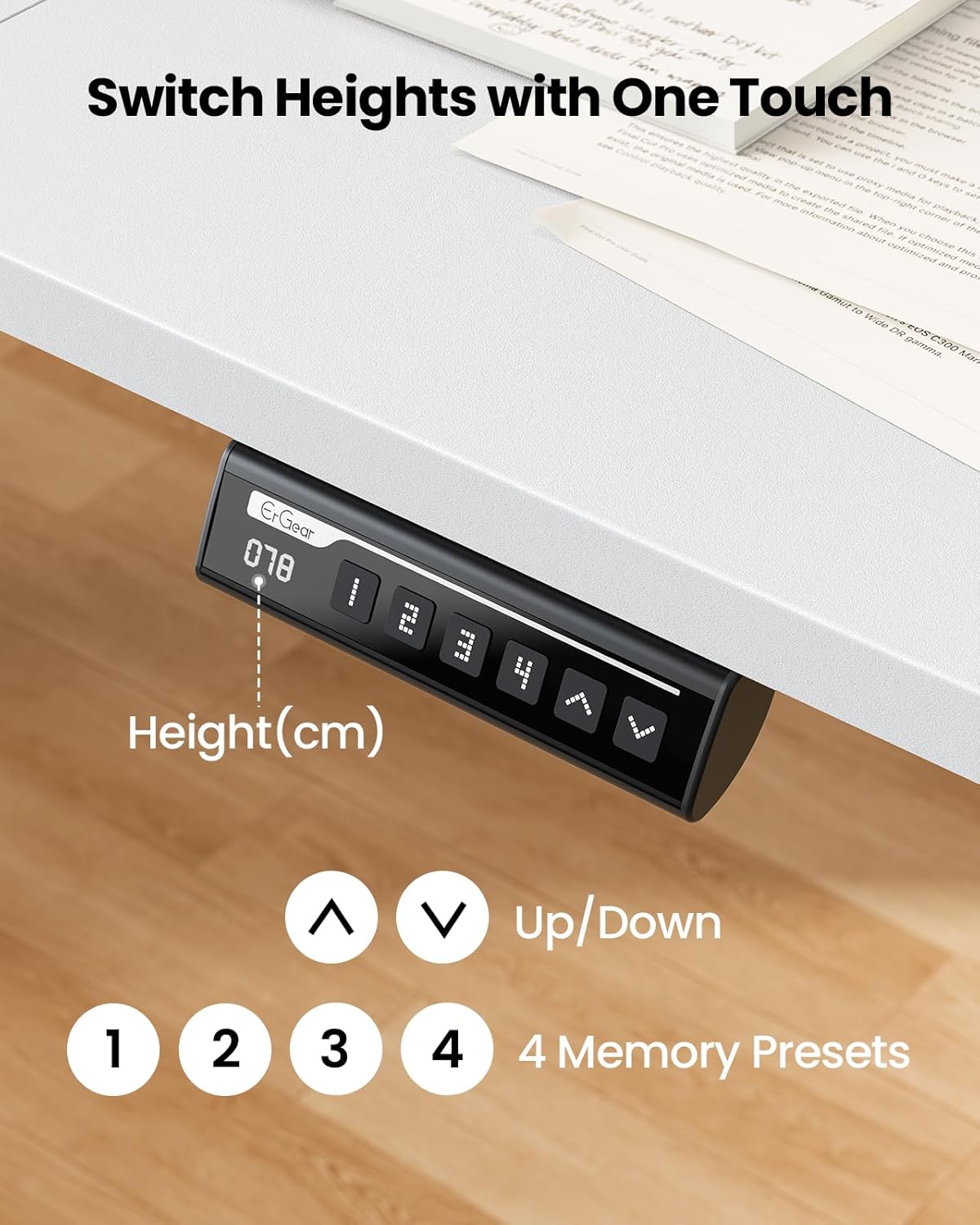
Figure 5: Close-up of the LED control panel, showing the digital height display, up/down arrows, and four memory preset buttons (1, 2, 3, 4).
Weight Capacity and Stability
The desk is designed to support up to 80KG (176 lbs) of equipment. Its robust construction ensures smooth and steady lifting, even under significant load.

Figure 6: Visual representation of the desk's 80KG weight capacity, demonstrating its ability to easily support heavier equipment.

Figure 7: Illustration highlighting the smooth and steady lifting mechanism of the desk, indicating excellent stability during height adjustments.
Mantemento
To ensure the longevity and optimal performance of your ErGear Electric Standing Desk, follow these maintenance guidelines:
- Limpeza: Limpa o escritorio e o marco cun pano suave eamp pano. Evite produtos de limpeza abrasivos ou produtos químicos agresivos que poidan danar o acabado.
- Xestión de cables Periodically check that all cables are securely connected and not pinched or tangled. Utilize the provided cable grommets and hooks to keep the workspace tidy.
- Distribución de peso: Distribute weight evenly across the desktop to prevent undue stress on the lifting mechanism.
- Comprobacións periódicas: De cando en vez, inspeccione todos os parafusos e bulóns para asegurarse de que estean ben axustados. Volva apertalos se é necesario.
Resolución de problemas
If you encounter any issues with your ErGear Electric Standing Desk, please refer to the following common troubleshooting tips:
- O escritorio non se move:
- Comprobe se o cable de alimentación está conectado correctamente tanto ao escritorio como á toma de corrente.
- Ensure there are no obstructions preventing the desk from moving up or down.
- Try resetting the desk by unplugging it for 30 seconds and then plugging it back in.
- Movemento irregular:
- Verify that the desk is placed on a level surface.
- Ensure that the weight on the desk is evenly distributed.
- Códigos de erro na pantalla:
- If an error code appears, consult the detailed troubleshooting section in the included installation guide. Often, a simple reset (unplugging and replugging) can resolve minor errors.
If the issue persists after attempting these steps, please contact ErGear customer support for further assistance.
Especificacións
| Atributo | Detalle |
|---|---|
| Marca | ErGear |
| Número de modelo | EGESD87W |
| Dimensións do produto | 140 x 70 x 72 cm (L x W x Min H) |
| Rango de altura axustable | 72 centímetros - 118 centímetros |
| Capacidade máxima de peso | 80 kg (176 libras) |
| Material primario | Metal (Frame), Wood (Top) |
| Tipo de acabado | Pintado |
| Cor | Branco |
| Nivel de ruído do motor | ≤55db |
| Requírese montaxe | Si (incluído) |
| Características especiais | Adjustable Height, Electric, Ergonomic, 4 Memory Presets, Cable Grommets, Headphone Hooks |
Garantía e Soporte
ErGear is committed to providing high-quality products. For information regarding warranty coverage, technical support, or replacement parts, please refer to the warranty card included with your product or visit the official ErGear website. Please have your model number (EGESD87W) and purchase details ready when contacting support.


