Introdución
This user manual provides comprehensive instructions for the VETEK 8K Video Camera Camcorder (Model: HDV01-8K). Please read this manual thoroughly before operating the device to ensure proper usage and to maximize its features. Keep this manual for future reference.
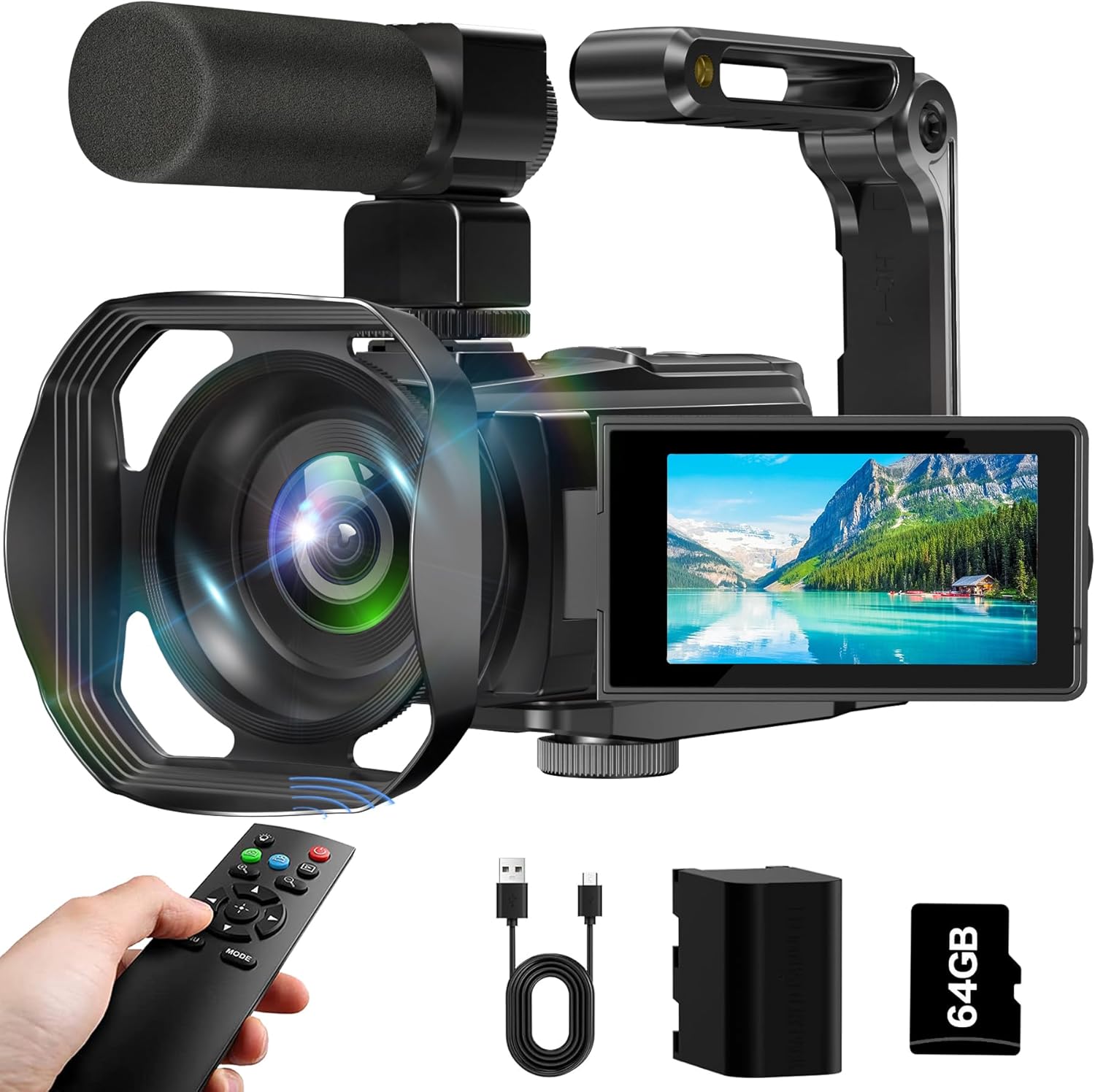
Figure 1: VETEK 8K Video Camera Camcorder with included accessories.
Contido do paquete
Verifique que todos os elementos que se indican a continuación estean incluídos no seu paquete:
- VETEK 8K Video Camera Camcorder
- Micrófono
- Parasol de lente
- Stabilizer (Hand Bracket)
- Batería de 4500 mAh
- Tarxeta SD de 64 GB
- Control remoto
- Cable de carga USB-C
- Bolsa de po
- Pano de limpeza
- Manual de usuario (este documento)
- Tarxeta posvenda

Figure 2: Visual representation of all included accessories.
Produto rematadoview
The VETEK 8K Camcorder is designed for ease of use while delivering high-quality video and photo capture. It features a 3-inch 270° rotating touch screen for flexible viewing and control, and supports various recording modes.

Figura 3: Máisview of 8K 64MP CMOS sensor and 18X digital zoom capability.
Guía de configuración
1. Instalación da batería e da tarxeta SD
- Inserir batería: Open the battery compartment cover. Insert the 4500mAh battery, ensuring correct polarity. Close the cover securely.
- Insira a tarxeta SD: Locate the SD card slot. Insert the provided 64GB SD card (or a compatible card up to 256GB) until it clicks into place. Ensure the card is inserted correctly to avoid damage.

Figure 4: Proper battery installation.
2. Colocación de accesorios
- Parasol: Screw the lens hood onto the front of the camera lens. This helps reduce glare and improve image contrast.
- Micrófono: Attach the external microphone to the hot shoe mount on top of the camera. Connect the microphone cable to the designated audio input port.
- Stabilizer (Hand Bracket): Attach the hand bracket to the bottom tripod mount of the camera for improved stability during handheld recording.
Figure 5: Camcorder with all primary accessories attached for enhanced usability.
3. Acendido/apagado
Open the LCD screen to power on the camcorder. Close the LCD screen to power off the camcorder.
Modos de funcionamento e características
1. Gravación de vídeo e captura de fotos
The camcorder supports 8K, 6K, 5K, 4K, and 2.7K video resolutions, and 64MP photo resolution. Use the touch screen to navigate between video and photo modes. The 18X digital zoom allows for closer shots.

Figure 6: Visual comparison of 8K vs 4K resolution capabilities.
2. IR Night Vision and Fill Light
Activate IR Night Vision for clear black and white recording in low-light conditions. The built-in LED fill light provides additional illumination for brighter photos and videos in dim environments.

Figure 7: Demonstration of IR Night Vision capability.
3. WiFi Connectivity and WebFunción cam
Download the "Hello Cam" app from your smartphone's app store. Connect your device to the camcorder's Wi-Fi network for real-time viewing, remote control, and file transfer. The camcorder can also function as a webcam when connected to a PC via USB, suitable for live streaming or video calls.

Figure 8: Using the camcorder's WiFi function with a smartphone.

Figure 9: Camcorder connected to a laptop for webcam use or recording while charging.
4. Operación de control remoto
The included remote control allows for convenient operation from a distance, including starting/stopping recording and taking photos. It has a range of up to 32 feet.

Figure 10: Remote control for the camcorder.
5. Advanced Recording Functions
Explore various recording options via the touch screen menu:
- Gravación en bucle: Continuously records, overwriting older footage cando o almacenamento está cheo.
- Gravación de detección de movemento: Starts recording automatically when motion is detected.
- Gravación por intervalos: Captures frames at set intervals for time-lapse videos.
- Función de pausa: Pause and resume recording within the same file.
- Disparo continuo: Captura varias fotos en rápida sucesión.
- Timed Selfies: Set a timer for self-portraits.

Figura 11: Examples of Continuous Shooting and Time-Lapse Photography.
Carga e transferencia de datos
1. Cargando a batería
The 4500mAh battery provides up to 4.5 hours of continuous 8K recording. Connect the camcorder to a power source using the provided USB-C cable. You can record while charging.
Figure 12: Battery charging indicator on the screen.
2. Transferencia Files
- Conexión USB: Connect the camcorder to your computer using the USB-C cable. The camera will appear as a removable drive, allowing you to drag and drop files.
- WiFi Transfer: Use the "Hello Cam" app to wirelessly transfer photos and videos to your smartphone or tablet.
- Lector de tarxetas SD: Remove the SD card and insert it into a compatible card reader connected to your computer for direct file acceso.
- Saída HDMI: Connect the camcorder to an HDTV via an HDMI cable (not included) to playback photos and videos on a larger screen.

Figure 13: Various methods for transferring media from the camcorder.
Mantemento
- Limpeza: Use the provided cleaning cloth to gently wipe the camera body and lens. Do not use liquid cleaners or abrasive materials.
- Almacenamento: Store the camcorder in the dust bag in a cool, dry place away from direct sunlight and extreme temperatures.
- Coidado da batería: For long-term storage, remove the battery from the camcorder. Recharge the battery periodically to maintain its lifespan.
Resolución de problemas
| Problema | Causa posible | Solución |
|---|---|---|
| A cámara non se acende. | Battery is not inserted correctly or is depleted. | Asegúrate de que a batería estea instalada correctamente. Cárgaa completamente. |
| Mala calidade de imaxe/vídeo. | Insufficient lighting, dirty lens, or shooting distance is too close. | Ensure adequate lighting. Clean the lens. Note that the camera has fixed focus and a shooting distance of more than 4 meters is recommended. |
| HDMI output not working. | Cable ou conexión incorrectos. | Ensure you are using a compatible mini HDMI cable (not included) and it is securely connected to both the camera and the display. |
| Non se pode transferir files via WiFi. | Incorrect app or connection issue. | Ensure "Hello Cam" app is installed. Reconnect to the camera's WiFi network. |
For further assistance, please refer to the contact information provided in the After Sales Card included in your package.
Especificacións
| Característica | Detalle |
|---|---|
| Marca | VETEK |
| Número de modelo | HDV01-8K |
| Resolución de vídeo | 8K (15FPS), 6K, 5K, 4K, 2.7K |
| Resolución fotográfica | 64 megapíxeles |
| Zoom | Zoom dixital 18X |
| Pantalla | 3-inch 270° Rotating Touch Screen |
| Visión Nocturna | Visión nocturna por infravermellos (IR) |
| Conectividade | WiFi, USB, HDMI (cable not included) |
| Capacidade da batería | 4500 mAh |
| Almacenamento | Supports SD Card up to 256GB (64GB included) |
| Tipo de foco | Fixed Focus (shooting distance > 4 meters) |
| Dimensións | 6.11 x 2.64 x 2.64 polgadas |
| Peso | 2.09 libras |
Vídeos oficiais de produtos
8K Video Camera Camcorder, IR Night Vision Vlogging Camera
Este vídeo ofrece un sobreview of the VETEK 8K Video Camera Camcorder, highlighting its key features including 8K resolution, IR night vision, and vlogging capabilities. It demonstrates the camera's design and some of its functions.
Garantía e Soporte
VETEK offers quality after-sales service. All products are eligible for a free return within 30 days of purchase. For any questions, concerns, or technical support, please refer to the contact information provided on the After Sales Card included in your product package. We are committed to providing cost-effective entry cameras and continuously improving our products based on customer feedback.