1. Introdución
This manual provides essential instructions for the proper setup, operation, and maintenance of your HMF 4612212 Electronic Combination Lock Furniture Safe. Please read this manual thoroughly before using the safe to ensure correct functionality and security.
The HMF 4612212 safe features a robust steel construction and an electronic combination lock for secure storage of your valuables. It is designed for installation within furniture or for wall/floor mounting.
2. Información de seguridade
- Always keep the emergency keys in a secure location, separate from the safe and its contents. Do not store them inside the safe.
- Asegúrate de que a caixa forte estea fixada de forma segura a unha parede ou ao chan para evitar que sexa retirada sen autorización.
- Non expoñas a caixa forte a temperaturas ou humidade extremas.
- Replace batteries promptly when the low battery indicator appears to avoid lockouts.
- Keep the safe door closed and locked when not in use.
3. Contido do paquete
Verifique que todos os elementos que se indican a continuación estean presentes no seu paquete:
- HMF 4612212 Caixa de mobles
- 4 pilas AA
- 2 chaves de emerxencia
- 4 x Mounting Screws and Dowels
- Manual de usuario (este documento)
4. Configuración
4.1 Instalación da batería
- Localiza o compartimento das baterías na parte interior da porta da caixa forte.
- Abra a tapa da batería.
- Introduza as 4 pilas AA, asegurándose de manter a polaridade correcta (+/-).
- Close the battery cover. The safe will emit a beep, indicating successful power-up.
4.2 Configuración inicial do código
The safe comes with a factory default code (usually 1-2-3-4). It is crucial to change this immediately.
- Coa porta da caixa forte aberta, prema o botón vermello de reinicio situado na parte interior da porta, preto da bisagra. Escoitará un pitido.
- En 5 segundos, introduza o código desexado de 3 a 8 díxitos no teclado.
- Press the '#' button to confirm. The safe will beep twice, indicating the new code is set.
- Proba o novo código coa porta aberta antes de pechala.
4.3 Montaxe da caixa forte
For optimal security, the safe should be securely mounted to a solid surface.
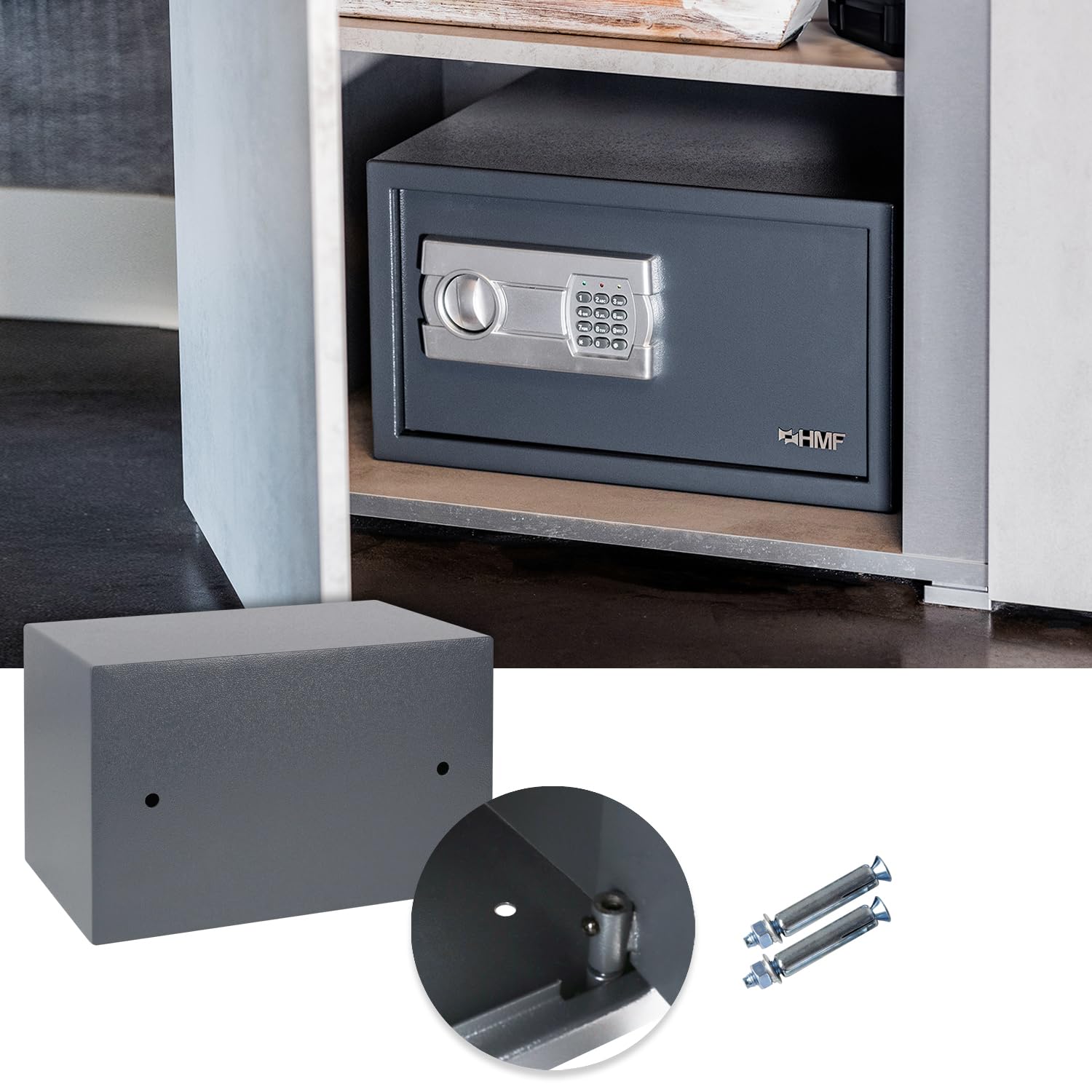
The HMF safe securely installed inside a cabinet. The image also highlights the pre-drilled holes on the safe's back and bottom, along with the provided mounting screws and dowels for installation.
- Choose a suitable location for mounting, such as inside a cabinet, on a wall, or on the floor.
- Marque os puntos de perforación usando os orificios pretaladrados na parte traseira ou inferior da caixa forte como modelo.
- Drill holes into the chosen surface using an appropriate drill bit.
- Insira os tarugos proporcionados nos buratos perforados.
- Position the safe and secure it using the mounting screws. Ensure the safe is firmly attached.
5. Funcionamento
5.1 Opening the Safe with Electronic Lock

The HMF furniture safe with its door open, revealing the electronic keypad for combination entry and the spacious interior.
- Enter your 3 to 8 digit personal combination on the keypad.
- Press the '#' button. A green light will illuminate, and you will hear a beep.
- Dentro de 5 segundos, xire o pomo no sentido das agullas do reloxo para abrir a porta da caixa forte.
5.2 Changing the Combination
You can change your personal combination at any time with the door open.
- With the safe door open, press the red reset button on the inside of the door. You will hear a beep.
- Within 5 seconds, enter your new 3 to 8 digit code on the keypad.
- Press the '#' button to confirm. The safe will beep twice, indicating the new code is set.
- Always test the new code with the door open before closing it.
5.3 Anulación da clave de emerxencia

Un máisview of the HMF safe installed on a shelf, accompanied by detailed views of the robust door bolts, the electronic keypad for secure access, and the emergency key entry point.
In case of forgotten combination, dead batteries, or electronic malfunction, the safe can be opened using the emergency keys.
- Locate the emergency keyhole, usually concealed behind a small cover on the keypad panel.
- Retire a tapa.
- Insert one of the emergency keys and turn it counter-clockwise.
- While holding the key turned, rotate the main knob clockwise to open the safe door.
- Once open, you can replace the batteries or reset the code as needed. Remember to remove the emergency key and replace the cover.
5.4 Capacity and Usage Examples

The interior of the HMF safe, demonstrating its capacity to store personal valuables such as a smartphone, wallet, and credit cards.

The HMF safe with a standard binder placed inside, illustrating that the internal dimensions are suitable for storing documents and items up to DIN A4 size.

Un example of the HMF safe installed within a vehicle's storage compartment, showcasing its versatility for mobile security.

The HMF safe mounted vertically against a wall, demonstrating an alternative installation method.
6. Mantemento
6.1 Substitución da batería
When the low battery indicator (red light) flashes during operation, it is time to replace the batteries.
- Open the safe using your combination or the emergency key.
- Abra a tapa do compartimento das baterías que está na parte interior da porta.
- Remove the old AA batteries and insert new ones, observing correct polarity.
- Pecha a tapa da batería.
6.2 Limpeza
Limpar o exterior da caixa forte cun pano suave eamp pano. Non empregue produtos de limpeza abrasivos nin disolventes, xa que poden danar o acabado ou os compoñentes electrónicos.
7 Solución de problemas
| Problema | Causa posible | Solución |
|---|---|---|
| Safe does not open with combination. | Incorrect code entered; Batteries are low or dead. | Re-enter code carefully; Replace batteries; Use emergency key. |
| O teclado non responde. | As baterías están completamente descargadas ou instaladas incorrectamente. | Replace batteries, ensuring correct polarity; Use emergency key. |
| Safe beeps continuously after entering code. | Incorrect code entered multiple times. | Wait for the system to reset (usually a few minutes); Re-enter correct code. |
| Non se pode definir unha nova combinación. | Reset button not pressed correctly; New code not entered within 5 seconds. | Ensure reset button is fully pressed; Enter new code promptly after reset. |
8. Especificacións

A visual representation of the HMF safe with its external dimensions clearly marked as 35 cm (width), 25 cm (height), and 25 cm (depth). The internal dimensions are also indicated as 34.6 cm x 24.6 cm x 19 cm.
| Característica | Detalle |
|---|---|
| Marca | HMF |
| Número de modelo | 4612212 / GF858 |
| Dimensións externas (ancho x alto x prof.) | 350 x 250 x 250 mm (35 x 25 x 25 cm) |
| Dimensións internas (L x A x P) | 346 x 246 x 190 mm (34.6 x 24.6 x 19 cm) |
| Capacidade | Approx. 16.17 litres (fits DIN A4 documents) |
| Peso | Approx. 5.45 kg (5 kg 450 g) |
| Material | Alloy Steel (Body: 2mm, Door: 4mm) |
| Tipo de bloqueo | Electronic Combination Lock, Key Override |
| Lonxitude da combinación | 3-8 díxitos |
| Fonte de enerxía | 4 pilas AA |
| Tipo de montaxe | Montaxe en parede, montaxe no chan |
| Cor | Anthracite / Charcoal |
9. Garantía e soporte
Specific warranty details are not provided within the product data. For warranty information, technical support, or service inquiries, please contact HMF customer service directly or refer to the official HMF websitio.
Please have your model number (4612212 or GF858) and purchase information available when contacting support.


