1. Introdución
Grazas pola compraasing the TELLUR VOX 95 Bluetooth Headset. This manual provides detailed instructions for the proper use, setup, and maintenance of your new headset. The Vox 95 is designed for seamless communication on the go, offering comfort and convenience with advanced features like Bluetooth 5.3, multipoint connectivity, and Sound+ Voice Enhancement (SVE) technology.

Figura 1.1: Fronte view of the TELLUR VOX 95 Bluetooth Headset, showcasing its sleek design and main button.
2. Información de seguridade
- Non expoñas os auriculares a temperaturas extremas, humidade nin substancias corrosivas.
- Evite deixar caer os auriculares nin someterlos a impactos fortes.
- Do not attempt to disassemble or modify the headset. This will void the warranty and may cause damage.
- Manteña os auriculares lonxe dos nenos e das mascotas.
- Use only the provided USB-A to USB-C cable for charging.
- When driving, prioritize road safety. Use the headset responsibly and in accordance with local laws and regulations.
- Escoitar música durante un tempo prolongado a niveis de volume elevados pode causar danos auditivos. Axuste o volume a un nivel cómodo.
3. Contido do paquete
Comprobe o contido do paquete para asegurarse de que estean presentes todos os elementos:
- 1 x TELLUR VOX 95 Bluetooth Headset
- 1 x cable de carga USB-A a USB-C
- 1 x Plastic ear hook
- 1 x Silicone ear hook
- 1 x Ear tip (Size M)
- 1 x Ear tip (Size S)
- 1 x Manual de usuario (este documento)
4. Produto rematadoview
Familiarize yourself with the various parts of your TELLUR VOX 95 headset.

Figura 4.1: Traseira view of the headset showing the ear hook attachment point and ear tip.

Figure 4.2: The headset's USB-C charging port, located at the end of the device, with the charging cable connected.
Compoñentes clave:
- Botón principal: For power on/off, answering/ending calls, playing/pausing audio.
- Botóns de volume: For adjusting volume up/down.
- Porto de carga USB-C: Para conectar o cable de carga.
- Indicador LED: Displays status (pairing, charging, low battery).
- Micrófono: Para a entrada de voz durante as chamadas.
- Punta da orella: Provides in-ear comfort and sound delivery.
- Gancho para a orella: Secures the headset over the ear.
5. Configuración
5.1 Carga dos auriculares
Antes do primeiro uso, carga completamente os auriculares. Unha carga completa tarda aproximadamente 2 horas.
- Conecta o extremo USB-A do cable de carga a un adaptador de corrente USB (non incluído) ou ao porto USB dun ordenador.
- Connect the USB-C end of the charging cable to the charging port on the headset.
- The LED indicator will show a specific color (refer to the LED indicator section in the manual, if available, or assume red for charging, blue/off for full).
- Unha vez cargado por completo, desconecte o cable de carga.
Figure 5.1: Illustrates connecting the USB-C charging cable to the headset's charging port.
5.2 Como usar os auriculares
The VOX 95 is designed for comfortable wear and can be adjusted for either the left or right ear.
- Choose the ear tip (S or M) that provides the best fit and comfort for your ear.
- Attach either the plastic or silicone ear hook to the headset. The 360° adjustable earpiece allows you to rotate the ear hook to fit perfectly in your left or right ear.
- Gently place the ear tip into your ear canal and position the ear hook over your ear for a secure fit.

Figure 5.2: A woman wearing the TELLUR VOX 95 headset, demonstrating its comfortable and discreet fit.

Figure 5.3: The headset being worn by a woman while driving, highlighting its hands-free convenience for safer communication.
5.3 Emparejamento cun dispositivo
The VOX 95 uses Bluetooth 5.3 for a stable connection up to 15 meters.
- Encendido: Press and hold the Main Button for approximately 3 seconds until the LED indicator flashes blue and red alternately, indicating it's in pairing mode.
- Activar Bluetooth: No teu teléfono intelixente, tableta ou ordenador, activa o Bluetooth.
- Busca Dispositivos: In your device's Bluetooth settings, search for available devices.
- Select "VOX 95": From the list of found devices, select "VOX 95".
- Confirmar conexión: Once connected, the LED indicator on the headset will flash blue slowly or turn off, depending on the model's specific behavior. You will also hear a confirmation tone.
Note: The headset supports multipoint connectivity, allowing it to be connected to two devices simultaneously (e.g., a phone and a tablet/laptop).

Figure 5.4: The headset positioned on a smartphone, symbolizing its readiness for Bluetooth pairing and connection.
6. Instrucións de funcionamento
6.1 Encendido/apagado
- Encendido: Press and hold the Main Button for approximately 3 seconds until the LED indicator flashes blue.
- Apagado: Press and hold the Main Button for approximately 5 seconds until the LED indicator flashes red and then turns off.
6.2 Xestión de chamadas
- Responder/Finalizar chamada: Press the Main Button once.
- Rexeitar a chamada: Press and hold the Main Button for 2 seconds.
- Volver a marcar o último número: Double-press the Main Button.
6.3 Control de volume
- Subir volume: Preme o botón para subir o volume (+).
- Baixar volume: Prema o botón para baixar o volume (-).
6.4 Activación do asistente de voz
Access your device's voice assistant (Siri, Google Assistant) with a simple button press.
- Activar o asistente de voz: Triple-press the Main Button.
Note: For iOS users, the headset also provides low battery notifications.
6.5 Multipoint Connectivity
The VOX 95 can connect to two Bluetooth devices simultaneously, such as a smartphone and a laptop.
- Pair the headset with the first device (e.g., your smartphone) as described in Section 5.3.
- Desactiva o Bluetooth no primeiro dispositivo.
- Put the headset back into pairing mode.
- Pair the headset with the second device (e.g., your laptop).
- Once connected to the second device, re-enable Bluetooth on the first device. The headset should automatically reconnect to both devices.
The headset will intelligently switch between devices for calls or audio playback.

Figure 6.1: A user demonstrating multipoint connectivity, with the headset simultaneously linked to a laptop and a smartphone, indicated by blue lines.
6.6 SVE Technology for Voice Clarity
The Sound+ Voice Enhancement (SVE) technology in the VOX 95 is a passive noise reduction feature that uses advanced signal processing to improve the clarity of your voice during calls, especially in noisy environments. It helps distinguish your speech from background noise, ensuring clearer communication for the listener.
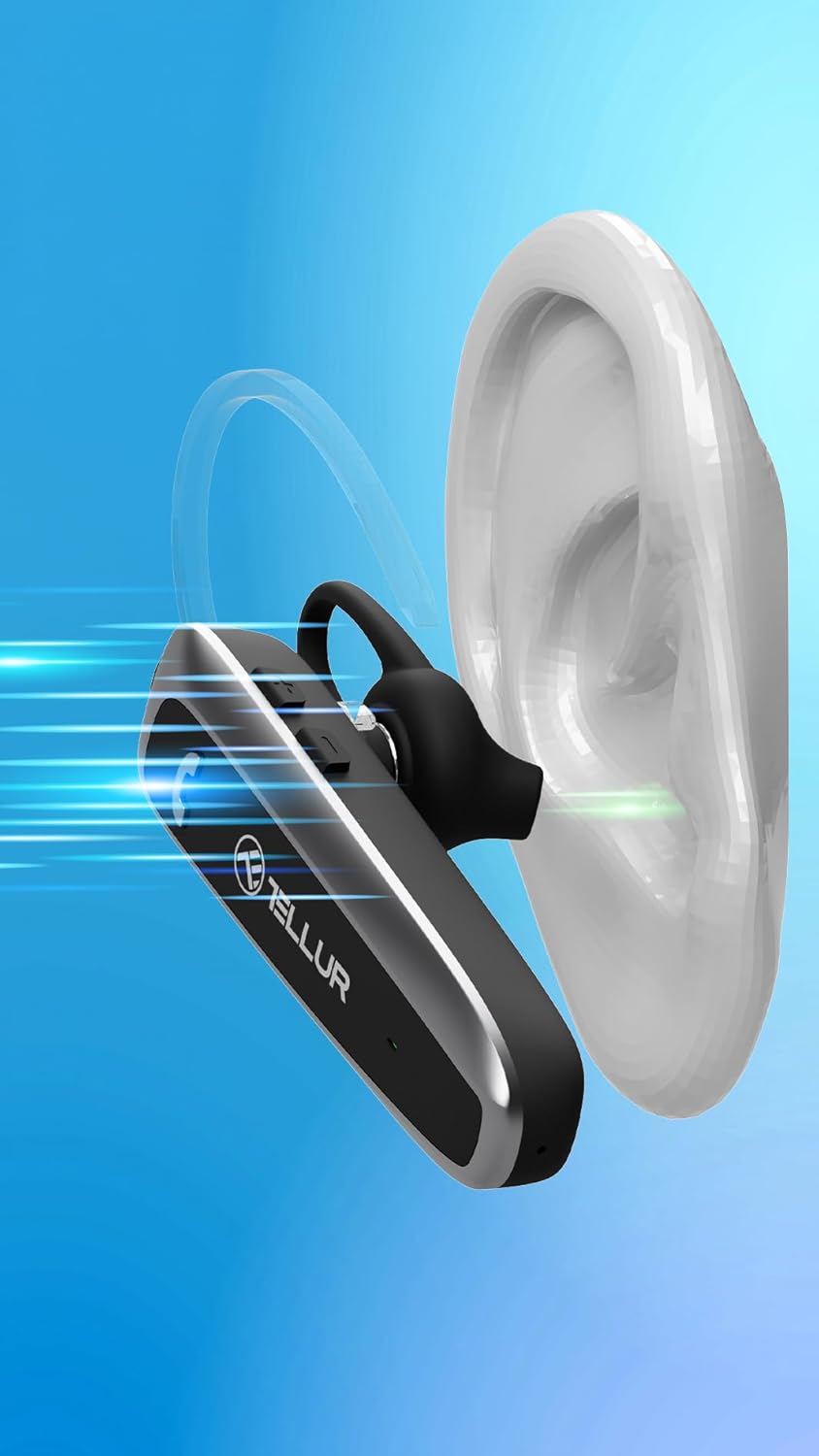
Figure 6.2: Visual representation of Sound+ Voice Enhancement (SVE) technology, showing sound waves being processed for clarity from the ear to the microphone.
7. Mantemento
- Limpeza: Use a soft, dry, lint-free cloth to clean the headset. Do not use abrasive cleaners, alcohol, or chemical solvents.
- Consellos para oídos: The ear tips can be removed and gently cleaned with a damp un pano e xabón suave, e logo sécao completamente antes de volvelo colocar.
- Almacenamento: When not in use, store the headset in a cool, dry place, away from direct sunlight and extreme temperatures.
- Coidado da batería: Para prolongar a duración da batería, carga os auriculares polo menos unha vez cada tres meses se non os usas regularmente.
8 Solución de problemas
| Problema | Causa posible | Solución |
|---|---|---|
| Os auriculares non se acende. | A batería está esgotada. | Cargue os auriculares completamente. |
| Non se poden emparellar os auriculares cun dispositivo. | Headset not in pairing mode; Bluetooth off on device; Device too far. | Ensure headset is in pairing mode (flashing blue/red). Turn on Bluetooth on your device. Move headset closer to the device (within 15m). |
| Sen son ou volume baixo. | Volume too low; Headset not connected; Audio output not set to headset. | Increase volume on both headset and connected device. Reconnect the headset. Check audio output settings on your device. |
| A calidade da chamada é mala. | Weak Bluetooth signal; Environmental noise. | Move closer to the connected device. Ensure microphone is not obstructed. SVE technology helps, but extreme noise may still affect quality. |
| Problemas de conexión multipunto. | Incorrect pairing sequence; Device conflict. | Follow the multipoint pairing instructions carefully (Section 6.5). Disconnect and reconnect devices if necessary. |
9. Especificacións
| Característica | Detalle |
|---|---|
| Nome do modelo | Telur Vox 95 |
| Tecnoloxía de conectividade | Bluetooth |
| Versión Bluetooth | 5.3 |
| Alcance Bluetooth | Ata 15 metros (49 pés) |
| Duración da batería (tempo de conversa) | Ata 20 horas |
| Tempo de espera | Ata 30 días |
| Tempo de carga | Aproximadamente 2 Horas |
| Porto de carga | USB-C |
| Peso | 11.4 gramos (0.402 onzas) |
| Control de ruído | Passive Noise Cancellation (SVE Technology) |
| Forma do auricular | Ear Hook (360° adjustable) |
| Dispositivos compatibles | Smartphones (iPhone, Android), Tablets (iPad, Android), Laptops, Smart TVs (Bluetooth enabled) |
| Compoñentes incluídos | Headset, USB-A to USB-C cable, Plastic ear hook, Silicone ear hook, Ear tip (M), Ear tip (S), User Manual |
10. Garantía e soporte
TELLUR products are manufactured to the highest quality standards. For detailed warranty information, please refer to the warranty card included in your package or visit the official TELLUR website. If you encounter any issues or have questions regarding your VOX 95 Bluetooth Headset, please contact TELLUR customer support through the contact information provided on the official websitio web ou a túa plataforma de compra.
Para obter máis axuda, pode visitar o TELLUR Store on Amazon.


