1. Introdución
The Triplett WS230 Wall Scanner is a versatile and compact tool designed for accurately detecting hidden objects behind walls. It features advanced capabilities to locate wood studs, metal objects (ferrous and non-ferrous), and live AC wiring, providing essential information for construction, home improvement, and maintenance tasks. This manual provides detailed instructions for safe and effective use of your WS230 Wall Scanner.
2. Información de seguridade
Please read all safety warnings and instructions carefully before using the device. Failure to follow these instructions may result in electric shock, fire, or serious injury.
- Always assume that live electrical wires are present behind walls. Exercise extreme caution.
- Do not rely solely on the detection results. Always verify findings through other means if possible.
- Manteña o dispositivo seco e limpo. Non o expoña á humidade nin a temperaturas extremas.
- Non intente abrir nin modificar o dispositivo. Encargue calquera mantemento a persoal cualificado.
3. Contido do paquete
Verifica que todos os elementos estean presentes no teu paquete:
- Triplett WS230 Wall Scanner
- 3.7V/300mAh Lithium Ion Battery (pre-installed)
- Soft Protective Pouch Case
- Manual de usuario (este documento)
- Cable de carga USB tipo C.

Figure 3.1: WS230 Wall Scanner with Pouch and USB-C Cable
4. Produto rematadoview
Familiarize yourself with the components of your Triplett WS230 Wall Scanner.

Figura 4.1: Fronte View of WS230 Wall Scanner

Figura 4.2: Atrás View of WS230 Wall Scanner (QR Code: C242594011)
4.1 Compoñentes clave
- Pantalla LCD a cor: Displays detection mode, depth, battery status, and object location.
- Botón de encendido: Acende/apaga o dispositivo.
- Botóns de selección de modo: Allows switching between Stud, Metal, and AC Voltage detection modes.
- Área do sensor: Located on the back of the device, this area must be in contact with the wall for accurate scanning.
- Porto de carga USB-C: For recharging the internal Lithium-ion battery.
5. Configuración e carga
5.1 Carga da batería
The WS230 is equipped with a rechargeable 3.7V/300mAh Lithium-ion battery. Before first use, ensure the device is fully charged.
- Connect the provided USB Type C charging cable to the charging port on the device.
- Conecta o outro extremo do cable USB a un adaptador de corrente USB estándar (non incluído) ou a un porto USB do ordenador.
- O indicador da batería na pantalla LCD mostrará o estado da carga. Unha carga completa adoita tardar unhas horas.
5.2 Acendido/Apagado
- Para acender, manteña premido o botón Botón de encendido (red button) until the screen illuminates.
- Para apagalo, manteña premido o botón Botón de encendido de novo ata que a pantalla se apague.
6. Funcionamento
6.1 General Usage Guidelines
- Asegúrate de que a superficie da parede estea limpa e seca.
- Avoid scanning over freshly painted or wallpapered surfaces until they are completely dry, as moisture can affect accuracy.
- Hold the scanner flat against the wall, ensuring the sensor area is in full contact.
- Move the scanner slowly and steadily across the surface.
6.2 Calibración automática
The WS230 features automatic calibration for accurate results. Calibration occurs automatically upon power-on or when switching detection modes.
- Place the scanner flat against the wall in an area where you are certain there are no studs, metal, or live wires.
- Preme o Botón de encendido or select your desired mode. The screen will display "Calibrating, please wait."
- Keep the device still against the wall until calibration is complete.

Figure 6.1: Calibration in Progress
6.3 Modos de detección
The WS230 offers three primary detection modes:

Figure 6.2: Multiple Detection Mode Displays
6.3.1 Stud Detection
This mode locates the center and edges of wood or metal studs behind walls.
- Select the Stud Detection mode using the appropriate button.
- Place the scanner flat against the wall and slowly move it horizontally.
- The display will indicate the presence of a stud, its center, and depth (up to 1.5 inches / 38mm). Audio alerts will also sound.

Figure 6.3: Wood Stud Detection
6.3.2 Metal Detection
This mode identifies ferrous and non-ferrous metals, such as pipes and electrical wiring (even if not live).
- Select the Metal Detection mode.
- Scan the wall slowly. The display will show "Detect metal" and indicate the object's location and type (magnetic/non-magnetic).
- Maximum detection depth is 4.0 inches (100mm).

Figure 6.4: Metal Detection

Figure 6.5: Non-Magnetic Metal Detection
6.3.3 AC Voltage Detección
This mode specifically detects live AC wires behind walls, providing an essential safety feature.
- Selecciona o volume da CAtage Detection mode.
- Scan the wall slowly. The display will show a lightning bolt icon and indicate the presence of live AC wiring.
- Maximum detection depth is 2 inches (50mm).
7. Mantemento
- Limpa o dispositivo cun pano suave e seco. Non empregues produtos de limpeza abrasivos nin disolventes.
- Store the device in its protective pouch in a cool, dry place when not in use.
- Regularly charge the battery to maintain its health, even if the device is not used frequently.
8 Solución de problemas
If you encounter issues with your WS230 Wall Scanner, try the following:
- Lecturas inexactas: Ensure the device is properly calibrated on a clear section of the wall. Check for moisture on the wall surface.
- Sen enerxía: Verify the battery is charged. Connect the USB-C cable and allow it to charge for at least 30 minutes before attempting to power on again.
- Intermittent Detection: Ensure the sensor area is in full contact with the wall and you are moving the device slowly and steadily.
If problems persist, contact Triplett customer support.
9. Especificacións
| Característica | Especificación |
|---|---|
| Dimensións do produto | 4.8 x 1 x 2.4 polgadas |
| Peso do elemento | 4 onzas |
| Número de modelo | WS230 |
| Baterías | 1 batería de iones de litio (incluída) |
| Fonte de enerxía | Alimentado por batería |
| Stud Detection Depth | Ata 1.5 polgadas (38 mm) |
| Metal Detection Depth | Ata 4.0 polgadas (100 mm) |
| Vol. ACtage Detection Depth | Ata 2 polgadas (50 mm) |
| Temperatura de funcionamento óptima | 0 a 40 °C |
| Temperatura de almacenamento | -20 a 60 °C |
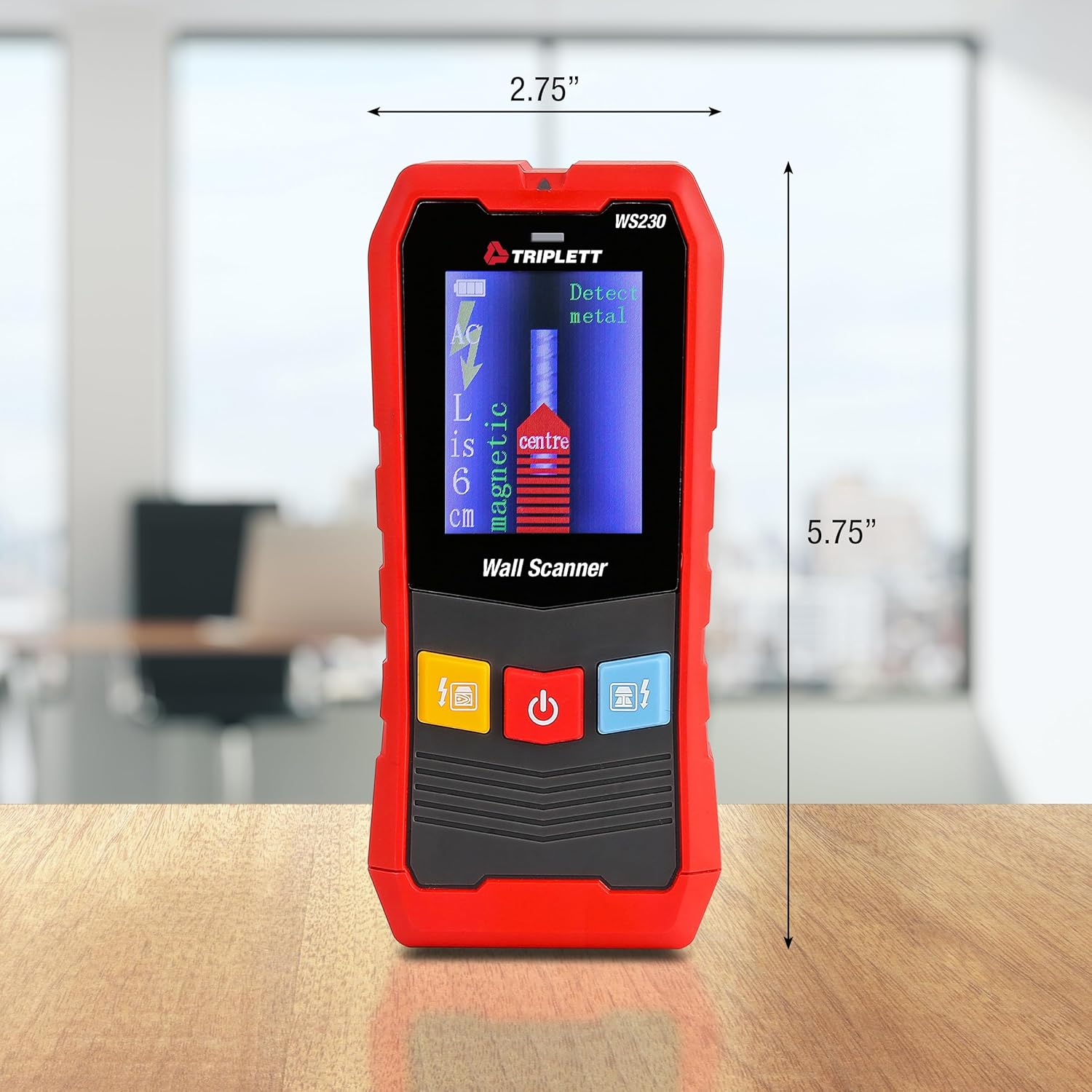
Figure 9.1: WS230 Dimensions
10. Garantía e soporte
For warranty information or technical support, please refer to the official Triplett websitio web ou póñase en contacto co seu departamento de atención ao cliente. Garde o recibo da compra como proba de compra.
Visit the official Triplett Store: Triplett Store on Amazon


