1. Introdución
The BUSICOM PC-SeaV15c is a 15-inch Windows IoT touch panel PC designed for commercial and industrial applications. This manual provides essential information for the safe and efficient setup, operation, and maintenance of your device. Please read this manual thoroughly before using the product and retain it for future reference.
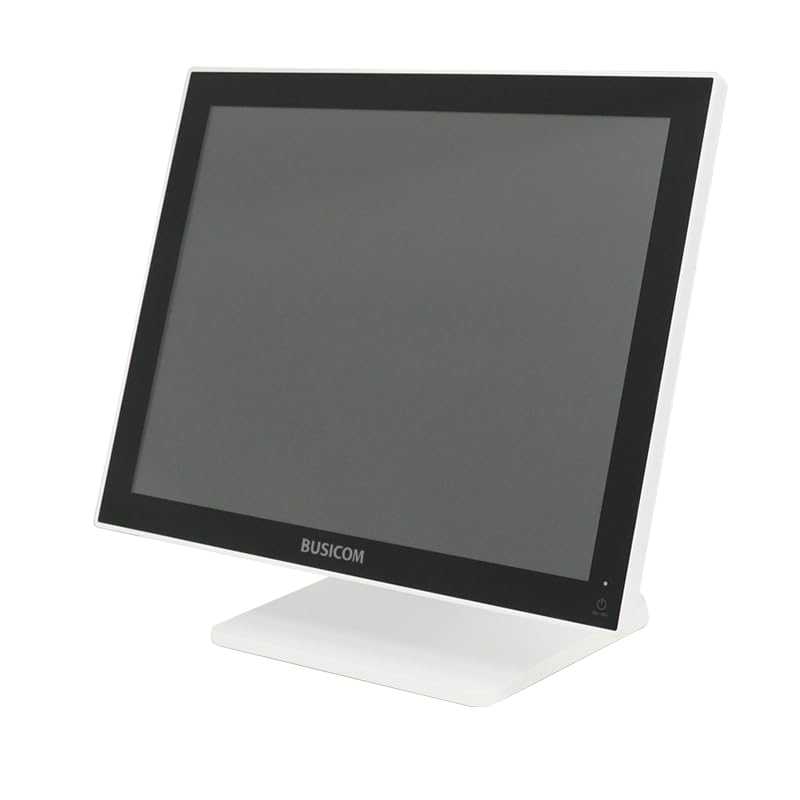
Figura 1: Fronte view of the BUSICOM PC-SeaV15c Touch Panel PC.
2. Produto rematadoview
2.1 Características principais
- Deseño avanzado: Features an ultra-thin bezel and a highly durable 7H reinforced display for enhanced aesthetics and protection.
- Rendemento superior: Equipped with Microsoft Windows 10 IoT Enterprise, ensuring long-term support and reliable operation.
- Intuitive Touch Panel: Utilizes a capacitive touch method, offering a familiar and responsive touch experience similar to smartphones and tablets.
- Fácil mantemento: Designed for simple RAM and SSD replacement, facilitating upgrades and servicing.
- Interfaces versátiles: Provides a wide range of connectivity options to integrate with various peripherals.
- Almacenamento eficiente: SSD storage ensures fast processing speeds, quiet operation, and excellent shock resistance.
2.2 Compoñentes
The package typically includes the BUSICOM PC-SeaV15c unit and a power adapter. Additional accessories may vary.

Figure 2: Front and side profile of the PC-SeaV15c unit.

Figura 3: Traseira view showing access panels for RAM and SSD components.
3. Instrucións de configuración
3.1 Desembalaxe
- Carefully remove the PC-SeaV15c from its packaging.
- Check for any visible damage. If damaged, contact your vendor immediately.
- Asegúrate de que estean presentes todos os compoñentes listados.
3.2 Conexión de periféricos
Refer to the interface diagram below for port locations and types.

Figure 4: Detailed diagram of the PC-SeaV15c's rear and bottom interfaces.
- Conexión de alimentación: Connect the provided power adapter to the DC In port and then to a power outlet.
- Dispositivos USB: Use the USB 2.0 (4 ports) and USB 3.0 (2 ports) for connecting keyboards, mice, printers, and other USB peripherals.
- Conexión de rede: Connect an Ethernet cable to the LAN port for wired network access.
- Saída de audio: Connect external speakers or headphones to the Audio Out port.
- Serial Ports (RJ45): Utilize COM1, COM2, COM3, and COM6 for connecting specialized POS peripherals such as barcode scanners or receipt printers.
- Cash Drawer (RJ11): Connect a compatible cash drawer to the RJ11 port.
- Pantalla externa: If an external monitor is required, connect it to the Mini DisplayPort.
- USB tipo C: Para dispositivos compatibles.
3.3 Acendido/Apagado
- Encendido: Press the power button located on the upper right side of the display bezel or the power mark on the rear panel.
- Apagado: To safely shut down the system, use the standard Windows shutdown procedure. Avoid direct power disconnection during operation to prevent data loss.
4. Instrucións de funcionamento
4.1 Windows 10 IoT Enterprise
The PC-SeaV15c operates on Windows 10 IoT Enterprise 2021. Familiarize yourself with the Windows operating system for basic navigation, application management, and system settings.
4.2 Touch Panel Usage
The capacitive touch screen supports multi-touch gestures.
- Toca: Equivalente a un clic do rato.
- Toca dúas veces: Equivalent to a double-click.
- Mantén premido: Equivalente a un clic co botón dereito.
- Pasar o dedo: For scrolling or navigating.
- Pinch-to-Zoom: Usa dous dedos para ampliar ou reducir a imaxe.
5. Mantemento
5.1 Limpeza do dispositivo
- Apague e desconecte sempre o dispositivo antes de limpalo.
- Use un pano suave e sen pelusa lixeiramente damplavado con auga ou cun limpador de pantallas non abrasivo.
- Do not spray liquids directly onto the screen or device.
- Evite o uso de produtos químicos agresivos, solventes ou materiais abrasivos.
5.2 RAM and SSD Replacement
The PC-SeaV15c is designed for easy replacement of RAM and SSD components. Refer to Figure 3 for the access panel location. For detailed instructions on component replacement, consult a qualified technician or the BUSICOM support websitio.
6 Solución de problemas
Esta sección ofrece solucións a problemas comúns cos que podes atoparte.
- O dispositivo non se acende:
- Asegúrate de que o adaptador de corrente estea conectado correctamente tanto ao dispositivo como a unha toma de corrente que funcione.
- Verifica que a toma de corrente funcione conectando outro dispositivo.
- Touch screen is unresponsive:
- Reinicie o dispositivo.
- Asegúrate de que a pantalla estea limpa e libre de obstrucións.
- Sen visualización:
- Comprobe se o dispositivo está acendido.
- If an external display is connected, ensure the correct input source is selected on the external display.
- Peripheral not detected:
- Ensure the peripheral is correctly connected to the appropriate port (USB, LAN, COM).
- Tenta conectar o periférico a un porto diferente.
- Check the peripheral's own power supply, if applicable.
For further assistance, please contact BUSICOM customer support.
7. Especificacións
| Característica | Detalle |
|---|---|
| Marca | BUSICOM |
| Nome do modelo | PC-SeaV15c |
| Cor | Branco |
| Tamaño da pantalla | 15 polgadas |
| Resolución | 1024x768 |
| Sistema Operativo | Windows 10 IoT Enterprise 2021 |
| Marca da CPU | Intel |
| Socket do procesador | Intel® N97 |
| Velocidade da CPU | 3.6 GHz |
| Tipo de memoria | DDR4 |
| RAM instalada | 4 GB |
| Tipo de disco duro | SSD |
| Capacidade SSD | 128 GB (as per product title) |
| Tipo de tarxeta gráfica | Integrado |
| VRAM Type | SDRAM DDR4 |
| VRAM Capacity | 4 GB |
| Portos USB 2.0 | 4 |
| Portos USB 3.0 | 2 |
| Unidade óptica | Ningún |
| Peso do produto | 6 quilogramos |
| Altura (aprox.) | 307.5 mm (as per dimension diagram) |

Figura 5: Traseira view of the PC-SeaV15c with approximate height dimension.
8. Garantía e soporte
For warranty information and technical support, please refer to the warranty card included with your product or visit the official BUSICOM websitio. Garde o recibo da compra como xustificante de compra para reclamacións de garantía.
BUSICOM Official Websitio: BUSICOM Store on Amazon.co.jp


