1. Produto rematadoview
The ANCEL DS600 Elite is a 2024 advanced full functional car diagnostic scanner based on Android 10. It offers extensive diagnostic capabilities and maintenance functions. The ANCEL VD500 OBD2 scanner is specifically designed for Volkswagen Group vehicles, providing essential diagnostic functions for VW, Audi, Skoda, and Seat models.

Figure 1: ANCEL DS600 Elite and ANCEL VD500 OBD2 Diagnostic Scanners.
2. Características clave
- Advanced Active Test: Perform active tests to pinpoint faulty components.
- ECU/Online Coding: Match ECU replacements, unlock high-level functions, and customize car settings for 98% of vehicles. Supports offline coding.
- 34+ Maintenance Functions: Includes oil reset, TPMS reset, SRS, SAS, ABS, EPB, IMMO, injector coding, AT learning, suspension matching, and more.
- Full Systems Diagnostics: Comprehensive diagnostics on all available modules.
- Autenticación automática para FCA SGW: Provides authorization for FCA Secure Gateway.
- V.A.G Guide: Step-by-step guided functions for Volkswagen Group vehicles.
- Wireless Diagnosis: Bluetooth VCI for convenient wireless connection.
- Intelligent VIN Recognition: Identifica automaticamente a información do vehículo.
- Ampla cobertura de vehículos: Supports 200,000+ vehicle models.
- 12-in-1 Data Stream: Displays live data in various formats.
- 6 Extension Modules Supported: Enhances diagnostic capabilities.

Figure 2: ANCEL DS600 Elite ECU Coding Capabilities.

Figura 3: Máisview of 34+ Maintenance Functions.

Figure 4: OE All-System Diagnostics and Bi-Directional Control.

Figure 5: Extensive Vehicle Coverage and 25 Supported Languages.
3. Configuración
The ANCEL DS600 Elite comes with a VCI (Vehicle Communication Interface) dongle for wireless connection to the vehicle's OBD2 port. The ANCEL VD500 is a wired scanner that connects directly to the OBD2 port.
3.1 Connecting the DS600 Elite
- Localiza o porto OBD2 do vehículo (normalmente debaixo do taboleiro).
- Plug the VCI dongle into the OBD2 port. Ensure a secure connection.
- Power on the DS600 Elite tablet.
- The tablet will automatically connect to the VCI via Bluetooth.
3.2 Connecting the VD500
- Locate the vehicle's OBD2 port.
- Plug the VD500's cable directly into the OBD2 port.
- The VD500 will power on automatically.
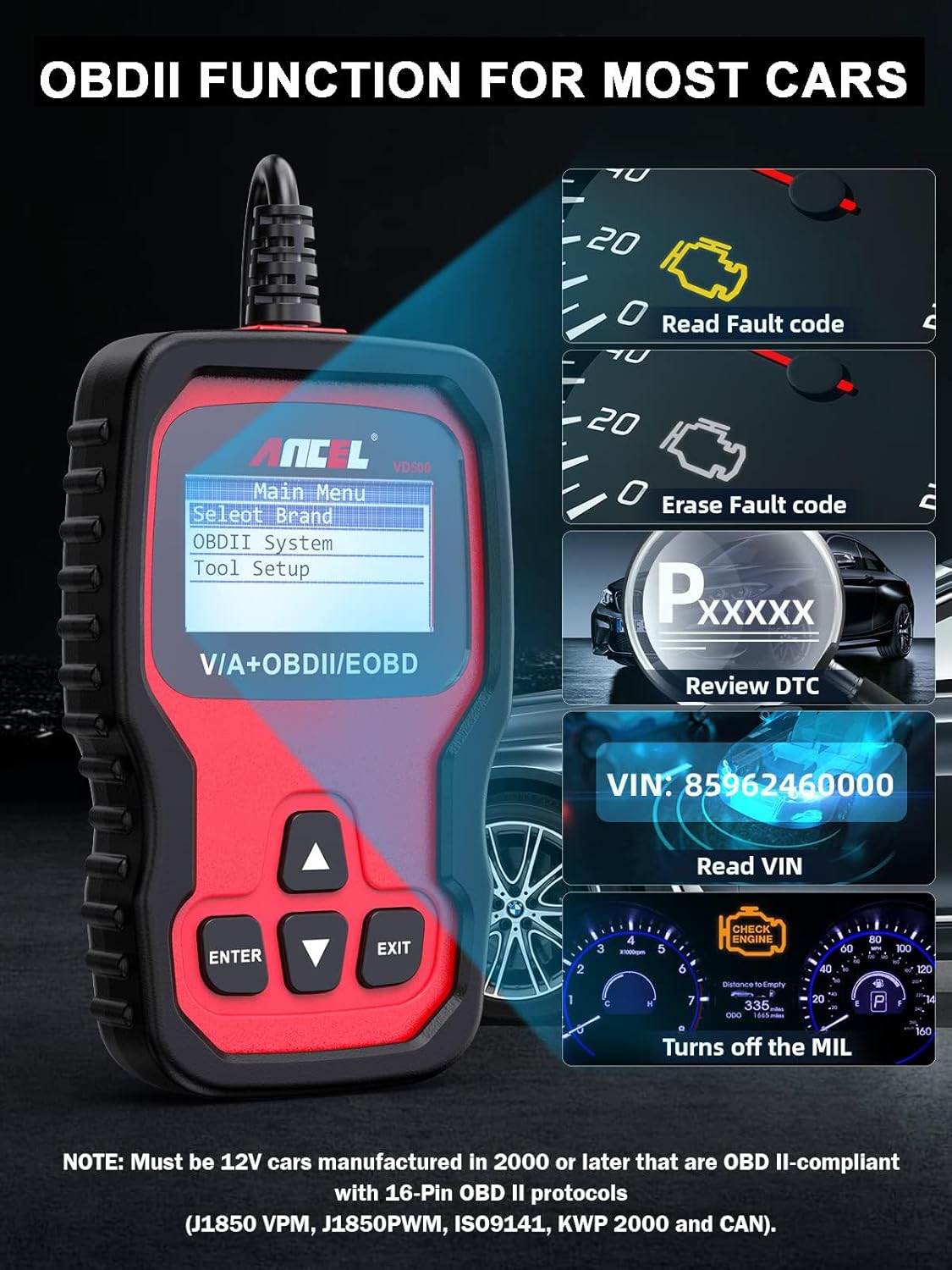
Figure 6: ANCEL VD500 connected to vehicle's OBD2 port.
4. Instrucións de funcionamento
4.1 Navigating the DS600 Elite Interface
The DS600 Elite features an 8-inch LCD touchscreen with an Android 10 operating system. Navigation is intuitive, similar to a standard tablet device.
- Pantalla táctil: Tap icons and menus to navigate.
- Botóns físicos: Use the physical buttons on the side for quick navigation (OK, directional arrows, back).
4.2 Recoñecemento automático do VIN
The DS600 Elite supports intelligent VIN recognition technology. Upon connection, it can automatically identify the vehicle's make, model, and year, streamlining the diagnostic process.
4.3 System Scan / Health Report
Initiate a full system scan to quickly identify any fault codes across all available modules in the vehicle. The health report provides a comprehensive overview of the vehicle's status.
4.4 Fluxo de datos en directo
The device can display live data parameters in text, graph, or combined formats. The 12-in-1 data stream allows for detailed monitoring of various sensors and system statuses.
4.5 Actuation Tests (Bi-Directional Control)
The DS600 Elite supports bi-directional control, allowing users to send commands to vehicle systems and receive data back. This helps in actively testing components and pinpointing faults.
4.6 OBD2 Functions (VD500 & DS600 Elite)
Both devices support standard OBD2 functions, including:
- Read and Clear DTCs (Diagnostic Trouble Codes)
- Ler datos en directo
- Ler datos de conxelar fotogramas
- Estado de preparación de I/M
- Proba do sensor de O2
- Proba de monitor a bordo
- Proba de compoñentes
- Información do vehículo (VIN, CID, CVN)
5. Funcións de mantemento
The DS600 Elite offers over 34 maintenance functions. The VD500 provides specific maintenance functions for VAG vehicles.

Figure 7: ANCEL VD500 Special Functions for VAG Vehicles.
5.1 ECU/Online Coding
Allows matching of ECU replacements, unlocking high-level functions, and customizing car settings. This includes power balance, PMI (Programmable Module Installation), adaptive data reset, online calibration, online parameterization, and flashing hidden functions.
5.2 Sangrado ABS
If the ABS computer, ABS pump, brake master cylinder, brake cylinder, brake line, or brake fluid is replaced, the ABS bleeding function must be performed to restore ABS brake sensitivity.
5.3 Battery Matching (BMS)
Registers new battery parameters to the ECU after battery replacement to ensure proper charging and system function.
5.4 Oil Reset
Restablece a luz de servizo do aceite e a quilometraxe de mantemento despois dun cambio de aceite.
5.5 TPMS Reset
Checks tire sensor IDs from the vehicle ECU and performs TPMS programming and reset after tire or TPMS sensors are replaced.
5.6 SAS Reset (Steering Angle Sensor)
Calibrates the steering angle sensor after replacement or repair to ensure correct steering system operation.
5.7 DPF Regeneration
Used to clear PM from the DPF filter through continuous combustion oxidation mode to stabilize the filter.
5.8 Codificación do inxector
After the ECU or injector is replaced, the injector code of each cylinder must be confirmed or re-coded.
5.9 Adaptación do acelerador
Initializes the throttle actuator to the default state for regulating throttle (or idle) operations accurately.
Video 1: Demonstration of Full ECU-Level Maintenance Resets.
6 Solución de problemas
If you encounter issues with your ANCEL diagnostic tool, consider the following steps:
- Comproba as conexións: Ensure the OBD2 connector/VCI dongle is securely plugged into the vehicle's port.
- Fonte de alimentación: Verify the device is sufficiently charged or receiving power from the vehicle.
- Actualizacións de software: Ensure the device software and vehicle-specific applications are up to date.
- Compatibilidade do vehículo: Confirm your vehicle's make, model, and year are supported for the specific function you are trying to perform.
- One Click Feedback: The DS600 Elite offers a 'Feedback' function to directly send diagnostic logs and problem descriptions to ANCEL's technical support for assistance.
Video 2: Demonstration of One-Click Features, including Feedback.
7. Especificacións
- Marca: ANCEL
- Operating System (DS600 Elite): Android 10
- Processor (DS600 Elite): 2 GHz Quad-Core CPU
- Display (DS600 Elite): 8-inch LCD Screen (1280x800 resolution)
- Memory (DS600 Elite): 2 GB de RAM + 32 GB de almacenamento
- Battery (DS600 Elite): 6000 mAh
- Connectivity (DS600 Elite): 2.4GHz & 5GHz Dual-Frequency Wi-Fi, Bluetooth VCI
- Camera (DS600 Elite): 8 Megapixel Rear-Facing
- Idiomas admitidos: 25 idiomas
- Vehicle Compatibility (VD500): Volkswagen Group (VW/Audi/Skoda/SEAT) 12-volt 16-pin vehicles, other 12-volt OBD II-compliant vehicles (1996 or later)
8. Garantía e soporte
The ANCEL DS600 Elite and VD500 come with a manufacturer's warranty. For specific warranty details, please refer to the documentation included with your product or contact ANCEL customer support.
8.1 Actualizacións de software
The DS600 Elite includes 2 years of free software updates. These updates are delivered over-the-air via Wi-Fi, ensuring your device always has the latest vehicle data and functionalities.
Video 3: Demonstration of One-Click Free Update process.
8.2 Remote Technical Assistance
The DS600 Elite offers remote technical service, allowing ANCEL's support team to provide instant assistance by remotely accessing your device via TeamViewer. This feature helps in diagnosing and resolving complex issues efficiently.


