Benvido
Thank you for choosing the BYTECH BICONIC True Wireless Earbuds. This manual provides essential information on how to set up, operate, maintain, and troubleshoot your new earbuds. Please read this manual thoroughly before use to ensure optimal performance and longevity of your device.
Instrucións de seguridade importantes
- Non expoñas os auriculares nin a caixa de carga a temperaturas extremas, humidade ou líquidos.
- Evite deixar caer, golpear ou desmontar o dispositivo.
- Do not use abrasive cleaners or harsh chemicals to clean the earbuds or case.
- Listen at moderate volume levels to prevent hearing damage. Prolonged exposure to loud sounds can cause irreversible hearing loss.
- Manter fóra do alcance dos nenos e animais.
- Dispose of the device responsibly according to local regulations. Do not dispose of with household waste.
Que está incluído
Comprobe o contido do paquete para asegurarse de que estean presentes todos os elementos:
- BYTECH BICONIC True Wireless Earbuds (Left and Right)
- Estuche de carga
- Cable de carga
- Manual de usuario
Produto rematadoview
Familiarize yourself with the components of your BYTECH BICONIC True Wireless Earbuds.

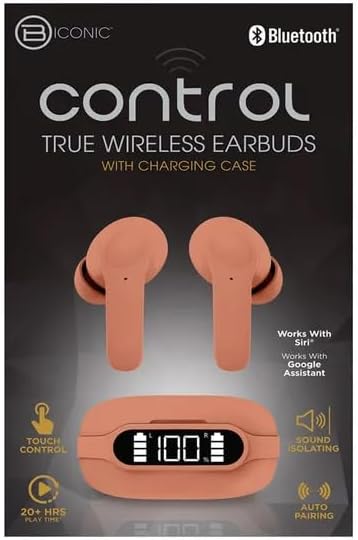
Comezando
Cargando os auriculares e o estuche
The BYTECH BICONIC earbuds come with a rechargeable battery in both the earbuds and the charging case. Ensure both are fully charged before first use.
- Place the earbuds into the charging case, ensuring they are correctly seated in their respective slots (L for left, R for right).
- Connect the provided charging cable to the charging port on the case and the other end to a USB power source (e.g., computer USB port, wall adapter).
- A pantalla dixital da caixa de carga mostrará o nivel da batería. Deixe o tempo suficiente para unha carga completa.
- Unha vez cargado por completo, desconecte o cable de carga.
Emparejamento Bluetooth
Follow these steps to pair your earbuds with your Bluetooth-enabled device:
- Asegúrate de que os auriculares estean cargados e dentro da caixa de carga.
- Abre a caixa de carga. Os auriculares entrarán automaticamente no modo de emparellamento e unha luz indicadora nos auriculares parpadeará.
- No teu dispositivo (teléfono intelixente, tableta, etc.), vai á configuración de Bluetooth e activa Bluetooth.
- Busca available devices. You should see "BYTECH BICONIC" or a similar name appear in the list.
- Select "BYTECH BICONIC" to connect. Once connected, a voice prompt will confirm the successful pairing, and the indicator lights on the earbuds will stop flashing.
- Os auriculares volverán conectarse automaticamente ao último dispositivo emparellado ao sacalos da funda, sempre que o Bluetooth estea activado no dispositivo.
Instrucións de funcionamento
Controis táctiles
The BYTECH BICONIC earbuds feature intuitive touch controls for easy management of your audio and calls.
| Acción | Función |
|---|---|
| Toque único (auricular esquerdo/dereito) | Reproducir/Pausa música, Responder/Finalizar chamada |
| Toca dúas veces (auricular dereito) | Próxima pista |
| Toca dúas veces (auricular esquerdo) | Pista anterior |
| Triplo toque (auricular esquerdo/dereito) | Activar o asistente de voz (Siri/Asistente de Google) |
| Presión longa (auricular esquerdo/dereito) | Rexeitar a chamada |
Acendido e apagado
- Encendido: Os auriculares acenderanse automaticamente cando se retiren da funda de carga.
- Apagado: Volve colocar os auriculares na caixa de carga e pecha a tapa. Apagaranse automaticamente e comezarán a cargar.
Mantemento e coidados
Proper care will extend the life of your BYTECH BICONIC True Wireless Earbuds.
- Limpeza: Use a soft, dry, lint-free cloth to clean the earbuds and charging case. Do not use liquids or aerosol cleaners.
- Almacenamento: Cando non estean en uso, garde sempre os auriculares no seu estoxo de carga para protexelos e mantelos cargados.
- Evita condicións extremas: Do not expose the device to extreme heat, cold, or direct sunlight.
- Resistencia á auga: These earbuds are not waterproof. Avoid contact with water or excessive moisture.
Resolución de problemas
Se tes algún problema cos teus auriculares, consulta as seguintes solucións habituais:
| Problema | Solución |
|---|---|
| Os auriculares non se emparejan | Asegúrate de que os auriculares estean cargados. Desactiva e activa o Bluetooth no teu dispositivo. Esquécete do dispositivo na configuración de Bluetooth e volve emparellalo. |
| Só funciona un auricular | Volva colocar os dous auriculares na caixa de carga, peche a tapa, agarde uns segundos e volve retiralos. Asegúrese de que ambos estean cargados. |
| Sen son | Comproba os niveis de volume tanto no dispositivo como nos auriculares. Asegúrate de que os auriculares estean conectados correctamente. Tenta reproducir sons diferentes. |
| O estuche de carga non se está cargando | Asegúrate de que o cable de carga estea conectado correctamente tanto á carcasa como á fonte de alimentación. Proba cun porto USB ou adaptador de corrente diferente. |
Especificacións técnicas
Detailed specifications for your BYTECH BICONIC True Wireless Earbuds:
| Característica | Detalle |
|---|---|
| Número de modelo | BC-AU-BE-144-TN |
| Tecnoloxía de conectividade | Sen fíos (Bluetooth) |
| Factor de forma | Intraurais (Intraurais) |
| Cor | Café |
| Características especiais | Rechargeable Battery, Touch Control, Sound Isolating, Auto Pairing |
| Compoñentes incluídos | Cable |
| Estimated Play Time | Máis de 20 horas (con funda de carga) |
Información sobre a garantía e atención ao cliente
BYTECH products are designed and manufactured to the highest quality standards. For information regarding warranty coverage, please refer to the warranty card included with your purchase or visit the official BYTECH websitio.
If you require further assistance or have questions not covered in this manual, please contact BYTECH customer support through their official channels. Please have your model number (BC-AU-BE-144-TN) and purchase details ready when contacting support.


