1. Introdución
Thank you for choosing the FLEXISPOT Mobile Standing Desk with Wheels (Model: 32x18 Maple). This pneumatic laptop desk is designed to provide a versatile and ergonomic workstation for various environments, including home offices, bedrooms, and living areas. Its height-adjustable feature and mobile design offer flexibility for both sitting and standing use. This manual provides essential information for assembly, operation, maintenance, and safety to ensure optimal performance and longevity of your desk.

Image: The FLEXISPOT Mobile Standing Desk in a home environment, showcasing o seu deseño compacto e versátil.
2. Información importante de seguridade
Lea e comprenda todas as instrucións de seguridade antes de montar ou usar este produto. O incumprimento destas instrucións pode provocar lesións ou danos no produto.
- Siga sempre atentamente as instrucións de montaxe.
- Asegúrate de que o escritorio estea colocado sobre unha superficie estable e nivelada.
- Do not exceed the maximum weight limit of the desk. (Refer to specifications for details).
- Keep fingers and other body parts clear of moving parts during height adjustment.
- Use caution when moving the desk, especially on uneven surfaces or around obstacles, to prevent tipping.
- Do not allow children to play on or around the desk, especially during height adjustments.
- Asegúrese de que todos os parafusos e elementos de fixación estean ben axustados antes do uso e comprobe periodicamente se están frouxos.
3. Lista de pezas
Antes de comezar a montaxe, comproba que todas as pezas que se indican a continuación estean presentes e non estean danadas. Se falta algunha peza ou está danada, ponte en contacto co servizo de atención ao cliente.
Imaxe: Explosión view of the FLEXISPOT Mobile Standing Desk components. This image shows the base, tabletop, lifting column, crossbeam, wrench spring, Phillips screwdriver, and cup holder, all labeled for easy identification.
- Sobremesa (1)
- Lifting Column (1)
- Travesaño (1)
- Base (1)
- Portavasos (1)
- Wrench Spring (1)
- Destornillador Phillips (1)
- Assembly Screws/Hardware (various, typically labeled A, B, C)
4. Configuración e montaxe
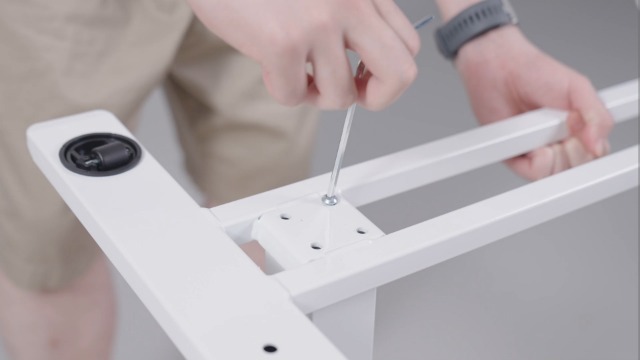
Assembly is designed to be straightforward and typically takes about 10 minutes. All necessary tools are included.
- Install the Lifting Column Spring: Insert the wrench spring into the top of the lifting column. Ensure proper alignment of the spring and handle protrusion with the handle notch.
- Instalar a viga transversal: Attach the crossbeam to the lifting column using the provided screws. Note that the notch on the crossbeam needs to be installed facing up. Secure tightly with the Phillips screwdriver.
- Instalar a mesa: Carefully align the tabletop with the assembled lifting column and crossbeam. Secure the tabletop to the crossbeam using the appropriate screws.
- Instalar a base: Attach the base to the bottom of the lifting column. Ensure all screws are tightened for stability.
- Instalar o portavasos: Assemble the cup holder components and attach it to the side of the tabletop using the provided screws and Phillips screwdriver.
- Dar a volta á mesa: With assistance if needed, carefully turn the desk upright.
Video: FLEXISPOT H7 Overbed Bedside Table Installation Guide. This video provides a step-by-step visual guide for assembling the desk, demonstrating how to install each component and adjust the height.
5. Instrucións de funcionamento
Axuste de altura
The desk features a gas spring pneumatic lift system for smooth and easy height adjustments.
- Aumentar: Gently pull the lever located under the tabletop and apply slight upward pressure to the tabletop. The desk will smoothly rise. Release the lever at the desired height.
- Para baixar: Gently pull the lever located under the tabletop and apply slight downward pressure to the tabletop. The desk will smoothly lower. Release the lever at the desired height.
- The height can be adjusted from 26 inches to 41.7 inches.

Image: Easy Height Adjustment. This image illustrates the simple one-hand operation for adjusting the desk's height using the pneumatic lift system.
Mobilidade
The desk is equipped with hidden casters for easy movement.
- To move the desk, simply push or pull it to your desired location. The hidden casters allow for smooth 360-degree rotation.
- O baixo profile base (1.2 inches high) is designed to easily tuck beneath furniture like beds and sofas, saving space.

Image: C-Shape & Hidden Casters. This image highlights the desk's design, which allows it to fit under low furniture, and shows the hidden wheels for easy movement.
Uso versátil
This desk is designed for multi-functional use:
- Use as a standing desk for improved posture and energy.
- Position over a bed or sofa for comfortable laptop use, reading, or dining.
- Ideal for small craft projects or as a portable workstation in any room.

Image: Multi-functional Use. This collage demonstrates various applications of the desk, including as a yoga side table, pet grooming station, small craft desk, and solo dining table.
6. Mantemento
Regular maintenance will help prolong the life and appearance of your FLEXISPOT Mobile Standing Desk.
- Limpeza: Limpa a superficie da mesa e o marco cun pano suave eamp pano. Evite produtos químicos agresivos ou produtos de limpeza abrasivos que poidan danar o acabado.
- Verificación de hardware: Comprobe periodicamente todos os parafusos e elementos de fixación para asegurarse de que permanecen axustados. Volva a apertalos se é necesario.
- Pezas móbiles: Ensure the gas spring mechanism operates smoothly. Do not apply lubricants unless specifically recommended by the manufacturer.
- Almacenamento: When not in use, store the desk in a dry, temperate environment away from direct sunlight or extreme temperatures.
7 Solución de problemas
If you encounter any issues with your desk, please refer to the following common troubleshooting tips:
| Problema | Causa posible | Solución |
|---|---|---|
| Desk does not adjust height smoothly. | Lever not fully engaged or gas spring issue. | Ensure the lever is fully pulled. If the issue persists, contact customer support. |
| O escritorio treme ou é inestable. | Fixadores soltos ou superficie irregular. | Check and tighten all assembly screws. Ensure the desk is on a flat, stable surface. |
| As rodas non xiran libremente. | Obstruction or debris in casters. | Inspect casters for any obstructions and remove them. Clean casters if necessary. |
If these solutions do not resolve the issue, please contact FLEXISPOT customer support for further assistance.
8. Especificacións do produto
| Característica | Detalle |
|---|---|
| Marca | FLEXISPOT |
| Modelo | 32x18 |
| Forma | Rectangular |
| Deseño de escritorio | Escritorio de pé |
| Dimensións do produto | 18" D x 32" W x 37" H |
| Cor | Arce |
| Estilo | Moderno |
| Material base | Metal e madeira |
| Tipo de material superior | Wood (FSC-Certified) |
| Tipo de acabado | Pintado |
| Característica especial | Portátil, con rodas |
| Altura mínima | 26 polgadas |
| Altura máxima | 41.7 polgadas |
| Montaxe necesaria | Si |
| Inclúe todas as ferramentas de montaxe | Si |
9. Garantía e soporte
This FLEXISPOT product comes with a Limited Warranty. For specific details regarding warranty coverage, terms, and conditions, please refer to the documentation included with your purchase or visit the official FLEXISPOT websitio.
Atención ao cliente: If you have any questions, require assistance with assembly, or need troubleshooting support, please contact FLEXISPOT customer service. Our team is available to help you within 24 hours.
- Soporte en liña: Visita o Tenda FLEXISPOT en Amazon para preguntas frecuentes e recursos adicionais.
- Correo electrónico/Teléfono: Refer to your product packaging or the official FLEXISPOT websitio para obter información de contacto directo.


