1. Introdución
Thank you for choosing the Tera P400 Android Barcode Scanner. This device is a high-performance, rugged mobile terminal designed for efficient data collection and management in various demanding environments such as industrial facilities, retail, logistics, and warehouses. Featuring an Android 11 operating system, a powerful octa-core processor, and a durable design, the P400 provides reliable and fast operation for your business needs.

Image: The Tera P400 Android Barcode Scanner, showcasing its robust design and integrated physical keyboard.
2. Contido do paquete
Verifique que todos os elementos que se indican a continuación estean incluídos no seu paquete:
- Tera P400 Android Barcode Scanner (x1)
- Screen Protector (x1)
- Cable USB (x1)
- Charging Adapter (x1)
- Correa de man (x1)
- Manual de usuario (x1)

Image: A visual representation of the Tera P400 barcode scanner and its included accessories: user manual, screen protector, QC adapter, USB cable, and hand strap.
3. Características clave
3.1. Display and Keyboard
The P400 features a 4-inch touchscreen display for clear visuals and intuitive navigation. Complementing the touchscreen is a 26-key physical keyboard, providing tactile feedback for rapid and precise data entry, enhancing productivity and minimizing errors.

Image: Close-up of the Tera P400's 4-inch screen and 26-key physical keyboard, highlighting custom keys, power button, and dedicated scan keys.
3.2. Batería e carga
Equipped with a robust 5100 mAh removable battery, the P400 offers up to 300 hours of standby time and over 12 hours of continuous usage. It supports QC 3.0 fast charging, allowing for a full charge in approximately 3 hours, optimizing power efficiency and maintaining long-term battery health.
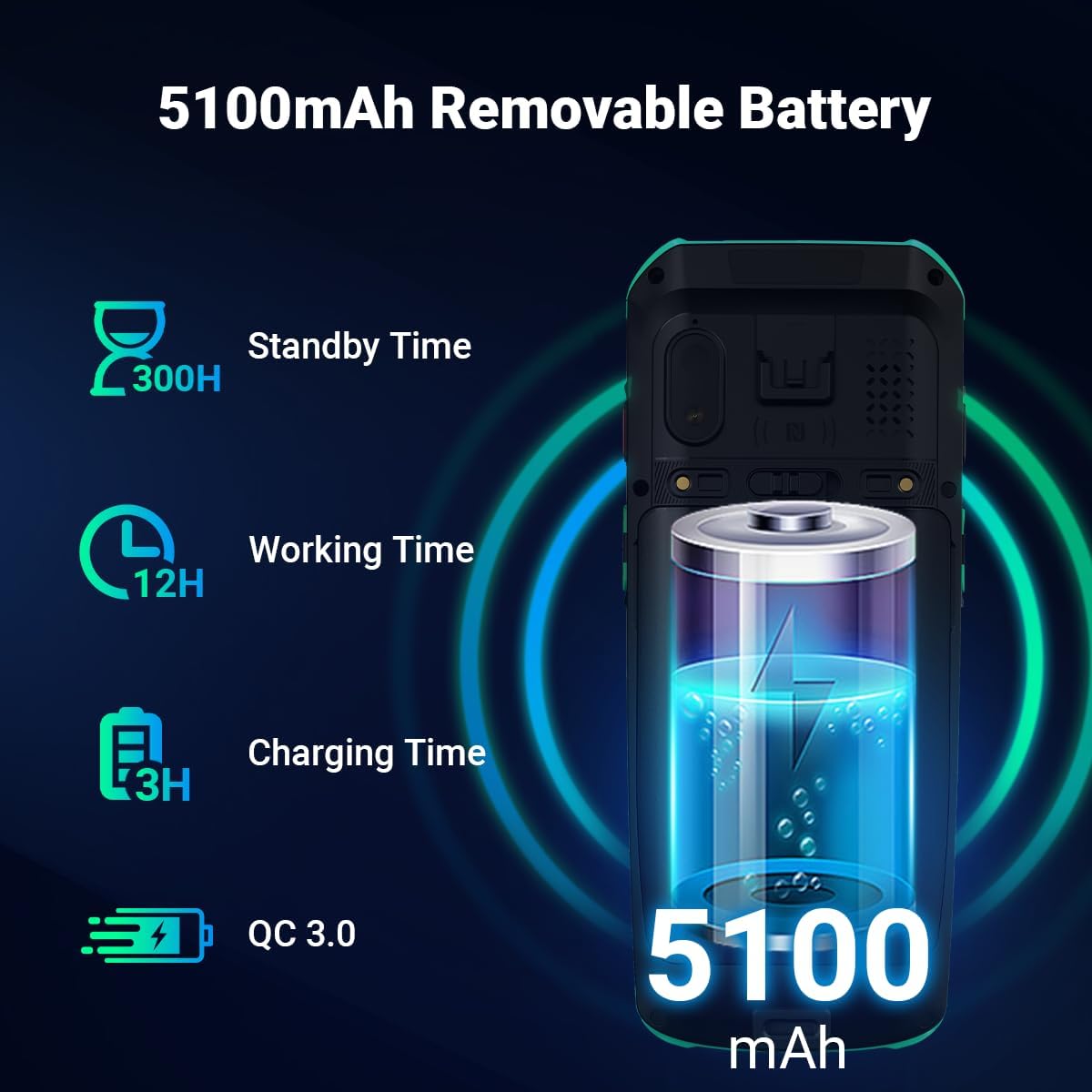
Image: Illustration of the Tera P400's 5100mAh removable battery, detailing its 300 hours standby time, 12 hours working time, and 3 hours charging time with QC 3.0 support.

Image: A visual demonstrating the QC 3.0 fast charging capability of the Tera P400, showing a charging cable connected to the device.
3.3. Performance and Operating System
Powered by a Mediatek MT6762 octa-core Cortex-A53 2.0 GHz CPU, the P400 delivers robust performance, stable connectivity, reduced power consumption, and faster processing speeds. It runs on Android 11, providing enhanced data privacy and security features to protect sensitive information.

Image: Depiction of the Tera P400's internal components, highlighting the Android 11 operating system and the MT6762 Octa-core 2.0GHz processor.
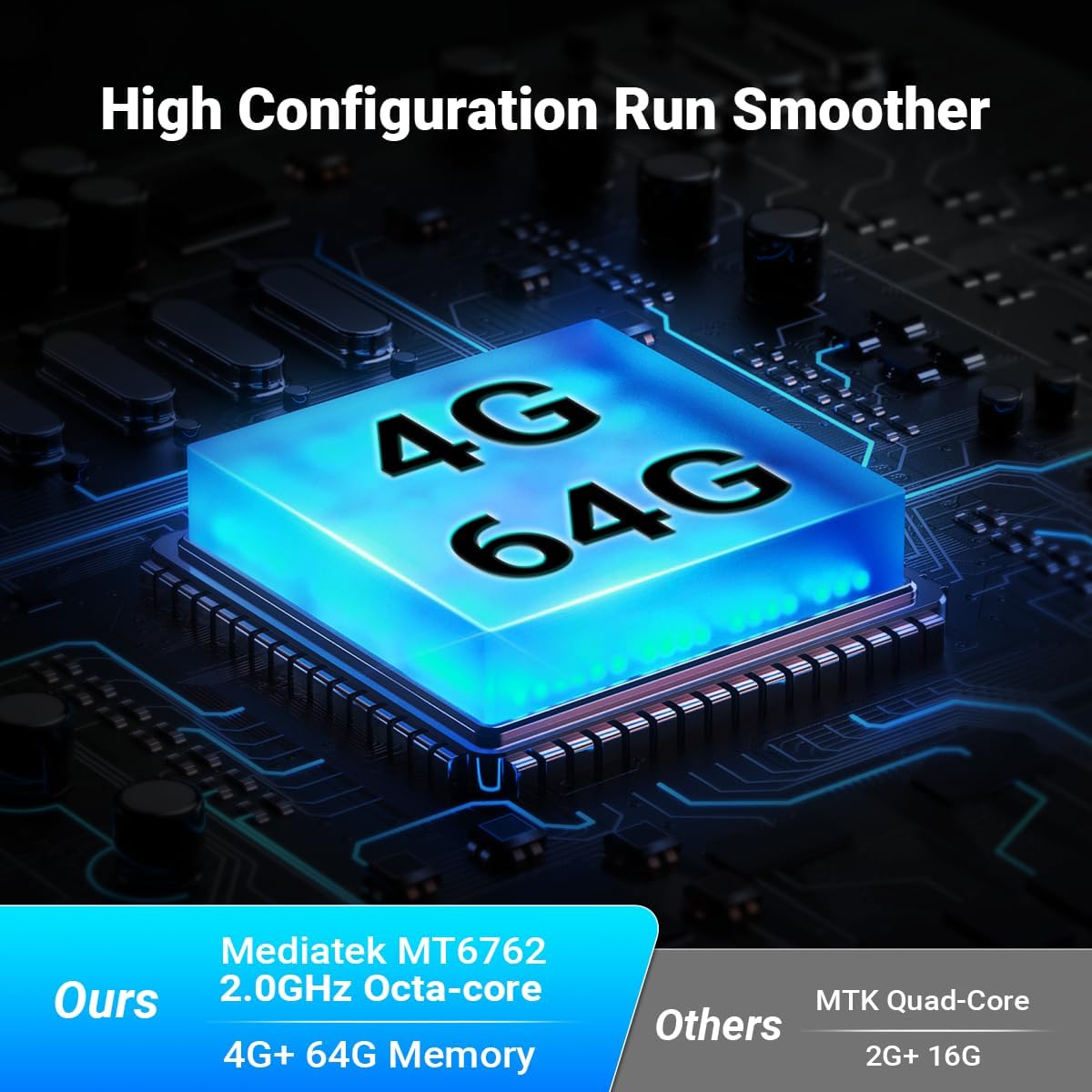
Image: A graphic illustrating the Tera P400's 4GB RAM and 64GB ROM configuration, emphasizing smoother performance compared to lower specifications.
3.4. Durabilidade e protección
The P400 is IP67 certified, ensuring resistance to water, dust, and drops from up to 1.8 meters. This makes it highly suitable for diverse and challenging work environments.

Image: The Tera P400 barcode scanner shown with indicators for IP67 grade, drop resistance, water resistance, and dustproof capabilities, along with a scale showing 1.8m drop height.

Image: A visual highlighting the Gorilla Glass screen protection on the Tera P400, emphasizing its durability.
3.5. Scanning Performance
Equipped with the Honey-Well HS7 Scan Engine, an upgraded version of the N670X series, the P400 offers superior scanning performance. It can scan fast-moving barcodes (up to 6 m/s) and captures high-quality images under various lighting conditions. It supports multiple barcode formats, including blurred, contorted, smeared, and DPM codes.

Imaxe: Examples of various barcode types (blurred, contorted, smeared, DPM) that the HS7 Scan Engine can effectively read, demonstrating its excellent scanning performance.
3.6. Connectivity and Audio
The P400 supports NFC for convenient short-range communication. It also features a 5W loudspeaker and dual microphones with noise reduction support for clear audio communication.

Image: A close-up of the Tera P400's rear, indicating NFC support with a radiating signal icon.

Imaxe: Unha detallada view of the Tera P400's audio features, highlighting the 5W loudspeaker and dual microphones with noise reduction capabilities.
4. Guía de configuración
4.1. Cargando o dispositivo
- Connect the USB cable to the charging adapter.
- Conecta o adaptador de carga a unha toma de corrente.
- Connect the USB-C end of the cable to the charging port on the Tera P400.
- The charging indicator will illuminate. Allow approximately 3 hours for a full charge.
4.2. Inserting SIM/SD Card (Optional)
The Tera P400 supports external storage and cellular connectivity. Locate the SIM/SD card slot on the device, open the cover, and carefully insert your Nano-SIM card and/or microSD card as indicated by the slot's diagram. Ensure the cover is securely closed to maintain IP67 protection.
4.3. Acendido inicial
Press and hold the power button located on the side of the device until the Tera logo appears on the screen. Follow the on-screen prompts to complete the initial setup, including language selection, Wi-Fi connection, and Google account setup.
5. Instrucións de funcionamento
5.1. Navegando por Android 11
The Tera P400 runs on Android 11, offering a familiar and intuitive user interface. Use the touchscreen for gestures such as swiping, tapping, and pinching. The physical keyboard provides quick access to numbers, letters, and function keys for efficient data input.
5.2. Escaneado de códigos de barras
Para escanear un código de barras:
- Open the scanning application on your device.
- Apunte a xanela do escáner cara ao código de barras que desexa escanear.
- Press one of the dedicated scan keys (located on the side or front of the device).
- Ensure the red aiming beam or illumination covers the entire barcode.
- Unha dixitalización exitosa normalmente indicarase cun pitido audible e/ou unha confirmación visual na pantalla.

Image: A visual representation of the Tera P400 scanning various barcode formats, demonstrating its capability to read multiple types of codes.
5.3. Usando o teclado físico
The 26-key physical keyboard allows for rapid and accurate data entry, especially useful in environments where gloves are worn or precise input is required. Familiarize yourself with the layout, including numeric keys, alphabet keys, and function keys (F1-F6) which can be customized for specific application shortcuts.
6. Mantemento
6.1. Limpeza do dispositivo
To maintain optimal performance and appearance, regularly clean your Tera P400. Use a soft, lint-free cloth slightly dampened with water or a mild, non-abrasive cleaning solution. Avoid using harsh chemicals, solvents, or abrasive materials that could damage the device's surface or screen. Ensure the charging port and scanner window are free of dust and debris.
6.2. Coidado da batería
Para prolongar a duración da batería:
- Evite descargar completamente a batería con frecuencia.
- Non expoña o dispositivo a temperaturas extremas.
- Se garda o dispositivo durante un período prolongado, cargue a batería aproximadamente ao 50 % antes de gardalo.
6.3. Actualizacións de software
Regularly check for and install software updates to ensure your device has the latest features, security patches, and performance improvements. Updates can typically be found in the device's settings under "System" or "About phone".
7 Solución de problemas
| Problema | Causa posible | Solución |
|---|---|---|
| O dispositivo non se acende | Batería baixa; Fallo do sistema | Charge the device for at least 30 minutes; Perform a forced restart by holding the power button for 10-15 seconds. |
| Barcode not scanning | Barcode damaged/unreadable; Incorrect scanning angle; Scanner lens dirty; Application issue | Try scanning a different barcode; Adjust scanning distance/angle; Clean the scanner lens; Restart the scanning application or device. |
| Rendemento lento | Demasiadas aplicacións en execución; Pouco espazo de almacenamento | Close unnecessary applications; Clear cache; Free up storage space by deleting unused files/apps. |
| Problemas de conectividade Wi-Fi/Bluetooth | Incorrect settings; Interference | Toggle Wi-Fi/Bluetooth off and on; Restart the device; Check network settings; Move closer to the access point. |
8. Especificacións
| Característica | Detalle |
|---|---|
| Modelo | P400 |
| Sistema Operativo | Android 11 |
| CPU | Mediatek MT6762, 8-Core Cortex-A53, 2.0 GHz |
| Memoria | 4 GB de RAM + 64 GB de ROM |
| Mostrar | Pantalla táctil de 4 polgadas |
| Teclado | 26-key Physical Keyboard |
| Motor de código de barras | Honey-Well HS7 Scan Engine |
| Batería | 5100 mAh (extraíble) |
| Cargando | QC 3.0 Fast Charging |
| Clasificación de protección | IP67 |
| Resistencia a caídas | Ata 1.8 metros |
| Conectividade | Bluetooth, USB, NFC, WLAN, 2G/3G/4G |
| Dimensións | 20.1 x 12.3 x 5.5 cm |
| Peso | 420 gramos |
9. Garantía e soporte
Tera is committed to providing high-quality products and excellent customer service. As one of the top players in the PDA industry, Tera offers comprehensive support for its products. For any inquiries, technical assistance, or warranty claims, please refer to the contact information provided with your purchase or visit the official Tera website. Tera provides lifelong customer support for its products.
Para máis información, visite o Tenda Tera en Amazon.


