1. Introdución
This manual provides instructions for the safe and effective use of your GT POWER AC/DC Power Adapter, Model 109. This adapter is designed to provide power to compatible TP-Link Mesh Wi-Fi 7 Systems, specifically Deco BE63, BE10000, and BE11000 models. Please read this manual thoroughly before use and retain it for future reference.
2. Información de seguridade
WARNING: To reduce the risk of fire or electric shock, carefully follow these instructions.
- Ensure the adapter's voltage and current ratings match the requirements of your device.
- Do not expose the adapter to rain or moisture.
- Do not open the adapter casing. Non hai pezas que o usuario poida reparar no interior.
- Keep the adapter away from excessive heat sources.
- Desconecte sempre o adaptador da toma de corrente antes de limpalo ou se non o vai usar durante un período prolongado.
- Non use o adaptador se o cable ou o enchufe están danados.
- This adapter is designed for indoor use only.
- The adapter features Over Voltage Protection (OVP), Over Current Protection (OCP), and Short Circuit Protection (SCP) for enhanced safety.
3. Produto rematadoview
The GT POWER AC Adapter (Model 109) is a compact power supply unit designed for specific TP-Link Deco Mesh Wi-Fi systems. It converts AC wall power to the DC power required by your device.

Figura 1: Fronte view of the GT POWER AC Adapter. The label indicates input voltage (AC100-240V) and output (DC12V 3A).
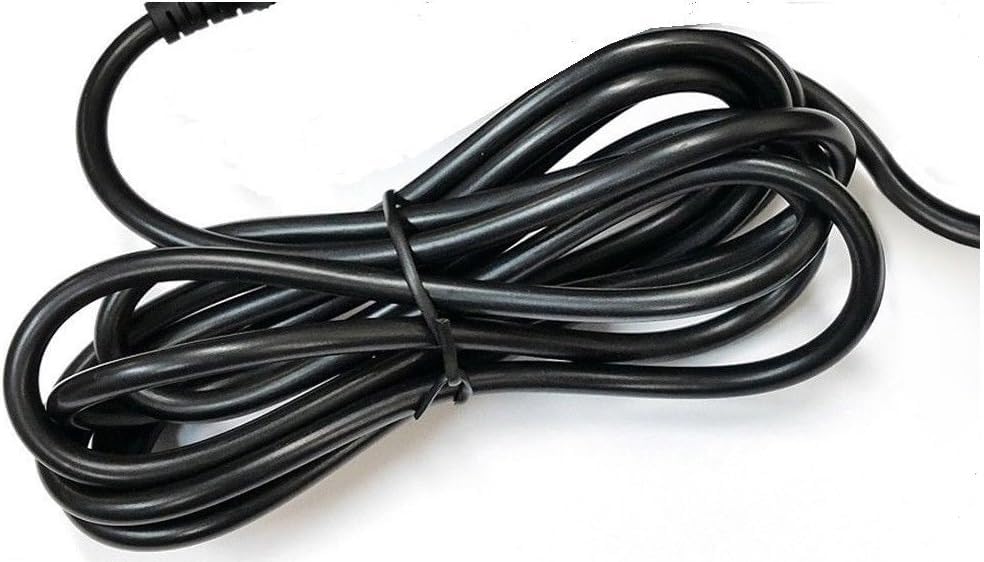
Figura 2: Lado view of the adapter, highlighting the barrel connector that plugs into your device.
4. Configuración
Follow these steps to connect your GT POWER AC Adapter to your TP-Link Deco Mesh Wi-Fi System:
- Ensure your TP-Link Deco device is powered off.
- Locate the power input port on your TP-Link Deco device. This is typically a circular port.
- Insert the barrel connector of the GT POWER AC Adapter firmly into the power input port of your Deco device.
- Conecte o adaptador de CA a unha toma de corrente estándar de 110 V CA.
- Power on your TP-Link Deco device.
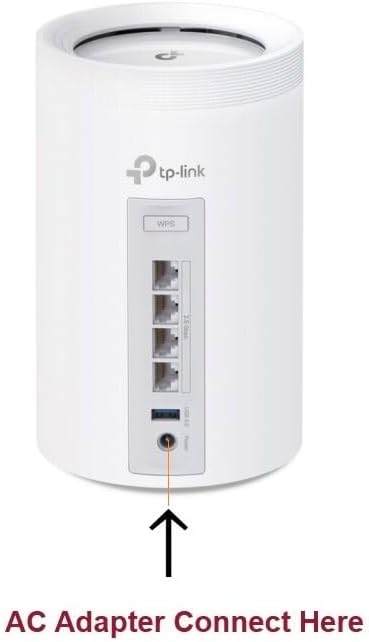
Figura 3: Example of connecting the AC adapter to a compatible TP-Link Deco device. The arrow indicates the power input port.
5. Instrucións de funcionamento
Once properly connected and plugged into a power outlet, the GT POWER AC Adapter will continuously supply power to your TP-Link Deco device. No further user interaction is required for operation.
- Ensure the adapter is always plugged into a functional power outlet.
- Avoid disconnecting the adapter during critical operations of your Deco device.
6. Mantemento
The GT POWER AC Adapter requires minimal maintenance:
- Keep the adapter clean and free from dust. Use a dry, soft cloth for cleaning.
- Non empregue produtos de limpeza líquidos nin aerosois.
- Regularly inspect the power cord and connector for any signs of damage. If damage is observed, discontinue use immediately.
- Garde o adaptador nun lugar fresco e seco cando non o use.
7 Solución de problemas
If your TP-Link Deco device is not receiving power, consider the following:
- Sen enerxía:
- Verify the adapter is securely plugged into both the wall outlet and the Deco device.
- Proba a toma de corrente con outro dispositivo para asegurarte de que funciona.
- Inspect the adapter's cable and connector for any visible damage.
- Potencia intermitente:
- Asegúrese de que todas as conexións sexan estancas.
- Avoid bending or stressing the power cord.
Se os problemas persisten, póñase en contacto co servizo de atención ao cliente.
8. Especificacións
| Característica | Detalle |
|---|---|
| Marca | POTENCIA GT |
| Número de modelo | 109 |
| Vol. De entradatage | CA 100-240 V |
| Vol. De saídatage / Actual | DC 12V / 3A |
| Formato de enchufe | Type A (US Standard) |
| Características de protección | OVP (Over Voltage Protection), OCP (Over Current Protection), SCP (Short Circuit Protection) |
| UPC | 781834735527 |
9. Garantía e soporte
This GT POWER AC Adapter comes with a Un ano de garantíaAdemais, unha Devolución de diñeiro de 30 días guarantee is offered.
For technical support or warranty claims, please contact the seller, GTXPower, through the platform where the product was purchased.


