Introdución
Grazas pola compraasing the PHORUS 52 Inch Tropical Ceiling Fan. This manual provides detailed instructions for the safe installation, operation, and maintenance of your new ceiling fan. Please read this manual thoroughly before installation and keep it for future reference.

Figure 1: PHORUS 52 Inch Tropical Ceiling Fan (Dark Brown)
This image shows the complete PHORUS 52 Inch Tropical Ceiling Fan, featuring five dark brown palm leaf-shaped blades and a central integrated LED light. A remote control and a smartphone displaying the control app are also visible, indicating multiple control options.
Información importante de seguridade
Siga sempre as precaucións de seguridade básicas ao instalar e usar este electrodoméstico para reducir o risco de incendio, descarga eléctrica e lesións persoais.
- Lea todas as instrucións antes de comezar a instalación.
- Ensure the power is turned off at the circuit breaker before wiring.
- Todo o cableado debe estar de acordo cos códigos eléctricos nacionais e locais.
- The mounting structure must be capable of supporting the fan's weight (16 pounds).
- Non fagas funcionar o ventilador con as aspas danadas.
Configuración e instalación
This section details the steps for assembling and installing your ceiling fan. Refer to the provided video for visual guidance.
Contido do paquete
Verifique que todas as pezas estean presentes antes de comezar a montaxe.
Video 1: Installation Guide for 52 Inch Outdoor Tropical Ceiling Fan
This video provides a comprehensive guide for the installation of the 52-inch tropical ceiling fan, covering all assembly steps from unboxing to final mounting and wiring. It is an official seller video.
The installation video (Video 1) provides a detailed visual walkthrough of the assembly process. Key components include the fan body assembly, mounting bracket, downrod, hanger ball, blades, lamp shade, LED light source, receiver, and remote control.
Pasos de montaxe
- Montaxe da lámina: Attach the palm leaf blades to the blade holders using the provided screws. Ensure all screws are tightened securely.
- Instalación do kit de luz: Secure the LED light source to the fan body. Connect the wiring as instructed in the manual and video. Attach the lampsombra.
- Downrod and Mounting Bracket: Assemble the downrod with the hanger ball and attach it to the fan motor. Secure the mounting bracket to your ceiling's electrical box. The fan supports both flat and angled ceiling mounts (up to 15°).
- Cableado: Connect the fan's electrical wires to the household wiring according to the wiring diagram in the video. Ensure all connections are secure and properly insulated.
- Asemblea final: Lift the fan assembly and hang it on the mounting bracket. Secure the canopy to cover the wiring.

Figura 2: detallada view of a palm leaf fan blade.
This image shows a close-up of one of the unique palm leaf-shaped fan blades, highlighting its textured surface and the attachment points for the blade holder.

Figure 3: LED Light Source and Lampsombra.
Esta imaxe ofrece información detallada view of the fan's integrated LED light source, showing the individual LED chips and the large luminous area of the lampshade, which is 11.61 inches in diameter.
Figure 4: Fan Dimensions and Mounting Options.
This image also contains the dimensions and mounting options, indicating suitability for rooms between 256-387 sq.ft.
Instrucións de funcionamento
Your PHORUS ceiling fan can be controlled via the included remote control or a smartphone application.
Funcións de control remoto
The remote control allows for comprehensive control over the fan and light features.

Figura 5: Deseño do control remoto.
This image displays the remote control for the PHORUS ceiling fan, with various buttons labeled for functions such as power on/off, fan speed control (1-6), light on/off, brightness adjustment, color temperature adjustment, 2-hour timer, night mode, and reverse function. It also shows a QR code for the companion app.
- Encendido/apagado: Acende ou apaga o ventilador e a luz.
- Velocidade do ventilador (1-6): Adjusts the fan speed from gentle breeze (1-2) to strong airflow (5-6).
- Control de luz: Turn the light on/off, adjust brightness (stepless dimming), and change color temperature (3000K Warm Light, 4500K Natural Light, 6000K White Light).
- Temporizador (2H): Configura o ventilador para que se apague automaticamente despois de 2 horas.
- Función inversa: Changes the direction of the fan blades for summer (downward airflow) or winter (upward airflow for heat distribution).

Figure 6: Customizable Light Effect.
This image demonstrates the fan's customizable light effect, showing three different color temperatures: 3000K Warm Light, 4500K Natural Light, and 6000K White Light. It also indicates that the color temperature and dimming range (10% to 100%) can be adjusted.

Figure 7: Downdraft and Updraft Modes.
This diagram illustrates the two operational modes of the fan: Summer Mode (strong wind, rapid cooling) with downdraft airflow, and Winter Mode (balance indoor heating and cooling) with updraft airflow. It also highlights the 6 adjustable wind speeds.
Remote Code Pairing
If your remote control is not responding, you may need to pair it with the fan.
Video 2: Remote Code Pairing Guide
This video demonstrates the steps to pair the remote control with the 52-inch palm leaf ceiling fan. It shows how to turn off and on the main power supply and long-press the code key on the remote for successful pairing.
- Turn off the main power supply to the fan for one minute.
- Turn on the main power supply and simultaneously long-press the "code key" on the remote control for 3-5 seconds.
- When the fan light blinks for 2-3 times, it indicates successful code matching. The remote control can now be operated normally.
Control de aplicacións para smartphones
Control your fan conveniently from your smartphone. Scan the QR code on the remote control (Figure 5) or visit jasonghost.com/fanlamppro to download the "Fan Lamp Pro" app.
Video 3: App Setting Guide
This video provides a guide for setting up and using the smartphone application to control the fan. It demonstrates how to connect the fan to the app, adjust fan speeds, change light color temperature, and utilize the reverse function via the app interface.
The app allows for similar control as the remote, including 6 wind speeds, 3 light colors, stepless dimming, and reverse function. Ensure your phone's Bluetooth is enabled for connection.
Mantemento
Un mantemento regular garante a lonxevidade e o rendemento óptimo do seu ventilador de teito.
- Limpeza: To avoid damage to the finish, clean the fan only with a soft, damp pano. Non use produtos químicos agresivos ou produtos de limpeza abrasivos.
- Coidados da folla: Periodically check the blade attachments for tightness. Loose blades can cause wobbling and noise.
- Motor: The DC motor is designed for high efficiency and low noise. It requires no lubrication.
Resolución de problemas
If you experience issues with your fan, refer to the following common problems and solutions.
| Problema | Causa posible | Solución |
|---|---|---|
| O ventilador non comeza | No power to the fan; Loose wire connections; Remote not paired. | Check circuit breaker and wall switch. Verify all wire connections are secure. Perform remote code pairing (refer to Operating Instructions). |
| O ventilador tambalea | Parafusos da lámina soltos; láminas mal equilibradas; soporte de montaxe solto. | Tighten all blade screws. Ensure blades are balanced (balancing kit not included, but can be purchased). Verify mounting bracket is securely fastened to the ceiling. |
| A luz non funciona | Loose wire connection; Faulty LED light source. | Check light kit wiring connections. Contact customer support for LED light source replacement if necessary. |
| O control remoto non funciona | Pilas gastadas; Mando a distancia non emparellado; Obstrución entre o mando a distancia e o receptor. | Replace AAA batteries (2 required, included). Re-pair the remote control. Ensure clear line of sight to the fan's receiver. |
Especificacións
| Característica | Detalle |
|---|---|
| Marca | FORO |
| Nome do modelo | 8909 |
| Tamaño | 52 polgadas |
| Cor | Marrón escuro |
| Material | Plástico, ferro, acrílico |
| Estilo | Tropical |
| Uso interior/exterior | Exterior, Interior |
| Fonte de enerxía | DC (90~265 volt) |
| Wattage | 50 watts (Motor) |
| Fonte de luz | LED (28W, 3640LM) |
| Método de control | Aplicación, control remoto |
| Características especiais | Remote Controlled, LED Light, Timer, App Operable, Dimmable, 6 Speeds, Reversible |
| Peso do elemento | 16 libras |
| Dimensións do produto | 52 x 52 x 16.33 polgadas |
| Tamaño da habitación recomendado | 256-387 sq.ft. |
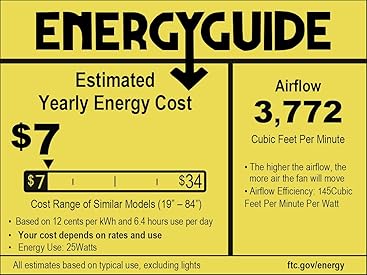
Figure 8: Energy Guide Information.
This image displays the Energy Guide label for the fan, indicating an estimated yearly energy cost of $7 based on 12 cents per kWh and 6.4 hours use per day. It also shows an airflow of 3,772 Cubic Feet Per Minute and an airflow efficiency of 145 Cubic Feet Per Minute Per Watt.
Garantía
PHORUS provides a one-year quality warranty for this product. We offer free replacement service for any damage and quality problems within this period.
Atención ao cliente
If you have any questions or require assistance, please feel free to contact us. We aim to provide a satisfactory answer within 24 hours.
For online installation video guides and app downloads, please refer to the links provided in the Operating Instructions section or scan the QR code on your remote control.


