1. Introdución
This manual provides essential instructions for setting up, operating, and maintaining your CyberGeek Mini PC T1. Please read this manual thoroughly before using the device to ensure proper function and longevity.
The CyberGeek Mini PC T1 is a compact and powerful computer featuring an 11th Gen Intel Core i9-11900H processor, 64GB DDR4 RAM, and a 2TB PCIe SSD, designed for various computing tasks including multitasking, gaming, and demanding software applications. It comes pre-installed with Ubuntu Linux.
2. Contido do paquete
Verifica que todos os elementos estean presentes no paquete:
- CyberGeek Mini PC T1
- Adaptador de alimentación
- Cable de alimentación
- Cable HDMI
- Manual de usuario (este documento)
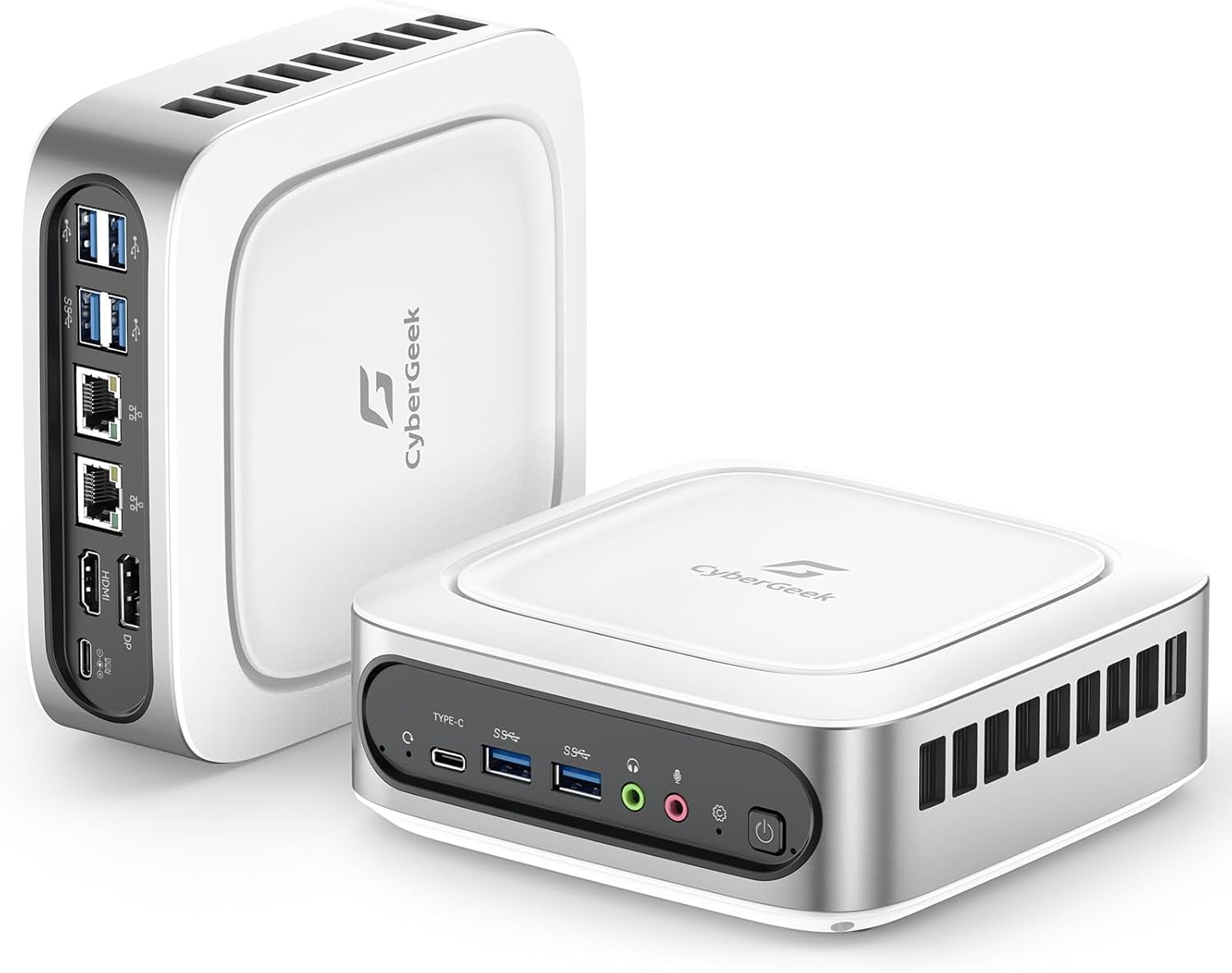
Image: CyberGeek Mini PC T1 with included accessories, including the power adapter, power cord, and HDMI cable.
3. Instrucións de configuración
3.1 Conexión de periféricos
- Conectar a pantalla: Use an HDMI, DisplayPort (DP), or USB-C cable to connect your monitor(s) to the corresponding ports on the Mini PC. The device supports up to three 4K displays simultaneously.
- Conectar o teclado e o rato: Plug your USB keyboard and mouse into any of the available USB ports (USB 2.0 or USB 3.0).
- Conectar á rede (opcional): For a wired internet connection, connect an Ethernet cable from your router or modem to one of the dual LAN ports on the Mini PC.
- Conectar enerxía: Plug the power adapter into the DC-in port on the Mini PC, then connect the power cord to an electrical outlet.

Imaxe: Detallada view of the CyberGeek Mini PC T1's front and rear ports, including USB, LAN, HDMI, DisplayPort, and USB-C.
3.2 Acendido
Press the power button located on the front of the Mini PC. The power indicator light will illuminate. The system will boot into the pre-installed Ubuntu Linux operating system.
3.3 Initial Ubuntu Setup
Follow the on-screen prompts to complete the initial setup of Ubuntu Linux, which typically includes:
- Selección da lingua
- Disposición do teclado
- Fuso horario
- Creating a user account and password
- Connecting to Wi-Fi (if not using a wired connection)
4. Instrucións de funcionamento
4.1 Funcionamento básico
Your CyberGeek Mini PC T1 runs on Ubuntu Linux, a user-friendly operating system. Familiarize yourself with the desktop environment, applications, and system settings.
4.2 Conectividade de rede
- Wi-Fi: To connect to a wireless network, click the network icon in the top right corner of the screen, select your desired network, and enter the password if prompted. The Mini PC supports Wi-Fi 6 for faster speeds.
- Bluetooth: To pair Bluetooth devices (e.g., headphones, speakers), go to System Settings > Bluetooth, ensure Bluetooth is enabled, and select your device from the list to pair. The Mini PC supports Bluetooth 5.2.
- LAN con cable: If an Ethernet cable is connected, the system should automatically establish a wired network connection.

Image: Visual representation of the CyberGeek Mini PC T1's Wi-Fi 6 and Bluetooth 5.2 capabilities, showing improved network performance.
4.3 Multiple Display Setup
The Mini PC supports up to three 4K displays. After connecting your monitors, navigate to System Settings > Displays to configure their arrangement, resolution, and orientation.

Image: A CyberGeek Mini PC T1 powering a triple 4K monitor setup, demonstrating its multi-display capability for various work scenarios.
5. Mantemento
5.1 Limpeza
To maintain optimal performance, regularly clean the exterior of the Mini PC with a soft, dry cloth. Ensure the ventilation openings are free from dust and obstructions. Do not use liquid cleaners directly on the device.
5.2 Actualizacións de software
Regularly update your Ubuntu Linux operating system and installed applications to ensure security and access to the latest features. You can typically find update options in the system's Software Updater or through the terminal.
5.3 Xestión do almacenamento
Periódicamente review and manage your 2TB PCIe SSD storage. Delete unnecessary files, uninstall unused applications, and consider backing up important data to external storage.
6 Solución de problemas
- Sen enerxía: Ensure the power adapter is securely connected to both the Mini PC and a working electrical outlet. Try a different outlet if necessary.
- Sen visualización: Verify that the monitor is powered on and the display cable (HDMI, DP, or USB-C) is securely connected to both the Mini PC and the monitor. Try a different display cable or port if available. If using DisplayPort with Ubuntu, some users have reported issues; ensure your Ubuntu installation is fully updated or consider using HDMI/USB-C.
- Sen conexión a Internet: For wired connections, check the Ethernet cable and your router/modem. For Wi-Fi, ensure the correct network is selected and the password is entered accurately.
- O sistema non responde: If the system becomes unresponsive, press and hold the power button for approximately 5-10 seconds to force a shutdown. Then, power it back on.
- Rendemento lento: Close unnecessary applications, check for background processes, and ensure the system has sufficient free storage space.
7. Especificacións
| Característica | Detalle |
|---|---|
| Procesador | 11th Gen Intel Core i9-11900H (8 Cores, 16 Threads, up to 4.9 GHz) |
| Gráficos | Gráficos Intel UHD |
| RAM | 64 GB DDR4 SODIMM (Max 64GB) |
| Almacenamento | 2 TB PCIe NVMe SSD (M.2, Max 2TB) |
| Sistema Operativo | Ubuntu Linux |
| Mostrar saída | HDMI x1, DisplayPort (DP) x1, USB-C x1 (Supports Triple 4K Display @ 60Hz) |
| Portos USB | 4x USB 3.0, 2x USB 2.0, 1x USB-C |
| Rede | Dual LAN (RJ45 x2), Wi-Fi 6 (802.11ax), Bluetooth 5.2 |
| Audio | Audio Jack x1, Mic Jack x1 |
| Dimensións (LxWxH) | 6.14 x 6.14 x 2.16 polgadas |
| Peso | 3.66 libras |
| Fonte de enerxía | Adaptador de CA |
8. Garantía e soporte
The CyberGeek Mini PC T1 comes with a manufacturer's warranty. For specific warranty terms and conditions, please refer to the documentation included with your purchase or visit the official CyberGeek websitio.
For technical support, troubleshooting assistance, or warranty claims, please contact CyberGeek customer service through their official support channels. Ensure you have your product model (T1) and purchase details available when contacting support.


