Introdución
The Stinger HORIZON10 is a state-of-the-art 10.1-inch universal car stereo designed to enhance your in-vehicle entertainment and connectivity. Featuring a 1280x800 HD weather-resistant touchscreen, wireless Apple CarPlay and Android Auto, advanced audio controls, and multiple camera inputs, the HORIZON10 provides a comprehensive and intuitive user experience. This manual provides detailed instructions for setting up, operating, maintaining, and troubleshooting your new car stereo.

Image: The Stinger HORIZON10 Infotainment System, showcasing its sleek design and user interface.
O que hai na caixa
Upon unboxing your Stinger HORIZON10, please verify that all the following components are included:
- 10.1" Multimedia Touchscreen Display
- Módulo de radio
- Soporte de visualización
- Nose Bracket - Radio Bracket
- Cuberta traseira do conector LVDS
- Parafusos
- Enchufe impermeable
- Arnés AV de 16 pines
- Arnés de pre-out de 12 pines
- Arnés de datos de 14 pinos
- 26 Pin Power Harness LVDS Display Cable
- Micrófono externo
- Antena GPS
- GPS Mounting Plate
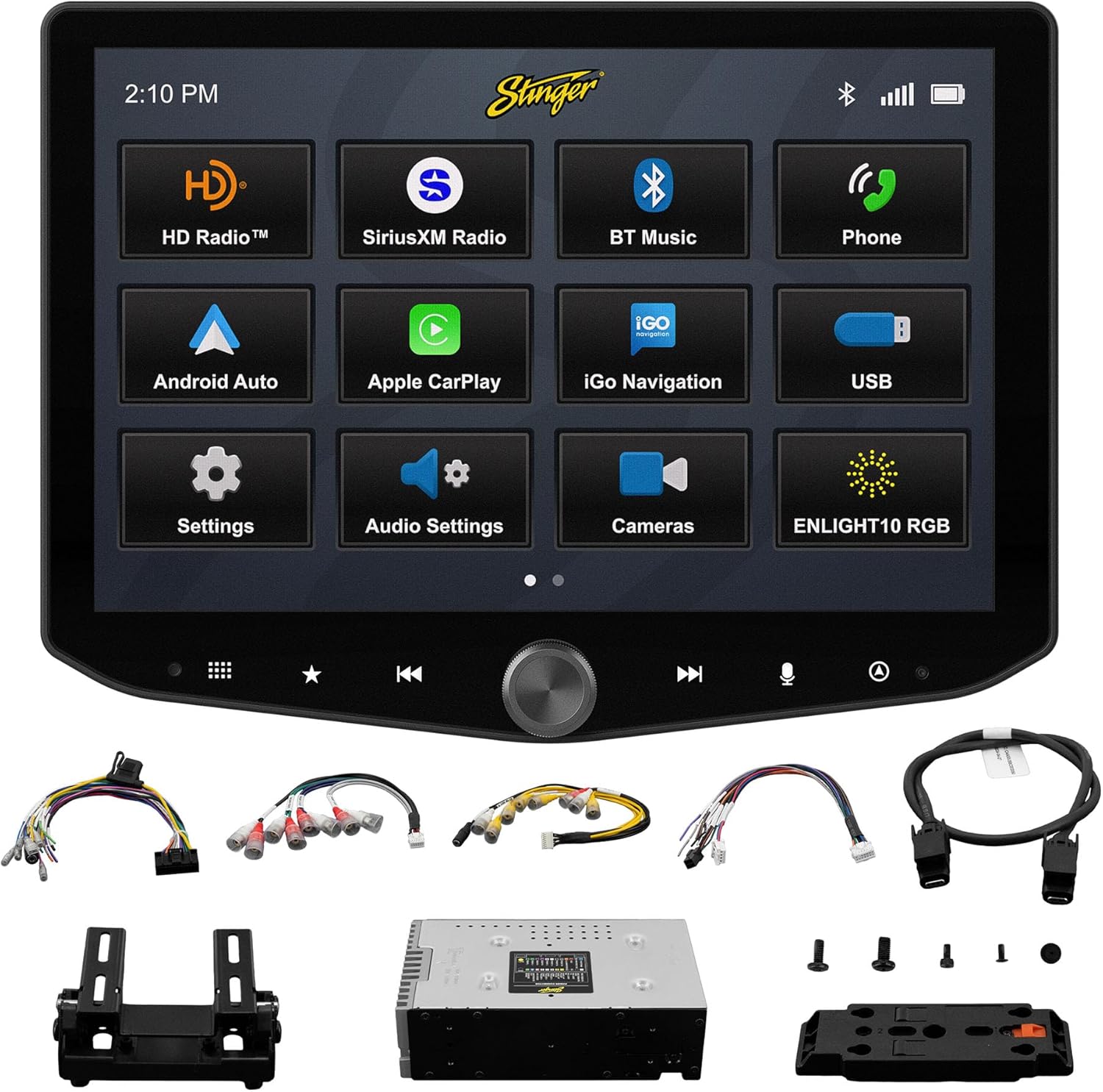
Image: All components included with the Stinger HORIZON10 car stereo system.
Configuración e instalación
Professional installation is highly recommended for the Stinger HORIZON10 to ensure proper functionality and integration with your vehicle's electrical system. This unit is designed for universal compatibility, but specific vehicle dash kits, wiring harness interfaces, or antenna adapters may be required and are sold separately.
Pasos de configuración inicial:
- Montaxe: Securely mount the display and radio module using the provided brackets and screws. Ensure proper ventilation around the unit.
- Cableado: Connect the 16-pin AV harness, 12-pin pre-out harness, 14-pin data harness, and 26-pin power harness LVDS display cable to the corresponding ports on the radio module and your vehicle's wiring system. Refer to your vehicle's specific wiring diagram if necessary.
- Conexións externas: Connect the external microphone for hands-free calling and the GPS antenna for navigation functionality.
- Encendido: Once all connections are secure, power on your vehicle to initiate the stereo. The unit should boot up and display the Stinger logo.
- Configuración inicial: Siga as instrucións que aparecen na pantalla para a configuración inicial, como a selección do idioma e a zona horaria.
Instrucións de funcionamento
Interfaz de pantalla táctil
The HORIZON10 features a large 10.1" 1280x800 HD floating touchscreen with anti-glare and anti-fingerprint film protection. Navigate through menus and applications by tapping, swiping, and pinching on the screen. The capacitive touch panel buttons and machined aluminum anodized knob provide additional tactile control.

Imaxe: Detallada view of the Stinger HORIZON10 touchscreen, highlighting its capacitive touch buttons and anodized knob.
Apple CarPlay sen fíos e Android Auto
Connect your iPhone or Android phone wirelessly to access navigation, calls, messages, music, and more directly on the HORIZON10 display. Wired connections are also supported via the USB-C input, which also provides fast 3A phone charging.

Image: The Stinger HORIZON10 displaying the Apple CarPlay interface wirelessly connected to an iPhone.

Image: The Stinger HORIZON10 displaying the Android Auto interface wirelessly connected to an Android phone.
Conectividade Bluetooth 5.1 e Wi-Fi
The unit supports dual phone connections for fast hands-free calling and music streaming via Bluetooth 5.1 A2DP. Wi-Fi connectivity enables additional features and updates.
Funcións de audio avanzadas
Customize your sound experience with the 15-band adjustable EQ, 6 user EQ presets, and built-in crossover with HPF & LPF. The system offers 4.5 Vrms & 8ch RCA outputs with subwoofer control, and a Toslink (optical) audio output (48 kHz variable) for high-fidelity sound.

Image: Screenshot of the Stinger HORIZON10's advanced audio settings, showing the 15-band equalizer.
Entradas da cámara
Integrate up to four cameras (front/rear dashcam, blind spot cameras, backup camera) for enhanced safety and visibility. The system supports both AHD 720p and CVBS 480p camera inputs.

Image: The Stinger HORIZON10 displaying multiple camera views, illustrating its 4 camera input capability.
Sintonizador de radio
Enjoy a wide variety of audio content with the built-in HD AM/FM radio tuner. The unit is also SiriusXM-Ready (SiriusXM Tuner Sold Separately).

Image: The Stinger HORIZON10 displaying the HD Radio interface, showing available stations.
USB & HDMI Inputs
The unit includes two USB-A inputs, one USB-C input (with 3A charging), and one HDMI input for media playback or mirroring.
Personalización
Personalize your experience by changing the background image and rearranging Home screen icons for easier access to your most used features.
onX Offroad App
The HORIZON10 includes a free 3-month trial of the onX GPS navigation off-roading map app. Register on the Stinger website to activate your trial.
Vídeo do produto máis aláview
Vídeo: Un funcionario acabouview of the Stinger HORIZON10's key features and capabilities.
Mantemento
To ensure the longevity and optimal performance of your Stinger HORIZON10, follow these maintenance guidelines:
- Limpeza da pantalla: Usa un pano suave e sen pelusa para limpar con suavidade a pantalla táctil. Para manchas difíciles, limpa lixeiramenteampLimpe o pano con auga ou cun limpador de pantallas. Evite materiais abrasivos ou produtos químicos agresivos.
- Resistencia á intemperie: While the display is IP65 weather-resistant, the radio chassis is not. Avoid direct exposure of the main unit to water or excessive moisture.
- Coidado xeral: Keep the unit free from dust and debris. Ensure all connections remain secure.

Image: The Stinger HORIZON10 display with water droplets, demonstrating its IP65 weather-resistant feature.
Resolución de problemas
If you encounter issues with your Stinger HORIZON10, refer to the following common problems and solutions:
| Problema | Causa posible | Solución |
|---|---|---|
| Sen Poder | Conexión de alimentación solta, fusible fundido, problema coa batería do vehículo. | Comprobe todas as conexións de alimentación. Inspeccione os fusibles do vehículo. Asegúrese de que a batería do vehículo estea cargada. |
| Sen saída de audio | Incorrect audio settings, loose speaker wires, ampcuestión de lifier. | Verify audio settings (volume, mute, source). Check speaker wire connections. Consult an audio specialist if using an external ampmáis vivo. |
| CarPlay/Android Auto non se conecta | Bluetooth/Wi-Fi off on phone, incorrect pairing, phone software issue. | Ensure Bluetooth and Wi-Fi are enabled on your phone. Re-pair the device. Restart both the phone and the HORIZON10 unit. Update phone OS. |
| Pantalla táctil non responde | Temporary software glitch, excessive dirt/moisture on screen. | Perform a soft reset (refer to device settings for reset option). Clean the screen thoroughly. If persistent, contact support. |
| Mala recepción de radio | Antena non conectada, antena danada, zona de sinal débil. | Check antenna connection. Consider a signal booster if in a weak reception area. |
If the problem persists after attempting these solutions, please contact Stinger customer support.
Especificacións
| Característica | Detalle |
|---|---|
| Número de modelo | 10.1" - IX210 |
| Dimensións do produto | 12.75 x 7.5 x 9.75 polgadas |
| Peso do elemento | 6.98 libras |
| Tamaño de visualización | 10.1 polgadas |
| Resolución de visualización | 1280 x 800 HD |
| Resistencia á intemperie | IP65 (Display only) |
| Tecnoloxía de conectividade | Bluetooth 5.1 A2DP, Wi-Fi |
| Tipo de controlador | Smartphone, Touchscreen |
| Entradas USB | 2x USB-A, 1x USB-C (3A charging) |
| Portos HDMI | 1 |
| Entradas da cámara | 4 (AHD 720p / CVBS 480p compatible) |
| Modo de saída de audio | Estéreo |
| Configuración da canle de son envolvente | 7.1 |
| Número de canles | 8 |
| EQ | 15-band adjustable EQ, 6 user presets |
| Saídas RCA | 4.5 Vrms & 8ch with subwoofer control |
| Saída de audio óptica | Toslink (48 kHz variable) |
Información da garantía
For detailed warranty information regarding your Stinger HORIZON10, please refer to the warranty card included with your product or visit the official STINGER websitio. Os termos e condicións da garantía poden variar e están suxeitos á política do fabricante.
Atención ao cliente
Should you require further assistance, technical support, or have questions not covered in this manual, please contact STINGER customer service through their official websitio web ou a información de contacto proporcionada coa documentación do produto.
STINGER Oficial Websitio: www.stinger.com


