1. Introdución
Welcome to the user manual for your Metz MOD9500 55" OLED Smart TV. This guide provides essential information for setting up, operating, and maintaining your television. The MOD9500 combines advanced display technology with smart features to deliver an exceptional viewexperiencia ing.

Imaxe: Fronte view of the Metz MOD9500 55-inch OLED Smart TV, showcasing a súa vibrante pantalla.
2. Que hai na caixa
Comprobe que todos os seguintes compoñentes estean incluídos no seu paquete:
- Metz MOD9500 55" OLED Smart TV
- Control remoto
- Base (Stand)
- Cable de alimentación
- Manual de usuario (este documento)
- Guía de inicio rápido
- Baterías para mando a distancia
- Stand Base & Stand Screws
- Wall Mount Column (if applicable, check packaging)

Image: Diagram illustrating the TV's dimensions, available input/output ports, and a list of items included in the box.
3. Configuración
3.1. Montaxe do soporte
- Coloque con coidado a pantalla do televisor sobre unha superficie suave e plana para evitar danala.
- Fixe a base do soporte ao televisor cos parafusos fornecidos. Asegúrese de que estea ben fixada.
- Once the stand is assembled, carefully lift the TV to its upright position on a stable surface.
3.2. Potencia de conexión
Conecta o cable de alimentación á entrada de alimentación do televisor e despois a unha toma de corrente. O televisor entrará no modo de espera.
3.3. Asistente de configuración inicial
Ao acender o televisor por primeira vez, este guiarache a través dun proceso de configuración inicial. Isto inclúe:
- Selección da lingua
- Conexión de rede (Wi-Fi ou Ethernet)
- Google account sign-in (for Google TV features)
- Channel scanning (DVB-T2/S2/C)
- Fuso horario e outros axustes básicos
4. Funcionamento da súa TV
4.1. Control remoto
The included remote control allows you to navigate the TV's interface, adjust settings, and access smart features. It features dedicated buttons for popular streaming services and Google Assistant.
4.2. Interface de Google TV
Your Metz MOD9500 operates on Google TV, providing a personalized and integrated streaming experience. Access thousands of movies, series, and apps from various streaming services in one place. The interface offers personalized recommendations based on your viewing hábitos.

Image: Screenshot of the Google TV home screen, displaying various applications and content suggestions.
4.3. Control de voz
Utilize the built-in voice control feature via Google Assistant. Press the dedicated button on your remote and speak commands to search for content, control smart home devices, or get information.
4.4. Chromecast integrado
The TV includes Chromecast functionality, allowing you to cast content directly from your smartphone or other compatible devices to the TV screen.
5. Características clave
5.1. OLED Panel Technology
The MOD9500 features a V22 OLED panel with over 8 million self-illuminating pixels. This technology delivers an exceptional contrast ratio of 1,850,000:1 and a peak brightness of 900 nits, ensuring deep blacks and vibrant, realistic colors with up to 99% DCI-P3 coverage. The panel's efficiency is enhanced by 3%, improving heat dissipation and product longevity.
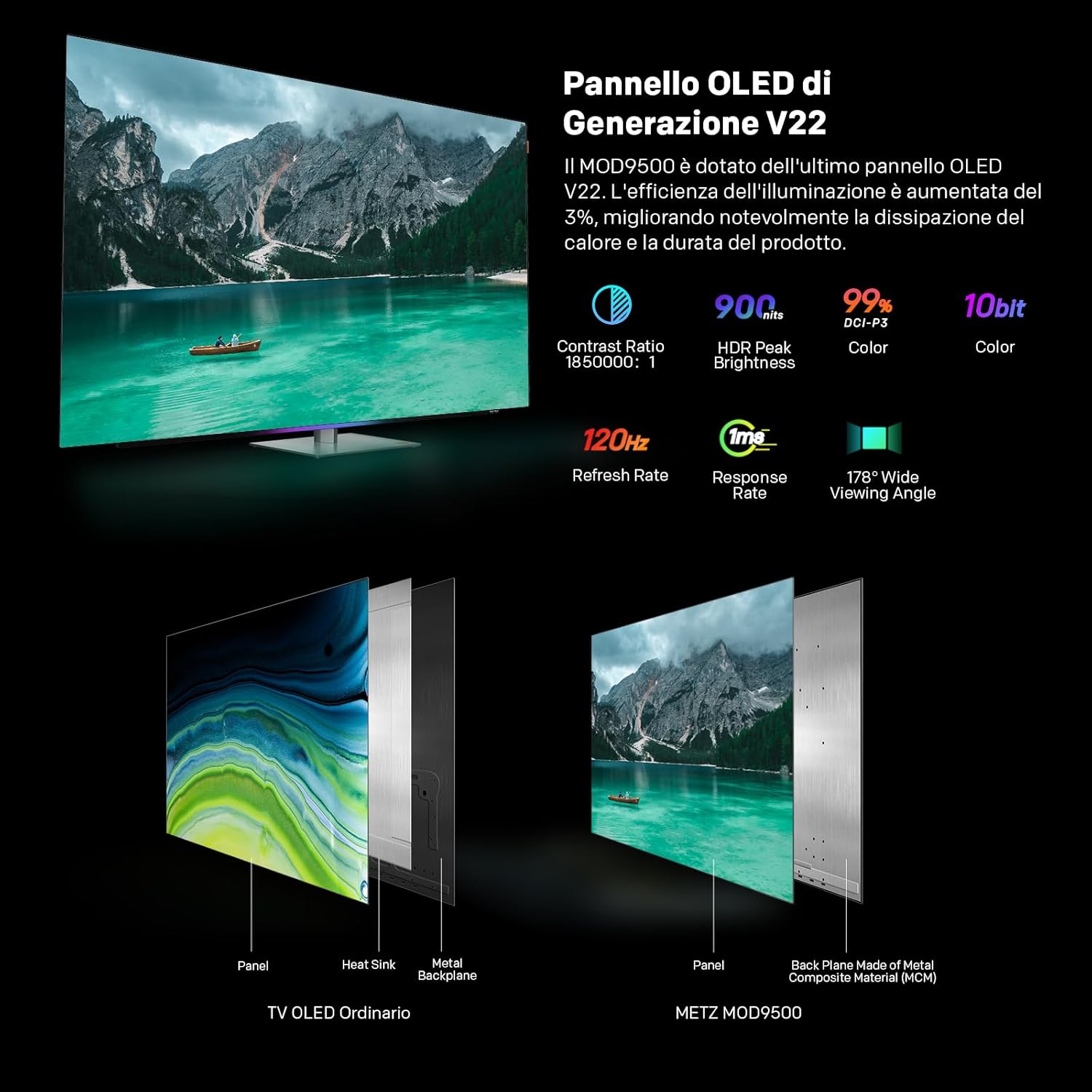
Image: Comparison of a standard OLED panel and the Metz MOD9500's V22 OLED panel, illustrating enhanced heat management.

Image: Infographic detailing the display's key performance metrics: 900 nits peak brightness, 1,850,000:1 contrast ratio, 99% DCI-P3 color accuracy, and the Chameleon Extreme 3.0 image processor.
5.2. Audio System with Dolby Atmos
Experience immersive audio with the 2.1.2 channel speaker system. It features a larger subwoofer cavity and two upward-firing tweeters, complemented by two full-range directional speakers. This configuration, combined with Dolby Atmos technology, creates a rich, spatial sound experience, making you feel part of the action.

Image: Visual representation of the TV's 2.1.2 channel audio system and the immersive sound field created by Dolby Atmos.
5.3. Advanced Image Processor
Powered by the Chameleon Extreme 3.0 image processor with AI-SR technology, the MOD9500 intelligently analyzes and enhances low-resolution video, restoring lost details for a clearer and more dynamic picture. It supports advanced HDR formats, including Dolby Vision IQ and HDR10+. Filmmaker Mode with P3 color ensures an authentic cinematic experience.

Image: A living room setup showcasing the cinematic experience with Dolby Vision IQ, Dolby Atmos, Filmmaker Mode, and Google TV.
5.4. Características dos xogos
Designed for gamers, the TV offers a 120Hz refresh rate and near-instant response time for fluid motion. AMD FreeSync Premium and HDMI 2.1 connectivity optimize the gaming experience, reducing input lag and screen tearing.

Image: A user engaged in a racing game on the TV, emphasizing the 120Hz refresh rate, FreeSync Premium, and HDMI 2.1 for an enhanced gaming experience.
5.5. Visual Comfort and Design
The MOD9500 is TÜV Rheinland certified for "Visual Comfort," incorporating features like low blue light and flicker-free display to ensure a comfortable and healthy viewing experience. Motion and brightness sensors adapt the TV's display to your environment. The TV also features a swiveling base (10 degrees left/right) for optimal viewing angles and colored light strips for an enhanced aesthetic.

Image: A family enjoying the TV in a natural setting, highlighting the health-focused features such as Low Blue Light, Flicker Free, and Motion Sensor.

Image: Close-up of the TV's swiveling base, demonstrating its 10-degree rotation capability, and the integrated colored light strips.
6. Conexións
The Metz MOD9500 offers a variety of input and output ports for connecting external devices:
- HDMI: x3 (for connecting Blu-ray players, game consoles, etc.)
- USB: x2 (for connecting USB drives, external storage)
- DVB-S/S2: x1 (Satellite input)
- DVB-T/T2/C: x1 (Terrestrial/Cable input)
- Slot CI+: x1 (Common Interface Plus for pay-TV modules)
- Saída de audio dixital (óptica): x1 (for connecting soundbars or audio receivers)
- LAN (Ethernet): x1 (for wired network connection)
- Entrada AV: x1 (for older analog devices)
- Saída de auriculares: x1
O televisor tamén admite conectividade sen fíos a través de Bluetooth e Wi-Fi.
7. Mantemento
7.1. Limpeza da pantalla
To clean the screen, first unplug the TV. Gently wipe the screen with a soft, dry, lint-free cloth. For stubborn marks, lightly dampEnxágüe o pano con auga ou cun limpador de pantallas especializado. Evite o uso de produtos químicos agresivos ou materiais abrasivos.
7.2. Limpeza do armario
Wipe the TV cabinet with a soft, dry cloth. Do not use liquid cleaners or sprays directly on the TV.
7.3. Actualizacións de software
Ensure your TV's software is up to date for optimal performance and security. The TV will typically prompt you for available updates, or you can check manually in the settings menu.
8 Solución de problemas
| Problema | Causa posible | Solución |
|---|---|---|
| Sen poder | Cable de alimentación desconectado; problema coa toma de corrente. | Comprobe a conexión do cable de alimentación; probe cunha toma de corrente diferente. |
| Sen imaxe, pero hai son | Fonte de entrada incorrecta seleccionada; problema co dispositivo externo. | Verificar a fonte de entrada; comprobar as conexións dos dispositivos externos. |
| Sen son, pero si imaxe | Volume silenciado ou demasiado baixo; configuración de son incorrecta. | Unmute or increase volume; check audio output settings. |
| O control remoto non funciona | Batteries depleted; obstruction; remote not paired. | Replace batteries; remove obstructions; re-pair remote (refer to Quick Start Guide). |
| Problemas de conexión wifi | Router problem; incorrect password; signal interference. | Restart router; re-enter password; move TV closer to router or use Ethernet. |
| Slow performance/App crashes | Too many apps running; insufficient memory; software bug. | Close unused apps; restart TV; check for software updates. |
9. Especificacións
- Marca: Metz
- Número de modelo: 55MOD9500Z
- Tamaño da pantalla: 55 polgadas
- Tecnoloxía da pantalla: OLED
- Resolución: 4K (3840 x 2160)
- Frecuencia de actualización: 120 Hz
- Relación de aspecto: 16:9
- Brillo máximo: 900 nits
- Relación de contraste: 1,850,000:1
- Gama de cores: 99% DCI-P3
- Sistema de audio: 2.1.2ch Speaker, Dolby Atmos, DTS
- Características especiais: Google TV, Chromecast, Gaming Mode, Pixel Dimming, Low Blue Light, Flicker Free, Motion Sensor, Swiveling Base
- Conectividade: Bluetooth, Ethernet, HDMI (x3), USB (x2), Wi-Fi, DVB-T2/S2/C, CI+, Digital Audio Out (Optical), AV Input, Headphone Output
- Product Dimensions (with base): 122.6 x 26.0 x 75.6 cm (ancho x fondo x alto)
- Product Dimensions (without base): 122.6 x 5.3 x 71.0 cm (ancho x fondo x alto)
- Peso (con base): 20.5 kg
- Peso (sen base): 18.7 kg
- Avaliación da eficiencia enerxética: F
10. Garantía e soporte
For warranty information and customer support, please refer to the specific terms provided with your purchase or visit the official Metz website. If you wish to return a product within 30 days of receipt because you have changed your mind, please consult the return policy of your retailer. For defective or damaged products, please refer to the retailer's policy on defective items.
Fabricante: METZ
First Available on Amazon.it: 24 de agosto de 2024
For further assistance, you may contact Metz customer service or your point of purchase.


