1. Introdución
The BTECH APRS-K1 PRO Multi-Function Audio Interface Cable is designed to facilitate advanced digital communication and audio interfacing for a wide range of radios. This versatile cable transforms your device into a powerful tool for various applications, including APRS, telemetry, and data transmission, by providing seamless connectivity between your radio and USB-C compatible devices.
2. Características clave
- Compatibilidade universal: The APRS-K1 PRO Cable features universal compatibility with USB-C devices and the Kenwood K1 accessory slot. It works with numerous radio models from brands like BaoFeng, BTECH, Kenwood, Wouxun, and TYT, as well as with Android, iOS, Windows, and Mac systems.
- Funcionalidade versátil: Beyond APRS, this cable supports recording audio, transmitting data, and operating as a KISS modem. It provides connectivity for line-in, mic-in, and speaker system transmissions.
- Enhanced Audio Clarity: Equipped with a built-in custom circuit board, the APRS-K1 PRO ensures clear and reliable packet transmissions, engineered to prevent over-modulation for high-quality audio.
- Auto PTT and Real-Time Data Relaying: The cable automatically triggers Push-To-Talk (PTT) upon detecting an input signal and relays audio packets directly to your connected device, ideal for APRS, data logging, and remote operations.

Figure 2.1: Audio I/O from any K1 radio to any USB-C device.

Figure 2.2: Enhanced Audio Clarity with Built-in Custom Circuit Board.
3. Contido do paquete
Asegúrate de que todos os artigos estean presentes ao desembalar:
- APRS-K1 PRO Multi-Function Audio Interface Cable

Figure 3.1: BTECH APRS-K1 PRO Cable.
4. Instrucións de configuración
- Conectar á radio: Plug the K1 audio plug (2-pin Kenwood/Baofeng standard) into your radio's speaker/microphone port.
- Conectar ao dispositivo: Plug the USB-C connector into your smartphone, tablet, or computer.
- Axustar a sensibilidade: Use the blue sensitivity adjust dial on the black control box to fine-tune the incoming audio sensitivity, which triggers the radio's PTT function.
- Configuración do software: Install and configure your preferred APRS or data communication software (e.g., APRSpro, APRSDroid) on your connected device. Ensure the software recognizes the APRS-K1 PRO as an audio input/output device.
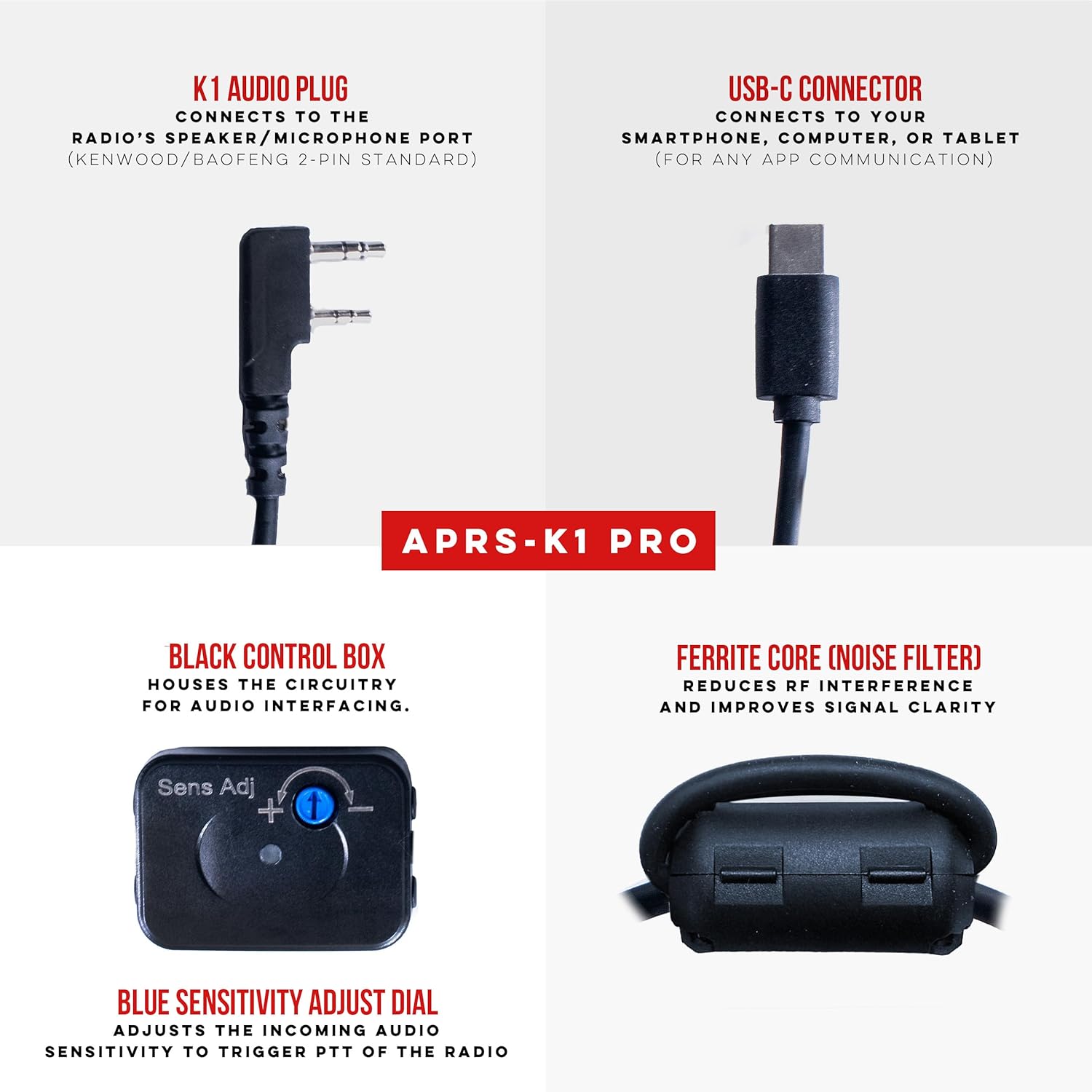
Figura 4.1: detallada view of APRS-K1 PRO components and connections.
Video 4.1: Demonstrates connecting a 3.5mm audio cable to a K-type adapter and then to a radio, similar to the APRS-K1 PRO's radio connection.
Video 4.2: Illustrates the connection of a K-type adapter to a radio and a 3.5mm female audio port, relevant for understanding the cable's interface.
5. Instrucións de funcionamento
5.1. APRS and Data Transmission
The APRS-K1 PRO cable enables your radio to send and receive data packets for Automatic Packet Reporting System (APRS). Once connected and configured with your software, the cable's auto PTT feature will activate transmission when data is sent from your device. Received data will be routed to your device's audio input for decoding.
5.2. KISS Modem Operation
For KISS modem functionality, ensure your software is set to use the APRS-K1 PRO as its TNC (Terminal Node Controller) interface. The cable handles the audio modulation and demodulation, allowing your device to communicate directly with other packet radio stations.
5.3. Audio Recording and Playback
To record audio from your radio, select the APRS-K1 PRO as the audio input device in your recording software. For playing audio through your radio (e.g., for voice announcements or pre-recorded messages), select the APRS-K1 PRO as the audio output device.

Figure 5.1: Auto PTT and Real-Time Data Relaying in action.

Figure 5.2: The APRS-K1 PRO functioning as a universal TNC interface.
6. Mantemento
- Limpeza: Use a soft, dry cloth to clean the cable and connectors. Avoid using harsh chemicals or abrasive materials.
- Almacenamento: Store the cable in a cool, dry place away from direct sunlight and extreme temperatures. Avoid sharp bends or kinks in the cable to prevent internal damage.
- Inspección: Periodically inspect the cable for any signs of wear, fraying, or damage to the connectors. Discontinue use if damage is observed.
7 Solución de problemas
| Problema | Causa posible | Solución |
|---|---|---|
| No audio input/output detected by device. | Incorrect driver installation, loose connection, or incorrect software settings. | Ensure the cable is securely connected. Verify that your operating system and communication software recognize the APRS-K1 PRO as an audio device. Reinstall drivers if necessary. |
| Poor audio quality or over-modulation. | Incorrect sensitivity adjustment or radio audio levels. | Adjust the blue sensitivity dial on the control box. Check your radio's audio output and input levels. Ensure VOX settings on the radio are optimized for data transmission. |
| Auto PTT not triggering. | Low audio input level from device or incorrect radio VOX settings. | Increase the audio output level from your connected device. Adjust the VOX sensitivity on your radio. Some radios may require specific squelch settings for reliable VOX operation. |
Video 7.1: Detailed guide on audio settings and troubleshooting for radio interfaces, applicable to the APRS-K1 PRO.
8. Especificacións
- Modelo: BTECH APRS-K1 PRO
- Conectividade: USB-C, Kenwood K1 Standard (2-pin)
- Características: Built-in custom circuit board, Auto PTT, Sensitivity Adjustment, Ferrite Core (Noise Filter)
- Compatibilidade: Android, iOS, Windows, Mac systems; Radios with Kenwood K1 accessory slot (BaoFeng, BTECH, Kenwood, Wouxun, TYT, etc.)
- Peso do artigo: 1.5 onzas
- Dimensións do paquete: 5.94 x 4.61 x 0.63 polgadas

Figure 8.1: BTECH APRS-K1 PRO Cable Length (53 inches).
9. Garantía e soporte
BTECH provides dedicated local support for its products. For any issues or inquiries regarding your APRS-K1 PRO cable, please refer to the official BTECH website or contact their customer service for assistance. Product registration may be required for warranty claims.
Official BTECH Websitio: https://baofengtech.com/download
Titoriais de YouTube: https://www.youtube.com/c/Baofengtechradio


