1. Introdución
Thank you for choosing the himaly IF1010AR Digital Bluetooth Body Weight Scale. This scale is designed to provide accurate measurements of your body weight and various body composition metrics, including BMI, body fat, muscle mass, and more, through its integrated mobile application. Please read this manual carefully before use to ensure proper operation and to maximize the benefits of your new scale.
Información importante de seguridade
- Consulte co seu médico antes de comezar calquera dieta ou programa de exercicios.
- Do not use if you are pregnant, have a pacemaker, or other internal medical devices.
- Coloque a báscula sobre unha superficie dura e plana para obter medicións precisas. Evite alfombras ou chans irregulares.
- The scale surface can be slippery when wet. Ensure the surface is dry before stepping on it.
- Non saltes á escala.
- Manter fóra do alcance dos nenos.
- This scale is for household use only and not for medical diagnosis or treatment.
2. Contido do paquete
Verifica que todos os elementos estean presentes no teu paquete:
- himaly IF1010AR Digital Bluetooth Body Weight Scale
- Cable de carga USB
- Manual de usuario (este documento)
3. Produto rematadoview
The himaly IF1010AR scale features a sleek design with a tempered glass surface and four high-precision sensors for accurate measurements. It includes a digital display and Bluetooth connectivity for app integration.

Figura 3.1: Fronte view of the himaly IF1010AR Digital Bluetooth Body Weight Scale, showing the display and electrode pads, alongside a smartphone displaying the companion app interface.

Figura 3.2: Parte inferior view of the himaly IF1010AR scale, highlighting the four non-slip mats, the 'UNIT' button for changing measurement units, and the USB charging port.
Compoñentes:
- Plataforma de vidro temperado: The main weighing surface.
- Electrodos: Four metallic pads for body composition analysis.
- Pantalla LCD dixital: Shows weight and other basic readings.
- Botón UNIT: Located on the underside, used to switch between weight units (kg/lb/st).
- Porto de carga USB: Para recargar a batería interna.
- Non-Slip Mats: Four rubber feet on the bottom for stability.
4. Configuración
4.1 Carga da báscula
The himaly IF1010AR scale is equipped with a built-in rechargeable battery. Before first use, ensure the scale is fully charged.
- Locate the USB charging port on the underside of the scale (refer to Figure 3.2).
- Connect the provided USB charging cable to the scale and to a standard USB power adapter (not included) or a computer's USB port.
- A pantalla indicará o estado da carga. Cargue ata que o indicador da batería mostre que está chea.

Imaxe 4.1: Primeiro plano view illustrating the USB charging port on the side of the scale and the included USB cable for power.
4.2 Descarga e emparellamento da aplicación
To access full body composition analysis and track your progress, download the companion app and pair it with your scale.
- Descarga a aplicación: Busca "Moving Life" in the Apple App Store (for iOS devices) or Google Play Store (for Android devices) and install it.
- Activar Bluetooth: Asegúrate de que o Bluetooth estea activado no teu smartphone.
- Abre a aplicación: Launch the "Moving Life" app and follow the on-screen instructions to create your user profile.
- Pair the Scale: Step onto the scale barefoot to activate it. The app should automatically detect and connect to the scale via Bluetooth. If not, follow the app's instructions for manual pairing.

Figure 4.2: Image showing the scale's Bluetooth connectivity and icons for downloading the "Moving Life" app from Google Play and the App Store.
4.3 Calibración inicial
For the most accurate first measurement, it is recommended to calibrate the scale:
- Coloque a báscula nunha superficie dura e plana.
- Lightly step on the scale until the display lights up, then step off immediately.
- The display will show "0.0" or "CAL" indicating successful calibration.
5. Instrucións de funcionamento
5.1 Tomar unha medida
Follow these steps for an accurate body composition measurement:
- Asegúrate de que os teus pés estean limpos e secos.
- Open the "Moving Life" app on your smartphone and ensure Bluetooth is active.
- Step onto the scale barefoot, placing your feet on the electrode pads. Stand still until the measurement is complete.
- Your weight will be displayed on the scale's LCD. Detailed body composition data will be sent to the app.
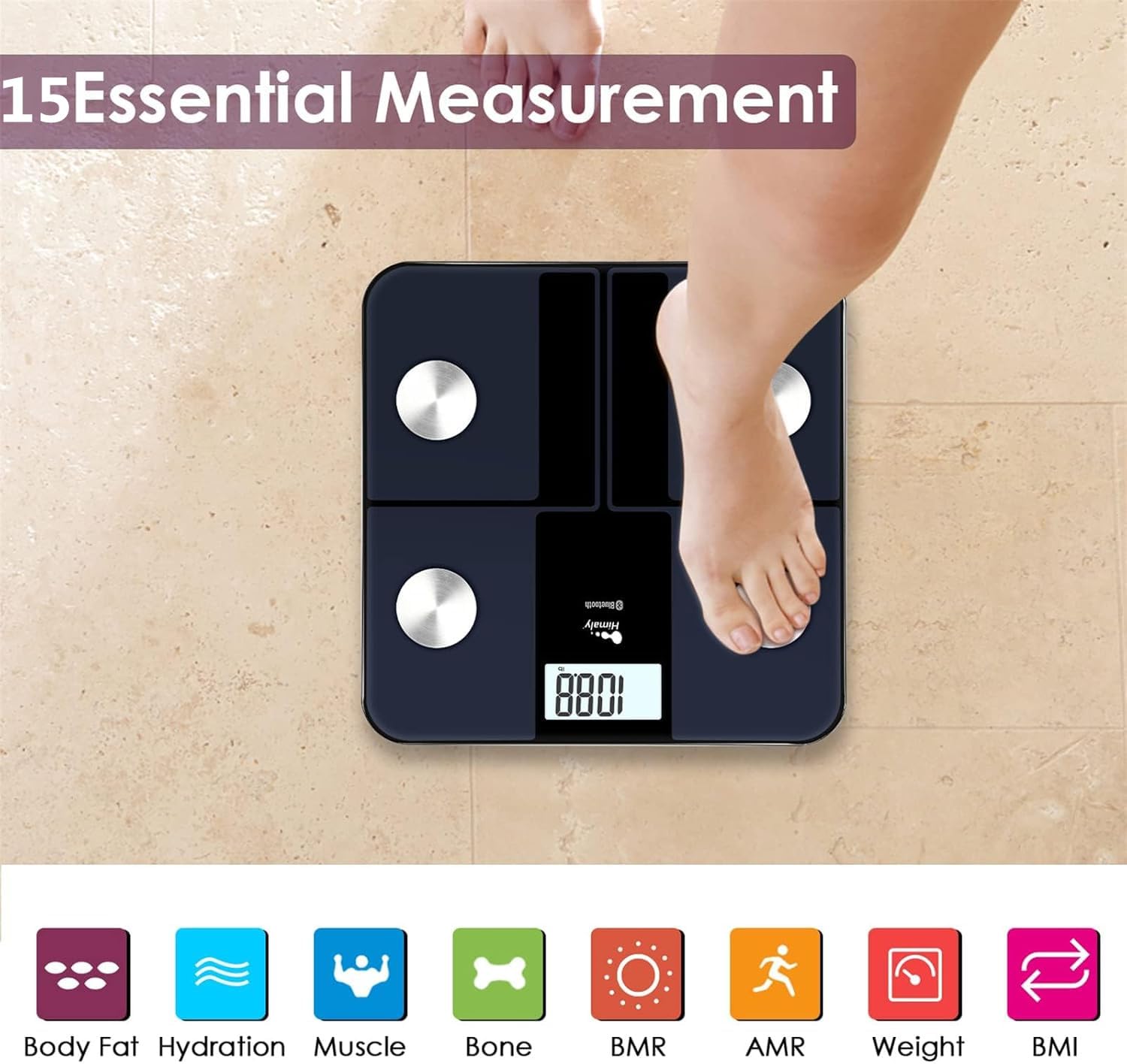
Figure 5.1: A person standing barefoot on the himaly scale, demonstrating the correct posture for obtaining 15 essential body composition measurements.
5.2 Comprensión da pantalla
The scale's LCD displays your weight. The app provides a more comprehensive breakdown of your body composition.

Figure 5.2: The scale's LCD display illustrating how different weight ranges (Thin, Slim, Normal, Heavy, Overweight) are visually represented, providing a quick reference for body type.
5.3 Multiple User Profiles
The "Moving Life" app supports multiple user profiles, allowing each family member to track their individual health data.
- Within the app, navigate to the user management section.
- Add new users by entering their details (age, height, gender).
- Ensure the correct user profile is selected in the app before taking a measurement to ensure data is assigned correctly.
6. Comprender as túas medidas
The "Moving Life" app provides detailed insights into various body composition metrics. Here's a brief explanation of some key indicators:
- Peso corporal: A túa masa corporal total.
- IMC (Índice de Masa Corporal): Unha medida da graxa corporal baseada na altura e no peso.
- Porcentaxe de graxa corporaltage: A proporción de graxa con respecto ao peso corporal total.
- Masa muscular: O peso total dos músculos do teu corpo.
- Hydration (Water Percentage): A cantidade de auga que tes no corpo.
- Masa ósea: O peso total dos ósos do teu corpo.
- BMR (Taxa Metabólica Basal): O número de calorías que o teu corpo queima en repouso.
- AMR (Active Metabolic Rate): The total calories your body burns in a day, including activity.

Figure 6.1: An illustrative graph from the app demonstrating how weight and body fat trends can be tracked over time, providing visual progress monitoring.
7. Mantemento
7.1 Limpeza
- Limpe a superficie da escala cun anuncioamp pano e deterxente suave.
- Non empregue produtos de limpeza abrasivos nin mergulle a báscula en auga.
- Asegúrese de que a báscula estea completamente seca antes de gardala ou usala o seguinte vez.
7.2 Almacenamento
- Almacene a balanza nun lugar fresco e seco.
- Evitar a luz solar directa ou as temperaturas extremas.
8 Solución de problemas
| Problema | Causa posible | Solución |
|---|---|---|
| Móstrase "Lo" | Batería baixa. | Recharge the scale using the provided USB cable. |
| Móstrase "Err" | Sobrecarga ou erro de medición. | Step off the scale. Ensure weight is within the 400 lbs (181 kg) limit. Recalibrate if necessary. |
| Lecturas inexactas | Scale on uneven surface, not calibrated, or feet not properly placed. | Place scale on a hard, flat surface. Perform initial calibration. Ensure bare feet are centered on electrode pads. |
| Sen conexión Bluetooth | Bluetooth off, app not open, or scale not activated. | Ensure Bluetooth is enabled on your phone. Open the "Moving Life" app. Step on the scale to activate it. Try restarting both the app and your phone. |
| Os datos da composición corporal non se mostran na aplicación | Not standing barefoot, or feet not making proper contact with electrodes. | Ensure you are standing barefoot with clean, dry feet making full contact with all four electrode pads. |
9. Especificacións
| Característica | Detalle |
|---|---|
| Número de modelo | IF1010AR |
| Marca | himalía |
| Capacidade de peso | 400 libras (181 kg) |
| Unidades de medida | kg / lb / st |
| Tipo de visualización | LCD dixital |
| Conectividade | Bluetooth 4.0 |
| Fonte de enerxía | Built-in Rechargeable Battery (USB charged) |
| Material | Vidro temperado, plástico |
| Dimensións | Aprox. 33.7 x 32.8 x 4.3 cm |
| Peso do elemento | Aprox. 1.77 kg |
| Compatibilidade de aplicacións | iOS and Android (Moving Life App) |
10. Garantía e soporte
10.1 Información da garantía
The himaly IF1010AR Digital Bluetooth Body Weight Scale comes with a standard manufacturer's warranty. Please refer to the warranty card included in your package or contact himaly customer support for specific warranty terms and conditions. This warranty typically covers defects in materials and workmanship under normal use.
10.2 Atención ao cliente
If you encounter any issues or have questions regarding your himaly scale, please contact our customer support team. For the most up-to-date contact information, please visit the official himaly websitio web ou consulte a embalaxe do produto.
Note: Specific contact details are not provided in this manual. Please check the product packaging or manufacturer's websitio para obter información de contacto de soporte.


