1. Introdución
Welcome to the user manual for your DOOGEE V Max Pro 5G Rugged Smartphone. This guide provides essential information to help you set up, operate, and maintain your device. Designed for durability and high performance, the V Max Pro is built to withstand challenging environments while offering advanced features for everyday use.

Figura 1: Parte dianteira e traseira view of the DOOGEE V Max Pro 5G Rugged Smartphone, highlighting its robust design and key features like the 22000mAh battery and 108MP camera.
2. Contido do paquete
Verifique que todos os elementos estean presentes no paquete do produto:
- 1 x V MAX Pro 5G Rugged Phone
- 1 x cable USB tipo C
- 1 x cargador
- 1 x Película antiexplosión (preaplicada)
- 1 x Additional Anti-explosion film
- 1 x Caixa de embalaxe
- 1 x Manual
3. Configuración
3.1 Instalación da tarxeta SIM e do almacenamento
The DOOGEE V Max Pro supports dual SIM cards and expandable storage. Locate the SIM card tray on the side of the device. Use the provided SIM ejector tool to open the tray. Insert your Nano-SIM cards and/or a microSD card (up to 2TB, sold separately) into the designated slots. Ensure the tray is securely reinserted to maintain water and dust resistance.
3.2 Carga inicial
Before first use, fully charge your DOOGEE V Max Pro. Connect the provided Type-C USB cable to the phone's charging port and the other end to the 33W fast charger. Plug the charger into a power outlet. The device features a massive 22000mAh battery, designed for extended usage. The OTG (On-The-Go) function allows your phone to act as a power bank to charge other compatible devices.
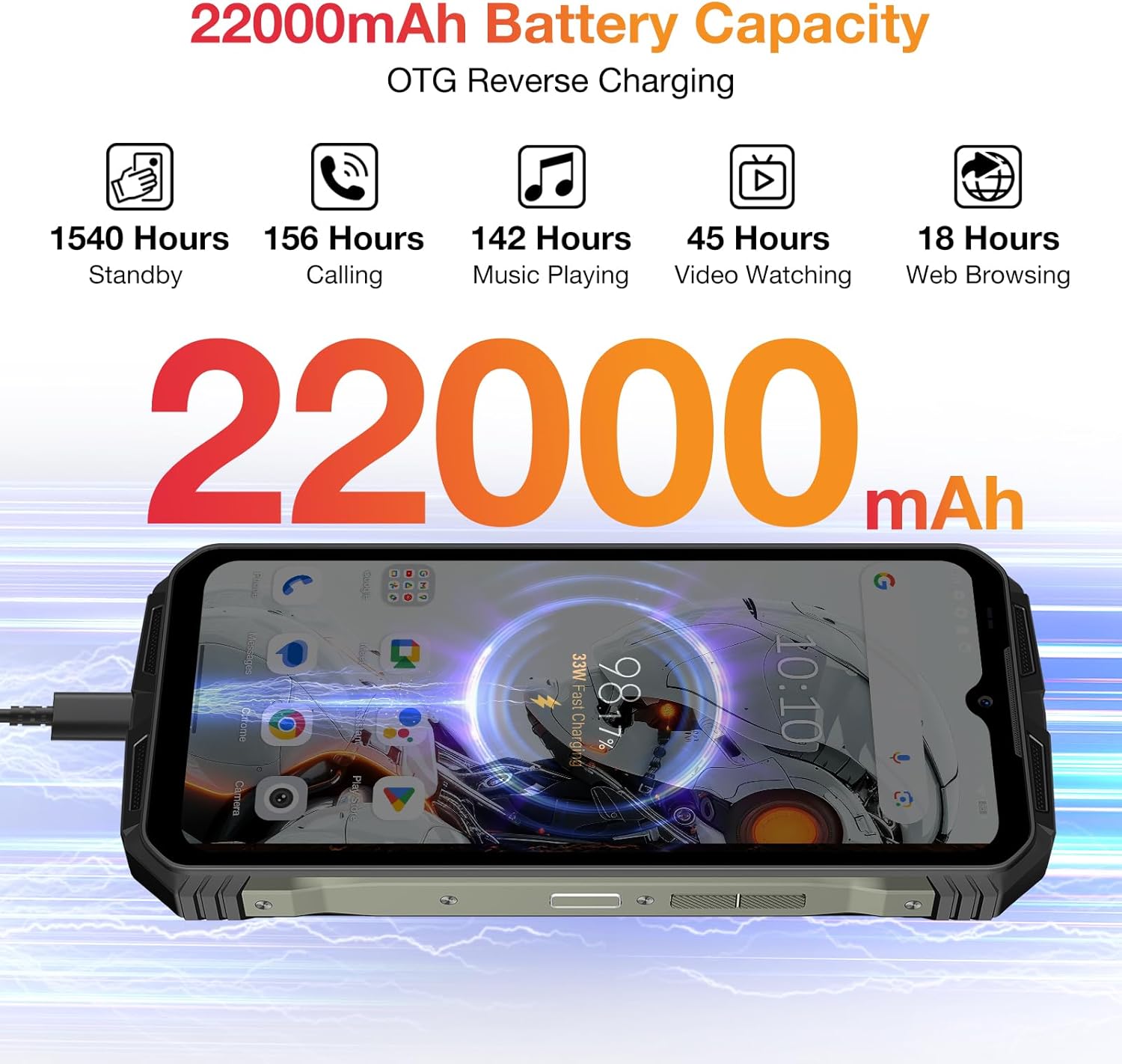
Figure 2: Visual representation of the DOOGEE V Max Pro's 22000mAh battery capacity and its OTG reverse charging capability.
4. Instrucións de funcionamento
4.1 Encendido/apagado
To power on your device, press and hold the Power button located on the side until the DOOGEE logo appears. To power off, press and hold the Power button, then select 'Power off' from the options displayed on the screen.
4.2 Pantalla e experiencia visual
The DOOGEE V Max Pro features a 6.58-inch FHD+ IPS Waterdrop Display with a 120Hz refresh rate. This provides a smooth and immersive visual experience for all your content, from browsing to gaming and video playback.

Figure 3: The 6.58-inch FHD+ 120Hz IPS Waterdrop Display offers vibrant colors and smooth visuals.
4.3 Rendemento e almacenamento
Powered by the Dimensity 7050 5G Octa-core processor and equipped with 32GB RAM (12GB + up to 20GB Extended RAM) and 512GB ROM, expandable up to 2TB via TF card, the V Max Pro ensures smooth multitasking and ample storage for all your applications, photos, and videos. It runs on the latest Android 14 system for enhanced user experience and security.

Figure 4: The Dimensity 7050 5G Octa-core Processor provides robust performance for demanding tasks.

Figure 5: The phone offers 32GB RAM and 512GB ROM for smooth operation and extensive storage.

Figure 6: The DOOGEE V Max Pro runs on the latest Android 14 system, offering enhanced features and security.
Sistema de cámara 4.4
Capture stunning photos and videos with the V Max Pro's versatile camera setup:
- Cámara principal con IA de 108 MP: For high-resolution, detailed shots.
- Cámara de visión nocturna de 20 MP: Allows for clear photography in low-light or dark conditions.
- 8MP Wide-angle & Macro Camera: Capture expansive landscapes or intricate close-ups.
- Cámara frontal de 16 MP: Para selfies e videochamadas de alta calidade.

Figura 7: Máisview of the DOOGEE V Max Pro's triple camera system, including the 108MP main camera, 20MP night vision, and 8MP wide-angle/macro lenses.
4.5 Smart Interaction Lights
The V Max Pro features intelligent interaction lights on the back, which can be customized to provide visual notifications for incoming calls, SMS messages, music playback, and charging status. These lights enhance user interaction and provide quick visual cues.

Figure 8: The smart interaction lights on the back of the DOOGEE V Max Pro provide visual feedback for various notifications.
4.6 Características de seguridade
For enhanced security and convenience, the DOOGEE V Max Pro supports multiple unlock methods, including facial recognition and fingerprint unlock. The fingerprint sensor is conveniently located for quick and secure access to your device.
4.7 Conectividade
The device supports 5G cellular technology for fast network speeds, Wi-Fi 6 for reliable wireless connectivity, and NFC for convenient mobile payments and data exchange.
5. Integración de medios
5.1 Produto superadoview Vídeo
Vídeo 1: Presentación oficial dun produto en vídeoasing the DOOGEE V Max Pro's overall features, including its ruggedness, large battery, and performance.
5.2 Battery and Charging Demonstration
Video 2: A short video demonstrating the DOOGEE V Max Pro's 22000mAh battery and its OTG reverse charging capability, allowing it to charge other devices.
5.3 Security Features Overview
Video 3: This video highlights the various security features of the DOOGEE V Max Pro, including NFC, Face ID, and fingerprint unlock for convenient and secure access.
5.4 Ruggedness Demonstration
Video 4: A brief demonstration of the DOOGEE V Max Pro's IP68/IP69K waterproof and dustproof capabilities, showcasing its resilience in challenging environments.
6. Especificacións técnicas
| Característica | Especificación |
|---|---|
| Dimensións do produto | 7.02 x 3.27 x 1.03 polgadas |
| Peso do elemento | 1.56 libras |
| Número de modelo do artigo | VMAXPRO |
| Baterías | 1 pilas de iones de litio necesarias (incluídas) |
| Sistema Operativo | Android 14 |
| Tecnoloxías de Conectividade | WIFi 6, Fingerprint, OTG, Face ID, NFC |
| Características especiais | NFC/Face ID/Fingerprint/OTG/WIFi 6 |
| Resolución de escáner | 1080 x 2408 |
| Outras características da cámara | Traseira, Fronteira |
| Jack de audio | 3.5 mm |
| Cor | Gris |
| Potencia nominal da batería | 22000 millónsamp Horario |
| Tempo de conversación telefónica | 156 horas |
| Fabricante | DOOGEE |
| Capacidade de almacenamento da memoria | 512 GB |
| Tamaño de visualización da pantalla de pé | 6.58 polgadas |
| Taxa de actualización | 120 Hz |
| Portador sen fíos | Desbloqueado para todos os transportistas |
7. Mantemento e coidados
To ensure the longevity and optimal performance of your DOOGEE V Max Pro, follow these maintenance guidelines:
- Limpeza: Limpe o dispositivo regularmente cun pano suave eamp pano. Evite o uso de produtos químicos agresivos ou materiais abrasivos.
- Temperatura: Do not expose the phone to extreme temperatures (hot or cold) for prolonged periods.
- Resistencia á auga e ao po: While the phone is IP68/IP69K rated, ensure all ports and covers are securely closed before exposing it to water or dust. Avoid intentional submersion in corrosive liquids.
- Protección contra impactos: Despite its rugged design, avoid unnecessary drops or impacts to prevent potential damage to internal components.
- Actualizacións de software: Comprobe e instale regularmente actualizacións de software para garantir que o seu dispositivo teña as últimas funcións e parches de seguridade.

Figure 9: The DOOGEE V Max Pro is built to IP68/IP69K and MIL-STD-810H standards for superior ruggedness.
8. Solución de problemas comúns
Se tes algún problema co teu DOOGEE V Max Pro, consulta os seguintes pasos comúns para a resolución de problemas:
- O dispositivo non se acende: Asegúrate de que a batería estea cargada. Conecta o cargador e agarda uns minutos antes de tentar acender de novo. Se non responde, tenta un reinicio forzado mantendo premido o botón de acendido durante 10-15 segundos.
- Problemas de carga: Check if the charging cable and adapter are securely connected and undamaged. Try using a different power outlet. Ensure the charging port is clean and free of debris.
- App Crashes/Freezing: Pecha a aplicación problemática e ábrea de novo. Borra a caché e os datos da aplicación en Configuración > Aplicacións. Se o problema persiste, desinstálaa e volve instalala.
- Sinal de rede deficiente: Check your SIM card installation. Restart the device. Ensure you are within network coverage. If issues persist, contact your service provider.
- Desbloqueo por impresión dixital/facial non funciona: Ensure your fingers are clean and dry for fingerprint recognition. For face unlock, ensure adequate lighting and that your face is clearly visible to the front camera. Re-register your fingerprint or face ID if necessary.
- Sobrequecemento: Avoid using the phone while charging for extended periods or running multiple demanding applications simultaneously. Close background apps and reduce screen brightness if the device feels excessively warm.
- Restablecemento de fábrica: Como último recurso para problemas persistentes de software, podes realizar un restablecemento de fábrica. Aviso: Isto borrará todos os datos do teu teléfono. Fai unha copia de seguridade dos datos importantes antes de continuar. Vaia a Configuración > Sistema > Opcións de restablecemento > Borrar todos os datos (restablecemento de fábrica).
9. Garantía e atención ao cliente
Grazas pola compraasing your DOOGEE V Max Pro 5G Rugged Phone. We value your experience and are committed to providing excellent customer service.
- Garantía: Your device comes with a 2-Year Limited Warranty. Please refer to the warranty card included in your package for detailed terms and conditions.
- Garantía de devolución do diñeiro: We offer a 30-Days Money Back Guarantee and Free Return policy.
- Atención ao cliente: If you encounter any issues or have questions regarding your product, please do not hesitate to contact us. You can reach our official customer support through Amazon's messaging system. We promise to respond within 24 hours and assist in resolving any issues you may have.
- Soporte en liña: 24/7 One-on-One Online Support is available for your convenience.


