Introdución
This manual provides detailed instructions for the Cillso H97 Wireless Earbuds. Please read this manual carefully before using the product to ensure proper operation and to maximize your user experience. Keep this manual for future reference.

Image: The Cillso H97 Wireless Earbuds in their charging case, displaying the digital battery indicator.
Contido do paquete
- Cillso H97 Wireless Earbuds (Left and Right)
- Estuche de carga
- Cable de carga USB-C
- Manual de usuario
Configuración
1. Carga dos auriculares e da funda
Before first use, fully charge the earbuds and the charging case. Connect the provided USB-C cable to the charging port on the case and to a 5V/1A or 5V/2A power adapter. The digital display on the case will indicate the charging status.
- Tempo de carga: Aproximadamente 1.5 horas para unha carga completa.
- Duración da batería: Up to 8 hours of playback per charge, and up to 40 hours total with the charging case.
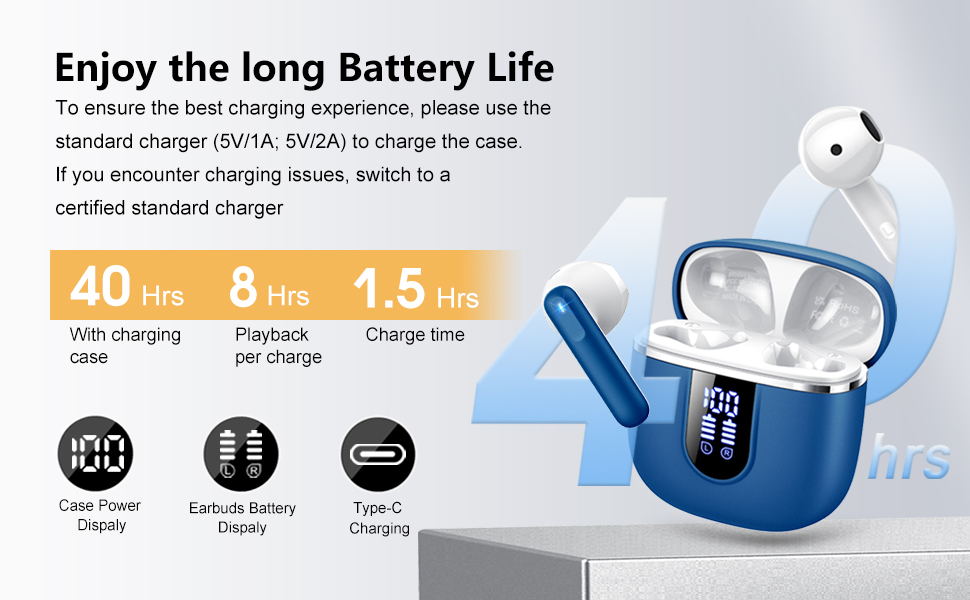
Image: Diagram illustrating the 40-hour total battery life, 8-hour single playback, and 1.5-hour charge time, along with the USB-C charging port and digital display.
The charging case is equipped with Over Current Protection (OCP) technology to prevent damage from prolonged high current. If the current exceeds the power limit, the power source will be cut off to protect the circuitry and device.

Image: Illustration explaining Over Current Protection (OCP) technology in the charging case.
2. Emparejamento cun dispositivo Bluetooth
- Abre a caixa de carga. Os auriculares entrarán automaticamente no modo de emparellamento.
- No teu dispositivo (teléfono intelixente, tableta, portátil), activa o Bluetooth.
- Busca "H97" in the list of available Bluetooth devices and select it to connect.
- Unha vez conectados, escoitarás unha confirmación audible e os auriculares estarán listos para usar.
The H97 earbuds feature Bluetooth 5.4 for a more stable connection, longer transmission range, lower power consumption, and reduced latency.

Image: Visual representation of Bluetooth 5.4 technology, highlighting benefits like stable connection, longer range, lower power consumption, and lower latency.
3. Como usar os auriculares
Gently insert the earbuds into your ears, ensuring a comfortable and secure fit. The rounded tips are designed for in-ear comfort. Adjust them until the sound quality is optimal and they feel stable.

Image: Diagram showing the recommended angle for inserting the earbud into the ear for a secure fit.
Instrucións de funcionamento
Controis táctiles
The H97 earbuds feature sensitive touch sensors for easy control of various functions:
| Acción | Función |
|---|---|
| Double tap the left/right MFB button | Reproducir/pausar música |
| One tap the left/right MFB button | Responder/Finalizar chamada |
| Long press the right/left MFB button for 2s | Pista seguinte/anterior |
| One tap the left/right MFB button (during call) | Volume Up/Down (specific mapping not detailed, typical for single tap) |
| Triple tap MFB button | Activate Voice Assistant (common function) |

Image: Visual guide to the smart touch controls on the earbuds for playback and call management.
Funcións de audio
The H97 earbuds deliver a high-quality audio experience:
- Son estéreo de alta fidelidade: Featuring 13mm diameter speakers with crystal clear treble, vibrant mid-range, and powerful bass.
- 3D Bass Stereo: Enhanced bass for an immersive listening experience.
- Chamadas claras: Equipped with 4 ENC (Environmental Noise Cancelling) microphones to filter out background noise and suppress wind noise, ensuring clear communication.

Image: Diagram illustrating the 13mm speaker driver and triple-layer composite diaphragm for enhanced bass and sound quality.

Image: Illustration detailing the 4-microphone design for crystal-clear calls, including feedback and talk mics, and anti-wind noise features.
Compatibilidade
The Cillso H97 Wireless Earbuds are compatible with a wide range of Bluetooth-enabled devices, including:
- Teléfonos intelixentes (Android, iOS)
- Tabletas
- Portátiles
- Desktop Computers (with Bluetooth adapter)

Image: Icons representing compatibility with phones, tablets, laptops, and desktops, shown alongside the earbuds and a smartphone playing music.
Mantemento
Limpeza e coidado
The H97 earbuds are IP7 waterproof, offering protection against water, sweat, and rain. However, proper care is still recommended:
- Wipe the earbuds and charging case with a soft, dry cloth after each use, especially after workouts.
- Evite o uso de limpadores abrasivos ou disolventes.
- Asegúrate de que o porto de carga estea seco antes de conectar o cable de carga.
- Garda os auriculares no seu estuche de carga cando non estes en uso para protexelos e mantelos cargados.

Image: A person wearing the earbuds with water splashing, illustrating the IPX7 waterproof feature, along with icons for dust prevention, sweatproof, and nano material.
Boas prácticas de carga
- Always use the provided USB-C cable or a certified standard charger (5V/1A or 5V/2A) to charge the case.
- If you encounter charging issues, try switching to a different certified standard charger.
- Non expoñas a caixa de carga nin os auriculares a temperaturas extremas.
Resolución de problemas
Problemas comúns e solucións
| Problema | Posible Solución |
|---|---|
| Os auriculares non se emparellan nin se conectan |
|
| Só funciona un auricular |
|
| Volume baixo ou mala calidade de son |
|
| O estuche de carga non se está cargando |
|
Especificacións
| Característica | Detalle |
|---|---|
| Número de modelo | H97 |
| Marca | Cillso |
| Versión Bluetooth | 5.4 |
| Tecnoloxía de audio | 3D Bass Stereo, Hi-Fi Stereo Sound |
| Tamaño do altofalante | 13 mm de diámetro |
| Micrófonos | 4 ENC Noise Cancelling Mics |
| Duración da batería (auriculares) | Ata 8 horas (unha soa carga) |
| Tempo de xogo total | Ata 40 horas (con funda de carga) |
| Porto de carga | USB-C |
| Entrada de carga | 5V/1A or 5V/2A recommended |
| Clasificación impermeable | IP7 |
| Dispositivos compatibles | Smartphones, Tablets, Laptops, Bluetooth Devices |
| Rango de frecuencias | 20 Hz - 20,000 Hz |
| Forma do auricular | Puntas redondeadas |
| Dimensións do produto | 0.79 x 0.79 x 0.79 inches (earbud dimensions, case dimensions are 48.9mm x 53.4mm) |
| Peso do elemento | 0.352 onzas |

Image: Visual representation of the earbuds and charging case dimensions, emphasizing their lightweight and pocket-sized design.
Garantía e Soporte
Information regarding product warranty and customer support was not available in the provided data. Please refer to the product packaging or the manufacturer's official websitio web para obter detalles sobre a cobertura da garantía e como contactar co servizo de atención ao cliente.
Información de seguridade
- Non desmontes nin modifiques os auriculares nin a caixa de carga.
- Keep the product away from extreme temperatures, direct sunlight, and moisture.
- Evite deixar caer ou someter o produto a fortes impactos.
- Manter fóra do alcance dos nenos e animais.
- Eliminar o produto de forma responsable segundo a normativa local.


