Produto rematadoview
The XINLEI Ultra Slim Full Motion TV Wall Mount (Model MAUS02) is designed to securely hold most 37-inch to 90-inch flat or curved screen televisions. This robust mount features an articulating 6-arm design, providing strong support for TVs weighing up to 120 lbs. It offers versatile viewing angles with tilt and swivel capabilities, and a super slim profile for space-saving installation.

Figure 1: XINLEI Ultra Slim Full Motion TV Wall Mount (Model MAUS02) showing its articulating arms and mounting plates.
Características principais:
- Compatibilidade universal: Supports 37" to 90" LCD, LED, or Plasma flat/curved TVs up to 120 lbs. Compatible with VESA patterns from 200x100mm to 600x400mm.
- Full Motion Design: Allows for tilt (+8°/-20°), swivel (±45°), and extension/retraction from 1.3 inches to 11.8 inches from the wall.
- Construción robusta: Made from high-quality cold-formed steel with an ultra-strong 6-arm design for enhanced safety and reliability.
- Pro para aforro de espazofile: Retracts to a mere 1.3 inches from the wall, minimizing the gap between the TV and the wall.
- Fácil instalación: Includes all necessary hardware, a bubble level, and clear instructions for a straightforward setup.
Configuración e instalación
Before beginning installation, carefully read all instructions and ensure you have all necessary parts and tools. Proper installation is crucial for the safety and stability of your television.
Lista de verificación previa á instalación:
- Verificar a compatibilidade do televisor: Ensure your TV's size is between 37 and 90 inches and its weight does not exceed 120 lbs.
- Comprobar o patrón VESA: Confirm your TV's VESA mounting holes are within the range of 200x100mm to 600x400mm.
- Identificar o tipo de muro: This mount is suitable for installation on wood studs (12" or 16" centers), concrete walls, and brick walls. NON instale só en paneles de yeso.
- Ferramentas de recollida: You will need a drill, stud finder (for wood studs), level, measuring tape, pencil, and a socket wrench or adjustable wrench.

Figure 2: Visual guide for checking TV size, VESA compatibility, wall types, and potential cable outlet obstruction.
Pasos de instalación:
Follow these steps for a secure installation. It is recommended to have at least two people for installation, especially when handling larger TVs.

Figura 3: Máisview of the three main installation steps: attaching brackets to TV, installing wall plate, and hanging TV.
- Paso 1: Fixar os soportes á parte traseira do televisor
Carefully place your TV face down on a soft, clean surface. Attach the vertical TV brackets to the back of your TV using the appropriate screws and spacers provided. Ensure the brackets are centered and securely fastened to the VESA mounting holes. The safety screw mechanism should be at the bottom.
- Paso 2: Instala a placa de parede
Locate and mark the desired mounting position on your wall. For wood stud installation, use a stud finder to locate the center of the wood studs and mark the drilling points. For concrete or brick walls, use a masonry drill bit and anchors. Drill pilot holes at the marked locations. Securely attach the wall plate to the wall using the provided lag bolts and washers. Use the included bubble level to ensure the wall plate is perfectly horizontal.
- Paso 3: Colgar a TV na placa de parede
With assistance, carefully lift the TV with the attached brackets and hook them onto the wall plate. Ensure the TV brackets are properly seated on the wall plate's arms. Once the TV is in place, tighten the safety screws located on the bottom of the TV brackets to prevent accidental dislodgement. Use the provided cable ties to manage and organize cables for a neat appearance.

Figura 4: detallada view highlighting the safety screw, tilt adjustment mechanism, and the robust six-arm structure of the mount.
Funcionamento do soporte do televisor
The XINLEI full motion TV mount offers flexible adjustments to achieve your optimal viewexperiencia ing.
Axustando ViewÁngulo de ing:
- Axuste de inclinación: The mount allows for a tilt range of +8° (upwards) to -20° (downwards). To adjust the tilt, gently push or pull the bottom or top of the TV to the desired angle. Some models may require loosening and re-tightening tilt adjustment knobs or screws on the mount arms.
- Axuste de xiro: The mount can swivel ±45° left or right. Gently push the side of the TV to rotate it horizontally to your preferred viewposición de ing.
- Extensión e retracción: The articulating arms allow the TV to extend up to 11.8 inches from the wall and retract to a slim 1.3 inches. Gently pull the TV forward or push it back towards the wall to adjust the distance.
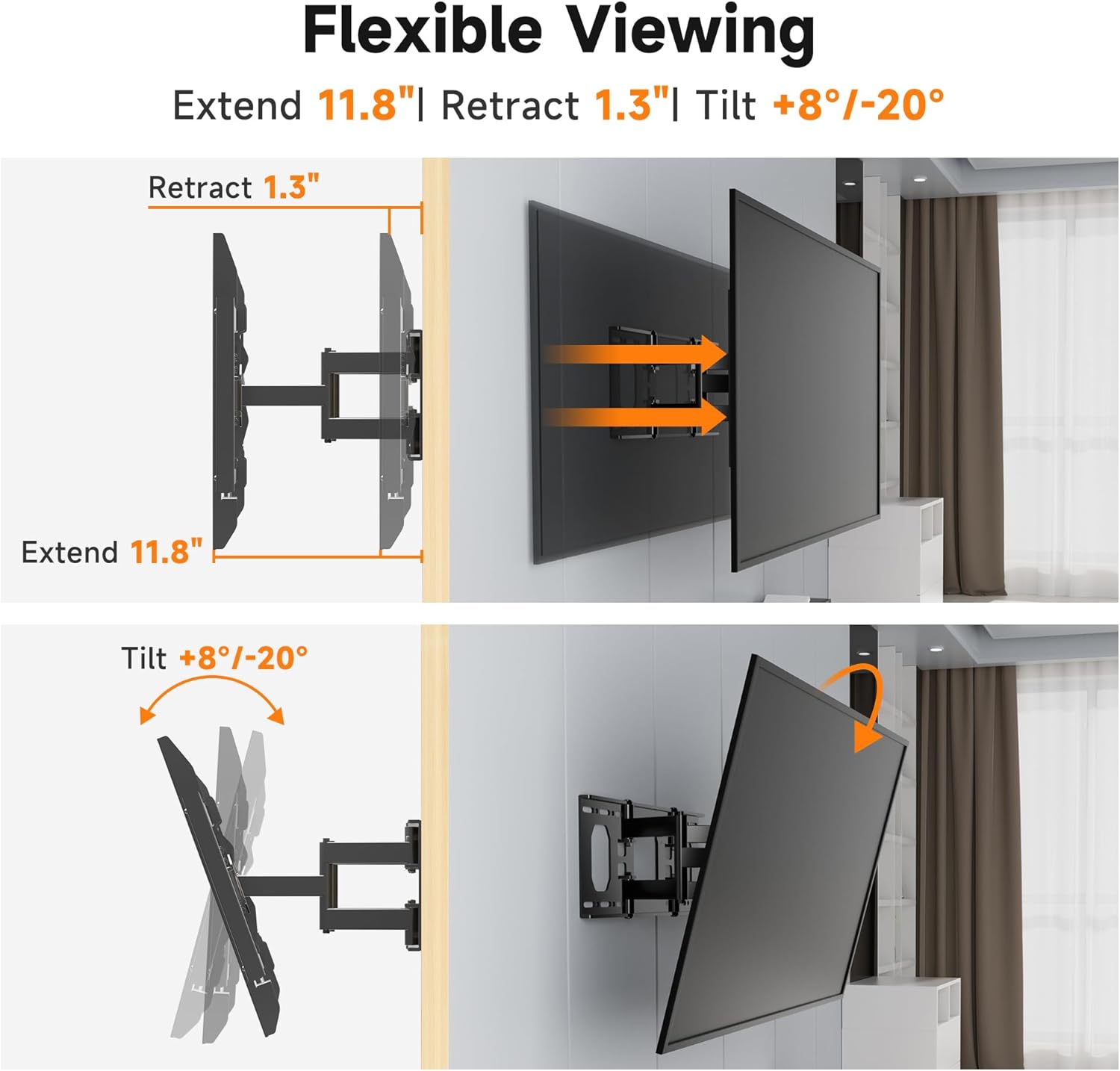
Figure 5: Illustration of the mount's ability to extend, retract, and tilt for flexible viewing.

Figure 6: Demonstrating the smooth ±45° swivel capability of the TV mount.
Mantemento
Un mantemento regular garante a lonxevidade e o funcionamento seguro do soporte de parede para TV.
- Limpeza: Usa un pano suave e seco para limpar o soporte. Evita produtos de limpeza abrasivos ou solventes que poidan danar o acabado.
- Comprobacións periódicas: Every few months, inspect all screws and bolts to ensure they remain tight and secure. Check for any signs of wear or damage to the mount's components.
- Lubricación: As xuntas articuladas están deseñadas para un movemento suave. Se observas algunha rixidez, podes aplicar unha pequena cantidade de lubricante a base de silicona ás pezas móbiles, evitando o contacto cos compoñentes eléctricos.
Resolución de problemas
If you encounter any issues with your XINLEI TV wall mount, refer to the common problems and solutions below.
| Problema | Causa posible | Solución |
|---|---|---|
| O televisor non está nivelado despois da instalación. | A placa de parede ou os soportes do televisor non están perfectamente horizontais. | Carefully adjust the TV brackets or wall plate using the built-in leveling features or by slightly loosening and re-tightening mounting screws. Use a level to verify. |
| Difficulty tilting or swiveling the TV. | Joints are stiff or adjustment screws are too tight. | Check if any tilt or swivel locking screws are fully tightened. Loosen them slightly if necessary. Apply a small amount of silicone lubricant to the joints if stiffness persists. |
| TV feels unstable on the mount. | Mounting screws are loose or incorrect wall type used. | Ensure all wall plate and TV bracket screws are securely tightened. Verify that the mount was installed on a suitable wall type (wood stud, concrete, or brick) and not drywall alone. |
If you continue to experience issues or have questions not covered here, please contact XINLEI customer service for assistance.
Especificacións
| Característica | Detalle |
|---|---|
| Marca | XINLEI |
| Modelo | MAUS02 |
| Tamaños de TV compatibles | 37" - 90" |
| Capacidade de carga máxima | 120 libras (54.5 kg) |
| Compatibilidade VESA | 200x100mm a 600x400mm |
| Tipo de montaxe | Soporte de parede |
| Tipo de movemento | Full Motion (Swivel, Tilt, Extend/Retract) |
| Ángulo de inclinación | +8° / -20° |
| Ángulo de giro | ± 45° |
| Extensión desde a parede | 1.3" (retraído) a 11.8" (estendido) |
| Material | Aceiro de aliaxe |
| Cor | Negro |
| Peso do elemento | 11.97 libras |
| Dimensións do paquete | 17.5 x 11 x 2 polgadas |
| Data de primeira dispoñibilidade | 21 de febreiro de 2025 |
Atención ao cliente
XINLEI is committed to providing excellent customer service. If you have any questions, concerns, or require assistance with your TV wall mount, please do not hesitate to contact us.
For support, please refer to the contact information provided with your product packaging or visit the official XINLEI website. Our team is ready to assist you with installation, troubleshooting, or any product-related inquiries.
We encourage you to register your product to receive updates and support information.


