1. Introdución
Thank you for choosing the MOREFINE M6 Mini PC N200. This compact and powerful mini computer is designed for various applications, from home entertainment to office tasks, offering efficient performance and versatile connectivity. This manual provides essential information for setting up, operating, maintaining, and troubleshooting your device.
2. Información de seguridade
- Fonte de alimentación: Use only the provided power adapter. Ensure the power source matches the specified voltage e corrente.
- Ventilación: Non bloquees as aberturas de ventilación. Asegúrate de que haxa un fluxo de aire axeitado arredor do dispositivo para evitar o sobrequecemento.
- Exposición ao líquido: Keep the device away from water, moisture, and other liquids. Avoid spills.
- Temperatura: Operate the device within a stable temperature range. Avoid extreme heat or cold.
- Limpeza: Desconecte a alimentación antes de limpar. Use un pano suave e seco. Non empregue produtos de limpeza líquidos nin aerosois.
- Manexo: Manexa o dispositivo con coidado. Evita deixalo caer nin sometelo a impactos fortes.
3. Contido do paquete
Verifica que todos os elementos estean presentes no teu paquete:
- 1 x MOREFINE M6 Mini PC
- 1 x adaptador de alimentación
- 1 x Manual de usuario (este documento)
- 1 x cable HDMI
4. Produto rematadoview
The MOREFINE M6 Mini PC N200 is a compact computing solution. Its small form factor allows for easy placement in various environments, while its robust internal components ensure reliable performance.
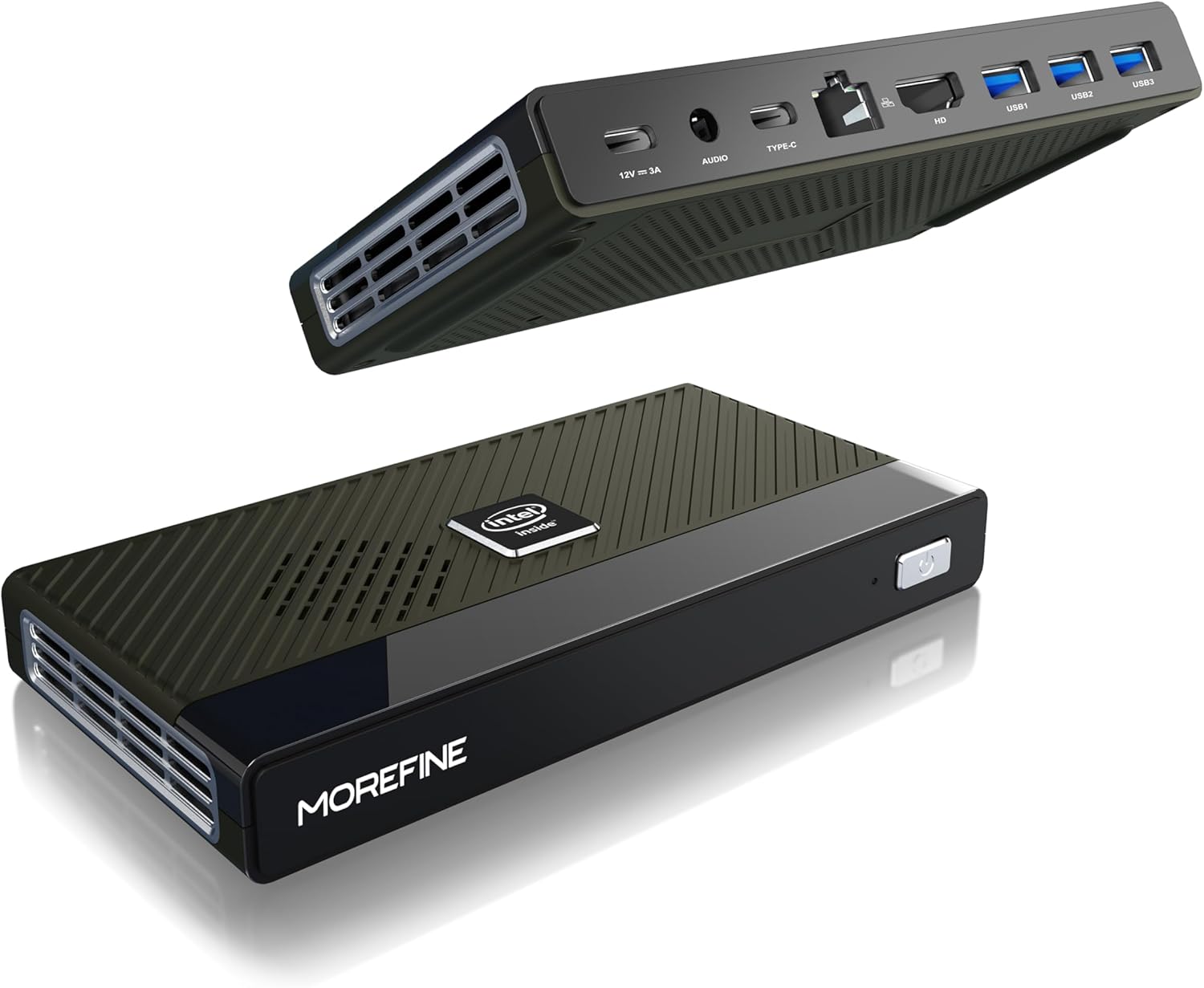
Figure 4.1: MOREFINE M6 Mini PC N200, showcasino seu deseño compacto e a disposición dos portos.
4.1 Portos e conectores
The M6 Mini PC features a comprehensive set of ports for connectivity:

Figura 4.2: detallada view of the MOREFINE M6 Mini PC's input/output ports.
- DC-IN (Type-C): Power input (12V/3A).
- Conector de audio: 3.5mm audio output for headphones or speakers.
- Type-C (Data/Display): Supports 4K@60Hz display output and data transfer.
- LAN 2.5G: Ethernet port for high-speed wired network connection.
- HDMI: HDMI 2.0 port for 4K@60Hz display output.
- USB 3.2 Gen1 (x3): Portos USB de alta velocidade para periféricos.
4.2 Compoñentes internos
The M6 Mini PC is powered by an Intel Alder Lake N200 processor, offering enhanced performance and energy efficiency. It includes 16GB LPDDR5 RAM and a 1TB PCIe M.2 SSD for fast operation and ample almacenamento.

Figure 4.3: Intel Alder Lake N200 Processor overview.
The device incorporates a silent copper cooling fan to maintain optimal operating temperatures, ensuring stable performance even under load.

Figure 4.4: Internal components and cooling system.
4.3 Compact Design and Versatility
The M6 Mini PC's compact size (approximately 5.91 x 3.01 x 0.75 inches) and lightweight design make it highly portable and suitable for various applications, including office work, home entertainment, and digital signage.

Figure 4.5: Size comparison of the M6 Mini PC.
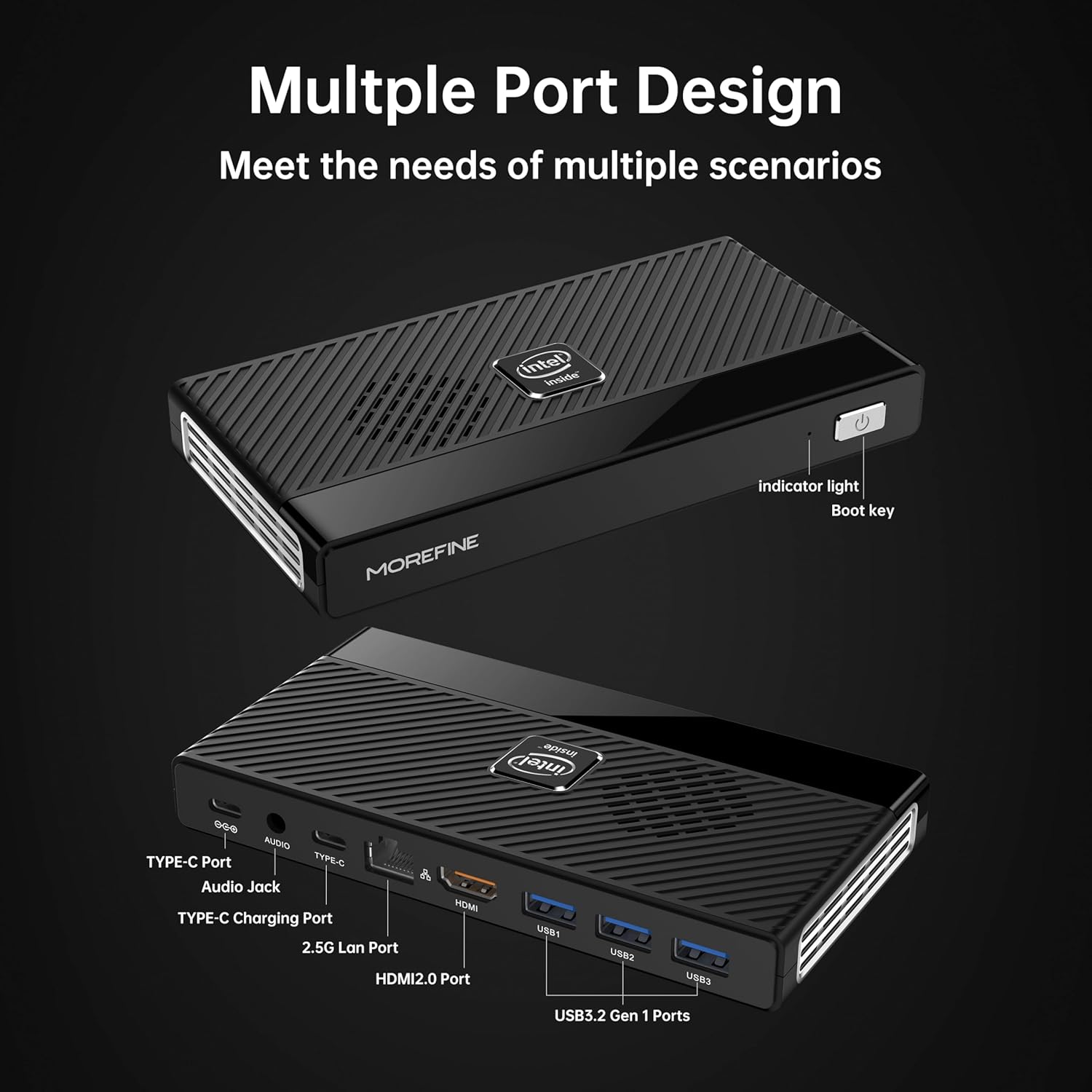
Figure 4.6: Illustrative usage scenarios for the M6 Mini PC.
5. Configuración
5.1 Conexión inicial
Follow these steps to set up your MOREFINE M6 Mini PC:
- Conectar a pantalla: Connect your monitor or TV to the Mini PC using the provided HDMI cable or a compatible Type-C to display cable. The device supports dual 4K@60Hz displays.
- Conectar periféricos: Conecta o teclado, o rato e calquera outro dispositivo USB aos portos USB 3.2 dispoñibles.
- Conectar á rede (opcional): For a wired internet connection, connect an Ethernet cable to the 2.5G LAN port. Alternatively, the device supports WiFi 6 for wireless connectivity.
- Conectar enerxía: Connect the power adapter to the DC-IN Type-C port on the Mini PC, then plug the adapter into a power outlet.
5.2 Primeiro arranque
After connecting all necessary components, press the power button on the front of the Mini PC. The device will power on, and the operating system (OS) setup process will begin. Follow the on-screen instructions to complete the OS configuration.

Figure 5.1: Dual 4K display setup example.
Vídeo 5.1: Un overview of the MOREFINE M6 Mini PC, demonstrating its features and compact design.
6. Instrucións de funcionamento
6.1 Encendido/apagado
- Encendido: Press the power button once. The indicator light will illuminate.
- Apagado: To shut down the system, use the operating system's shutdown function. For a forced shutdown, press and hold the power button for approximately 5 seconds.
6.2 Dual Display Configuration
The M6 Mini PC supports connecting two external displays simultaneously via the HDMI and Type-C ports. Once connected, you can configure display settings within your operating system to extend or duplicate your desktop.
6.3 Expansión do almacenamento
The Mini PC has two PCIe 3.0 SSD slots. One slot supports NVMe/SATA SSDs (up to 2TB), and the other supports NVMe SSDs (up to 2TB). To expand storage:
- Ensure the device is powered off and disconnected from the power supply.
- Carefully open the bottom cover of the Mini PC.
- Insert the M.2 SSD into the appropriate slot and secure it with the provided screw.
- Volva colocar a tapa inferior.
- Upon booting, you may need to initialize and format the new SSD through your operating system's disk management tools.
7. Mantemento
- Limpeza: Regularly clean the exterior of the Mini PC with a soft, dry cloth. Use compressed air to clear dust from ventilation openings.
- Ventilación: Ensure the Mini PC is placed in a well-ventilated area. Do not obstruct the air vents.
- Actualizacións de software: Manteña o sistema operativo e os controladores actualizados para garantir un rendemento e unha seguridade óptimos.
- Copia de seguridade de datos: Regularly back up important data to an external storage device or cloud service.
8 Solución de problemas
This section addresses common issues you might encounter with your MOREFINE M6 Mini PC.
| Problema | Causa posible | Solución |
|---|---|---|
| O dispositivo non se acende. | O adaptador de corrente non está conectado ou está avariado; problema coa toma de corrente. | Ensure power adapter is securely connected to the device and a working power outlet. Try a different outlet. |
| Sen visualización no monitor. | Display cable loose or faulty; incorrect input selected on monitor. | Check display cable connections. Ensure the monitor is set to the correct input source (HDMI/Type-C). Try a different cable or monitor. |
| Rendemento lento. | Too many applications running; insufficient storage space; outdated drivers. | Close unnecessary applications. Free up disk space. Update operating system and drivers. |
| Device feels hot. | Obstructed ventilation; prolonged heavy usage. | Ensure air vents are clear and the device is in a well-ventilated area. Reduce heavy workload if necessary. If overheating persists, contact support. |
| Non se pode conectar á wifi. | Wi-Fi module disabled; incorrect password; driver issue. | Check Wi-Fi settings in the OS. Verify password. Ensure Wi-Fi drivers are installed and up to date. |
9. Especificacións técnicas
| Característica | Especificación |
|---|---|
| Procesador | Intel Alder Lake N200 (up to 3.7 GHz, 4 Cores) |
| RAM | 16GB LPDDR5 4800MHz (non-removable) |
| Almacenamento | 1TB PCIe M.2 SSD (expandable via 2 M.2 slots, up to 2TB each) |
| Gráficos | Gráficos Intel UHD |
| Saída de vídeo | HDMI (4K@60Hz) x1, Type-C (4K@60Hz) x1 |
| Portos USB | USB 3.2 Gen1 x3, Type-C x1 (data/display) |
| Rede | 2.5G LAN (RJ45), WiFi 6 (802.11ax) |
| Bluetooth | Bluetooth 5.2 |
| Audio | 3.5mm Jack de audio |
| Sistema Operativo | Pre-installed OS (specific version may vary) |
| Dimensións | Aprox. 5.90 x 3.07 x 0.75 polgadas (149.86 x 76.5 x 19.05 mm) |
| Peso | Aproximadamente 0.102 onzas (240 g) |
| Características especiais | Wake On LAN, PXE Boot, RTC Wake, Auto Power On |
10. Garantía e soporte
MOREFINE products are designed for reliability and performance. For warranty information, please refer to the documentation included with your purchase or visit the official MOREFINE websitio.
If you encounter any issues or require technical assistance, please contact MOREFINE customer support. You can typically find contact information on the MOREFINE official store page or through the retailer where you purchased the product. When contacting support, please have your product model (M6-N200) and purchase details ready.


