1. Introdución
This manual provides comprehensive instructions for the safe and effective use, maintenance, and troubleshooting of your Dasqua 3230-8115-A Digital Dual-Column Height Gauge. Please read this manual thoroughly before operating the device to ensure optimal performance and longevity.
1.1 Produto superadoview
The Dasqua 3230-8115-A is a precision digital height gauge designed for accurate measurement of height, depth, and step dimensions. It features a robust dual-column design for stability and a clear digital display for easy reading.

Figura 1.1: Fronte view of the Dasqua 3230-8115-A Digital Dual-Column Height Gauge, showing the digital display and measuring jaw.

Figura 1.2: Traseira view of the height gauge, showing the handwheel for precise vertical adjustment.

Figura 1.3: detallada view highlighting key features such as the fine adjustment mechanism, measuring scale, and stable base.
2. Instrucións de seguridade
To ensure safe operation and prevent damage to the instrument or injury to the user, please observe the following safety guidelines:
- Always handle the height gauge with care to avoid dropping or impacting the instrument, which can affect its precision.
- Keep the instrument clean and free from dust, debris, and corrosive liquids.
- Do not attempt to disassemble or modify the height gauge. Repairs should only be performed by qualified personnel.
- Store the height gauge in its protective case when not in use to prevent damage.
- Evite expoñer o instrumento a temperaturas ou humidades extremas.
3. Configuración
3.1 Desembalaxe e inspección inicial
Carefully remove the height gauge from its packaging. Inspect the instrument for any signs of damage that may have occurred during transit. Ensure all components listed in the packing list are present.
3.2 Instalación da batería
The digital display requires a CR2032 lithium coin cell battery. To install or replace the battery:
- Locate the battery compartment cover on the side of the digital display unit.
- Deslice a tapa na dirección indicada pola frecha.
- Insira unha nova pila CR2032 co lado positivo (+) cara arriba.
- Pecha a tapa do compartimento da batería de forma segura.
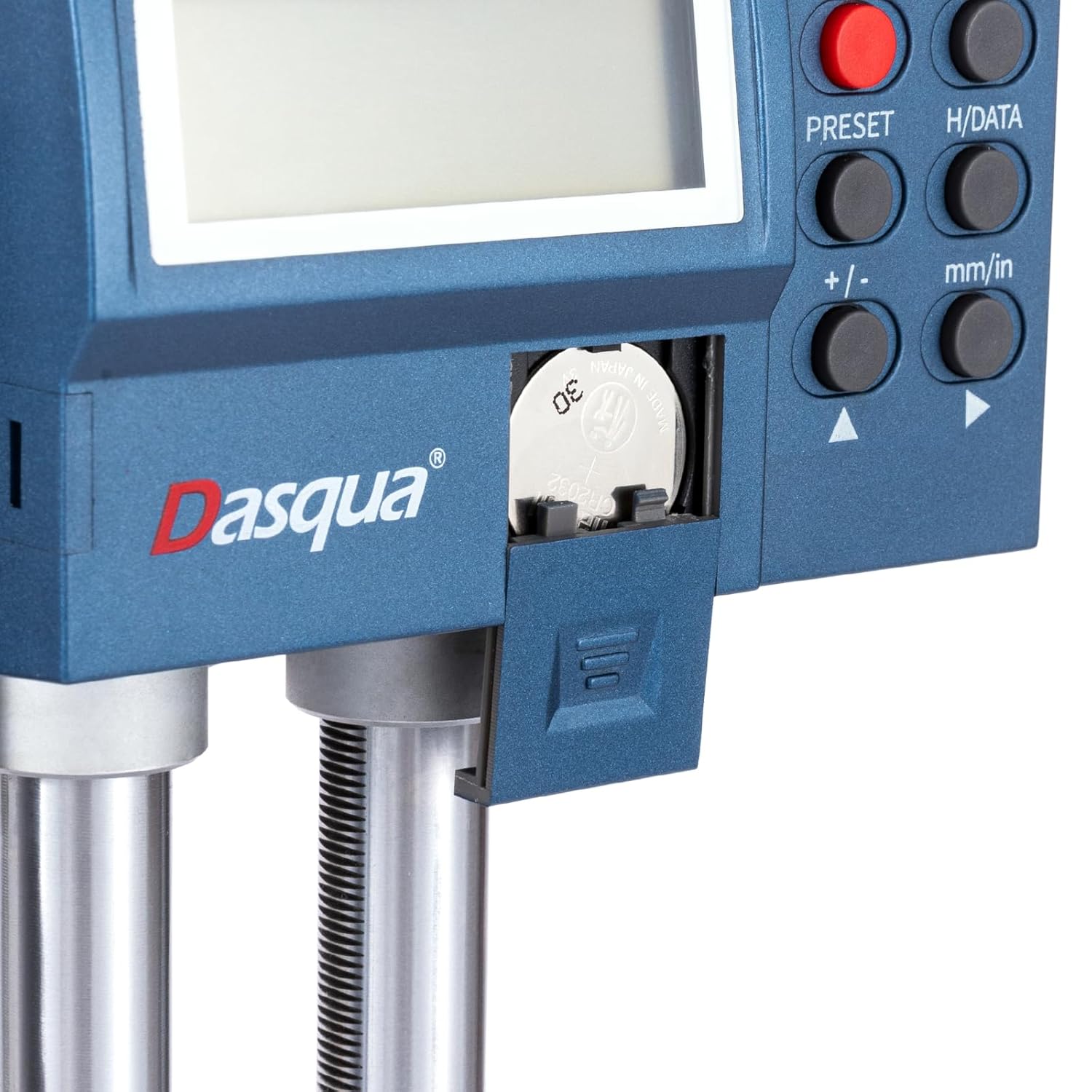
Figure 3.1: Close-up of the battery compartment, showing the location for CR2032 battery insertion.
3.3 Preparación para a medición
Place the height gauge on a stable, flat, and clean surface. Ensure the measuring surface of the workpiece is also clean and free of burrs or debris.
4. Instrucións de funcionamento
4.1 Panel de control rematadoview
Familiarize yourself with the functions of the buttons on the digital display unit:

Figure 4.1: Digital display control panel with numbered buttons and their corresponding functions.
- 1. ON/OFF: Acende ou apaga a unidade.
- 2. ZERC/ABS: Switches between Absolute (ABS) and Incremental (INC) measurement modes.
- 3. H/DATA: Holds the displayed value.
- 4. PRESET: Sets a preset value or origin.
- 5. mm/in: Toggles between millimeter (mm) and inch (in) measurement units.
- 6. +/- / Direction Arrows: Adjusts preset values or moves the cursor in certain modes.
4.2 Procedemento básico de medición
- Preme o ON/OFF button to power on the height gauge.
- Select the desired unit of measurement (mm or inch) by pressing the mm/in botón.
- Clean the measuring surface of the height gauge base and the workpiece.
- Lower the measuring jaw until it makes contact with the reference surface (e.g., the surface the workpiece rests on).
- Preme o ZERC/ABS button to set the display to zero at this reference point. This establishes your measurement origin.
- Carefully raise the measuring jaw using the handwheel until it makes contact with the feature you wish to measure on the workpiece.
- Read the measurement directly from the digital display.
4.3 Adjusting the Measuring Jaw
The measuring jaw can be adjusted for different measurement tasks. Loosen the locking screw, slide the jaw to the desired position, and then tighten the screw to secure it.

Figure 4.2: Illustration of how to adjust and secure the measuring jaw for various applications.
5. Mantemento
5.1 Limpeza
Regular cleaning is essential for maintaining the accuracy and lifespan of your height gauge. Use a clean, soft, lint-free cloth to wipe down all surfaces. For stubborn dirt, a small amount of isopropyl alcohol can be used, but avoid contact with the digital display. Never use abrasive cleaners or solvents.
5.2 Almacenamento
When not in use, store the height gauge in its original protective case in a dry, temperature-controlled environment. Avoid areas with high humidity, dust, or direct sunlight. Ensure the measuring jaw is not clamped tightly to prevent unnecessary stress on the mechanism.
5.3 Substitución da batería
Replace the CR2032 battery when the display becomes dim or shows a low battery indicator. Refer to Section 3.2 for detailed battery installation instructions.
6 Solución de problemas
This section addresses common issues you might encounter with your height gauge. If the problem persists after attempting these solutions, please contact customer support.
| Problema | Causa posible | Solución |
|---|---|---|
| A pantalla non se acende. | Batería descargada ou instalada incorrectamente. | Replace the battery (CR2032) and ensure it is installed with correct polarity. |
| Lecturas inexactas. | Dirty measuring surfaces; instrument not zeroed correctly; environmental factors (temperature fluctuations). | Clean all measuring surfaces. Re-zero the instrument. Ensure stable operating environment. |
| Display flickering or unstable. | Low battery; electromagnetic interference. | Replace battery. Move the instrument away from strong electromagnetic fields. |
| Measuring jaw movement is stiff. | Accumulated dirt or debris on the columns; locking screw too tight. | Clean the columns thoroughly. Loosen the locking screw slightly. |
7. Especificacións
Technical specifications for the Dasqua 3230-8115-A Digital Dual-Column Height Gauge:
| Característica | Detalle |
|---|---|
| Número de modelo | 3230-8115-A |
| Rango de medición | 0 - 600 mm |
| Fabricante | Dasqua |
| Dimensións do paquete | 89 x 30 x 18.5 cm |
| Peso do elemento | 10.92 kg |
| Primeira data dispoñible | 26 de xaneiro de 2024 |
8. Garantía e soporte
Dasqua products are manufactured to high quality standards and are typically backed by a manufacturer's warranty. Please refer to the warranty letter included with your product for specific terms and conditions regarding coverage and duration.

Figure 8.1: The height gauge shown alongside its packaging and the included warranty letter.
For technical assistance, spare parts, or warranty claims, please contact your authorized Dasqua dealer or the customer support channel provided at the point of purchase. When contacting support, please have your model number (3230-8115-A) and purchase details ready.


