1. Introdución
This manual provides detailed instructions for the FINGERS ANC-Paradise TWS Earbuds. Please read this manual carefully before using the product to ensure proper operation and to maximize your listening experience.
The FINGERS ANC-Paradise TWS Earbuds offer high-quality audio with Active Noise Cancellation (ANC) and Surround Noise Cancellation (SNC™) technologies. They feature a sleek design, extended playtime, and intuitive controls for calls and music.
2. Contido do paquete
Verifique que todos os elementos que se indican a continuación estean presentes no paquete do produto:
- 1 x FINGERS ANC-Paradise TWS Earbuds (Charging Case + TWS Pods)
- 1 x cable de carga USB
- 2 x Extra Eargels (pairs)
- 1 x Guía de inicio rápido
- 1 x Nota de marca
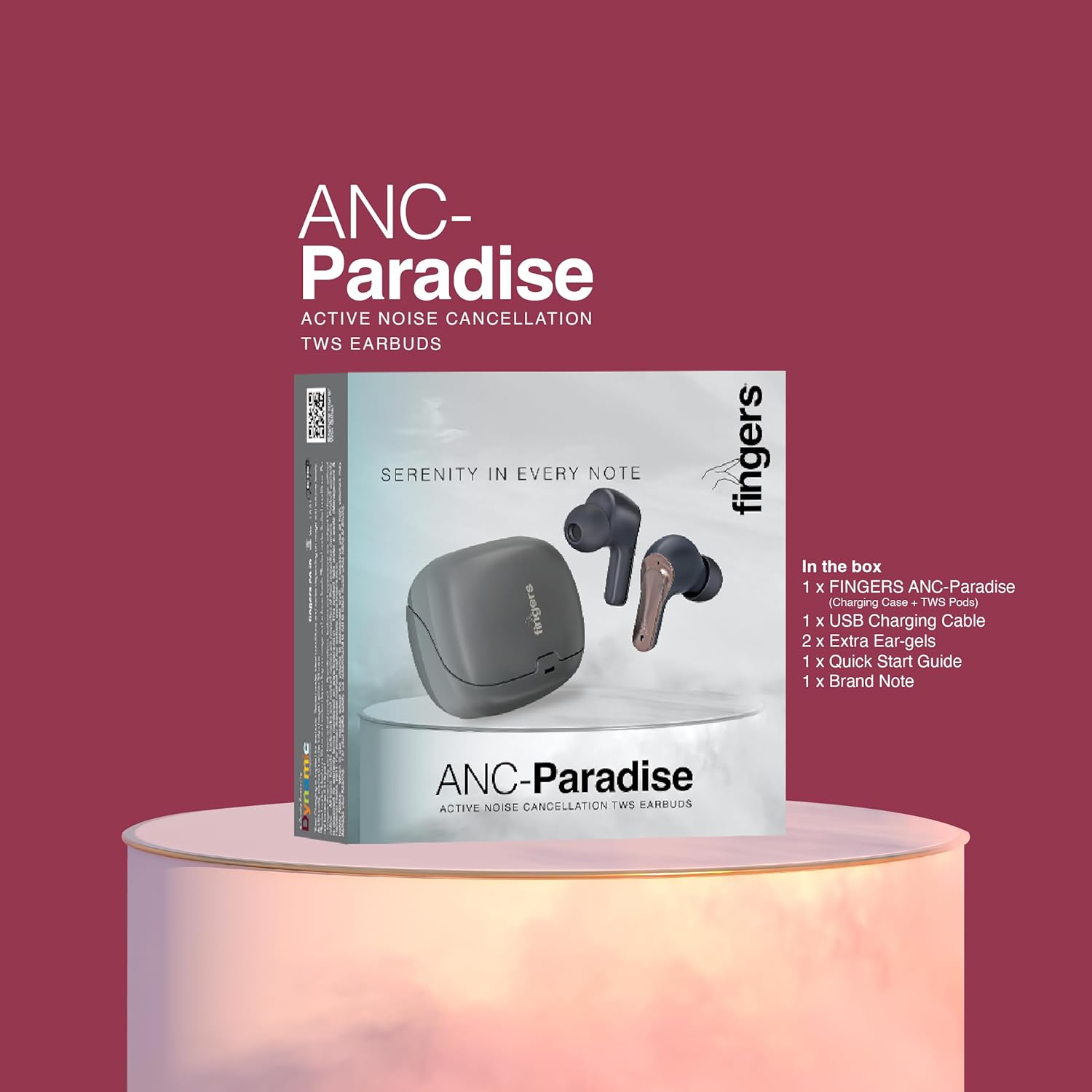
Imaxe 2.1: Contents of the FINGERS ANC-Paradise TWS Earbuds package, including earbuds, charging case, USB cable, extra eargels, quick start guide, and brand note.
3. Produto rematadoview
The FINGERS ANC-Paradise TWS Earbuds consist of two wireless earbuds and a portable charging case. Each earbud is equipped with a built-in microphone and touch controls.

Imaxe 3.1: The FINGERS ANC-Paradise TWS Earbuds shown with their charging case. The earbuds are dark silver and gun metal in color.
4. Configuración e primeiro uso
4.1 Carga dos auriculares e da funda
- Coloca os auriculares na caixa de carga. Asegúrate de que estean correctamente asentados.
- Conecta o cable de carga USB ao porto de carga da carcasa e a unha fonte de alimentación (por exemplo, un adaptador de parede USB, un porto USB do ordenador).
- As luces indicadoras da caixa mostrarán o estado de carga.
- A 10-minute charge provides approximately 1.5 hours of playtime. A full charge offers up to 32 hours of total playtime with the charging case.

Imaxe 4.1: Visual representation of the 32-hour playtime and fast charging capability (10 minutes charge for 1.5 hours playtime).
4.2 Emparejamento Bluetooth
- Abre a caixa de carga. Os auriculares entrarán automaticamente no modo de emparellamento.
- No teu dispositivo (teléfono intelixente, tableta, portátil), activa o Bluetooth.
- Busca available Bluetooth devices and select "FINGERS ANC-Paradise" from the list.
- Unha vez conectados, escoitarás un ton de confirmación e os auriculares estarán listos para usar.
- The earbuds can be used as a single unit or as a pair.
5. Instrucións de funcionamento
5.1 Controis táctiles
The earbuds feature intuitive touch controls for managing calls and music playback.
- Reproducir/Pausa: Toca un só auricular en calquera dos auriculares.
- Próxima pista: Toca dúas veces no auricular dereito.
- Pista anterior: Toca dúas veces no auricular esquerdo.
- Responder/Finalizar chamada: Un só toque en calquera dos auriculares durante unha chamada entrante.
- Rexeitar a chamada: Manteña premido calquera dos auriculares durante 2 segundos durante unha chamada entrante.
- Activar o asistente de voz: Triple tap on either earbud (on default OS).

Imaxe 5.1: Acabadoview of the earbud features including sweat resistance, voice assistant, intuitive touch controls, and flexibility for single or dual earbud use.
5.2 Cancelación activa de ruído (ANC)
ANC technology reduces ambient noise, providing a more immersive audio experience.
- Enable/Disable ANC: Use the dedicated switch or touch control (refer to quick start guide for specific gesture) to toggle ANC on or off.

Imaxe 5.2: The earbuds showcasing the built-in dual microphones, Active Noise Cancellation (ANC) for pure sound, and Surround Noise Cancellation (SNC™) for advanced voice clarity.
5.3 Surround Noise Cancellation (SNC™)
SNC™ technology enhances call clarity by filtering out surrounding ambient noise, focusing on your voice. This feature is automatically active during calls.
5.4 Efectos sonoros
The earbuds offer three distinct sound effects to customize your listening experience.
- Modos dispoñibles: Hi-Fi, Bass, Rock.
- Modos de cambio: Refer to the quick start guide for the specific touch control gesture to cycle through these sound effects.

Imaxe 5.3: The earbuds illustrating the three exceptional sound effects: Hi-Fi, Bass, and Rock, allowing users to choose their preferred audio profile.
6. Mantemento e coidados
- Limpeza: Usa un pano suave e seco para limpar os auriculares e a funda de carga. Evita o uso de materiais abrasivos ou produtos químicos agresivos.
- Resistencia á auga: The earbuds have an IPX4 sweat-resistant rating. This means they are protected from splashing water from any direction. Do not submerge them in water or expose them to heavy rain.
- Almacenamento: Cando non estean en uso, garde os auriculares no seu estoxo de carga para protexelos e mantelos cargados.
- Temperatura: Evita expoñer os auriculares a temperaturas extremas (calor ou frío).
7 Solución de problemas
| Problema | Posible Solución |
|---|---|
| Os auriculares non se emparejan |
|
| Non hai son dun auricular |
|
| ANC non funciona eficazmente |
|
| Os auriculares non se cargan |
|
8. Especificacións
| Característica | Detalle |
|---|---|
| Nome do modelo | ANC-Paradise |
| Tecnoloxía de conectividade | Sen fíos |
| Comunicación sen fíos | Bluetooth |
| Control de ruído | Cancelación activa de ruído (ANC) |
| Tecnoloxía de micrófono | Dual Mic with SNC™ (Surround Noise Cancellation) |
| Duración da batería | Ata 32 horas (con funda de carga) |
| Carga rápida | 10 minutos de carga para 1.5 horas de reprodución |
| Resistencia á auga | Resistente á suor IPX4 |
| Método de control | Táctil, asistente de voz |
| Efectos sonoros | Hi-Fi, Bass, Rock |
| Dispositivos compatibles | Teléfonos intelixentes, tabletas, portátiles |
| Peso do elemento | 43 gramos |
| Dimensións do produto | 1.7 x 2.4 x 3.2 cm |
| Impedancia | 32 ohmios |
| Colocación do oído | En Orella |
| Factor de forma | En Orella |
9. Garantía e soporte
For warranty information and customer support, please refer to the "Brand Note" included in your package or visit the official FINGERS websitio.
You can also contact FINGERS customer service for assistance with product issues or inquiries.
Fabricante: Dynamic Conglomerate Pvt. Ltd.
País de orixe: India


