Introdución
This manual provides comprehensive instructions for the safe and efficient use of your Hello Kitty Wireless Bluetooth Light-Up Headphones. Please read this manual thoroughly before operating the device and retain it for future reference.

Imaxe: Fronte view of the Hello Kitty Wireless Bluetooth Light-Up Headphones in white, featuring the iconic Hello Kitty face on the earcups and light-up cat ears on the headband.
O que hai na caixa
Verifica que estean presentes todos os elementos ao desembalar:
- Hello Kitty Wireless Bluetooth Light-Up Headphones
- Cable de carga USB
- Manual de usuario (este documento)
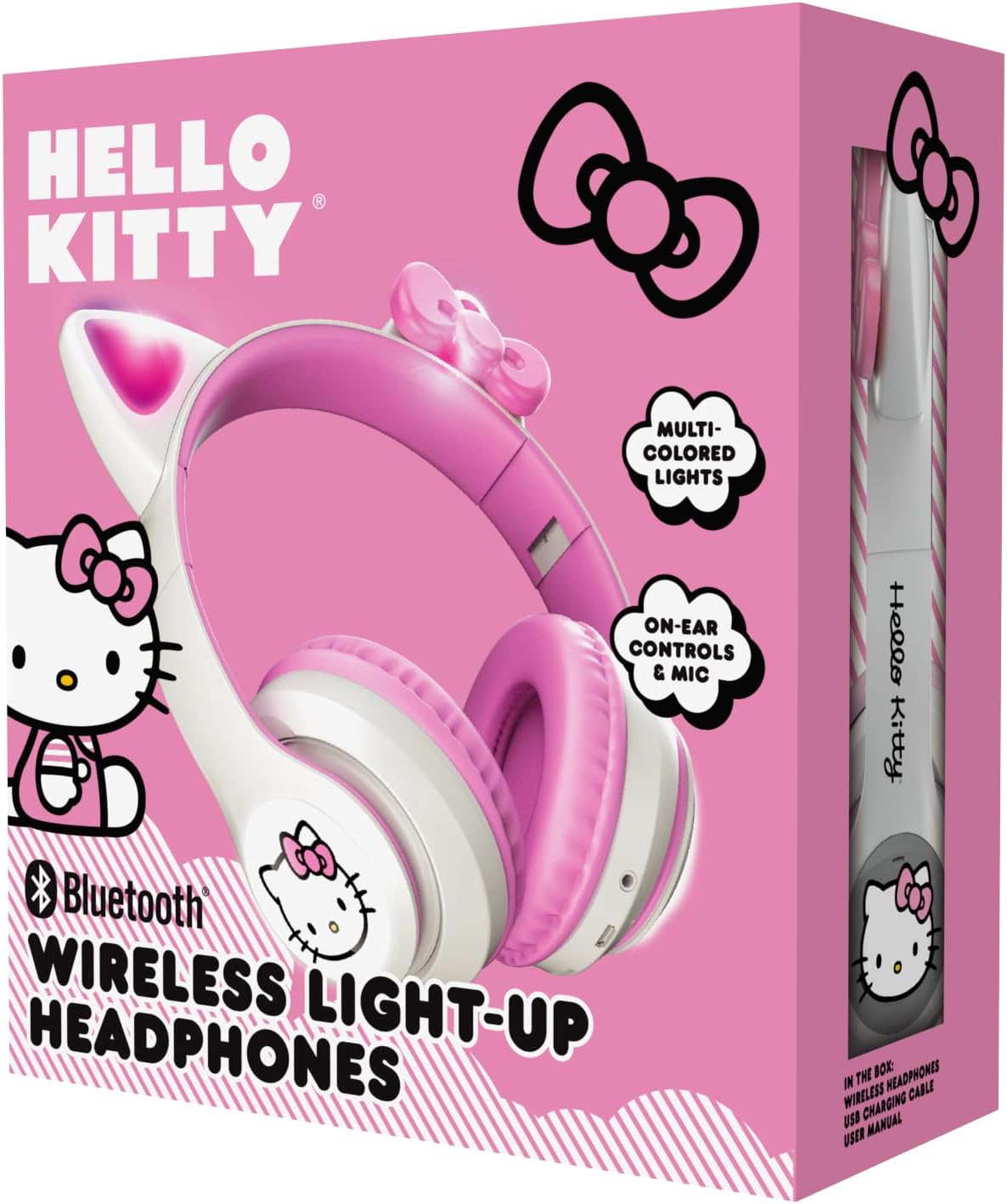
Image: The retail packaging for the Hello Kitty Wireless Bluetooth Light-Up Headphones, illustrating the headphones and the USB charging cable.
Características do produto
- Conectividade Bluetooth: Seamless wireless pairing with compatible devices.
- Light-Up LED Earcups & Cat Ears: Features Hello Kitty graphics on earcups and colorful LED lights in the ears. Lights can change with music or be turned on/off as desired.
- Deseño plegable e portátil: Easy to store and carry, ideal for travel.
- Micrófono incorporado: Enables hands-free calls, voice chats, and gaming communication.
- Diadema axustable: Provides a custom and comfortable fit for various head sizes.
Configuración
1. Carga dos auriculares
Before first use, fully charge the headphones. Connect the included USB charging cable to the charging port on the headphones and to a USB power source (e.g., computer, wall adapter). The LED indicator will show charging status and turn off or change color when fully charged.
2. Emparellamento Bluetooth
- Asegúrese de que os auriculares estean apagados.
- Manteña premido o botón de acendido/apagado ata que o indicador LED parpadee en azul e vermello, o que indica o modo de emparellamento.
- No teu dispositivo (teléfono intelixente, tableta, portátil), activa o Bluetooth e busca os dispositivos dispoñibles.
- Select "Hello Kitty Headphones" from the list of devices.
- Once paired, the LED indicator will typically show a solid blue light or flash slowly.
Note: If prompted for a password, enter "0000".
Instrucións de funcionamento
Encendido/apagado
- Para acender: Manteña premido o botón de acendido/apagado durante aproximadamente 3 segundos.
- Para apagar: Manteña premido o botón de acendido/apagado durante aproximadamente 5 segundos.
Control de volume
- Subir volume: Prema o botón "+".
- Baixar volume: Prema o botón '-'.
Reprodución de música
- Reproducir/Pausa: Press the Multi-function button (often the Power button when not powering on/off).
- Próxima pista: Manteña premido o botón "+".
- Pista anterior: Manteña premido o botón '-'.
Xestión de chamadas
- Responder/Finalizar chamada: Preme o botón multifunción.
- Rexeitar a chamada: Manteña premido o botón multifunción.
- Volver a marcar o último número: Prema dúas veces o botón multifunción.
Control de luz LED
The LED lights on the earcups and cat ears can be controlled independently. Locate the dedicated light button (refer to the diagram in the included quick start guide if available). Press the button to cycle through light modes (e.g., blinking, solid, off).
Adjusting and Folding
- Axustar a diadema: Gently slide the earcups up or down along the headband to achieve a comfortable fit.
- Dobrar para almacenar: The earcups can be folded inwards towards the headband for compact storage and portability.

Image: The Hello Kitty Wireless Bluetooth Light-Up Headphones shown in their folded position, demonstrating their portability.
Mantemento
- Limpeza: Limpe os auriculares cun pano suave e seco. Non empregue produtos de limpeza abrasivos nin os mergulle en auga.
- Almacenamento: Store the headphones in a cool, dry place away from direct sunlight and extreme temperatures. Utilize the foldable design for compact and safe storage.
- Coidado da batería: Para prolongar a duración da batería, carga os auriculares con regularidade, mesmo se non os usas con frecuencia. Evita descargar completamente a batería durante períodos prolongados.
Resolución de problemas
| Problema | Posible Solución |
|---|---|
| Os auriculares non se acenden. | Asegúrate de que os auriculares estean completamente cargados. Conéctaos a unha fonte de alimentación e inténtao de novo. |
| Non se pode emparellar co dispositivo. |
|
| Sen son ou volume baixo. |
|
| As luces LED non funcionan. | Press the dedicated light control button to cycle through modes or turn them on. Ensure headphones have sufficient battery. |
Especificacións
- Nome do modelo: Hello Kitty Wireless Bluetooth Light-Up Headphones with Built-in Microphone, Foldable Design, Adjustable Headband, 8 Hours Playtime, LED Kitty Earcups, for Kids & Adults (White)
- Número de modelo: HKLEDBTHP2-WH-MFN
- Tecnoloxía de conectividade: Sen fíos (Bluetooth)
- Versión Bluetooth: 5.0
- Forma do auricular: Na Orella
- Material: Plástico
- Peso do artigo: 0.27 quilogramos (9.6 onzas)
- Batería: 1 batería non estándar (incluída)
- Características especiais: Adjustable Headband, Foldable, Lightweight, Light-Up LED Earcups & Cat Ears, Built-in Microphone
- Dispositivos compatibles: Teléfonos intelixentes, tabletas, portátiles
- Fabricante: Southern Telecom
- UPC: 680079035358
Garantía e Soporte
For warranty information and technical support, please refer to the contact details provided on the product packaging or visit the official Hello Kitty or Southern Telecom websitio. Garda o comprobante de compra para reclamacións de garantía.


